Global Agent Memory
Local-first, project-aware, durable memory for Claude Code, Codex, and other MCP-compatible agents.
Power your agent
คำสั่งของผู้เผยแพร่เอง ไม่ใช่เอนด์พอยต์ของ PlugMCP
Host a copy with our keys and logs.
uvx global-memory-mcp==0.1.6Claude Code ไม่มีลิงก์ติดตั้งสำหรับคำสั่งแบบโลคัล ให้คัดลอกคำสั่งด้านล่างแล้วรันในเทอร์มินัล
claude mcp add io.github.ozankasikci-global-agent-memory -- uvx global-memory-mcp==0.1.6รันในเทอร์มินัล
{ "mcpServers": { "io.github.ozankasikci-global-agent-memory": { "command": "uvx", "args": [ "global-memory-mcp==0.1.6" ] } }}claude_desktop_config.json
URL แบบรีโมตหรือคำสั่งบนเครื่องของคุณ? การติดตั้งสองแบบต่างกันอย่างไร
รันบน PlugMCP
A new server you create. It is not this listing's official endpoint. Use the publisher install when you want their URL and their credentials.
เปิดGlobal Agent Memory gives multiple coding agents one shared, reviewable memory without handing control of your knowledge base to a hosted service. Markdown files are canonical, a hybrid local MCP runtime is the public agent interface, and the dashboard lets a human approve, edit, protect, or remove what agents remember. Agent commands work without a background server. The authenticated localhost server starts on demand for the dashboard and can optionally run continuously for live file watching and shared embedding work.
One Vault. Multiple agents. Human-controlled memory.
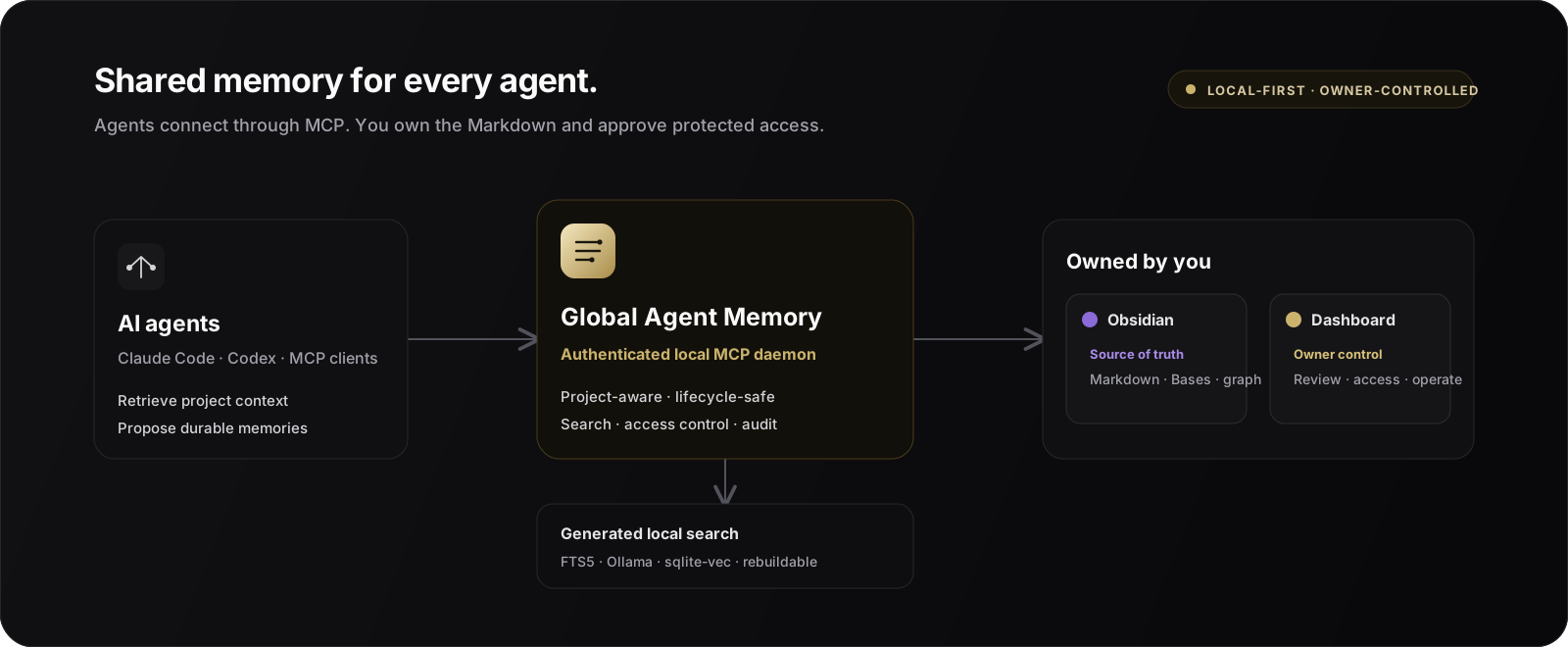
Coding agents are useful inside a session, but important context is often lost between sessions or fragmented across individual clients. Global Agent Memory provides a durable layer for knowledge such as:
Agents propose memories as candidates. A human reviews them before they become durable, controls their visibility, and can later update, supersede, archive, or hard-delete them.
Use project instruction files for compact rules that always belong in a prompt. Use Global Agent Memory when knowledge should be searchable, shared between clients, reviewed by a person, updated over time, or hidden behind explicit permission.
sqlite-vec add semantic ranking.127.0.0.1 and requires a generated bearer token stored outside the Vault.The opt-in performance suite creates 10,000 synthetic memories and exercises the same indexing and retrieval paths used by both runtime modes. On the recorded macOS ARM64 baseline, a full rebuild takes 36.5 seconds, warm keyword search P95 is 56 ms, warm hybrid search P95 is 76 ms, and incremental stdio proxy overhead is 1.5 ms. Results vary by machine; the changed-note, search, and proxy budgets run as regression gates. See the methodology and complete baseline.
Global Agent Memory is more than an MCP server. Agents, owners, and knowledge workers use the same canonical memories through three purpose-built surfaces:
The Vault is the durable source of truth. The dashboard is a complementary control plane, and the MCP interface is the safe automation layer used by agents. You can use Obsidian, the dashboard, or both without creating separate copies of your memory.
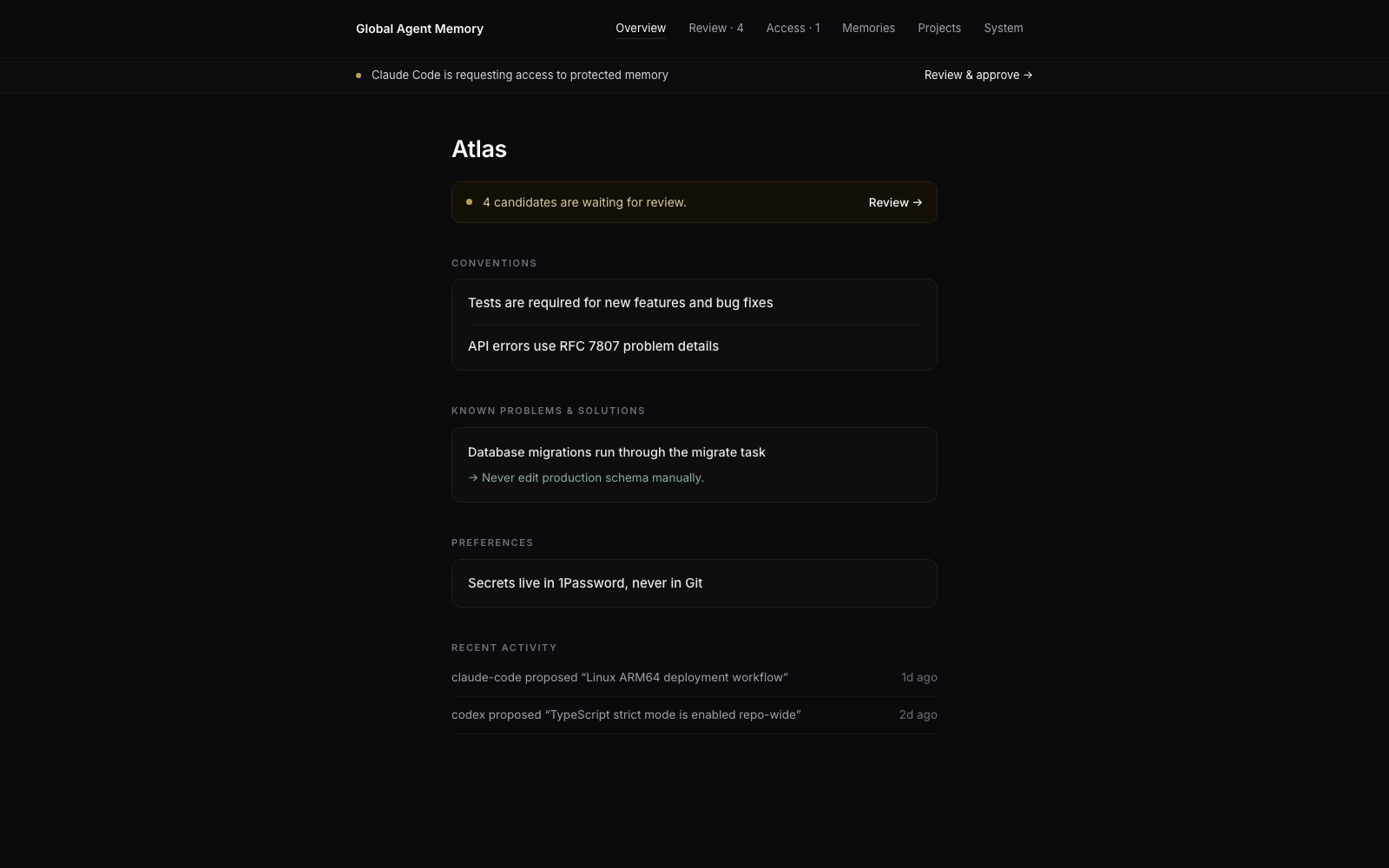
This is the shortest path to persistent memory for Claude Code, Codex, and other MCP clients. The guided installer creates the local service, Obsidian-compatible Vault, dashboard, MCP registrations, and agent skills together.
uv tool install global-memory-mcp
To install the latest unreleased source, use
uv tool install git+https://github.com/ozankasikci/global-agent-memory.git. For a
local checkout, use uv tool install ..
global-memory setup
Setup shows one plan and asks once before it changes anything. It initializes the local Vault, creates the protected token, detects Claude Code and Codex, installs their MCP integrations and skills, verifies healthy clients, and opens the dashboard. Opening the dashboard starts its authenticated localhost server on demand. The command is idempotent, so running it again repairs or updates managed components without replacing unrelated client configuration.
Use flags when you need a non-default setup:
# Non-interactive installation
global-memory setup --yes

# Choose a different Vault on first setup
global-memory setup --vault "$HOME/Memory"

# Install only one client, or no client yet
global-memory setup --clients claude-code
global-memory setup --clients none

# Optional: install an always-on native service for live watching and shared indexing
global-memory setup --service

# Preview without changing files or services
global-memory setup --dry-run
Setup installs five basic shortcuts for each detected client:
In Claude Code, invoke them directly, for example /gam-context fix the upload retry bug.
In Codex, type /skills and choose one, or mention it directly, for example
$gam-context fix the upload retry bug.
global-memory dashboard
You can also ask a connected agent:
Open the Global Agent Memory dashboard.
The agent calls memory_dashboard_open and opens the same authenticated local
dashboard.
The individual commands remain available for advanced setups and troubleshooting:
global-memory init --vault "$HOME/Documents/Global Agent Memory"
global-memory daemon install-service --kind launchd  # use systemd on Linux
global-memory integrations install all
global-memory integrations verify all
global-memory doctor
After integration, you normally describe your intent instead of running memory commands manually.
Before you start, load the relevant memory for this project and summarize the conventions and recent decisions.
Remember that production ARM64 binaries must be built locally and uploaded to the server. Add it as a project convention with the deployment discussion as evidence.
The agent creates a candidate. Nothing becomes active until it is approved.
Find the deployment memory and update it with the new health-check command. Do not create a duplicate.
Open the memory dashboard so I can review the candidates.
The shared integration skill teaches supported agents when to retrieve, propose, update, and avoid duplicating memory.
The configured Obsidian Vault is the human-readable, durable source of truth—not an export of an opaque database. Every managed memory is a normal Markdown file with YAML properties, a stable memory ID, lifecycle metadata, and project-aware links.
Initialization adds an Obsidian workspace without replacing your existing files:
Obsidian is optional: the same Markdown remains readable and editable with any text editor. Lifecycle and access-policy changes should still go through the dashboard, MCP, or CLI so validation, optimistic concurrency, and audit records remain intact.
The authenticated dashboard is the owner control plane for:
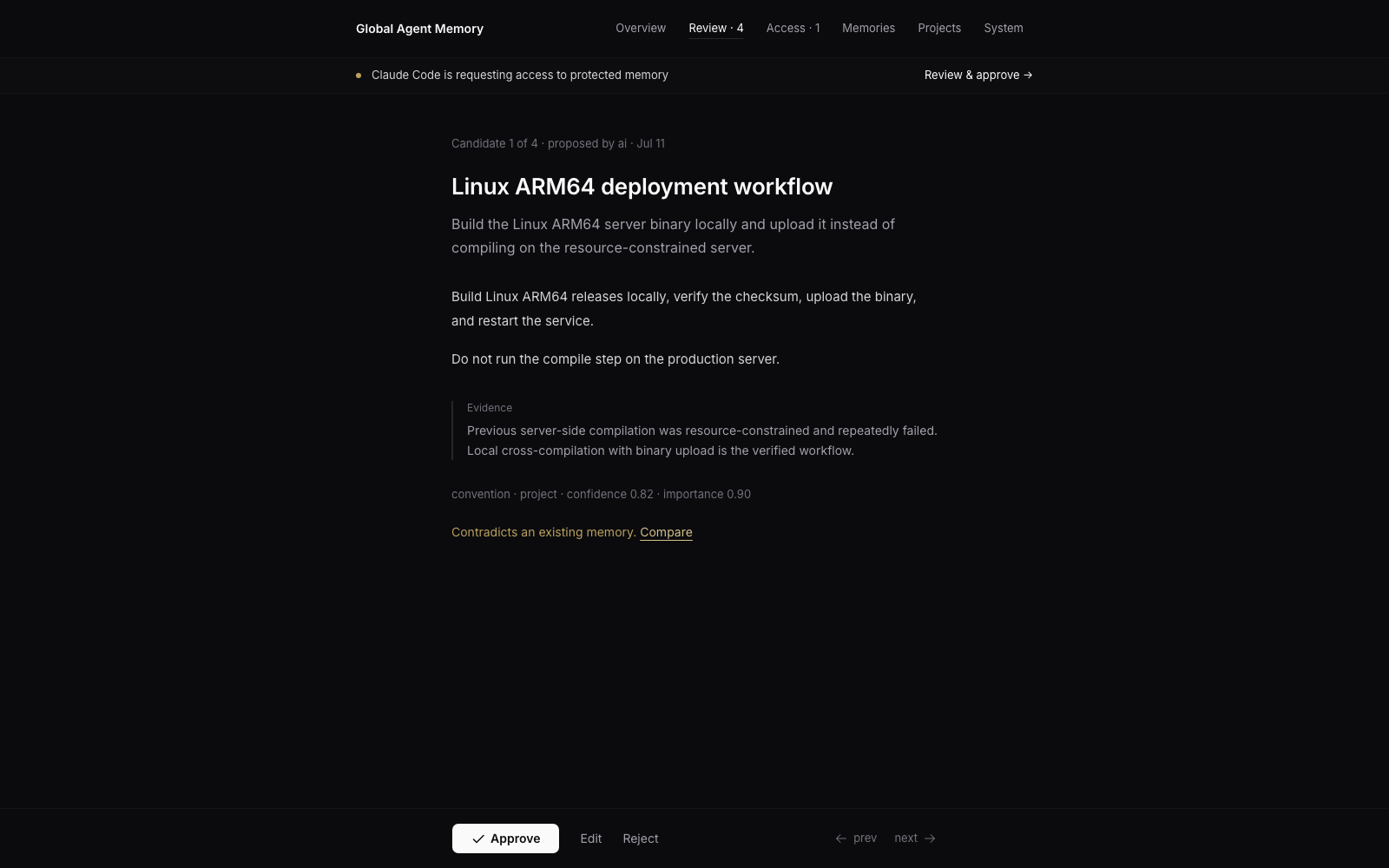 Dashboard launch URLs expire after 60 seconds, can be exchanged only once, and create a
local HttpOnly session. Do not share a launch URL.
Protected grants are scoped by purpose, project, agent, permission, exact memory IDs, and duration. Owners may downgrade a request but never elevate it. Agents may request and poll for access, but they cannot approve, deny, or revoke grants.
[!IMPORTANT]
Protected and Sealed memory are not secret managers. Never store passwords, credentials, private keys, API keys, or bearer tokens in Global Agent Memory.
flowchart LR
    A[Claude Code] -->|stdio MCP| H[Hybrid MCP runtime]
    B[Codex] -->|stdio MCP| H
    C[CLI] -->|MCP| H

    H -->|daemonless default| E[Application and domain services]
    H -.->|optional localhost daemon| D[Watcher, shared indexing, dashboard]
    D --> E
    E --> V[Markdown Vault<br/>canonical state]
    E --> I[SQLite FTS5 and sqlite-vec<br/>generated state]
    E --> O[Ollama embeddings<br/>optional]
    D --> W[Local dashboard<br/>owner control]
The global-memory-mcp bridge prefers a healthy shared daemon and otherwise runs the
same MCP server and application services in-process. Both paths expose the same frozen
MCP V1 contract and use the same canonical Markdown and generated SQLite state. The
optional daemon owns real-time Vault watching, background embedding retries, HTTP MCP,
and dashboard sessions. Agent memory operations do not depend on its availability.
The dependency direction is:
transport and client adapters → application services → domain
Vault, SQLite, vectors, embeddings, Git, Watchdog, and client integrations are adapters. The domain layer does not depend on them.
The MCP interface is the only public AI-facing API. Clients do not read the Vault, SQLite database, vectors, token, or runtime logs directly.
The frozen V1 discovery snapshot currently contains 17 tools, 10 resources, and 6 prompts.
All mutations are replay-safe through request_id. Updates use optimistic concurrency,
and a stale version fails with VERSION_CONFLICT instead of silently overwriting newer
knowledge.
See MCP Contract V1 and the generated
contracts/mcp/v1/ schemas for the complete contract.
The CLI uses the same MCP path as connected agents. It prefers the optional daemon and otherwise invokes the frozen MCP contract through an in-memory transport. It never bypasses access control by reading Markdown or SQLite directly.
# Check health
global-memory status
global-memory doctor

# Register and detect a project
global-memory project add my-project --root "$HOME/Projects/my-project"
global-memory project detect "$HOME/Projects/my-project"

# Search and build bounded task context
global-memory search "deployment rollback" --project my-project
global-memory context "Prepare the next release" --project my-project --token-budget 3000

# Create a review candidate
global-memory remember \
  "Release rollback procedure" \
  "Use the blue-green rollback task and verify both health endpoints." \
  --type reference \
  --scope project \
  --project my-project

# Rebuild generated indexes
global-memory reindex --full

# Back up canonical Markdown
global-memory backup "$HOME/Backups/global-agent-memory.zip"
Run global-memory --help or global-memory <command> --help for the complete command
reference.
Global Agent Memory is designed as a local service, not a remotely exposed memory API.
127.0.0.1.Please report security issues according to SECURITY.md.
Clone the repository, then install Python and dashboard dependencies:
uv sync
npm ci --prefix dashboard
Run the standard quality gate:
make check
The gate covers Ruff formatting and linting, strict MyPy, the TypeScript production build, unit/integration/contract/E2E tests, coverage, and deterministic MCP contract regeneration.
Useful focused commands:
make unit
make integration
make contract
make e2e
make dashboard-check
make performance   # opt-in 10,000-note performance suite
When changing the MCP contract:
make contract-generate
make contract-check
Contributions are welcome. Start with CONTRIBUTING.md, and keep changes compatible with the frozen V1 contract unless a parallel major contract is intentionally introduced.
good first issue
or help wanted
queues.Global Agent Memory is under active V1 development and is distributed through
GitHub Releases and
PyPI. The current GitHub release and
source package version is 0.1.7; the MCP contract version is v1.
The product name is Global Agent Memory. The technical identifiers global-memory,
global-memory-mcp, global-memoryd, global_memory, and product: global-memory
remain stable for V1 compatibility.
See the V1 release checklist for verified scenarios and remaining live acceptance work.
Global Agent Memory is available under the MIT license declared in pyproject.toml.
Shared, project-aware memory for Claude Code, Codex, and other agents with human review.
{ "mcpServers": { "io.github.ozankasikci-global-agent-memory": { "command": "uvx", "args": [ "global-memory-mcp==0.1.6" ] } }}เครื่องมือ
ยังไม่มีรายการเครื่องมือ เซิร์ฟเวอร์แบบรีโมตจะได้รายการหลังการตรวจสอบสถานะครั้งแรก
FAQ
คัดลอกคอนฟิก stdio สำหรับ Cursor, Claude Desktop, Claude Code หรือ VS Code ได้ในหน้านี้ คอนฟิกนี้ใช้การติดตั้งของผู้เผยแพร่ ไม่ใช่พร็อกซีของ PlugMCP
ระเบียนนี้ไม่ได้ระบุตัวแปรสภาพแวดล้อมที่จำเป็น
Global Agent Memory ทำงานแบบโลคัลผ่าน stdio
ตรวจสอบล่าสุดเมื่อ 2026-11-10 Shared, project-aware memory for Claude Code, Codex, and other agents with human review.
