Use Quipu as the central graph and base for many tools: see the stack.
The full case is in Why Quipu.
Install
curl -fsSL https://raw.githubusercontent.com/intigraph/quipu/main/install.sh | sh
Linux and macOS, x86_64 and arm64; requires Python 3.9+ and curl.
The installer verifies the published archive checksum and executable version.
Then run quipu --version. Install, upgrade or remove Quipu.
For the whole stack, use Tambo's guided onboarding.
First success in three commands
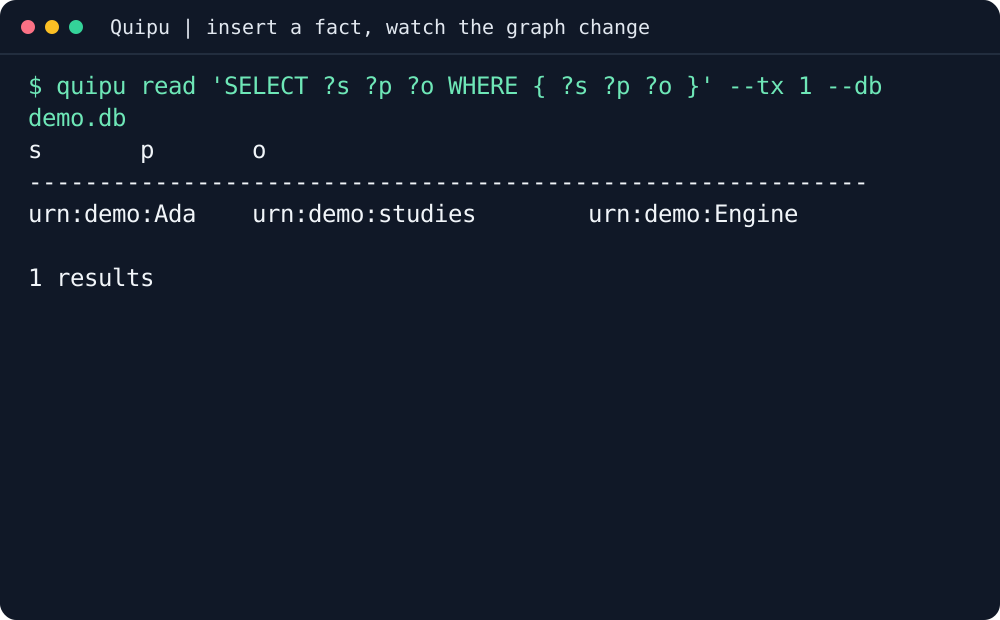
In an empty directory, fetch the public fixture, store its episode, then ask about its relationship:
The query returns Ada → Engine. Here is the real local episode and query:
The resulting row, drawn as cords and knots:
The recording uses a local public fixture, without a server or model. Its native
warning is retained: loading facts is not proof that a semantic index is ready.
Transcript, tool version and reproducible capture.
On your own code
Keep project facts, decisions and relationships together instead of pasting the same context into each agent.
The latest release includes a repository pendant,
checksum and provenance. Verify them together, then use quipu import SHARE_DIR --db repository.db;
import stages knowledge and leaves ROOT unchanged. Follow the verified import workflow.
Delivery events
Bring deployment outcomes and change history into the same governed memory.
These adapters use CDEvents on CloudEvents and Camayoc's single ingress.
The catalog describes source support, not installed producers or measured event coverage.
The graph queries for deployment frequency, change failure rate, lead time and restore time
need recorded events for the selected service, repository and time window.
Missing change or deployment history is not a measured zero.
Wire it into your agent
For Claude Code, connect the local MCP server to your database:
claude mcp add quipu -- quipu mcp --db /path/to/knowledge.db
The MCP Registry identifier is mcp-name: io.github.intigraph/quipu.
Other clients, HTTP MCP and credential configuration: Agent Setup.
Use Tambo to configure and verify the tools together.
Before you start
The CLI runs locally; quipu-server supplies the network API and explorer.
Keep your database and credentials private. A demo fixture is not a deployment profile.
Semantic search needs a configured model and index; storing a graph alone does not provide either.
Tambo installs these together and proves each one works; every tool also stands alone.
Use each tool's README for its own installation and first success.
The Quipu stack is built around a governed, bitemporal knowledge store: shared
facts, decisions and work history your agents can query. Quipu can check writes
against your rules, records where each fact came from, and answers what was true
when.