SendSoon AI MCP
SendSoon MCP is a Model Context Protocol (MCP) server that lets Codex, Claude, and WorkBuddy use capabilities: send email, look up public IPs, and convert local documents to Markdown.
Power your agent
คำสั่งของผู้เผยแพร่เอง ไม่ใช่เอนด์พอยต์ของ PlugMCP
Host a copy with our keys and logs.
npx -y @sendsoon/[email protected]Claude Code ไม่มีลิงก์ติดตั้งสำหรับคำสั่งแบบโลคัล ให้คัดลอกคำสั่งด้านล่างแล้วรันในเทอร์มินัล
SENDSOON_EMAIL_RECIPIENT=<value> SENDSOON_API_KEY=<secret> SENDSOON_API_BASE_URL=<value> claude mcp add io.github.sendsoon-ai -- npx -y @sendsoon/ai@0.1.2รันในเทอร์มินัล
{ "mcpServers": { "io.github.sendsoon-ai": { "command": "npx", "args": [ "-y", "@sendsoon/[email protected]" ], "env": { "SENDSOON_EMAIL_RECIPIENT": "<value>", "SENDSOON_API_KEY": "<secret>", "SENDSOON_API_BASE_URL": "<value>" } } }}claude_desktop_config.json
URL แบบรีโมตหรือคำสั่งบนเครื่องของคุณ? การติดตั้งสองแบบต่างกันอย่างไร
รันบน PlugMCP
A new server you create. It is not this listing's official endpoint. Use the publisher install when you want their URL and their credentials.
เปิดจากผู้เผยแพร่
SendSoon MCP is a Model Context Protocol (MCP) server that lets Codex, Claude, and WorkBuddy use capabilities: send email, look up public IPs, and convert local documents to Markdown.
Send email, look up public IP information, and convert files to Markdown through SendSoon.
Configure it once, then describe tasks in natural language. You usually do not need to mention SendSoon in every prompt.
Send an email to [email protected] with the subject “Meeting reminder” and the body “The meeting starts at 3 PM today.”
Look up the location and ISP for 8.8.8.8.
Convert /path/to/report.pdf to Markdown and summarize the key points.
If the agent does not select a tool automatically, say:
Use the sendsoon MCP to complete this task.
The instructions below cover Codex, Claude Desktop, and WorkBuddy.
Config file: user-level ~/.codex/config.toml (macOS / Linux) or %USERPROFILE%\.codex\config.toml (Windows).
[mcp_servers.sendsoon]
command = "npx"
args = ["-y", "@sendsoon/mcp"]

[mcp_servers.sendsoon.env]
SENDSOON_API_KEY = ""
Verify: Save the file, restart Codex, and run /mcp in a chat. You should see sendsoon connected. In the desktop app, also check Settings > MCP servers.
First use: Start a new conversation and ask for a simple task (e.g. “Look up 8.8.8.8”). Approve the tool if Codex asks for permission.
Config file:
You can also open Settings > Developer > Edit Config inside Claude Desktop.
{
  "mcpServers": {
    "sendsoon": {
      "command": "npx",
      "args": ["-y", "@sendsoon/mcp"],
      "env": {
        "SENDSOON_API_KEY": ""
      }
    }
  }
}
Verify: Save the file, fully quit Claude Desktop (including the system tray), then relaunch. Start a new chat and confirm sendsoon tools appear in the tools menu or settings.
First use: Claude may ask to approve tool access on the first invocation; allow it to continue.
WorkBuddy can add SendSoon by pasting the connector JSON directly in MCP Server Management.
Config file: %USERPROFILE%\.workbuddy-ai\mcp.json (Windows) or ~/.workbuddy-ai/mcp.json (macOS / Linux).
SENDSOON_API_KEY if you have a Key; leave it empty for the anonymous trial.{
"mcpServers": {
"sendsoon": {
"command": "npx",
"args": [
"-y",
"@sendsoon/mcp"
],
"env": {
"SENDSOON_API_KEY": ""
}
}
}
}
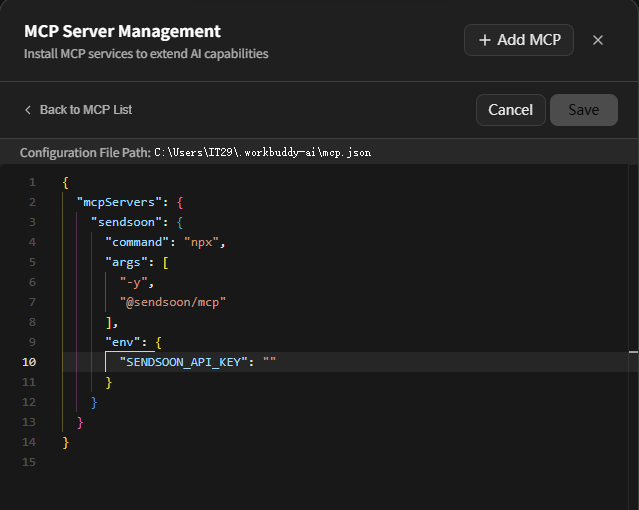
The screenshot shows the WorkBuddy connector editor: the configuration file path is at the top, and the sendsoon JSON is pasted into the editor. After saving, return to the MCP list and confirm sendsoon is connected.
Verify: Start a new conversation and ask for a simple task (e.g. “Look up 8.8.8.8”). Approve the tool if WorkBuddy asks for permission.
Optional environment variable:
Never commit a real Key to Git or share it with anyone.
ssk_live_... Key immediately and enter it as SENDSOON_API_KEY in your MCP configuration.If the anonymous quota is exhausted, send_email will tell you to register and configure a Key. An invalid or revoked Key is rejected and does not fall back to the anonymous quota.
Skip local setup and try ip_lookup, markitdown_convert, and send_email in the browser.
The notebook calls the same SendSoon HTTP APIs used by these MCP tools.
To see all three tools in a browser and click through them manually before installing into an AI client, use the MCP Inspector.
Requires Node.js 20+. Run the command below in a terminal; Inspector opens a web UI automatically:
npx @modelcontextprotocol/inspector npx -y @sendsoon/mcp
MCP Inspector Web is up and running in the terminal. If the browser does not open, paste the http://127.0.0.1:6274?... URL from the terminal.error.code and error.message.See LICENSE.
Send email, look up public IP information, and convert files to Markdown through SendSoon.
{ "mcpServers": { "io.github.sendsoon-ai": { "command": "npx", "args": [ "-y", "@sendsoon/[email protected]" ], "env": { "SENDSOON_EMAIL_RECIPIENT": "<value>", "SENDSOON_API_KEY": "<secret>", "SENDSOON_API_BASE_URL": "<value>" } } }}เครื่องมือ
ยังไม่มีรายการเครื่องมือ เซิร์ฟเวอร์แบบรีโมตจะได้รายการหลังการตรวจสอบสถานะครั้งแรก
FAQ
คัดลอกคอนฟิก stdio สำหรับ Cursor, Claude Desktop, Claude Code หรือ VS Code ได้ในหน้านี้ คอนฟิกนี้ใช้การติดตั้งของผู้เผยแพร่ ไม่ใช่พร็อกซีของ PlugMCP
ผู้เผยแพร่ระบุตัวแปรสภาพแวดล้อมเหล่านี้: SENDSOON_EMAIL_RECIPIENT, SENDSOON_API_KEY, SENDSOON_API_BASE_URL
Ai ทำงานแบบโลคัลผ่าน stdio
ตรวจสอบล่าสุดเมื่อ 2026-11-10 Send email, look up public IP information, and convert files to Markdown through SendSoon.
