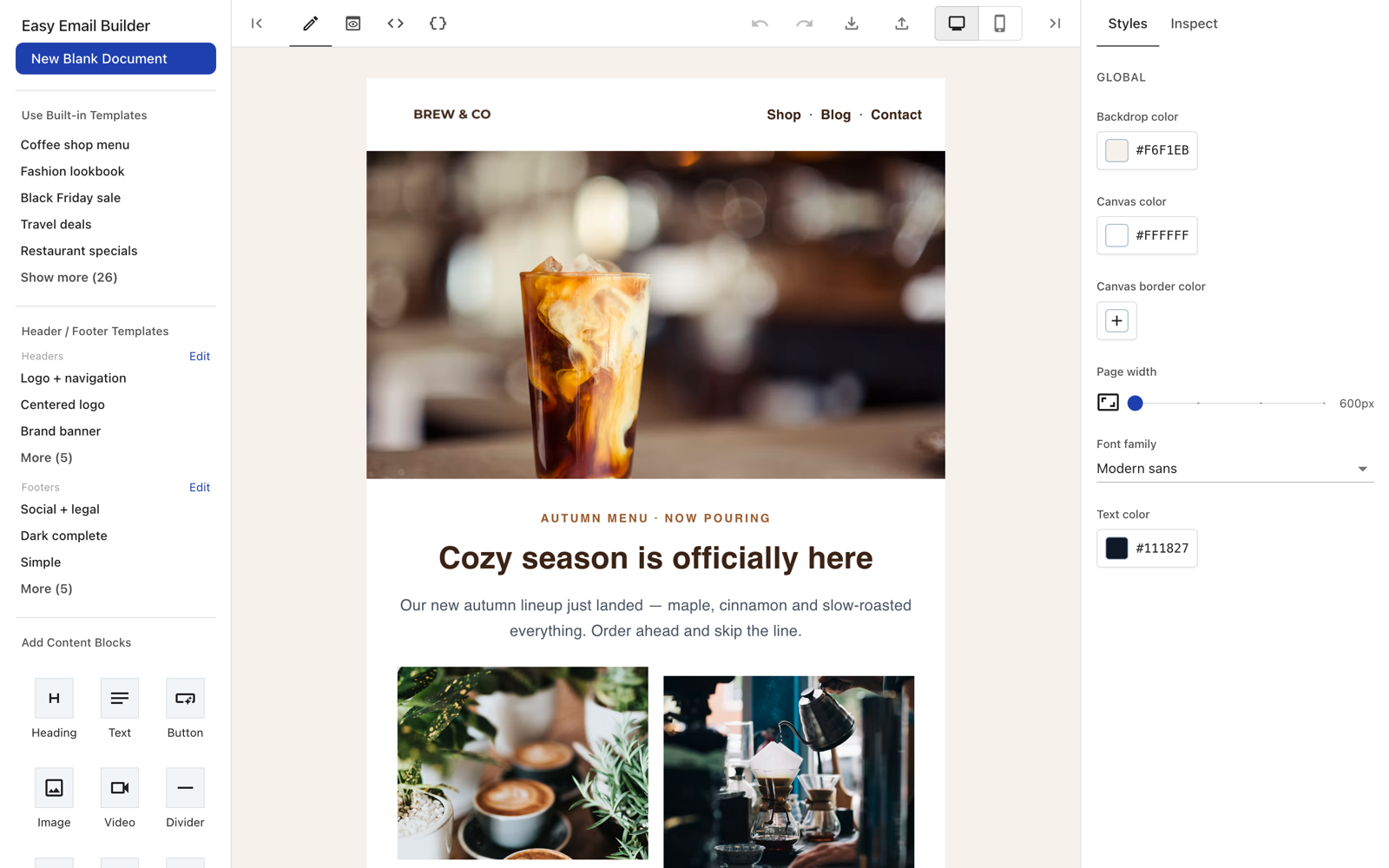
Easy Email Builder
A drag-and-drop email template editor for React.
Power your agent
คำสั่งของผู้เผยแพร่เอง ไม่ใช่เอนด์พอยต์ของ PlugMCP
Host a copy with our keys and logs.
npx -y [email protected]Claude Code ไม่มีลิงก์ติดตั้งสำหรับคำสั่งแบบโลคัล ให้คัดลอกคำสั่งด้านล่างแล้วรันในเทอร์มินัล
EASY_EMAIL_BUILDER_EDITOR_URL=<value> claude mcp add io.github.shahkarkhan440-easy-email-builder -- npx -y easy-email-builder-mcp@0.1.3รันในเทอร์มินัล
{ "mcpServers": { "io.github.shahkarkhan440-easy-email-builder": { "command": "npx", "args": [ "-y", "[email protected]" ], "env": { "EASY_EMAIL_BUILDER_EDITOR_URL": "<value>" } } }}claude_desktop_config.json
URL แบบรีโมตหรือคำสั่งบนเครื่องของคุณ? การติดตั้งสองแบบต่างกันอย่างไร
รันบน PlugMCP
A new server you create. It is not this listing's official endpoint. Use the publisher install when you want their URL and their credentials.
เปิดจากผู้เผยแพร่
A drag-and-drop email template editor for React.
Design HTML email templates with AI: render to HTML and open them in a visual editor
Add Easy Email Builder to your favorite AI agent as an MCP server, then ask it to design an email. It returns the email HTML and a link that opens the result in the visual editor.
Claude Desktop: download the one-click extension easy-email-builder.mcpb, double-click it and click Install.
Claude Code
claude mcp add easy-email-builder --scope user -- npx -y easy-email-builder-mcp
OpenAI Codex
codex mcp add easy-email-builder -- npx -y easy-email-builder-mcp
VS Code (GitHub Copilot)
code --add-mcp '{"name":"easy-email-builder","command":"npx","args":["-y","easy-email-builder-mcp"]}'
Gemini CLI
gemini mcp add easy-email-builder npx -y easy-email-builder-mcp
Cursor, Windsurf, Cline and other MCP clients: add to the client's MCP config:
{
  "mcpServers": {
    "easy-email-builder": {
      "command": "npx",
      "args": ["-y", "easy-email-builder-mcp"]
    }
  }
}
Config file locations and troubleshooting: see the MCP server README.
npm install easy-email-builder
Peer dependencies (React 18 and MUI 5):
npm install react@18 react-dom@18 @mui/material@5 @mui/icons-material@5 @emotion/react @emotion/styled react-syntax-highlighter
Give the editor a container with a fixed height:
import { EmailBuilder } from 'easy-email-builder';

export default function App() {
  return (
    <div style={{ height: '100vh' }}>
      <EmailBuilder
        onChange={(json, html) => console.log(json, html)}
        imageUploadHandler={async (file) => {
          // upload the file and return its URL
          return 'https://example.com/image.png';
        }}
      />
    </div>
  );
}
Use a ref to read the current template:
const ref = useRef<EmailBuilderRef>(null);
ref.current?.getData((json, html) => save(json, html));
An HTML-only code editor is also available:
import { HtmlEditor } from 'easy-email-builder/html-editor';
pnpm install
pnpm dev        # preview app (docs/)
pnpm build:lib  # build the library to dist/
MIT. Author: shahkar khan.
Design HTML email templates with AI: render to HTML and open them in a visual editor
{ "mcpServers": { "io.github.shahkarkhan440-easy-email-builder": { "command": "npx", "args": [ "-y", "[email protected]" ], "env": { "EASY_EMAIL_BUILDER_EDITOR_URL": "<value>" } } }}เครื่องมือ
ยังไม่มีรายการเครื่องมือ เซิร์ฟเวอร์แบบรีโมตจะได้รายการหลังการตรวจสอบสถานะครั้งแรก
FAQ
คัดลอกคอนฟิก stdio สำหรับ Cursor, Claude Desktop, Claude Code หรือ VS Code ได้ในหน้านี้ คอนฟิกนี้ใช้การติดตั้งของผู้เผยแพร่ ไม่ใช่พร็อกซีของ PlugMCP
ผู้เผยแพร่ระบุตัวแปรสภาพแวดล้อมเหล่านี้: EASY_EMAIL_BUILDER_EDITOR_URL
Easy Email Builder ทำงานแบบโลคัลผ่าน stdio
ตรวจสอบล่าสุดเมื่อ 2026-11-09 Design HTML email templates with AI: render to HTML and open them in a visual editor
