ThinChain
The catalytic converter between raw broker data and your AI trading agent.
Battle-tested. Sanitization logic extracted from a production options trading app. Handles every bad tick Tradier has thrown at us in production.
Power your agent
คำสั่งของผู้เผยแพร่เอง ไม่ใช่เอนด์พอยต์ของ PlugMCP
Host a copy with our keys and logs.
uvx thinchain==0.1.1Claude Code ไม่มีลิงก์ติดตั้งสำหรับคำสั่งแบบโลคัล ให้คัดลอกคำสั่งด้านล่างแล้วรันในเทอร์มินัล
claude mcp add io.github.snipmcp-thinchain -- uvx thinchain==0.1.1รันในเทอร์มินัล
{ "mcpServers": { "io.github.snipmcp-thinchain": { "command": "uvx", "args": [ "thinchain==0.1.1" ] } }}claude_desktop_config.json
URL แบบรีโมตหรือคำสั่งบนเครื่องของคุณ? การติดตั้งสองแบบต่างกันอย่างไร
รันบน PlugMCP
A new server you create. It is not this listing's official endpoint. Use the publisher install when you want their URL and their credentials.
เปิดจากผู้เผยแพร่
The catalytic converter between raw broker data and your AI trading agent.
Battle-tested. Sanitization logic extracted from a production options trading app. Handles every bad tick Tradier has thrown at us in production.
MCP server that sanitizes bad broker data and compresses options chains 95% for AI trading agents.
The open-source server runs locally with your own API keys. For hosted infrastructure with multi-broker failover, SLA guarantees, and webhook alerts — join the managed cloud waitlist.
Tradier's MCP dumps 500-row JSON chains. One bad print can corrupt an agent's reasoning. ThinChain sanitizes, compresses, and circuit-breaks that data before it reaches your model.
git clone https://github.com/snipmcp/thinchain.git
cd thinchain
pip install -e ".[dev]"
cp .env.example .env
Or with Docker:
docker-compose up --build
TRADIER_API_KEY=your_key_here
TRADIER_BASE_URL=https://api.tradier.com/v1
POLYGON_API_KEY=your_key_here
POLYGON_BASE_URL=https://api.polygon.io
DEFAULT_BROKER=tradier
CACHE_TTL_SECONDS=30
LOG_LEVEL=INFO
Three example prompts to send to Claude (or any MCP-compatible agent):
Use get_compressed_chain to get an iron condor setup on SPY expiring 2026-06-19Check if SPY options data is trustworthy before I place my tradeGet me the ATM straddle strikes for AAPL expiring 2026-06-19# Tab 1 — start the MCP server
python -m thinchain.server
# Tab 2 — call a tool from a Python shell or your MCP client
# Tool signatures:
#   get_compressed_chain(symbol, expiration, strategy="raw",
#                        delta_range=None, broker="tradier")
#   get_sanitized_quote(symbol, broker="tradier")
#   get_circuit_status(symbol, expiration, broker="tradier")
Three layers between raw broker output and your model:
Broker API → [Sanitize] → [Compress] → [Circuit Break] → MCP Tool → AI Agent
              hygiene     strategy      anomaly gate
              rules       slicing       + cache
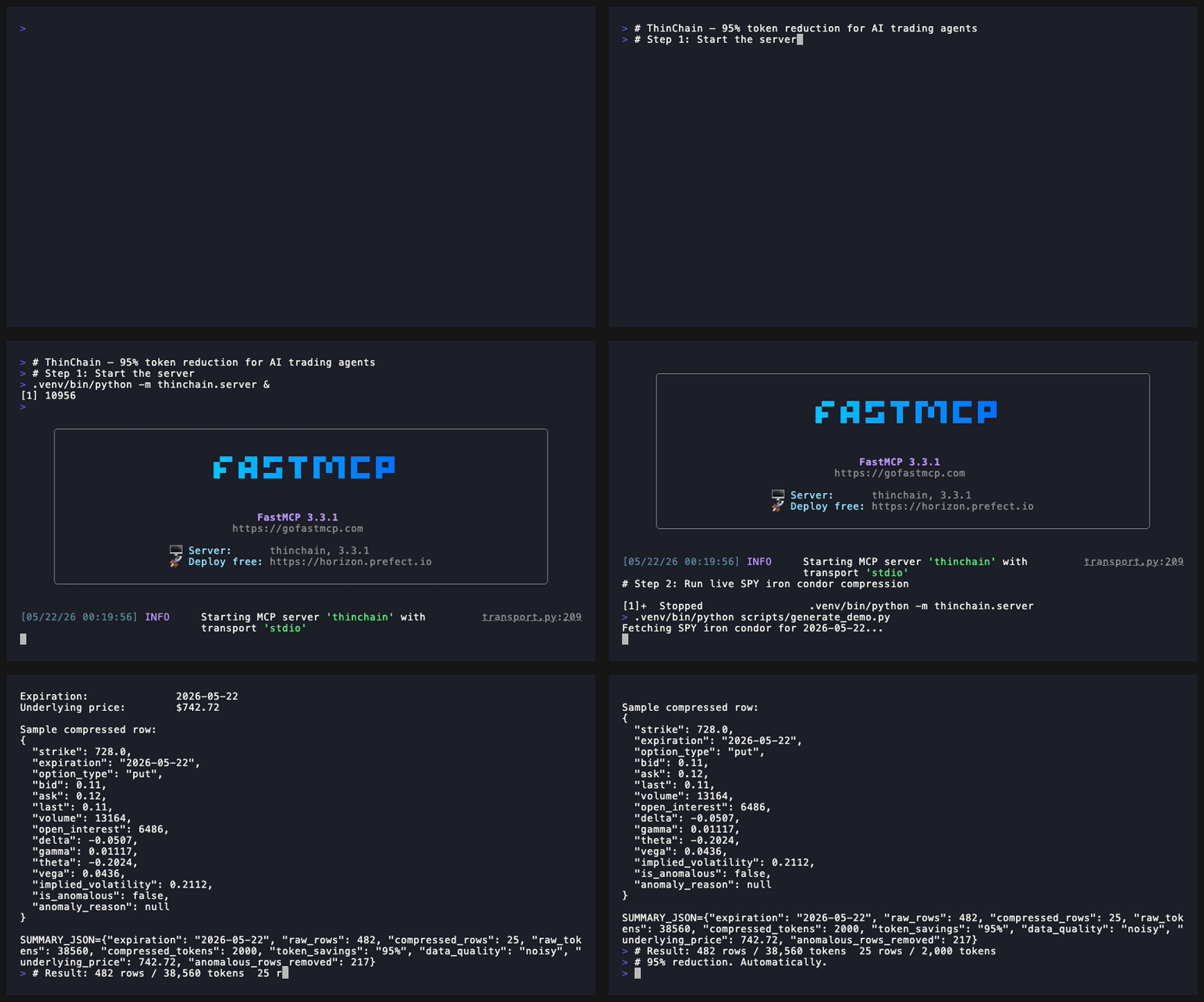
clean / noisy / degraded / circuit_breaker_active). When >65% of rows are anomalous, refuses to serve stale data and falls back to last known-good cache.RAW TRADIER PAYLOAD THINCHAIN OUTPUT
─────────────────────────────────────────────
Rows: 482 Rows: 25
Est tokens: 38,560 Est tokens: 2,000
Token savings: 95%
Anomalous rows removed: 217
Data quality: noisy → still safely served
ThinChain compresses 482 rows / 38,560 tokens down to 25 rows / 2,000 tokens — and flags 217 anomalous strikes (illiquid, ghost quotes, wide spreads) that would have polluted the agent's context.
PRs welcome. Run pytest before submitting.
MCP server that sanitizes bad broker data and compresses options chains 95% for AI trading agents.
{ "mcpServers": { "io.github.snipmcp-thinchain": { "command": "uvx", "args": [ "thinchain==0.1.1" ] } }}เครื่องมือ
ยังไม่มีรายการเครื่องมือ เซิร์ฟเวอร์แบบรีโมตจะได้รายการหลังการตรวจสอบสถานะครั้งแรก
FAQ
คัดลอกคอนฟิก stdio สำหรับ Cursor, Claude Desktop, Claude Code หรือ VS Code ได้ในหน้านี้ คอนฟิกนี้ใช้การติดตั้งของผู้เผยแพร่ ไม่ใช่พร็อกซีของ PlugMCP
ระเบียนนี้ไม่ได้ระบุตัวแปรสภาพแวดล้อมที่จำเป็น
Thinchain ทำงานแบบโลคัลผ่าน stdio
ตรวจสอบล่าสุดเมื่อ 2026-11-09 MCP server that sanitizes bad broker data and compresses options chains 95% for AI trading agents.
