Power your agent
คำสั่งของผู้เผยแพร่เอง ไม่ใช่เอนด์พอยต์ของ PlugMCP
Host a copy with our keys and logs.
mcpb https://github.com/Sriram-PR/doc-scraper/releases/download/v2.27.0/doc-scraper.mcpbClaude Code ไม่มีลิงก์ติดตั้งสำหรับคำสั่งแบบโลคัล ให้คัดลอกคำสั่งด้านล่างแล้วรันในเทอร์มินัล
claude mcp add io.github.sriram-pr-doc-scraper -- mcpb https://github.com/Sriram-PR/doc-scraper/releases/download/v2.27.0/doc-scraper.mcpbรันในเทอร์มินัล
{ "mcpServers": { "io.github.sriram-pr-doc-scraper": { "command": "mcpb", "args": [ "https://github.com/Sriram-PR/doc-scraper/releases/download/v2.27.0/doc-scraper.mcpb" ] } }}claude_desktop_config.json
URL แบบรีโมตหรือคำสั่งบนเครื่องของคุณ? การติดตั้งสองแบบต่างกันอย่างไร
รันบน PlugMCP
A new server you create. It is not this listing's official endpoint. Use the publisher install when you want their URL and their credentials.
เปิดA configurable, concurrent, and resumable web crawler written in Go. Specifically designed to scrape technical documentation websites, extract core content, convert it cleanly to Markdown format suitable for ingestion by Large Language Models (LLMs), and save the results locally.
doc-scraper crawls documentation sites into clean Markdown and serves them to coding agents over MCP. Your agent searches and reads the docs you chose, offline, instead of guessing from training data or a live web search. Point doc-scraper add at any docs page and it detects the framework (30+ docs generators, including Docusaurus, Starlight, Sphinx, VitePress, Material for MkDocs, and mdBook), validates the content selector, and drafts the config for you.
Documentation: https://sriram-pr.github.io/doc-scraper/
search_docs) and page reads (read_page) over the stored corpus, with no network accesspages.jsonl, llms.txt, and llms-full.txtget_freshness, diff_crawl)Download a release binary (Linux, macOS, Windows; amd64 and arm64) from the Releases page, or:
go install github.com/Sriram-PR/doc-scraper/v2/cmd/doc-scraper@latest
docker run --rm --user "$(id -u):$(id -g)" -v "$PWD":/data ghcr.io/sriram-pr/doc-scraper:latest crawl -site rust_cli_book
Claude Desktop users can install doc-scraper.mcpb from the latest release instead. Details: Install.
doc-scraper add -site rust_cli_book https://rust-cli.github.io/book/index.html   # detect, preview, confirm
doc-scraper crawl -site rust_cli_book             # Markdown lands in ./crawled_docs/rust_cli_book/
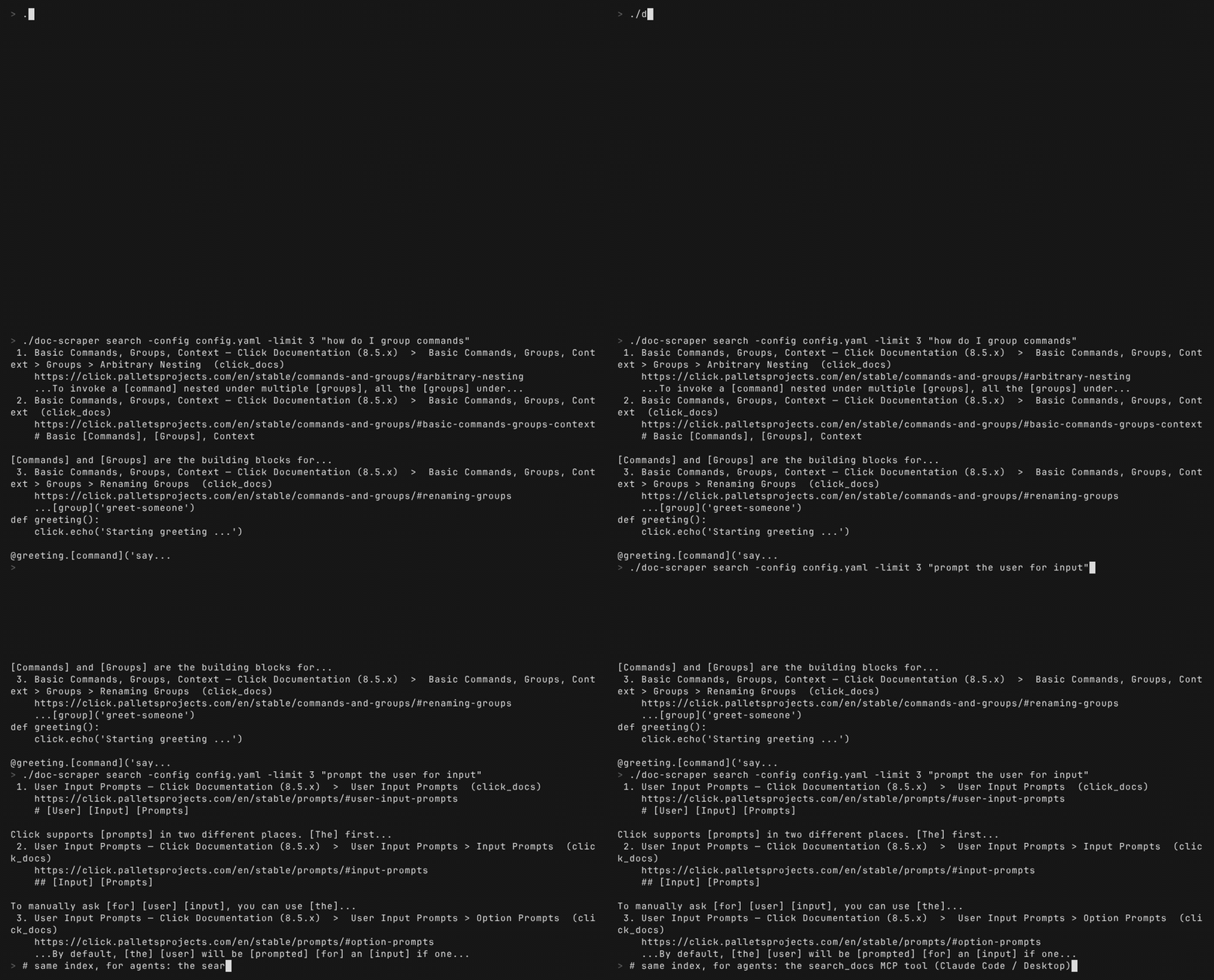
doc-scraper search -site rust_cli_book "error handling"
Then give it to Claude Code:
claude mcp add --transport stdio doc-scraper -- /path/to/doc-scraper mcp-server -config /path/to/config.yaml
See Claude Code setup for scopes and a first prompt.
Contributions are welcome. Read CONTRIBUTING.md before starting: it covers setup, the testing rules CI enforces, how to claim an issue, and the policy on AI-assisted contributions. Issues labeled good first issue are a good place to begin.
Report security problems privately as described in SECURITY.md. Everyone taking part follows the Code of Conduct.
doc-scraper collects nothing: no telemetry, no analytics, no accounts. All output and state stays on your machine, and the only network requests it makes are the crawls and fetches you explicitly ask for. Full policy: PRIVACY.md.
This project is licensed under the Apache-2.0 License.
robots.txt parsingCrawl documentation sites into local corpora agents can search, read, and diff fully offline.
{ "mcpServers": { "io.github.sriram-pr-doc-scraper": { "command": "mcpb", "args": [ "https://github.com/Sriram-PR/doc-scraper/releases/download/v2.27.0/doc-scraper.mcpb" ] } }}เครื่องมือ
ยังไม่มีรายการเครื่องมือ เซิร์ฟเวอร์แบบรีโมตจะได้รายการหลังการตรวจสอบสถานะครั้งแรก
FAQ
คัดลอกคอนฟิก stdio สำหรับ Cursor, Claude Desktop, Claude Code หรือ VS Code ได้ในหน้านี้ คอนฟิกนี้ใช้การติดตั้งของผู้เผยแพร่ ไม่ใช่พร็อกซีของ PlugMCP
ระเบียนนี้ไม่ได้ระบุตัวแปรสภาพแวดล้อมที่จำเป็น
Doc Scraper ทำงานแบบโลคัลผ่าน stdio
ตรวจสอบล่าสุดเมื่อ 2026-11-15 Crawl documentation sites into local corpora agents can search, read, and diff fully offline.