Power your agent
คำสั่งของผู้เผยแพร่เอง ไม่ใช่เอนด์พอยต์ของ PlugMCP
Host a copy with our keys and logs.
npx -y [email protected]Claude Code ไม่มีลิงก์ติดตั้งสำหรับคำสั่งแบบโลคัล ให้คัดลอกคำสั่งด้านล่างแล้วรันในเทอร์มินัล
MCP_MEMORY_DB_PATH=<value> MCP_MEMORY_MODEL=<value> claude mcp add io.github.yonasvalentin-mcp-memory-graph -- npx -y mcp-memory-graph@2.10.3รันในเทอร์มินัล
{ "mcpServers": { "io.github.yonasvalentin-mcp-memory-graph": { "command": "npx", "args": [ "-y", "[email protected]" ], "env": { "MCP_MEMORY_DB_PATH": "<value>", "MCP_MEMORY_MODEL": "<value>" } } }}claude_desktop_config.json
URL แบบรีโมตหรือคำสั่งบนเครื่องของคุณ? การติดตั้งสองแบบต่างกันอย่างไร
รันบน PlugMCP
A new server you create. It is not this listing's official endpoint. Use the publisher install when you want their URL and their credentials.
เปิดA memory server for Claude Code and any other MCP client. It gives your AI assistant a permanent, searchable memory that lives in one SQLite file on your machine. Store a decision today, ask about it next month, and the answer comes back. Everything runs locally: the embedding model, the search index, the knowledge graph. No cloud account, no API key, no per-token cost.
License: source-available and free for noncommercial use (PolyForm Noncommercial 1.0.0): personal projects, hobby, study, research, charity, education, and government. Commercial use requires a paid license (COMMERCIAL.md).
Who it's for: developers who want Claude (or Cursor, Codex, any MCP client) to remember decisions across sessions. Solo builders and hobbyists use it free. Teams share a knowledge base over git. And anyone who wants to replace a cloud memory service (mem0, Zep, Letta, Supermemory) with something that runs entirely on their own machine.
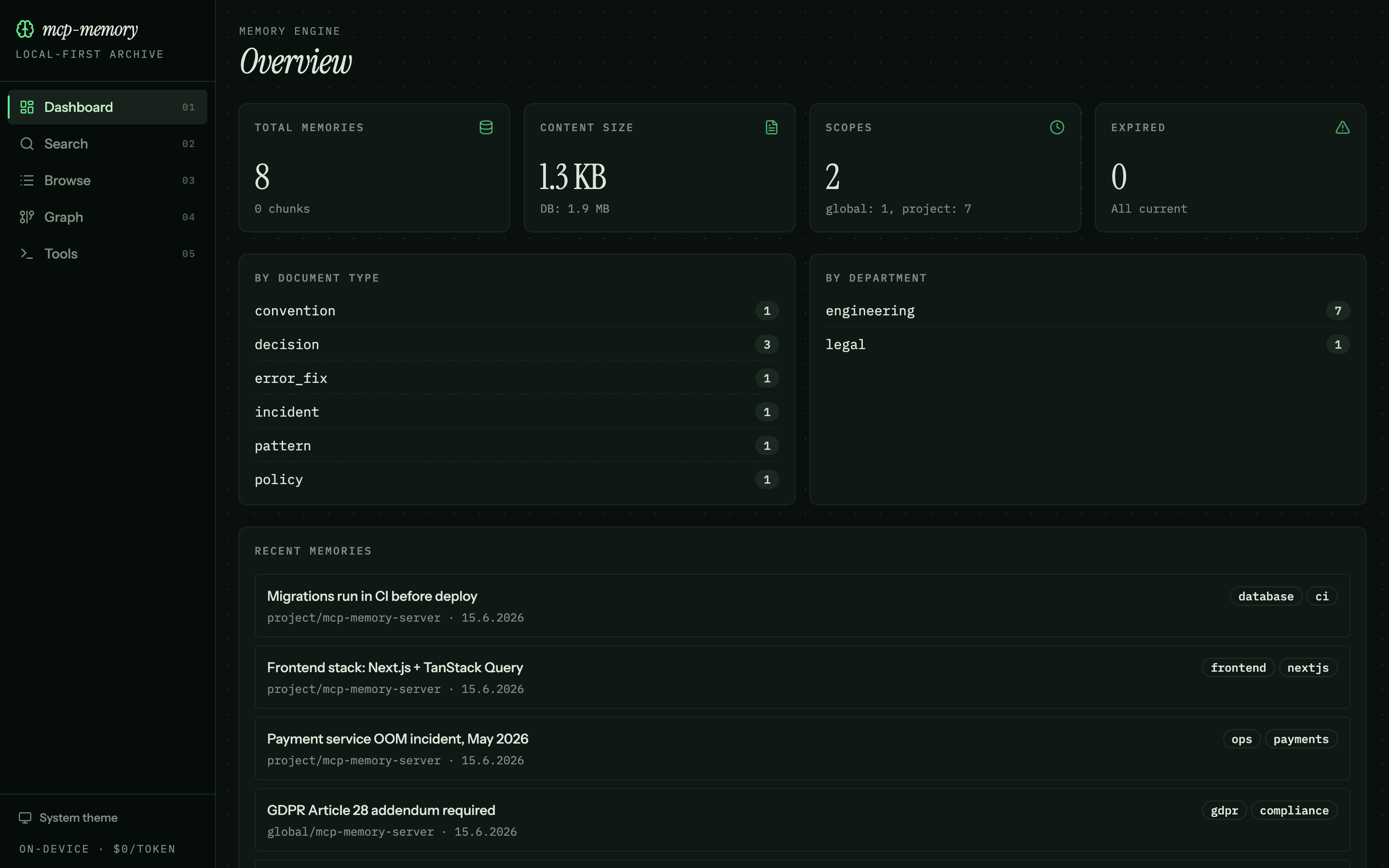
Run npx mcp-memory-graph serve and you get a local web dashboard for browsing and searching your memory outside Claude.
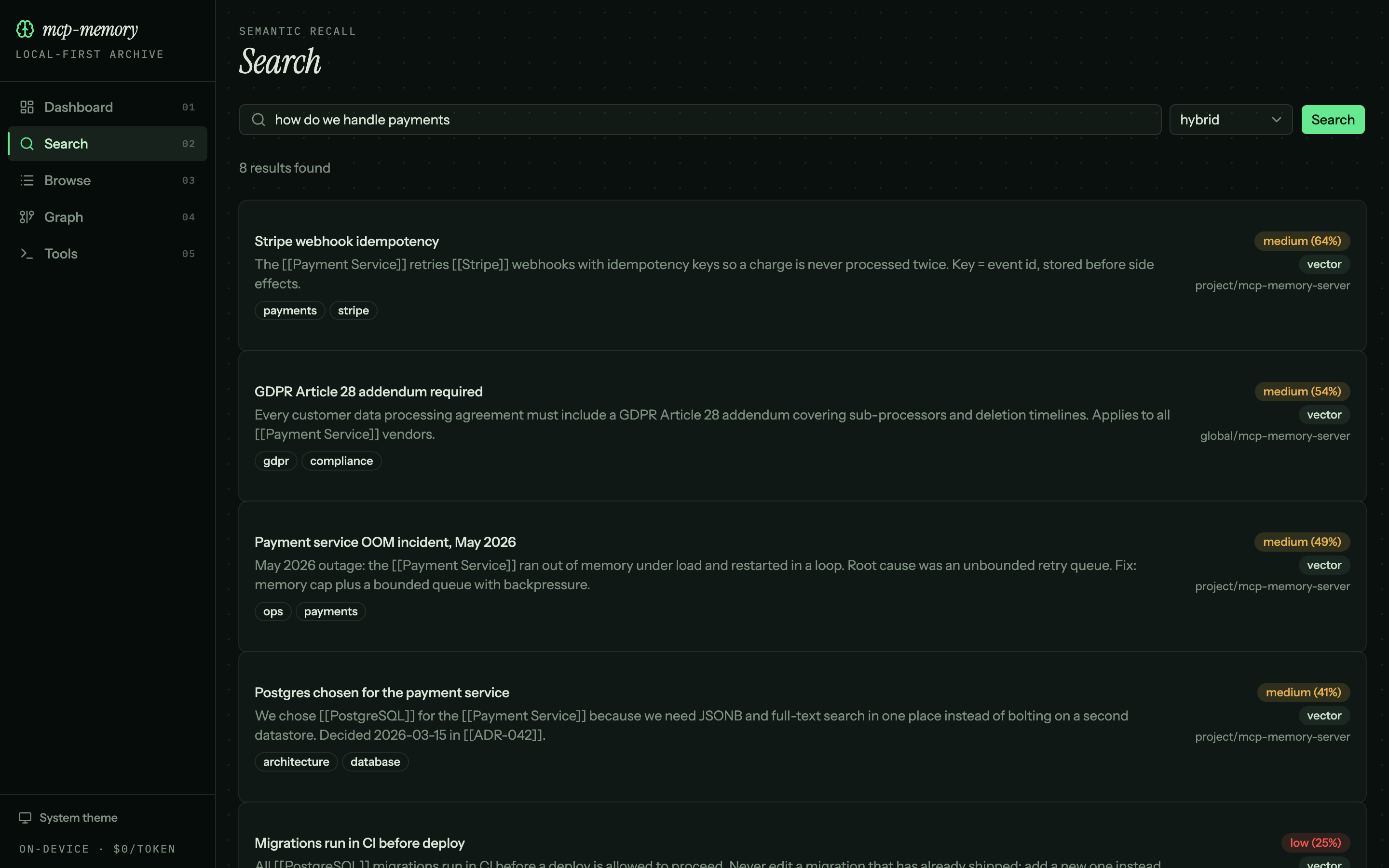
Search works by meaning, not keywords. The query below ("how do we handle payments") finds the Stripe, GDPR, and Postgres notes even though none of them contains that phrase — each result carries a confidence score and a match-type badge:
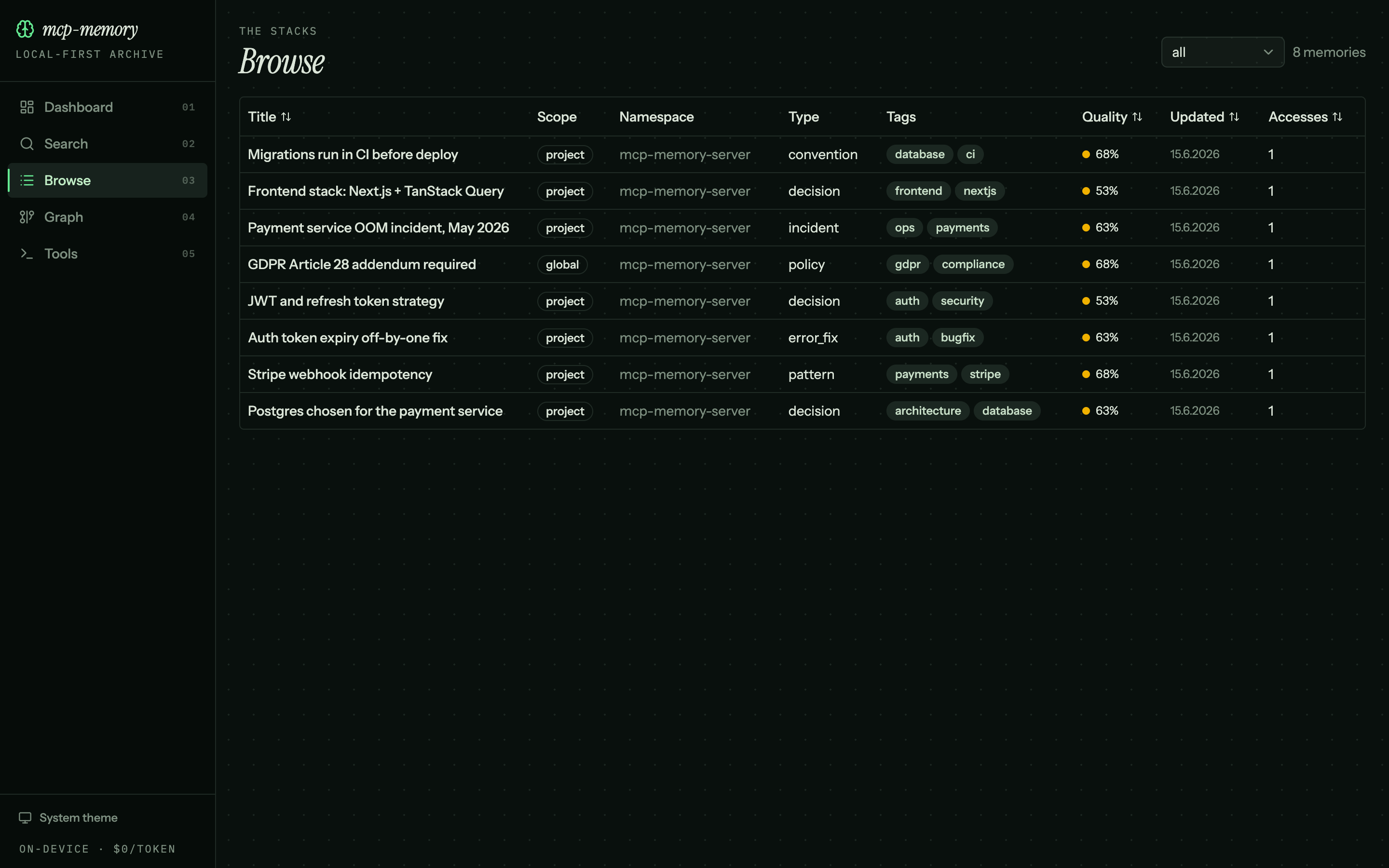
Browse and sort the whole store in one table — scope, type, tags, quality score, and how often each memory has been read:
mem0, Zep, Letta, and Supermemory are the usual names for AI memory, and several of them have open-source cores. This one is built around a different default: nothing leaves your machine and there's no infrastructure to run.
The trade-off is honest: a single-process SQLite server tops out in the low hundreds of thousands of vectors (see Limitations), and a hosted service will scale past that without you thinking about it. If you're a solo developer or a small team who wants memory that's private, free, and zero-ops, that ceiling is rarely the thing you hit first.
AI assistants forget everything between sessions. Your decisions, your patterns, the bug you fixed last Tuesday: all gone when the conversation ends. This server fixes that.
claude -p) for learning extraction. You can turn that off with review_on_stop: false.You need Node.js 20 or newer and Claude Code installed.
1. Get the server. From npm (easiest):
npm install -g mcp-memory-graph
Or from source:
git clone https://github.com/YonasValentin/mcp-memory-graph.git
cd mcp-memory-graph
npm install
npm run build
2. Register the server with Claude Code (optional — init in step 3 does this for you at user scope):
# npm install:
claude mcp add memory-server -- npx -y mcp-memory-graph

# from source:
claude mcp add memory-server node /path/to/mcp-memory-graph/dist/index.js
3. Install the hooks (recommended):
npx mcp-memory-graph init
This is the one command that wires everything up: it registers the MCP server (user scope), installs the auto-capture/recall hooks and the usage skill, writes config, and schedules a nightly cleanup. Answer the prompts, or pass --yes to accept the defaults. (Skip the auto-registration with --no-register if you manage claude mcp yourself.)
4. Try it. Open a Claude Code session and say:
Remember this: we use Postgres for the main app database. Decided 2026-06-01,
because we need JSONB and full-text search in one place.
Then, in a later session:
What database did we decide to use, and why?
Claude searches its memory and answers with the stored decision. That's the whole loop.
5. Verify the install. Ask Claude:
What memory tools do you have available?
It should list all 51 tools (45 memory_*, 3 vault_*, 3 core_memory_*).
The first time a memory tool runs, the embedding model (about 30 MB) downloads from HuggingFace and is cached at ~/.cache/huggingface/. Every start after that is instant.
To undo everything: npx mcp-memory-graph uninstall.
npm install -g mcp-memory-graph@latest   # or just let `npx -y mcp-memory-graph` pull it
npx mcp-memory-graph init                # re-run to refresh on-disk hooks + the nightly schedule
Upgrading the package updates the code that runs each session (hooks, tools, the server), so server-side fixes apply the next time a tool runs — nothing else needed for those.
But files that init wrote earlier are not rewritten by a package upgrade: the Claude Code hook registrations in settings.json and the macOS launchd plist at ~/Library/LaunchAgents/com.mcp-memory.consolidate.plist. If you installed before 2.6.3, that plist used a bare node that launchd (whose minimal PATH excludes nvm) could not run — so the nightly consolidation silently never fired. Re-run npx mcp-memory-graph init once after upgrading to regenerate it with an absolute node path and an output log. Verify it then runs:
launchctl start com.mcp-memory.consolidate
cat ~/.mcp-memory/consolidation.log      # should show a "Consolidation complete" report
To clear conflict noise that accumulated while the job wasn't running: npx mcp-memory-graph consolidate.
When you store a memory, the server turns the text into a vector (a list of 384 numbers that captures its meaning) using a small model that runs inside Node.js. It also indexes the text for keyword search. Both live in one SQLite file, by default at ~/.mcp-memory/memory.db.
When you search, the server runs both kinds of search at once, merges the rankings, and returns the best matches with a confidence label. A second model can then re-sort the top results for better precision (this is the reranker, on by default for MCP clients, and it costs about 200 ms).
On top of that sits a knowledge graph: memories link to entities and to each other, so the server can answer questions that need more than one hop, like "what does the payment service depend on?". A nightly "dream cycle" deduplicates, re-scores, prunes, and reports gaps.
Every number below was produced locally: real embedding model, real production handlers, no network. You can rerun all of them on your own machine.
A quick primer if benchmarks are new to you. A gold set is a list of questions where the right answer is known in advance. Precision@1 asks: was the top result the right one? Recall@5 asks: was the right answer anywhere in the top 5? MRR (mean reciprocal rank) rewards putting the right answer near the top. The reranker is a second model that re-sorts the top 50 results; it is slower but noticeably more accurate.
Reproduce with npm run bench. Full methodology, the gold set itself, and every miss are printed and documented in docs/BENCHMARKS.md.
With the real embedder and a file-backed SQLite database, retrieval p95 is 9.1 ms at 10,000 vectors and 30 ms at 50,000. The rerank pass adds a roughly constant 200 ms on top. Most memory products publish self-reported, cloud-hosted numbers; these are measured locally and reproducible from a committed corpus and runner.
Four public memory benchmarks, run untuned (stock MiniLM embedder, production handlers, zero benchmark-specific tweaks), matching or beating MemPalace on all four:
Run them yourself: npm run bench:longmemeval, bench:locomo, bench:convomem, bench:membench. The honest notes (where the reranker helps and where it hurts, the dedup floor on MemBench, gold-set size caveats) are in docs/BENCHMARKS.md.
rerank: true adds the cross-encoder pass. use_graph: true blends in HippoRAG Personalized PageRank multi-hop scores. as_of: <timestamp> searches the graph as it stood at a past moment.global, project, user, team, department.importance_score and confidence_score on every memory, from access frequency, recency, and content signals.claude -p reviews the transcript and stores zero to five curated learnings. (This replaces the older type: "agent" Stop hook, which is silently broken on macOS; see anthropics/claude-code#39184.)Five opt-in hooks, installed by init:
The Stop hook detaches in about 30 ms and reviews in the background for 10 to 60 seconds. It needs the claude CLI on $PATH (or $CLAUDE_BIN), authenticated. Turn it off with review_on_stop: false in ~/.mcp-memory/config.json.
scope and namespace group content within one database. A shared-database MCP_API_NAMESPACE pin gives supported per-namespace multi-tenant isolation (schema v14); a separate database file per tenant is the strongest boundary. See docs/MULTI-TENANCY.md.
valid_from, valid_to) alongside transaction-time. Updates invalidate rather than delete: the prior fact gets a valid_to stamp instead of being overwritten, so history is never lost. Reads default to currently valid rows but accept as_of: <timestamp> for point-in-time recall. memory_history returns one memory's full timeline.memory_graph traverses entities and relationships up to 3 hops. memory_extract_entities stores LLM-extracted entities and relationships.use_graph: true on search runs Personalized PageRank over the entity and link graph for associative retrieval.memory_query answers a question with a tight subgraph. It seeds from hybrid search, walks the graph up to max_hops while avoiding hubs, and returns a token-budgeted context string instead of flooding the window.memory_communities finds densely connected entity clusters, for "what are the main themes in here?" questions.on_conflict), so new facts reconcile with existing ones instead of piling up duplicates.stability signal, so rarely reinforced knowledge slowly sinks in ranking, the way human memory fades.(scope, namespace) that the agent maintains itself (core_memory_get, core_memory_append, core_memory_replace). Appends that would overflow are refused, which forces deliberate compaction.memory_tiers reports a MemGPT-style hot / recall / archival distribution and lists the hot working set.memory_reflect gathers the most reflection-worthy memories and, in store mode, persists synthesized insights linked back to their sources.vault_sync reads a vault in. memory_export_vault writes memories out as .md files with YAML frontmatter that round-trips losslessly for every authored field (id, scope, namespace, tags, access_level, importance, timestamps). Two derived scores are not in the frontmatter and reset on re-import: confidence_score (to 0.6) and stability (to 1.0). Use memory_export (JSON) for a byte-perfect backup. One metadata key is reserved: metadata._vault holds internal sync bookkeeping and never appears in tool output or exported files.memory_canvas exports the graph as a JSON Canvas 1.0 .canvas file that opens as a spatial board in Obsidian.serve exposes /publish/:namespace (index, page, search, graph) as a read-only wiki. It is deliberately not behind bearer auth, but is hard-scoped to published access levels (MCP_PUBLISH_ACCESS_LEVELS, default public).memory_session_note appends to one "daily note" per session. memory_template returns structured note scaffolds per document type.memory init wizard: interactive setup (or --yes for defaults) that writes ~/.mcp-memory/config.json (or project-scoped config) plus the Claude Code wiring.memory export-graph writes a deterministic memory-graph.json you can commit and share. memory git-setup installs a .gitattributes entry and the memory-union merge driver so parallel commits merge instead of conflict.MCP_AGENT_ID (or pass agent_id per store) and memory_attribution reports how many valid memories each agent wrote.memory_questions surfaces what the graph is well placed to find: ambiguous links to confirm, frequently mentioned but under-documented entities, orphaned and stale memories.memory_forget soft-deletes by default (a tombstone via valid_to, recoverable, still visible via as_of). With hard: true it returns a portability export first, then permanently erases. memory_delete is unchanged.The server ships a browser dashboard for viewing and managing memories outside Claude. It runs on the same Express server as the MCP HTTP transport, so there is no separate process.
Six pages:
Tech: React 19, Vite, Tailwind CSS v4, shadcn/ui, Fuse.js, D3, Recharts.
Run it:
# Development (hot reload)
npm run build && npm run serve   # Terminal 1: server on :3100
npm run dev:web                   # Terminal 2: Vite on :5173 (proxies /api to :3100)

# Production (single process)
npm run build:all                 # Builds server + frontend
npm run serve                     # http://localhost:3100 serves both API and UI
Docker: the image includes the built frontend. After docker compose up, the dashboard is at http://<host>:3200 alongside the MCP endpoint. Team members can browse the shared store from any browser, no Claude Code required.
The REST surface is for reading and managing. Creating memories goes through MCP (memory_store over POST /mcp); there is deliberately no POST /api/memories.
The first nine are what the dashboard uses. All REST endpoints call the same handlers as the MCP tools; no business logic is duplicated.
The server tracks how knowledge is used, scores quality, learns from sessions, and consolidates itself over time.
 ┌──────────────────────────────────────────────────────────┐
 │                    SESSION                                │
 │  Claude searches → access_count++ on matched memories     │
 │  Claude stores   → new memory with initial scores         │
 │  Zero results    → knowledge gap recorded                 │
 └─────────────┬────────────────────────────────────────────┘
               │
               ▼
 ┌──────────────────────────────────────────────────────────┐
 │            SESSION END (Stop command hook)                │
 │  Hook spawns detached `claude -p` headless review         │
 │  --allowedTools restricts to memory_store only            │
 │  Claude judges → 0-5 curated entries via memory_store     │
 │  Deduplicates against existing memories                   │
 └─────────────┬────────────────────────────────────────────┘
               │
               ▼
 ┌──────────────────────────────────────────────────────────┐
 │              DREAM CYCLE (nightly or manual)              │
 │  1. Score    : Recalculate importance from access data    │
 │  2. Expire   : Enforce expiration dates                   │
 │  3. Prune    : Remove low-quality, never-accessed items   │
 │  4. Dedup    : Merge near-duplicate memories              │
 │  5. Gaps     : Surface zero-result search patterns        │
 └──────────────────────────────────────────────────────────┘
Every memory gets an importance_score between 0 and 1:
importance = 0.3 * current_score + 0.4 * normalized_access_frequency + 0.3 * recency_factor
Recency factor:
Memories that are never accessed gradually lose importance. Auto-extracted memories start lower and get pruned if they never prove useful.
Note on access reinforcement. The formula above is the periodic recompute run by the consolidate Score stage. Each read (
memory_get,memory_search,memory_related) also applies a small immediate boost (importance_score += 0.03, capped at 1.0), and search uses importance as a mild rank multiplier (1 + importance * 0.5). A memory read 20 or more times approaches the ceiling from reads alone, and consolidate re-baselines it on the next run. This popularity weighting is intentional. If you want a fixed value that reads don't drift, set an explicitimportance_scoreonmemory_storeormemory_update.
When a search returns nothing, the query is logged. The dream cycle's gap stage surfaces these, so you can see what's missing from the store.
claude binary on $PATH (or $CLAUDE_BIN), authenticated without prompting. Optional; disable with review_on_stop: false.init doesnpx mcp-memory-graph init # user scope: hooks apply to all projects
npx mcp-memory-graph init --scope project # this project only
User scope writes hooks to ~/.claude/settings.json, so they fire in every Claude Code session. Project scope writes hooks to .claude/settings.json in the current directory and creates .mcp.json for automatic server discovery; collaborators who clone the project get the memory server registered automatically.
Init does seven things:
dist/hooks/.~/.mcp-memory/config.json (user scope) or <project>/.mcp-memory/config.json (project scope; the generated .mcp.json pins it via MCP_MEMORY_CONFIG_PATH)..claude/CLAUDE.md (project scope) or prints a snippet (user scope).claude mcp add -s user memory-server -- npx -y mcp-memory-graph for you (idempotent; best-effort — warns with the manual command if the claude CLI isn't on PATH; skip with --no-register). Project scope is registered via the committable .mcp.json instead. This makes step 2 of the Quick Start optional.mcp-memory-graph usage skill into ~/.claude/skills/ so Claude Code has inline guidance for all 51 tools, gotchas, and workflows. Skip with --no-skill.Under a non-interactive shell (agent/CI) the wizard is bypassed: defaults are applied and a report is printed showing what was set and how to change each value. Passing --yes applies the defaults silently (no report).
Key flags: --scope user|project, --schedule HH:MM[,HH:MM] (nightly consolidation time, default 03:00), --vault <path> (enable Obsidian vault round-trip), --no-review-on-stop (disable the end-of-session learning review), --no-skill (skip skill install), --no-register (skip the user-scope claude mcp add), --remote <url> (team server mode).
npx mcp-memory-graph uninstall reverses everything init did: removes hooks, the nightly schedule, the CLAUDE.md block, and the installed skill.
Every step is scriptable. There is no interactive-only path:
git clone https://github.com/YonasValentin/mcp-memory-graph.git
cd mcp-memory-graph
npm install && npm run build
npx mcp-memory-graph init --scope project --yes   # local: hooks + .mcp.json, no prompts
# or point at a shared self-hosted server instead:
# npx mcp-memory-graph init --remote https://memory.example.com --token-env MEMORY_MCP_TOKEN
Claude Code gets the hooks; everyone else gets the same 51 tools, driven manually. The server is a standard MCP server, so any client works. A line in the client's rules file makes usage near-automatic.
Register the server. Example for Codex, in ~/.codex/config.toml (global) or .codex/config.toml (project, trusted only):
[mcp_servers.memory-graph]
command = "node"
args = ["/abs/path/to/mcp-memory-graph/dist/index.js"]
tool_timeout_sec = 180   # the first call downloads the ~30 MB model once; the 60s default can be tight

[mcp_servers.memory-graph.env]
MCP_MEMORY_DB_PATH = "/abs/path/to/.mcp-memory/memory.db"

# or a shared self-hosted server over HTTP (see Self-hosting below):
# url = "https://memory.example.com/mcp"
# bearer_token_env_var = "MEMORY_MCP_TOKEN"
Or codex mcp add memory-graph -- node /abs/path/to/mcp-memory-graph/dist/index.js. Cursor, Windsurf, and other clients use their own MCP config format, but the server command (node .../dist/index.js) and the HTTP option are the same.
Then nudge the agent in its instructions file (Codex: AGENTS.md; Cursor: project rules):
Before answering questions about architecture, decisions, patterns, or past fixes, call
memory_searchon the memory-graph server first; store new decisions, patterns, and fixes withmemory_store.
The server runs three ways, from a single-user cache to a knowledge base shared across many machines. All three are local-first: nothing leaves the machines you choose to run it on.
npx mcp-memory-graph init registers a local stdio server plus the hooks. Memory lives in one SQLite file on your machine. Nothing else to run. Right choice for solo use.
Run one server that many clients connect to over HTTP. Everyone shares the same memory base, live.
Start the server (pick one):
# From source: build the server (and the dashboard, if you want it) first
npm run build:all
MCP_AUTH_TOKEN=$(openssl rand -hex 32) MCP_BIND=0.0.0.0 npm run serve
# MCP at /mcp, REST at /api, dashboard at /, all on :3100

# Or with Docker (frontend included; publishes host port 3200 by default)
MCP_AUTH_TOKEN=$(openssl rand -hex 32) docker compose up -d
Set MCP_AUTH_TOKEN whenever the server is reachable beyond loopback. It is a shared bearer token, one secret for all clients. The server refuses to start unauthenticated on a non-loopback bind unless you set MCP_AUTH_OPTIONAL=1. Terminate TLS at a reverse proxy or tunnel for anything off-host.
Connect a client, one command per machine:
npx mcp-memory-graph init --remote https://memory.example.com --token-env MEMORY_MCP_TOKEN
export MEMORY_MCP_TOKEN=<the server token>     # in your shell or .env
For Claude Code this writes a project .mcp.json pointing at the shared server. The token is stored as an env-var reference ("Authorization": "Bearer ${MEMORY_MCP_TOKEN}"), so the committed .mcp.json never contains the secret. Non-Claude clients point at the same server through their own MCP config.
In remote mode the local capture and recall hooks are not installed. The memory lives on the server, not in a local file the hooks could read. The agent uses
memory_searchandmemory_storedirectly (the CLAUDE.md guidance is still written).
Prefer your knowledge base in git, reviewed through pull requests, with no server to run? Export memories to plain Markdown and share the folder as a git repo:
npx mcp-memory-graph vault-init                    # make the vault a git repo (union merge driver + rebuild hook)
git add -A && git commit -m "memory snapshot" && git push
# collaborators, once after cloning:
#   npx mcp-memory-graph vault-init                # registers the union merge driver + post-merge hook in THEIR clone
# collaborators, thereafter: git pull && npx mcp-memory-graph rebuild
Each collaborator must run
vault-initonce in their own clone. The merge driver and post-merge rebuild hook live in local git config (.git/), not in the repo. A fresh clone withoutvault-initwill hit raw conflict markers in.memory/graph.jsonon its first concurrent pull. Re-runningvault-initis idempotent and does not clobber the committed sidecar.
Two recovery notes for team vaults:
memory rebuild can refuse with VaultIntegrityError because .memory/manifest.json is stale. Delete that file and re-run rebuild; it is derived state and regenerates..md while your database has newer state? Import first (vault_sync or rebuild), then export (memory sync). A full export from a stale database overwrites vault files, including your hand edit.MCP_AUTH_TOKEN is a single shared secret, fine for a trusted group; rotate it by restarting the server with a new value. For per-key RBAC (one server, N keys, each pinned to a namespace set and an access-level ceiling) use memory keys create|list|revoke (schema v16). The legacy shared token still works and is checked first. See docs/MULTI-TENANCY.md.--remote default keeps it in an env var by design.127.0.0.1 (the default) unless you front the server with a proxy that terminates TLS; then set MCP_BIND=0.0.0.0.Building an org-wide AI brain? One server, a key per employee, an org chart the AI can traverse (people, teams, SOPs, and tools as typed graph nodes), with enforced who-sees-what. The recipe, built on existing primitives, is in docs/ENTERPRISE-BRAIN.md.
The full env reference (auth, rate limits, webhooks, vault, publish) is in docs/ENV.md.
claude mcp add memory-server --env MCP_MEMORY_DB_PATH=/path/to/project/.memory.db node /path/to/dist/index.js
# Swap the embedding model (same 384 dimensions; drop-in for the existing index
# AFTER a re-embed; see the warning below)
claude mcp add memory-server \
  --env MCP_MEMORY_MODEL=Xenova/bge-small-en-v1.5 \
  --env MCP_MEMORY_DIMENSIONS=384 \
  node /path/to/dist/index.js
Model identity is recorded and enforced. The database remembers which embedding model built it (
schema_meta.embedding_model). Starting the server with a differentMCP_MEMORY_MODELfails loudly instead of silently degrading every search (same dimension does not mean same vector space). To switch models: set the new model and runmemory rebuild(re-embeds from the vault), or export and re-import.
The config file controls self-improvement behavior, hook settings, and per-project overrides. Resolution order: MCP_MEMORY_CONFIG_PATH env, then <cwd>/.mcp-memory/config.json (project-scope init writes this), then ~/.mcp-memory/config.json. Created by npx mcp-memory-graph init, or write it by hand:
{
  "defaults": {
    "scope": "project",
    "namespace": "auto"
  },
  "projects": [
    {
      "path": "~/Documents/MyApp",
      "namespace": "my-app",
      "watch": ["README.md", "docs/**/*.md"]
    }
  ],
  "consolidation": {
    "similarity_threshold": 0.85,
    "prune_after_days": 30,
    "min_importance_to_keep": 0.1,
    "max_operations": 100,
    "schedule": [
      { "hour": 11, "minute": 30 },
      { "hour": 16, "minute": 0 }
    ]
  },
  "hooks": {
    "extract_on_compact": false,
    "extract_on_session_end": false,
    "track_searches": true,
    "review_on_stop": true
  },
  "extraction": {
    "categories": ["decision", "pattern", "error_fix", "convention"],
    "min_confidence": 0.4
  }
}
memory_storeStore a new memory. The vector embedding is generated automatically.
¹ When omitted, a loaded config file's defaults.scope and defaults.namespace ("auto" = project directory name) apply first; the hardcoded fallback is global with no namespace.
Example prompt:
Store this memory with department=legal and tags=["compliance","gdpr"]:
"All customer data processing agreements must include a GDPR Article 28 addendum effective January 2025."
memory_searchHybrid vector plus keyword search across stored memories.
How it works:
Example prompts:
Search memories for "contract renewal notice requirements" in the legal department

Search memories for "authentication" with search_mode=keyword

Search memories for "deployment patterns" with temporal_decay={type:"exponential", half_life_days:60}
Each result includes the memory content and metadata, the combined RRF score, a normalized confidence (0-1), a confidence_level label (high at 0.7 and above, medium at 0.4 and above, low below that), and a match_type (hybrid, vector, or keyword).
The default
detail_level: "summary"projection returnsconfidence_levelbut omits the numericconfidenceand the fullcontent, to save tokens. Passdetail_level: "full"when you need them.
memory_getRetrieve a specific memory by ID. For ingested documents, optionally include all child chunks.
memory_updateUpdate an existing memory. If content changes, the embedding regenerates automatically. The previous version is saved to history.
memory_deleteDelete memories by ID or by filter. At least one of id or filter is required.
memory_listBrowse memories with filtering, pagination, and sorting.
memory_ingestIngest a full document: it is chunked by content type, each chunk is embedded, and everything is stored with parent-child relationships. Use this for large documents.
Chunking by content type:
memory_relatedFind memories semantically related to a given one. Uses vector similarity, so it finds connections keyword search misses.
memory_versionsView a memory's version history. Every update creates a version record.
memory_statsUsage statistics about stored memories.
Returns totals for memories, documents, and chunks, breakdowns by scope, department, and type, storage size, and the expired count.
memory_exportExport current memory content as JSON for portability or migration. This is not a full backup: it serializes only currently live, top-level memories. It omits edit history, the knowledge graph, condense-undo originals, ingested child chunks, and soft-forgotten rows. For disaster recovery, copy the SQLite file (cp ~/.mcp-memory/memory.db ..., see the RUNBOOK); embeddings recompute deterministically on import.
Max 1000 records per export.
memory_importImport memories from JSON. Each item is embedded and stored.
vault_syncScan an Obsidian vault, parse the markdown, embed and store. See Obsidian Vault Integration below.
vault_statusSync status for a vault: files synced, pending, changed, and the last sync time.
vault_searchHybrid search scoped to one vault's memories.
By default this searches the namespace named after the vault's folder name. Memories exported from another namespace keep their original namespace in frontmatter. If a search over a freshly synced vault returns nothing, pass an explicit
namespace(and/orscope) override.
memory_consolidateThe dream cycle: deduplicate, score, prune, expire, and detect knowledge gaps.
Five stages run in order: Score (recalculate importance), Expire (enforce expires_at), Prune (drop low-quality when enabled), Dedup (merge near-duplicates), Gaps (surface zero-result searches). Returns a report with counts per stage.
Example prompts:
Run a dream cycle consolidation with dry_run=true to preview what would change

Consolidate memories in namespace=my-project with similarity_threshold=0.9

Run consolidation with prune_low_quality=true to clean up unused memories
memory_extract_learningsMine a session transcript for decisions, patterns, error fixes, and conventions using heuristic pattern matching. No external LLM needed.
Extraction looks for decision language ("we decided", "the fix was"), pattern language ("always use", "never do"), error fixes ("the problem was", "solved by"), and conventions ("our convention is", "standard practice"). Each hit is deduplicated against existing memories and stored with a lower initial confidence.
Parameters for the remaining tools are validated by Zod schemas in src/schemas/; each registration's full description lives in src/server.ts.
Claude Code ──stdio──> MCP Memory Graph
                            │
                    ┌───────┴───────┐
                    │               │
              Transformers.js   SQLite DB
              (embeddings)    (~/.mcp-memory/memory.db)
                                    │
                       ┌────────────┼────────────┐
                       │            │            │
                   memories    memories_fts  memories_vec
                   (data +     (FTS5 index)  (vec0 index)
                    scores)
                       │
              ┌────────┼────────┐
              │        │        │
        memory_    memory_    ingest_
        versions   access_    source_
                   log        tracking

Claude Code Hooks (opt-in)
    │
    ├── SessionStart ──> memory_stats (status check)
    ├── PostToolUse ───> search-log.jsonl (hit/miss tracking)
    ├── PreCompact ────> learning extraction (disabled by default)
    └── Stop ──────────> spawn detached `claude -p` headless review
                              │
                              └─> --allowedTools mcp__memory-server__memory_store
                                  Claude reviews transcript → memory_store calls

Nightly Schedule (opt-in)
    └── 3:00 AM ───────> memory_consolidate (dream cycle)
Query: "contract renewal notice"
         │
    ┌────┴────┐
    │         │
 Embed     Tokenize
    │         │
    ▼         ▼
 sqlite-vec  FTS5
 (semantic)  (keyword)
    │         │
    │  rank   │  rank
    │  1: A   │  1: A
    │  2: C   │  2: B
    │  3: B   │  3: D
    │         │
    └────┬────┘
         │
   Reciprocal Rank Fusion
   RRF(d) = Σ 1/(60 + rank)
         │
         ▼
   [A: 0.033, B: 0.026, C: 0.016, D: 0.016]
         │
   Temporal Decay (optional)
         │
   Confidence Scoring
         │
   Access Tracking (record hit)
         │
         ▼
   Final ranked results
The SQLite database is at schema version 18, with automatic forward migration from any earlier version. The core tables:
memories: all memory data, TEXT primary key (UUIDs), parent-child support for document chunks, plus access_count, last_accessed_at, importance_score, and confidence_score.memories_fts: FTS5 virtual table for keyword search with BM25 ranking, synced with the memories table.memories_vec: vec0 virtual table for vector search. 384-dimension float32 embeddings with scope and namespace metadata for pre-filtering.memory_versions: version history for every change.memory_access_log: every search, get, and related-memory access, with timestamps and query context.ingest_source_tracking: ingested files, for change detection on re-ingestion.Later schema versions add the knowledge-graph tables (entities, links, conflicts, communities), webhooks, session state, and the RBAC api_keys table. Every mutation keeps the three core tables in sync atomically inside a SQLite transaction; the repository.ts layer enforces this, and nothing else touches the tables directly.
src/
├── index.ts        # Entry point (stdio transport)
├── server.ts       # All 51 tool registrations
├── config/         # Config file loading + validation
├── db/             # Connection, schema, migrations, repository (three-table sync)
├── embeddings/     # Embedding providers (Transformers.js, registry, Ollama)
├── search/         # Hybrid search, reranker, temporal decay, scoring
├── chunking/       # Per-content-type chunking strategies
├── graph/          # Entities, links, PageRank, communities
├── vault/          # Obsidian round-trip, write-through, bookkeeping
├── tools/          # One handler per MCP tool
├── api/            # REST routes + security middleware
├── events/         # Webhook bus (SSRF guard, HMAC, retry)
├── cli/            # init, serve, vault, backup, keys, migrate, ...
├── hooks/          # Claude Code lifecycle hooks
└── schemas/        # Zod schemas for every tool input
Engineering:
Store memory: "We chose event sourcing over CRUD for the order service because
we need full audit trail and the ability to replay events for debugging.
ADR-042, decided 2026-03-15."
department=engineering, document_type=decision, tags=["architecture","event-sourcing"]
Legal:
Ingest this contract template with content_type=legal, department=legal,
document_type=contract, tags=["template","nda","standard"]
Finance:
Store memory: "Q4 2025 revenue recognition policy change: SaaS contracts
over 12 months now recognized ratably per ASC 606 guidance."
department=finance, document_type=policy, tags=["revenue-recognition","asc-606"]
HR:
Ingest the employee handbook with department=hr, content_type=text,
document_type=policy, tags=["handbook","onboarding"]
Sales:
Store memory: "When prospect objects on price vs CompetitorX, lead with
our 99.9% uptime SLA and dedicated support. This converted 3 deals in Q1."
department=sales, document_type=pattern, tags=["objection-handling","pricing","competitorx"]
Point the server at a vault folder and every markdown file becomes a searchable memory, with frontmatter, tags, and wiki-links extracted. No Obsidian app needed; it reads the files straight from disk.
What gets extracted:
Usage examples:
Sync my Obsidian vault at ~/Documents/my-vault

Check vault sync status for ~/Documents/my-vault

Search my vault for "meeting action items about hiring"

Sync vault but only the notes/ and projects/ folders:
  vault_sync with include_patterns=["notes/**", "projects/**"]

Force re-sync everything (ignore modification times):
  vault_sync with force=true
vault_sync parameters:
How sync works: it scans the vault recursively for .md files (skipping .obsidian/, .trash/, .git/), compares modification times against the last sync, extracts frontmatter, wiki-links, and tags from new or changed files, embeds, and stores. Deleted files have their memories removed. Files larger than the chunk size are split with markdown-aware chunking. A second sync of an unchanged vault takes under a millisecond.
npx mcp-memory-graph init.npx mcp-memory-graph uninstall.access_level metadata (public, internal, confidential, restricted) for organizational awareness.Backup:
# WAL-safe online snapshot with retention
npx mcp-memory-graph backup

# Or a simple file copy
cp ~/.mcp-memory/memory.db ~/.mcp-memory/memory.db.backup
Reset:
# Delete the database to start fresh
rm ~/.mcp-memory/memory.db
When installed via npx mcp-memory-graph init, a nightly job runs all five dream-cycle stages plus access-log rotation (entries older than 90 days are dropped).
On macOS, a launchd plist is created at ~/Library/LaunchAgents/com.mcp-memory.consolidate.plist, scheduled for 3:00 AM. On Linux, init prints a cron suggestion:
# Add to crontab -e
0 3 * * * /usr/local/bin/npx mcp-memory-graph consolidate
Run it manually any time:
npx mcp-memory-graph consolidate
MCP_MEMORY_MODEL (with a rebuild), but the shipped benchmarks only validate the default.memory_extract_learnings uses pattern matching, not an LLM. It catches common phrasings and misses subtle ones. (The Stop hook's claude -p review is the LLM-quality path.)What's actually next, in rough order:
.md changes instead of manual rebuild.as_of content reconstruction. Point-in-time queries currently reconstruct validity (which facts were live); reconstructing the content of edited memories at that instant is the remaining half.Source-available, not open source. Licensed under the PolyForm Noncommercial License 1.0.0: free for any noncommercial purpose (personal projects, hobby, study, research, charitable, educational, public-research, and government use). Commercial use requires a paid license; see COMMERCIAL.md.
If you're unsure whether your use counts as commercial, check the safe harbors in the license or just ask: [email protected].
MCP memory server · Model Context Protocol · Claude Code memory · persistent AI memory · LLM long-term memory · AI agent memory · local-first memory · $0/token memory · hybrid vector + keyword search · semantic search · knowledge graph · bi-temporal memory · HippoRAG / Personalized PageRank · cross-encoder reranking · RAG memory · SQLite vector database · sqlite-vec · FTS5 / BM25 · local embeddings (all-MiniLM-L6-v2, Transformers.js) · Obsidian vault sync · JSON Canvas · GDPR forget · signed provenance · self-hosted memory.
Also searched as: a self-hosted, privacy-first alternative to mem0, Zep, Letta, Cognee, and Supermemory · long-term memory for Claude / Cursor / Codex · an Obsidian-backed knowledge base for AI agents · a local knowledge-graph memory that never leaves your machine.
Local-first memory for Claude Code and any MCP client: hybrid search + knowledge graph, $0/token.
{ "mcpServers": { "io.github.yonasvalentin-mcp-memory-graph": { "command": "npx", "args": [ "-y", "[email protected]" ], "env": { "MCP_MEMORY_DB_PATH": "<value>", "MCP_MEMORY_MODEL": "<value>" } } }}เครื่องมือ
ยังไม่มีรายการเครื่องมือ เซิร์ฟเวอร์แบบรีโมตจะได้รายการหลังการตรวจสอบสถานะครั้งแรก
FAQ
คัดลอกคอนฟิก stdio สำหรับ Cursor, Claude Desktop, Claude Code หรือ VS Code ได้ในหน้านี้ คอนฟิกนี้ใช้การติดตั้งของผู้เผยแพร่ ไม่ใช่พร็อกซีของ PlugMCP
ผู้เผยแพร่ระบุตัวแปรสภาพแวดล้อมเหล่านี้: MCP_MEMORY_DB_PATH, MCP_MEMORY_MODEL
MCP Memory Graph ทำงานแบบโลคัลผ่าน stdio
ตรวจสอบล่าสุดเมื่อ 2026-11-09 Local-first memory for Claude Code and any MCP client: hybrid search + knowledge graph, $0/token.
