execkit
Persistent, structured shell sessions for AI agents, on your laptop, your servers over SSH, and your Docker containers.
Power your agent
การติดตั้งจากผู้เผยแพร่ ไม่ใช่เอนด์พอยต์ของ PlugMCP
URL แบบรีโมตหรือคำสั่งบนเครื่องของคุณ? การติดตั้งสองแบบต่างกันอย่างไร
รันบน PlugMCP
A new server you create. It is not this listing's official endpoint. Use the publisher install when you want their URL and their credentials.
เปิด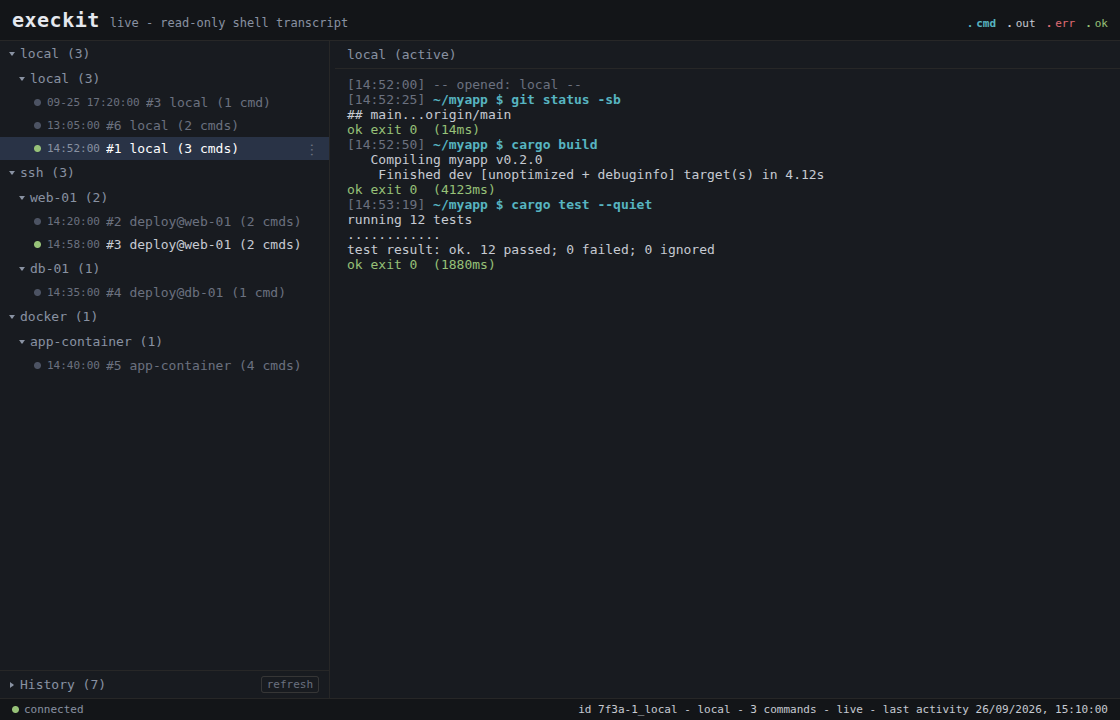
What you get that a built-in agent shell doesn't:
cd and env carry across
calls, and every command returns a structured result: split stdout/stderr,
exit code, duration, cwd.tail, head, grep, a char cap) keep a
noisy build from flooding the context window.Zero-install, with uv. Add this to your MCP client config:
{ "mcpServers": { "execkit": { "command": "uvx", "args": ["execkit-mcp"] } } }
Or install it and let execkit print the config for your client:
pip install execkit-mcp && execkit-mcp setup claude # or: cursor | gemini | codex | vscode | windsurf
Then execkit-mcp doctor checks your setup. More options (prebuilt binary,
cargo install, building from source) are in the Quickstart.
Status: early 0.x. The API may change between minor versions. Read
Limitations before pointing it at anything important.
execkit complements your agent's built-in shell or sandbox; it does not replace it. Use it when the agent needs to work on a remote host or inside a container, when you want a record of what ran, or when you want to undo file changes on a remote workspace.
The agent is the adversary. The LLM driving execkit can be prompt-injected by anything it reads, so execkit contains its own caller: a command passes the policy fence before it runs, secrets are redacted before output returns, and a changed SSH host key fails loudly instead of reconnecting into a MITM.
flowchart LR
    A([AI agent]) -->|command| F{policy fence}
    F -->|blocked| X([rejected, never runs])
    F -->|allowed| T[transport: local / SSH / Docker]
    T --> O[raw output]
    O --> R[redact secrets, bound output]
    R --> E([structured ExecResult])
    E -.-> A
The agent gets session_create (local, ssh, or docker), session_exec,
session_list and session_destroy, plus session_checkpoint /
session_checkpoints / session_restore for remote undo.
State persists across calls, and every result is parsed, not scraped from a terminal:
// session_exec {"command": "cd /app && npm ci"}   -> { "exit_code": 0, "cwd": "/app" }
// session_exec {"command": "npm run build"}        // cwd is still /app
//   -> { "stderr": "Error: Cannot find module 'webpack'",
//        "exit_code": 1, "duration_ms": 3420, "cwd": "/app",
//        "truncated": false, "timed_out": false }
Commands time out after 120 seconds by default (timeout_secs per call, up to
3600). On timeout execkit interrupts the command with Ctrl-C and returns
timed_out: true with exit code 124. The session keeps its cwd and env.
See crates/execkit-mcp/README.md for the operator
security settings (host-key verification, key dir, audit, session limits).
Set EXECKIT_MCP_AUDIT_DIR and every session is recorded. execkit-mcp watch
shows it live in the terminal, and execkit-mcp watch --serve --open opens the
read-only browser viewer shown at the top.
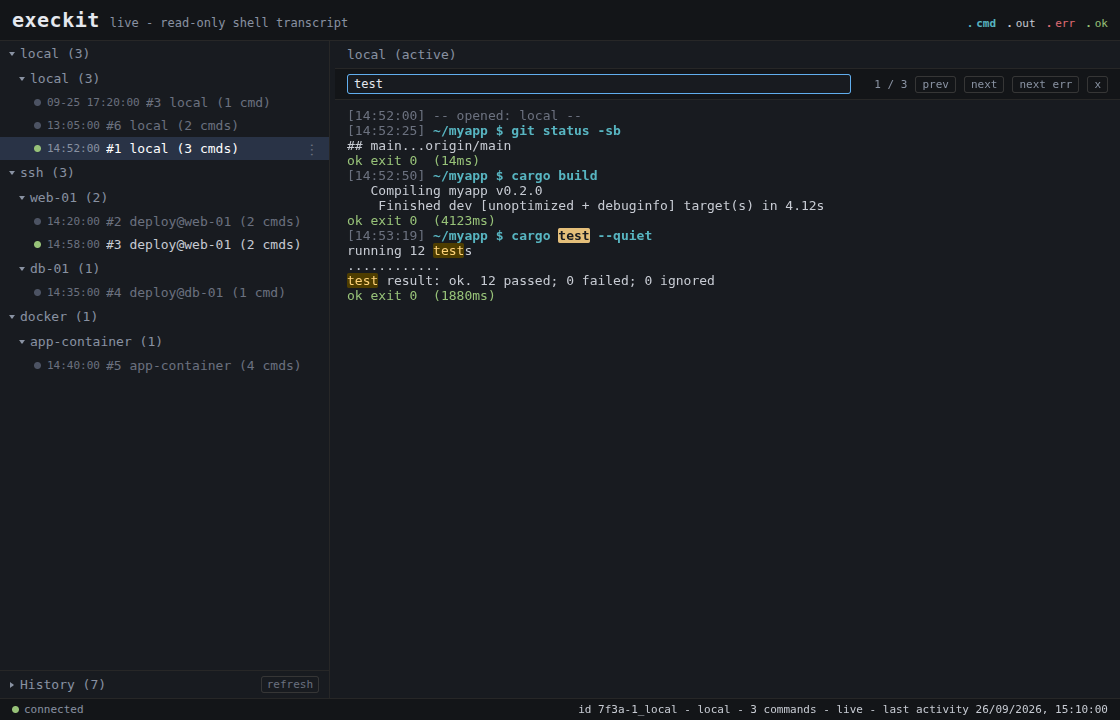 | 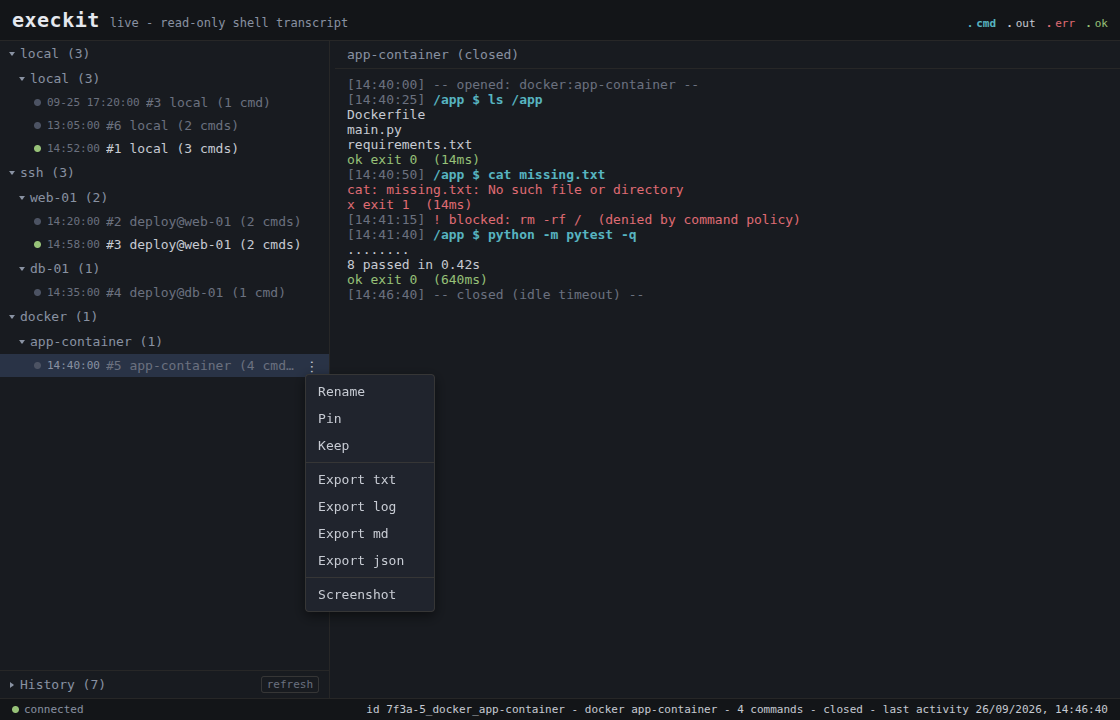 |
Search a transcript with / and jump between errors. | Rename, pin or keep a session, export it, or take a screenshot. Blocked commands show inline. |
[dependencies]
execkit = "0.9"                                           # local + SSH + Docker
# execkit = { version = "0.9", default-features = false }  # local + Docker only (no SSH; no russh/tokio)
use std::time::Duration;
use execkit::{Policy, Session};

fn main() -> Result<(), execkit::Error> {
    let mut s = Session::local()?
        .with_policy(Policy { allow: vec![], deny: vec!["rm".into()] })
        .with_timeout(Duration::from_secs(60));

    let r = s.exec("echo hi; echo err 1>&2; cd /tmp")?;
    // r.stdout == "hi"  r.stderr == "err"  r.exit_code == 0  r.cwd == "/tmp"
    println!("{} (exit {})", r.stdout, r.exit_code);

    let r = s.exec_with_timeout("sleep 30", None, Duration::from_secs(1))?;
    // r.timed_out == true  r.exit_code == 124; the session is still usable
    Ok(())
}
Runnable examples: cargo run --example local,
EXECKIT_SSH="user:password@host:22" cargo run --example ssh, and
EXECKIT_DOCKER=<container> cargo run --example docker.
The same sessions from Python. pip install execkit (native bindings, no Rust
toolchain needed):
from execkit import Session

with Session.local() as s:
    r = s.exec("echo hi; echo err >&2; cd /tmp")
    print(r.stdout, r.exit_code, r.cwd, r.stderr)   # hi 0 /tmp err
~/.ssh/config.ExecResult: split stdout/stderr, exit code, duration, cwd,
truncated, timed_out.!, trailing &, syntax
errors and long commands do not hang the session.password=/token=-style pairs, and values the session assigned to
secret-named variables. The echoed command is redacted too.tail/head/head+tail by line, a grep filter with
context, and a char cap. Per call or a session default; the result reports what
was kept.git on the remote and an
explicit workspace; files only, not side effects).cargo add, in your process; no daemon, no vendor.Breaking changes from 0.8. The details are in Upgrading to 0.9.
~/.execkit/known_hosts, not ~/.ssh/known_hosts.
Old pins are not read. The first connection re-pins, or copy them over with
mkdir -p ~/.execkit && chmod 700 ~/.execkit then
grep -E '^[^ ]+ SHA256:' ~/.ssh/known_hosts >> ~/.execkit/known_hosts.
Old pins were keyed by bare host whatever the port: rewrite a line for a
non-22 port as [host]:port, or a later port-22 connection to that host fails
as a key mismatch./dev/null for every command, and pagers are set to cat.base64.timed_out: true and keeps the session,
instead of an error that closed it. ExecResult has a new timed_out field.a3f9-1_local instead of 1_local.SshConfig has a new connect_timeout field (default 15 s). Use
SshConfig::new.deny: ["curl"] blocks curl but not env curl, sudo curl or
sh -c curl. The real control is a least-privilege environment: run the agent
and SSH user with minimal rights./dev/null, so prompts, REPLs and editors do
not work. Use non-interactive flags (sudo -n, apt-get -y). Pagers default to
cat, but running less or vim directly hangs until the timeout and closes
the session. Shell history is off.nohup CMD > /tmp/job.log 2>&1 &) and poll the log.base64. Local sessions use bash.
Windows is not supported.AcceptAny host-key mode exists for testing, behind an explicit insecure
opt-in. Never use it in production.Found something rough? Open an issue.
CONTRIBUTING.md.SECURITY.md. Please don't open a
public issue for security reports.Stateful, structured, safe command execution for AI agents - over local shells, SSH, and Docker.
เครื่องมือ
ยังไม่มีรายการเครื่องมือ เซิร์ฟเวอร์แบบรีโมตจะได้รายการหลังการตรวจสอบสถานะครั้งแรก
FAQ
คัดลอกคอนฟิก stdio สำหรับ Cursor, Claude Desktop, Claude Code หรือ VS Code ได้ในหน้านี้ คอนฟิกนี้ใช้การติดตั้งของผู้เผยแพร่ ไม่ใช่พร็อกซีของ PlugMCP
ระเบียนนี้ไม่ได้ระบุตัวแปรสภาพแวดล้อมที่จำเป็น
Execkit ทำงานแบบโลคัลผ่าน stdio
ตรวจสอบล่าสุดเมื่อ 2026-10-28 Stateful, structured, safe command execution for AI agents - over local shells, SSH, and Docker.