🐇 MCP SQLite Server
This is a Model Context Protocol (MCP) server that provides comprehensive SQLite database interaction capabilities.

Power your agent
คำสั่งของผู้เผยแพร่เอง ไม่ใช่เอนด์พอยต์ของ PlugMCP
Host a copy with our keys and logs.
npx -y [email protected]Claude Code ไม่มีลิงก์ติดตั้งสำหรับคำสั่งแบบโลคัล ให้คัดลอกคำสั่งด้านล่างแล้วรันในเทอร์มินัล
claude mcp add jparkerweb-mcp-sqlite -- npx -y mcp-sqlite@1.0.9รันในเทอร์มินัล
{ "mcpServers": { "jparkerweb-mcp-sqlite": { "command": "npx", "args": [ "-y", "[email protected]" ] } }}claude_desktop_config.json
URL แบบรีโมตหรือคำสั่งบนเครื่องของคุณ? การติดตั้งสองแบบต่างกันอย่างไร
รันบน PlugMCP
A new server you create. It is not this listing's official endpoint. Use the publisher install when you want their URL and their credentials.
เปิดจากผู้เผยแพร่
This is a Model Context Protocol (MCP) server that provides comprehensive SQLite database interaction capabilities.
🐇 Model Context Protocol (MCP) server that provides comprehensive SQLite database interaction capabilities
Define the command in your IDE's MCP Server settings:
e.g. Cursor:
{
    "mcpServers": {
        "MCP SQLite Server": {
            "command": "npx",
            "args": [
                "-y",
                "mcp-sqlite",
                "<path-to-your-sqlite-database.db>"
            ]
        }
    }
}
e.g. VSCode:
{
    "servers": {
        "MCP SQLite Server": {
            "type": "stdio",
            "command": "npx",
            "args": [
                "-y",
                "mcp-sqlite",
                "<path-to-your-sqlite-database.db>"
            ]
        }
    }
}
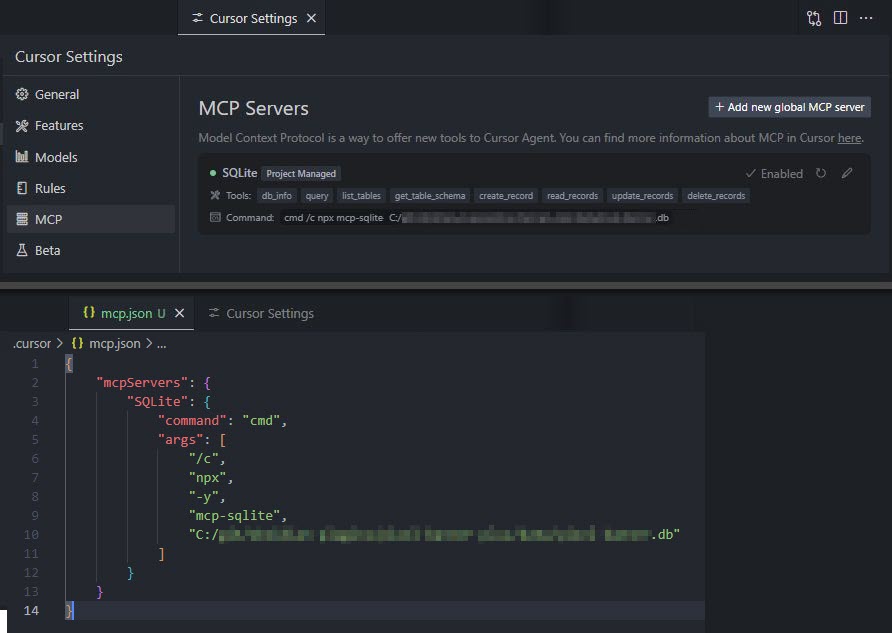
Your database path must be provided as an argument.
Get detailed information about the connected database.
Example:
{
  "method": "tools/call",
  "params": {
    "name": "db_info",
    "arguments": {}
  }
}
List all tables in the database.
Example:
{
  "method": "tools/call",
  "params": {
    "name": "list_tables",
    "arguments": {}
  }
}
Get detailed information about a table's schema.
Parameters:
tableName (string): Name of the tableExample:
{
  "method": "tools/call",
  "params": {
    "name": "get_table_schema",
    "arguments": {
      "tableName": "users"
    }
  }
}
Insert a new record into a table.
Parameters:
table (string): Name of the tabledata (object): Record data as key-value pairsExample:
{
  "method": "tools/call",
  "params": {
    "name": "create_record",
    "arguments": {
      "table": "users",
      "data": {
        "name": "John Doe",
        "email": "[email protected]",
        "age": 30
      }
    }
  }
}
Query records from a table with optional filtering.
Parameters:
table (string): Name of the tableconditions (object, optional): Filter conditions as key-value pairslimit (number, optional): Maximum number of records to returnoffset (number, optional): Number of records to skipExample:
{
  "method": "tools/call",
  "params": {
    "name": "read_records",
    "arguments": {
      "table": "users",
      "conditions": {
        "age": 30
      },
      "limit": 10,
      "offset": 0
    }
  }
}
Update records in a table that match specified conditions.
Parameters:
table (string): Name of the tabledata (object): New values as key-value pairsconditions (object): Filter conditions as key-value pairsExample:
{
  "method": "tools/call",
  "params": {
    "name": "update_records",
    "arguments": {
      "table": "users",
      "data": {
        "email": "[email protected]"
      },
      "conditions": {
        "id": 1
      }
    }
  }
}
Delete records from a table that match specified conditions.
Parameters:
table (string): Name of the tableconditions (object): Filter conditions as key-value pairsExample:
{
  "method": "tools/call",
  "params": {
    "name": "delete_records",
    "arguments": {
      "table": "users",
      "conditions": {
        "id": 1
      }
    }
  }
}
Execute a custom SQL query against the connected SQLite database.
Parameters:
sql (string): The SQL query to executevalues (array, optional): Array of parameter values to use in the queryExample:
{
  "method": "tools/call",
  "params": {
    "name": "query",
    "arguments": {
      "sql": "SELECT * FROM users WHERE id = ?",
      "values": [1]
    }
  }
}
If you enjoy this library please consider sending me a tip to support my work 😀
🐇 Model Context Protocol (MCP) server that provides comprehensive SQLite database interaction capabilities
{ "mcpServers": { "jparkerweb-mcp-sqlite": { "command": "npx", "args": [ "-y", "[email protected]" ] } }}เครื่องมือ
ยังไม่มีรายการเครื่องมือ เซิร์ฟเวอร์แบบรีโมตจะได้รายการหลังการตรวจสอบสถานะครั้งแรก
FAQ
คัดลอกคอนฟิก stdio สำหรับ Cursor, Claude Desktop, Claude Code หรือ VS Code ได้ในหน้านี้ คอนฟิกนี้ใช้การติดตั้งของผู้เผยแพร่ ไม่ใช่พร็อกซีของ PlugMCP
ระเบียนนี้ไม่ได้ระบุตัวแปรสภาพแวดล้อมที่จำเป็น
MCP Sqlite ทำงานแบบโลคัลผ่าน stdio
ตรวจสอบล่าสุดเมื่อ 2026-10-28 🐇 Model Context Protocol (MCP) server that provides comprehensive SQLite database interaction capabilities
