Power your agent
การติดตั้งจากผู้เผยแพร่ ไม่ใช่เอนด์พอยต์ของ PlugMCP
URL แบบรีโมตหรือคำสั่งบนเครื่องของคุณ? การติดตั้งสองแบบต่างกันอย่างไร
รันบน PlugMCP
A new server you create. It is not this listing's official endpoint. Use the publisher install when you want their URL and their credentials.
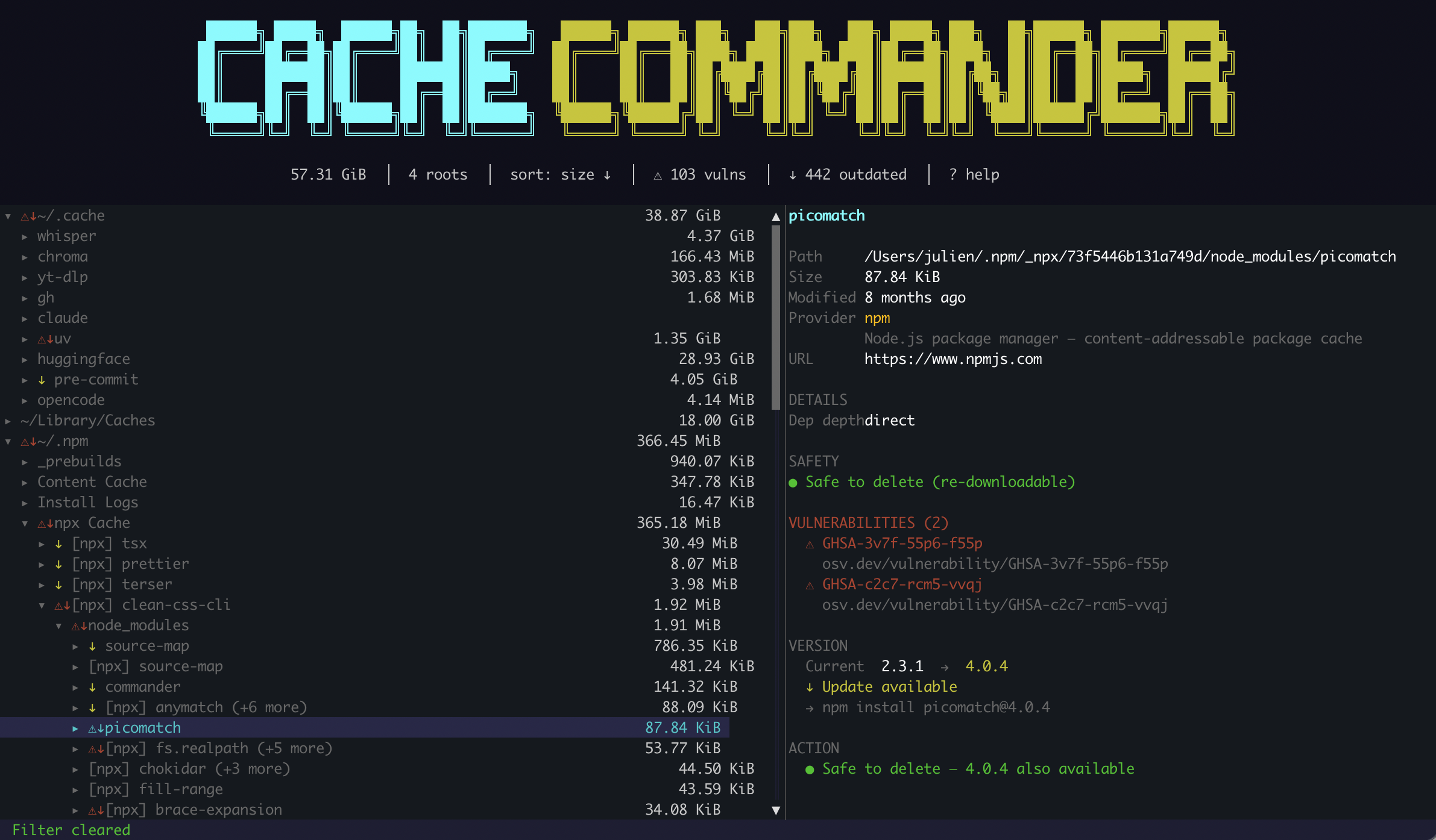
เปิดA terminal UI (TUI) for exploring, auditing, and cleaning developer cache directories on macOS and Linux. Scan cached packages for known CVEs, find outdated dependencies, and reclaim disk space — all from one tool.
Developer machines accumulate tens of gigabytes of invisible cache data — ML models, package archives, build artifacts, downloaded bottles. ccmd makes it all visible, scannable for vulnerabilities, and safely deletable.
SwiftURL coverage is sparse)ccmd gives you a single view across all of them with security scanning built in.
brew tap juliensimon/tap
brew install ccmd
cargo install ccmd                  # TUI only
cargo install ccmd --features mcp   # TUI + MCP server for AI integration
cargo binstall ccmd
git clone https://github.com/juliensimon/cache-commander
cd cache-commander
cargo build --release
./target/release/ccmd
Download from GitHub Releases — available for macOS (x86_64, Apple Silicon) and Linux (x86_64, aarch64).
ccmd                            # browse all default cache locations
ccmd --vulncheck                # scan for CVEs on startup
ccmd --versioncheck             # check for outdated packages on startup
ccmd --root ~/.cache/huggingface  # scan a specific directory
/ — case-insensitive filter across the treec to copy pip install pkg>=version to clipboardd to delete with confirmationm marks all visible (non-dimmed) items after filteringV) → filter (f) → mark all (m) → delete (d)macOS and Linux only. Windows is not supported. Path detection, cache directory resolution, and provider logic all assume Unix-style paths.
All providers support tree navigation, size display, and deletion. This matrix shows which optional capabilities each provider implements.
Legend:
● in the detail panel).◐).○).Notes:
repositories/ layout requires parsing git refs, which is too brittle; OSV's SwiftURL ecosystem has sparse coverage; and Swift package upgrades are project-local (Package.swift / Package.resolved), not global cache operations. May be reconsidered when OSV coverage improves.index.db, which ccmd labels but does not yet read package identities from (#39). Scanning of v10 stores and of virtual stores (node_modules/.pnpm/) is unaffected.clone on macOS/Linux, hardlink on Windows), where environments keep working after the cache is deleted. With the opt-in link-mode = symlink, which uv itself discourages, environments point into the cache and deleting it breaks their installed packages. ccmd does not detect the link mode and reports Safe either way.Create ~/.config/ccmd/config.toml:
roots = ["~/.cache", "~/Library/Caches", "~/.npm", "~/.cargo/registry"]
sort_by = "size"          # size | name | modified
sort_desc = true
confirm_delete = true

[vulncheck]
enabled = false           # set true to scan on startup

[versioncheck]
enabled = false           # set true to check on startup
CLI flags override config file values.
ccmd walks your cache directories and identifies providers by directory name and structure. Each provider has custom logic to decode semantic names — for example, HuggingFace stores models in directories like models--meta-llama--Llama-3.1-8B, which ccmd displays as [model] meta-llama/Llama-3.1-8B.
When you press V (or pass --vulncheck):
ccmd walks the cache tree to discover packages with identifiable name + versionThe npx cache (~/.npm/_npx/) contains full node_modules trees. ccmd scans every transitive dependency for:
preinstall, install, postinstall) — the primary vector for supply chain attacksThe intended workflow for cleaning vulnerable packages:
V to scan all packages for CVEsf to show only vulnerable items (non-matching items are dimmed)m to mark all vulnerable items for deletiond to delete — frees space and forces fresh downloadsccmd includes an MCP server that lets AI assistants like Claude query and manage your caches conversationally. Build with the mcp feature and run ccmd mcp to start the stdio transport.
# Install with MCP support
cargo install ccmd --features mcp

# Or build from source
cargo build --release --features mcp
Configure in Claude Code:
claude mcp add ccmd -s user -- ccmd mcp
Then ask Claude things like:
"list my caches"
┌──────────────────┬────────────┬───────┐
│     Provider     │    Size    │ Items │
├──────────────────┼────────────┼───────┤
│ HuggingFace Hub  │ 28.93 GiB  │ 447   │
│ ~/Library/Caches │ 11.18 GiB  │ 234   │
│ uv               │ 3.16 GiB   │ 149   │
│ Homebrew         │ 1.55 GiB   │ 170   │
│ Cargo            │ 719.77 MiB │ 614   │
│ ...              │            │       │
└──────────────────┴────────────┴───────┘
Total: ~53.6 GiB across 2,167 items
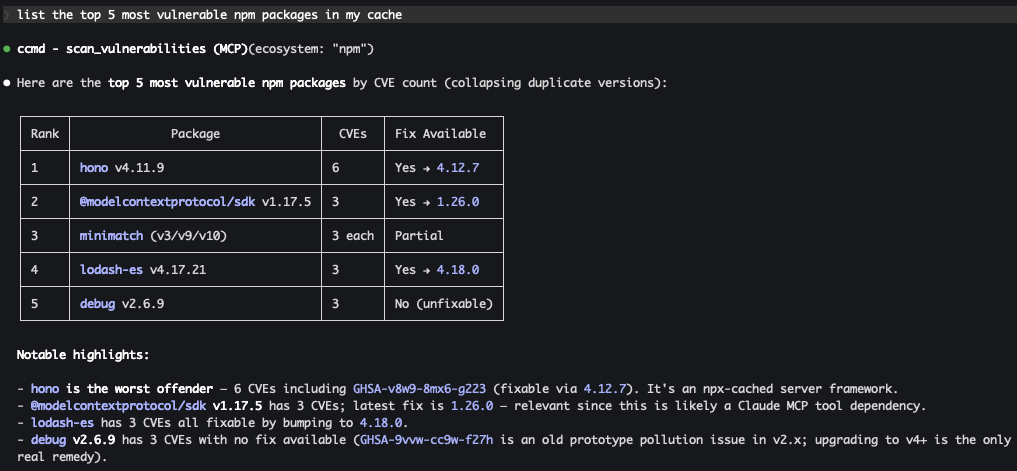
"find the most vulnerable npm packages"
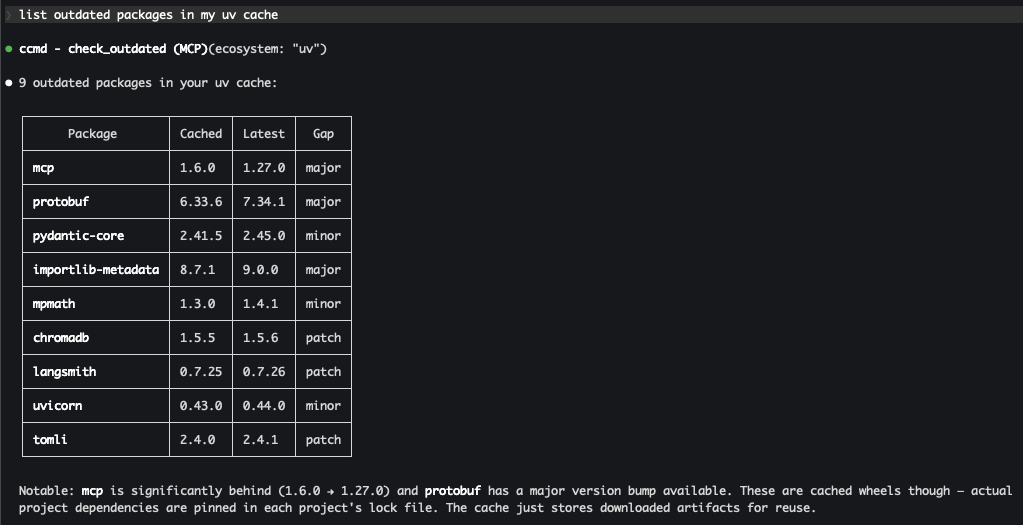
"find outdated packages in my cache"
Available tools: list_caches, get_summary, search_packages, get_package_details, scan_vulnerabilities, check_outdated, preview_delete, delete_packages. See docs/mcp.md for full details.
src/
├── main.rs              # CLI bootstrap, terminal setup, subcommand routing
├── config.rs            # TOML config + CLI flag merging
├── app.rs               # Event loop, key handling, rendering
├── tree/
│   ├── node.rs          # TreeNode, CacheKind enum
│   └── state.rs         # TreeState, FilterMode, visibility, marking
├── scanner/
│   ├── mod.rs           # Background scan orchestrator, package discovery
│   └── walker.rs        # Directory traversal, size calculation
├── providers/
│   ├── mod.rs           # Provider dispatch, safety levels, upgrade commands
│   ├── huggingface.rs   # HuggingFace Hub semantic decoding
│   ├── pip.rs, uv.rs    # Python package providers
│   ├── npm.rs           # npm + npx + node_modules scanning
│   ├── cargo.rs         # Rust crate provider
│   └── ...              # 15 more providers (Yarn, pnpm, Bun, Maven, Gradle, Go, SwiftPM, Xcode, Homebrew, …)
├── security/
│   ├── mod.rs           # Scan orchestration, vulnerability filtering
│   ├── osv.rs           # OSV.dev API, version comparison, fix extraction
│   └── registry.rs      # PyPI, crates.io, npm, Maven Central, proxy.golang.org lookups
├── mcp/                 # MCP server (optional, behind `mcp` feature flag)
│   ├── mod.rs           # ServerHandler, tool routing, cache scanning
│   ├── tools.rs         # Tool parameter and response types
│   └── safety.rs        # Delete safety enforcement
└── ui/
    ├── tree_panel.rs    # Left pane — tree with status icons
    ├── detail_panel.rs  # Right pane — metadata, vulns, guidance
    ├── dialogs.rs       # Delete confirmation, help overlay
    └── theme.rs         # Color and style constants
std::thread + mpsc::channelContributions and feedback are welcome!
cargo fmt and cargo clippy before submitting.docs/adding-a-provider.md — it covers the wire-up sites, the OSV/registry design questions, and the test-sharpening rules distilled from every provider we've shipped so far.Julien Simon — [email protected] — github.com/juliensimon
MIT — see LICENSE for details.
Cache Commander — a TUI and MCP server to explore, audit, and clean developer cache directories. Scan for CVEs, find outdated packages, reclaim disk space. Supports pip, npm, Cargo, HuggingFace, Homeb
ภาพรวม
Cache Commander — a TUI and MCP server to explore, audit, and clean developer cache directories. Scan for CVEs, find outdated packages, reclaim disk space. Supports pip, npm, Cargo, HuggingFace, Homebrew, and more.
เครื่องมือ
ยังไม่มีรายการเครื่องมือ เซิร์ฟเวอร์แบบรีโมตจะได้รายการหลังการตรวจสอบสถานะครั้งแรก
FAQ
คัดลอกคอนฟิก stdio สำหรับ Cursor, Claude Desktop, Claude Code หรือ VS Code ได้ในหน้านี้ คอนฟิกนี้ใช้การติดตั้งของผู้เผยแพร่ ไม่ใช่พร็อกซีของ PlugMCP
ระเบียนนี้ไม่ได้ระบุตัวแปรสภาพแวดล้อมที่จำเป็น
Cache Commander ทำงานแบบโลคัลผ่าน stdio
ตรวจสอบล่าสุดเมื่อ 2026-11-05 Cache Commander — a TUI and MCP server to explore, audit, and clean developer cache directories. Scan for CVEs, find outdated packages, reclaim disk space. Supports pip, npm, Cargo, HuggingFace, Homebrew, and more.
