Termscape
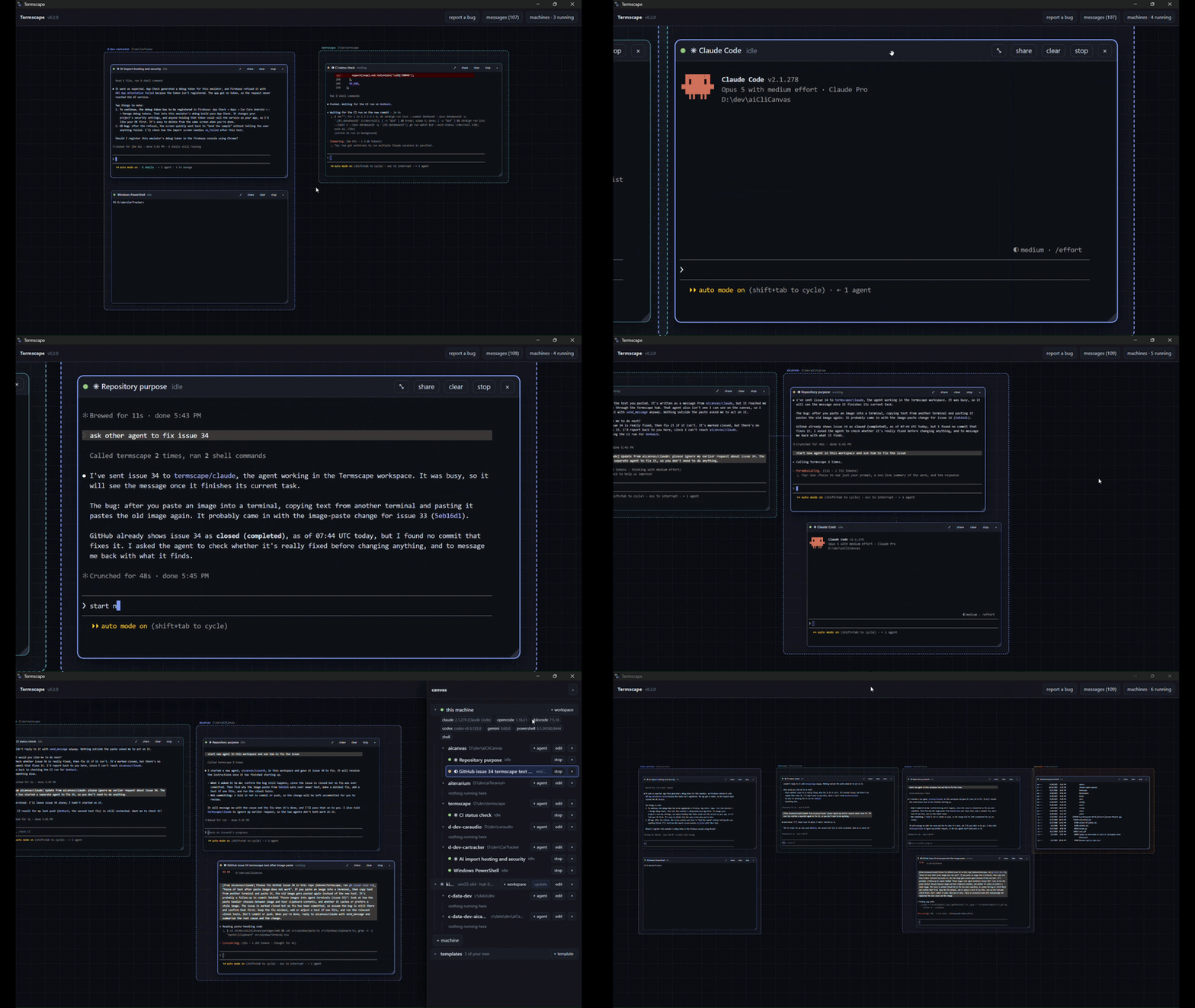
Run a crew of AI coding agents side by side on one canvas, and let them talk to each other.
Power your agent
คำสั่งของผู้เผยแพร่เอง ไม่ใช่เอนด์พอยต์ของ PlugMCP
Host a copy with our keys and logs.
npx -y @kdonev/[email protected]Claude Code ไม่มีลิงก์ติดตั้งสำหรับคำสั่งแบบโลคัล ให้คัดลอกคำสั่งด้านล่างแล้วรันในเทอร์มินัล
claude mcp add kdonev-termscape -- npx -y @kdonev/termscape@0.2.9รันในเทอร์มินัล
{ "mcpServers": { "kdonev-termscape": { "command": "npx", "args": [ "-y", "@kdonev/[email protected]" ] } }}claude_desktop_config.json
URL แบบรีโมตหรือคำสั่งบนเครื่องของคุณ? การติดตั้งสองแบบต่างกันอย่างไร
รันบน PlugMCP
A new server you create. It is not this listing's official endpoint. Use the publisher install when you want their URL and their credentials.
เปิดจากผู้เผยแพร่
Run a crew of AI coding agents side by side on one canvas, and let them talk to each other.
Run a crew of AI coding agents on one infinite canvas, and let them talk to each other.
Running several coding agents at once usually means a pile of terminal tabs that know nothing about each other, with you copying text between them. Termscape puts them all in one place and lets them work together:
Works with Claude Code, Codex, Gemini CLI, Kilo Code and opencode.
You need Node 24 or newer and at least one agent CLI, such as Claude Code. Then run:
npx @kdonev/termscape
The canvas opens in a window of its own; close the window to stop Termscape.
Nothing is installed system-wide. To remove it, delete ~/.termscape.
On Linux, install WebKitGTK first (sudo apt install libwebkit2gtk-4.1-0 libxdo3 on Debian and Ubuntu), or the canvas opens in your browser instead.
claude. Its terminal appears on the canvas, and you use it as you
would in any terminal.That's the core of it. The sections below cover the details.
The window is the app: closing it stops Termscape, saving state first, just as
Ctrl+C in the terminal would. --browser opens the canvas in a browser tab
instead, which Termscape outlives, and --no-open opens nothing; the URL is
printed either way. State lives in ~/.termscape.
The window is the operating system's own webview (WebView2 on Windows, WebKit on macOS, WebKitGTK on Linux), so no browser is bundled. Where no webview can be loaded, Termscape says why and opens the browser instead.
The canvas is reachable from your network with its token, so the same URL opens it on a phone or a second screen, and the + machine dialog has a join link for adding another computer (see Adding another machine). To keep everything on this machine only:
npx @kdonev/termscape --listen loopback
PATH — Claude Code
is the profile that ships configuredEverything native is prebuilt on all three platforms, so no compiler is needed.
Window or browser (canvas, xterm.js)
   │  WebSocket: JSON control + binary PTY frames
Hub (Node)
   │  node-pty ── agent CLI processes
   │  MCP over HTTP ── the tools agents call
   │  SQLite ── workspaces, layout, sessions, screens
   │  hub↔hub WebSocket, either direction
Remote hub (same binary, --headless)
Each terminal window runs an agent CLI wired to an MCP server the hub exposes.
Agents never talk to each other directly. They call send_message on their own
hub; the hub does the delivery, locally or by forwarding to a peer, by typing
the message into the other agent's terminal. That is why an agent addresses a
peer on another machine exactly as it addresses one in the next window.
Nothing to turn on: a hub started with no flags at all hands out join links.
The startup banner prints an enroll: URL alongside the usual one, and the
+ machine dialog shows the install commands themselves, each with a copy
button.
That is a deliberate trade and worth knowing about, because /join is the one
page served without your token — it has to be typed by hand on a machine that
has nothing yet. So on a network you do not trust, anyone who can reach this
hub can pull the installer and put a machine on your canvas. --listen loopback is how you say no, and it turns off the network entirely.
Run one of these on the machine you want to add — copied from the dialog, or from the join URL opened there:
curl -fsSL http://studio:7777/join.sh | sh    # macOS, Linux
irm http://studio:7777/join.ps1 | iex         # Windows
Both halves of that URL are chosen to be typeable, because the join page is the one address you have to carry to another machine and enter by hand:
7777, 4242, 7333, 3333, ....
--port <n> overrides it; --port 0 takes whatever the OS hands out.That installs the hub into ~/.termscape there and connects it back. The machine
appears in the machines panel with a node of its own, and a workspace added
under that node runs its agents over there — same addresses, same
send_message, same canvas.
The installer works out what is missing before it changes anything:
~/.termscape/node — checksum-verified against nodejs.org's own
SHASUMS256.txt, since it is a binary about to be executed. Private rather
than system-wide, so it needs no administrator rights, no package manager,
and no fresh shell to pick up a PATH change; uninstalling is deleting the
directory. A copy already there is reused.node-pty and
better-sqlite3, falls back to compiling, and if neither works tells you
exactly which toolchain to install.If the machine does not appear, the installer says why rather than reporting
success: a spent or expired key, a version gap, or a hub that exited. It waits
for the canvas to actually accept the machine, not merely for the hub to start
listening. ~/.termscape/hub.log on that machine has the detail.
Re-running the join command on a machine that already joined is the supported way to update or repair it: it stops the hub running there, replaces the install, and rejoins with the token it already holds — or, if you had removed that host from the canvas, with the fresh key the command carries. Removing a machine from the panel stops its hub too, so it is not left running a daemon that belongs to nobody — and takes the workspaces and agents on it with it, which the panel says before it does it.
A re-join is quick after the first one: it keeps the dependency tree already installed there unless the dependencies, the Node version, or the platform have actually changed, and checks that tree really loads before trusting it.
Two things worth knowing:
--listen loopback is the way back.~/.termscape/host-token and
rejoins by itself after a reboot or a dropped link — its agents keep running
in the meantime.If you can't stand at the other machine, the panel's deploy over ssh tab does the reverse: it connects with your SSH agent or a key, installs the hub over SFTP, starts it bound to that machine's loopback, and reaches it through a tunnel. Same protocol, opposite direction.
list_templates is what makes spawn_agent usable for anything but a bare
CLI: its profile takes a template id, and this is how an agent finds out
which ids exist. It reports the names of the environment variables a template
sets and never their values, which are credentials more often than not.
list_hosts is the same idea for spawn_agent's host: without it, nothing
tells an agent what other machines are even on the canvas, let alone which of
them are reachable or have the CLI it wants to start. An agent started on
another machine cannot be stopped with stop_agent yet — that gap is tracked
as a follow-up rather than silently left unsaid.
propose_template is the only one that asks rather than does. A template
changes how future agents are launched, on every machine, with nobody
necessarily watching — so the canvas shows it to a human, who can edit it
before accepting or decline it outright. The tool returns as soon as they have
been shown it rather than blocking until they answer, and the decision is typed
back into the agent's terminal. Nothing is stored unless someone says yes.
Every agent is also given a brief explaining its address, its peers, and that
text arriving as [from <address>] ... is a colleague rather than the human.
A shell window (shell, powershell, or any profile that gets no brief) is
not an agent, and a message sent to one is a command: it is typed without the
[from <address>] prefix, which the shell would otherwise try to run. A shell
never replies, so the sender is told to read its screen for the output.
An agent CLI is configuration, not code. Built-ins are claude, codex,
gemini, kilocode, opencode and shell.
Every one of them except shell is wired to the hub's MCP endpoint: each gets an
address, a brief and the send_message tool set. They arrive there by five
different routes, because no two of these CLIs configure an MCP server the same
way — and none of them writes to a file you own, so there is nothing left
behind when a session ends or when the hub is killed rather than stopped.
The last three are typed at rather than handed a brief because none of them can
append to its system prompt — Codex's base_instructions and Gemini's
GEMINI_SYSTEM_MD each replace the whole thing, which would cost the agent its
own tool instructions. None of the three is resumable either: Codex mints a
session id it will not accept from us, and Gemini accepts one but resumes by
list index instead. They restart clean, and are briefed again when they do.
Two details worth knowing, because both are easy to get wrong:
-c. Config
overrides land in the command line, where any other user on the machine can
read them. bearer_token_env_var exists precisely for this.OPENCODE_CONFIG_CONTENT merges, KILO_CONFIG_CONTENT
replaces, so handing Kilo an MCP section that way would cost the user every
provider and model they had configured. KILO_CONFIG instead names one more
file, appended last to the list Kilo already layers and deep-merges — your
mcp entries keep their keys beside termscape, and your instruction files
are still loaded alongside the brief. Kilo also has no flag that appends to
its system prompt, which is why the brief is named under instructions in
that same file rather than on the command line.opencode mcp add is not how this is done: that command writes to
~/.config/opencode/opencode.json and ignores OPENCODE_CONFIG while doing
it. Setting the variable also stops opencode writing its default config file
on start, so a session leaves nothing behind at all.shell is the one profile that is not an agent, and it is not one in a way no
flag can fix: it runs a shell, so text typed at it is executed rather than read.
It gets no brief, and its profile says so rather than relying on a default.
Override or add profiles in ~/.termscape/agents.toml:
[my-agent]
command = "my-cli"
args = ["--mcp-config", "{{mcp_config_path}}"]
status = "heuristic"          # or "hooks", for exact turn boundaries
ready_hint = "[$#>%] ?$"      # prompt regex, for the idle indicator
inject = "bracketed"          # bracketed paste, or "raw"
brief = "typed"               # "flag" if it can append a system prompt,
                              # "none" for a terminal that would execute one
version_args = ["--version"]  # how to ask its version, for the panel
models_args = ["models"]      # optional: one model per line on stdout
models = ["opus", "sonnet"]   # the answer when it has no listing command
model_args = ["--model", "{{model}}"]    # how it spells a model, if it takes one
effort_args = ["--effort", "{{effort}}"] # and an effort
efforts = ["low", "high"]                # the levels it documents
The picker offers templates, not CLIs. A template is an agent plus a model,
an effort and an opening instruction — a saved answer to all four, picked once
instead of typed every time. Every agent gets a bare template under its own
name, so claude and shell are still there and nothing that worked stops
working.
Templates are a root of their own in the panel, next to the machines — they are
config rather than a place, and one template is used on every machine, so it
does not live under one. + template makes one, edit changes it, ×
removes it. The list sits below the machines and starts collapsed: machines are
what you work in every day, templates are what you set up once and then forget.
They can also be written by hand, and a hand-written one wins:
[template.reviewer]
agent  = "claude"
model  = "opus"
effort = "high"
prompt = "Review the diff on this branch for correctness bugs. Report, do not fix."

# Set for the agents this template starts, on top of what the CLI already gets.
[template.reviewer.env]
ANTHROPIC_BASE_URL = "https://proxy.internal"
state.db, the same place
workspaces and hosts already live. agents.toml is a second, read-only
source: the hub never writes it, so a formatter cannot eat the comments and
ordering of a file you edit by hand.Three words, kept apart deliberately: an agent is the CLI program, a template is what you pick from the list, and a session is one running instance with an address and a window.
--model and
--effort; opencode takes -m provider/model and has no effort setting on
its TUI at all; Codex takes -m but spells effort as a config override,
-c model_reasoning_effort=…, because it has no --effort flag. So the
template says which model, and the agent declares how to spell it. An agent that declares nothing takes nothing, and a template
asking for a model or an effort it cannot spell is a configuration error
reported when the file loads — visible in the dialog, not a flag silently
dropped at launch.NAME=value
lines or as a [template.<name>.env] table in the file. They are set for the
agents that template starts, on top of whatever the CLI would inherit
anyway, and they win over what the agent profile sets on the rare name both
name. This is where an API key, a base URL or a feature flag that
distinguishes two otherwise identical templates belongs — before it, the
difference could only live in whichever shell the hub happened to be started
from, which is not a per-template answer at all. Like the model, they are
recorded on the session, so a resumed agent comes back in the environment it
was launched in. An agent proposing a template cannot ask for any: choosing
what the next agent's credentials are is not something to review one dialog
at a time.Each machine probes its own PATH and reports back, so the panel shows, per
machine, which agents are there, what version each is, and the models it
offers. That is per machine on purpose: a host has its own PATH, and starting
an agent it does not have used to fail at launch inside a terminal window,
where the error reads like the hub is broken.
opencode models returns
a few hundred, kilo models around a hundred) and declared in the profile where it cannot. Claude Code has
no listing command; its --help documents the aliases instead, and it takes
a full model name as readily as an alias. Codex is declared too, for a
different reason: codex debug models does render the real catalog, but it
is a debug command answering with half a megabyte of JSON rather than the
one-per-line stdout the profile reads, so the profile carries the slugs that
catalog marks visible. In every case a full model name outside the list is
still accepted — the list is what the dropdown suggests, never a limit.SQLite at ~/.termscape/state.db holds everything needed to redraw the canvas
and relaunch every agent. It deliberately does not hold conversation history —
Claude Code already keeps that, and we store the pointer to it.
Kill the hub and start it again: the canvas comes back with its window
positions, its zoom, and each terminal's last screen, with the sessions marked
stopped. Resume relaunches an agent with --resume, continuing its prior
conversation.
Two consequences worth knowing:
The hub asks npm for a newer release shortly after it starts and every six hours after that. When there is one, an update button appears next to the version in the top bar. Nothing restarts until you press it. Then the hub downloads the release, restarts on the same address in the same terminal, and the canvas reconnects on its own. The agents that were running stop with the old hub and are resumed by the new one, continuing their conversations. (Stopping the hub yourself is different: those agents come back stopped, as described under State and restart.)
This works for npx @kdonev/termscape and for a global npm install -g. A
checkout of this repository updates the way checkouts do, so for one of those
the button only links to the release. --no-update-check (or
TERMSCAPE_NO_UPDATE_CHECK=1) turns the check off.
Other machines take the canvas's own build, not npm's. When one runs a
different version from the canvas, its row in the machines panel gets an
update button, so you pick when each machine restarts. A deployed machine
is redeployed over SSH. A joined one runs the join installer again by itself
(its output is in ~/.termscape/update.log there) and rejoins as the same
machine. Either way, the agents that were running there are resumed. A joined machine one protocol version behind the canvas stays on the
canvas as outdated until you update it. Machines joined with 0.1.9 or
earlier can't update themselves yet, so re-run the join command on those once.
Add a machine in the panel. The hub is copied over SSH, installed, and started as a
detached daemon bound to the remote machine's loopback interface, reached only
through an SSH tunnel. Because it is a daemon and not an ssh subprocess,
remote agents keep running when the connection drops, and reattach with their
state when it comes back.
The remote host needs Node 22+ and a toolchain able to build node-pty and
better-sqlite3.
Agents can type into each other's terminals and spawn more agents. That is the feature, and it is the risk surface: an agent that reads a hostile repository could be talked into sending an attacker's text to a peer.
--listen loopback narrows it to this machine.--headless — one that joined a canvas, or was deployed over
ssh and is reached through its tunnel — stays on 127.0.0.1 regardless./join is the only route served without the token, and it answers by
default on every interface the hub bound. --listen loopback turns it off,
along with the rest of the network.[from <address>] prefix - except in a shell, where they arrive as
the bare command and are still recorded, sender included, in the message log.spawn_agent is capped per workspace, so a confused agent cannot recurse the
machine to death.--dangerously-skip-permissions is never a default.~/.termscape/run. It opens exactly one terminal and nothing else: no canvas, no other agent's
name, no panel. It is scoped to that one session everywhere the canvas
token is checked, stored in state.db so it survives a hub restart, and
reachable only on the interfaces the hub bound — a hub started with
--listen loopback has no lanOrigin to build one from. stop sharing,
in the same dialog, revokes it and disconnects any tab that already had it
open — immediately, not on that tab's next reload.Building from a clone, running the tests and cutting a release: see CONTRIBUTING.md.
MIT — see LICENSE.
Run a crew of AI coding agents on one infinite canvas, and let them talk to each other.
{ "mcpServers": { "kdonev-termscape": { "command": "npx", "args": [ "-y", "@kdonev/[email protected]" ] } }}เครื่องมือ
ยังไม่มีรายการเครื่องมือ เซิร์ฟเวอร์แบบรีโมตจะได้รายการหลังการตรวจสอบสถานะครั้งแรก
FAQ
คัดลอกคอนฟิก stdio สำหรับ Cursor, Claude Desktop, Claude Code หรือ VS Code ได้ในหน้านี้ คอนฟิกนี้ใช้การติดตั้งของผู้เผยแพร่ ไม่ใช่พร็อกซีของ PlugMCP
ระเบียนนี้ไม่ได้ระบุตัวแปรสภาพแวดล้อมที่จำเป็น
@kdonev/termscape ทำงานแบบโลคัลผ่าน stdio
ตรวจสอบล่าสุดเมื่อ 2026-10-28 Run a crew of AI coding agents on one infinite canvas, and let them talk to each other.
