Power your agent
การติดตั้งจากผู้เผยแพร่ ไม่ใช่เอนด์พอยต์ของ PlugMCP
URL แบบรีโมตหรือคำสั่งบนเครื่องของคุณ? การติดตั้งสองแบบต่างกันอย่างไร
รันบน PlugMCP
A new server you create. It is not this listing's official endpoint. Use the publisher install when you want their URL and their credentials.
เปิดจากผู้เผยแพร่
Works with: VS Code Copilot · Claude Code · Claude Desktop · Cursor · any MCP-compatible AI assistant
Supported languages: TypeScript · JavaScript · TSX/JSX · Python · Go · Rust · Java Databases: Memgraph (graph) · Qdrant (vector) Transports: stdio (local) · HTTP (remote/fleet)
An open-source Model Context Protocol (MCP) server that adds a persistent code intelligence layer to AI coding assistants — Claude Code, VS Code Copilot, Cursor, and Claude Desktop. Unlike static RAG or batch-oriented GraphRAG, lxDIG MCP is a live, incrementally-updated intelligence graph that turns any repository into a queryable knowledge graph — so agents can answer architectural questions, track decisions across sessions, coordinate safely in multi-agent workflows, and run only the tests that actually changed — without re-reading the entire codebase on every turn.
It is purpose-built for the agentic coding loop: the cycle of understand → plan → implement → verify → remember that AI agents (Claude, Copilot, Cursor) repeat continuously.
The core problem it solves: most AI coding assistants are stateless and architecturally blind. They re-read unchanged files on every session, miss cross-file relationships, forget past decisions, and collide when multiple agents work in parallel. lxDIG MCP is the memory and structure layer that fixes all four.
Most code intelligence tools solve one of these problems. lxDIG solves all of them together:
Turn your repository into a queryable property graph of files, functions, classes, imports, and their relationships. Ask questions in plain English or Cypher.
graph_query)code_explain)find_pattern, arch_validate)arch_suggest)semantic_slice)find_similar_code, code_clusters)Your agent remembers what it decided, what it changed, what broke, and what it observed — even after a VS Code restart or a Claude Desktop session ends.
episode_add, episode_recall)decision_query)reflect)asOf, compare drift with diff_sinceRun multiple AI agents in parallel on the same repository without conflicts.
agent_claim, agent_release)coordination_overview, agent_status)context_pack)blocking_issues)Stop running your full test suite on every change. Know exactly what's affected.
impact_analyze)test_select, test_run)test_categorize, suggest_tests)Your READMEs, ADRs, and changelogs become searchable graph nodes, linked to the code they describe.
index_docs)search_docs?query=...)search_docs?symbol=MyClass)Enforce architectural boundaries automatically and get placement guidance for new code.
arch_validate)arch_suggest)find_pattern)Go from a fresh clone to a fully wired AI assistant in one tool call.
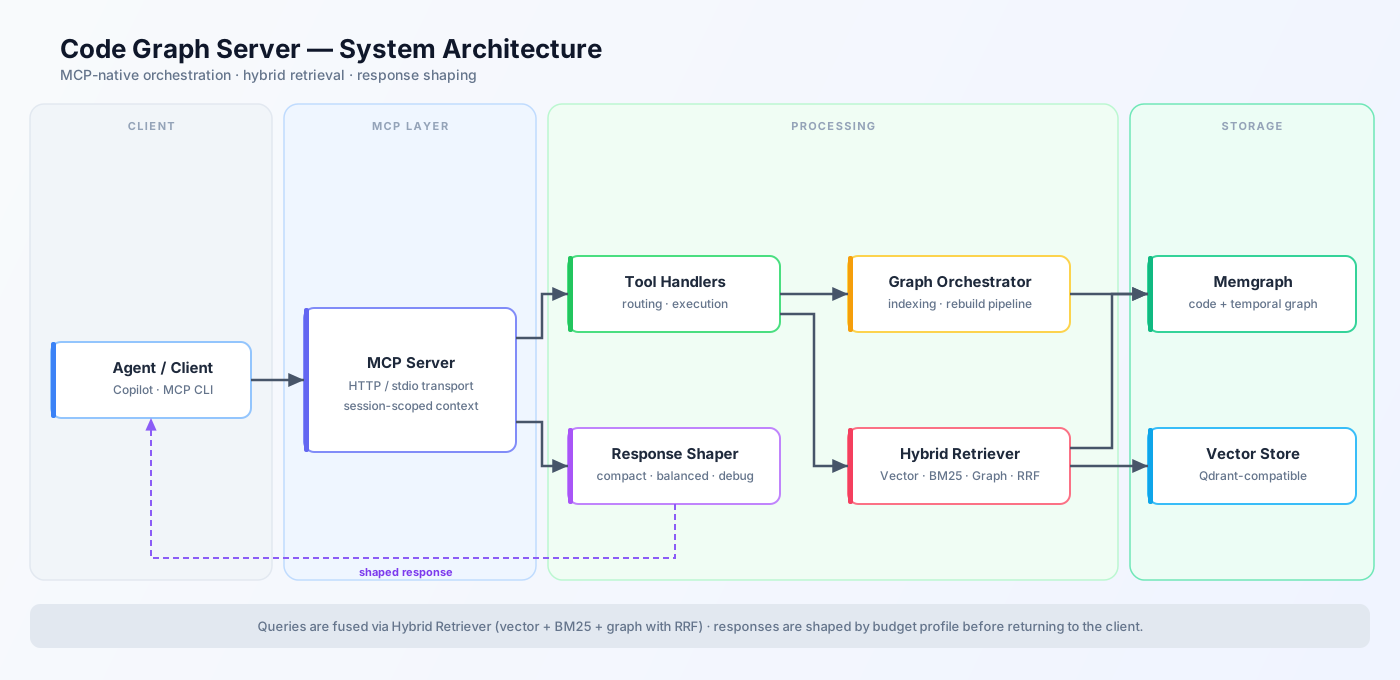
init_project_setup — sets workspace, rebuilds graph, generates Copilot instructionssetup_copilot_instructions — generates .github/copilot-instructions.md from your repo's topologylxDIG runs as an MCP server over stdio or HTTP and coordinates three data planes behind a single tool interface:
┌─────────────────────────────────────────────────────────────┐
│                     MCP Tool Surface (39 tools)              │
│  stdio transport (local)  │  HTTP transport (remote/fleet)   │
└──────────────┬────────────┴────────────────┬────────────────┘
               │                             │
   ┌───────────▼────────────┐   ┌────────────▼────────────┐
   │   Graph Plane          │   │   Vector Plane           │
   │   Memgraph (Bolt)      │   │   Qdrant                 │
   │   ─────────────────    │   │   ─────────────────────  │
   │   FILE · FUNC · CLASS  │   │   Semantic embeddings    │
   │   IMPORT · CALL edges  │   │   Nearest-neighbor search│
   │   Temporal tx history  │   │   Natural-language code  │
   └────────────────────────┘   └─────────────────────────┘
               │
   ┌───────────▼────────────────────────────────────────────┐
   │   Hybrid Retrieval (RRF fusion)                         │
   │   Graph expansion + Vector similarity + BM25 lexical   │
   └────────────────────────────────────────────────────────┘
When you call graph_query in natural language mode, retrieval runs as hybrid fusion:
The result: structurally accurate, semantically relevant answers — not just the closest embedding match.
lxDIG Visual is the open-source browser-based visualization layer for lxDIG MCP. It renders your code dependency graph as an interactive, navigable canvas — turning abstract code relationships into a tangible spatial representation you can explore.
Key features:
Setup (shares the same Memgraph instance as lxDIG MCP — no extra database needed):
git clone https://github.com/lexCoder2/lxDIG-visual.git
cd lxDIG-visual
npm install && cp .env.example .env
npm run dev:all
# Open http://localhost:5173
After indexing with graph_rebuild, changes appear in the visual explorer immediately — no manual refresh required.
Recommended setup: Memgraph + Qdrant in Docker, MCP server on your host via stdio. Your editor spawns and owns the process — no HTTP ports, no session headers.
git clone https://github.com/lexCoder2/lxDIG-MCP.git
cd lxDIG-MCP
npm install && npm run build
docker compose up -d memgraph qdrant
docker compose ps   # wait for "healthy" (~30 s)
VS Code — add to .vscode/mcp.json:
{
  "servers": {
    "lxdig": {
      "type": "stdio",
      "command": "node",
      "args": ["/absolute/path/to/lxDIG-MCP/dist/server.js"],
      "env": {
        "MCP_TRANSPORT": "stdio",
        "MEMGRAPH_HOST": "localhost",
        "MEMGRAPH_PORT": "7687",
        "QDRANT_HOST": "localhost",
        "QDRANT_PORT": "6333"
      }
    }
  }
}
Claude Desktop — add to claude_desktop_config.json:
{
  "mcpServers": {
    "lxdig": {
      "command": "node",
      "args": ["/absolute/path/to/lxDIG-MCP/dist/server.js"],
      "env": {
        "MCP_TRANSPORT": "stdio",
        "MEMGRAPH_HOST": "localhost",
        "MEMGRAPH_PORT": "7687",
        "QDRANT_HOST": "localhost",
        "QDRANT_PORT": "6333"
      }
    }
  }
}
{
  "name": "init_project_setup",
  "arguments": {
    "workspaceRoot": "/absolute/path/to/your-project",
    "sourceDir": "src",
    "projectId": "my-repo"
  }
}
This single call sets the workspace context, rebuilds the code graph, and generates .github/copilot-instructions.md for your project. Your agent is ready to query.
Total setup time: ~5 minutes. See QUICK_START.md for the full guide including Docker, Claude Desktop, and HTTP transport.
AuthService.login across the whole repo?" and get a graph answer, not a file dumpimpact_analyze before committing — know exactly which tests to runarch_validate to catch layer violations before they become bugscoordination_overview to see what every agent is working oncontext_pack hands off a high-signal task briefing between agents in one callgraph_health as a startup readiness gatetest_select + test_run for impact-scoped CI that's 5–10x faster than full suitearch_validate as an automated architecture compliance check on every PRinit_project_setup on a new codebase — graph + copilot instructions in ~30 secondscode_explain to understand unfamiliar subsystems with full dependency contextsetup_copilot_instructions generates AI assistant instructions tailored to your repo's topologyBenchmarks run against a synthetic 20-scenario agent task suite (benchmarks/):
Benchmarks are workload-dependent. Run
npm run benchmark:check-regressionagainst your own repository for accurate numbers.
Every feature below is production-ready today:
graph_query — vector + BM25 + graph expansion fused with RRFLXDIG_ENABLE_WATCHER=true)asOf queries any past graph state; diff_since shows what changednpm run start # stdio server (recommended)
npm run start:http # HTTP supervisor (multi-session)
npm run build # compile TypeScript
npm test # run all 557 tests
npm run benchmark:check-regression # check latency/token regressions
graph_set_workspace → graph_rebuild (or configure init_project_setup to run automatically)graph_query over file reads for discovery — far fewer tokens, cross-file context includedprofile: compact in autonomous loops; switch to balanced or debug when you need detailimpact_analyze before tests so your agent only executes what's actually affectedlxDIG is open source and self-hosted today. Planned work ahead — see ROADMAP.md for the full prioritized backlog with detail on each item.
resources surface (expose graph nodes as MCP resources)graph_health or triggering manual rebuildscalculateBMI function links to CDC/WHO references, a payment function links to PCI-DSS rules, a GDPR-scoped model links to regulation articles — giving agents real-world context alongside structural contextPull requests are welcome. Whether it's a new parser, a tool improvement, a bug fix, or better docs — contributions of all sizes move this project forward.
src/tools/; include testssrc/parsers/lxDIG MCP is built and maintained in personal time — researching graph retrieval techniques, designing the tool surface, writing tests, and keeping everything working across MCP protocol updates. If it saves you time or makes your AI-assisted workflows meaningfully better, consider supporting the work:
Q: Does lxDIG require a cloud service or API key? No. lxDIG runs entirely on your machine. Memgraph and Qdrant run in Docker containers you control. No data leaves your environment.
Q: Does it work with Cursor? Yes. Any MCP-compatible client works. Add the stdio config to Cursor's MCP settings the same way as VS Code.
Q: How large a codebase can it handle?
The graph plane (Memgraph) scales to millions of nodes. For very large monorepos, use sourceDir to scope indexing to the relevant subdirectory. Incremental rebuilds keep the graph fresh without re-indexing everything.
Q: Do I need to run Qdrant?
Qdrant is optional but recommended for large codebases. Without it, semantic_search and find_similar_code are unavailable; all other tools continue to work via graph-only or BM25 retrieval.
Q: Can multiple developers on a team share one lxDIG instance? Yes, via HTTP transport. One running instance handles multiple independent sessions. Team-level shared memory is on the lxDIG Cloud roadmap.
Q: Is this production-ready? The core tools are stable and tested (402 tests, all green). Treat it as beta — APIs may change before a 1.0 release. Pin your version and watch the changelog.
Q: Is lxDIG MCP the same as GraphRAG? No. GraphRAG is a batch retrieval technique applied to documents. lxDIG MCP is a live, incrementally-updated code graph with persistent agent memory, multi-agent coordination, and impact-scoped test selection — not just a retrieval improvement.
Q: How do I add persistent memory to Claude Code?
Install lxDIG MCP, add the stdio config to .vscode/mcp.json, and call init_project_setup once per repository. From that point, Claude Code can call episode_add / episode_recall and decision_query to read and write memory that persists across sessions.
Q: Can I visualize the code graph?
Yes. lxDIG Visual is the companion browser-based graph explorer. It shares the same Memgraph instance — run npm run dev:all in the lxDIG-visual repo and open http://localhost:5173.
MIT — free to use, modify, and distribute.
Dynamic Intelligence Graph (DIG) MCP server for AI coding agents. Persistent code knowledge graph, a code RAG improvement, with hybrid Graph + Vector + BM25 retrieval, agent memory, multi-agent coordi
ภาพรวม
Dynamic Intelligence Graph (DIG) MCP server for AI coding agents. Persistent code knowledge graph, a code RAG improvement, with hybrid Graph + Vector + BM25 retrieval, agent memory, multi-agent coordination, and impact-scoped test selection. Works with Claude Code, VS Code Copilot, and Cursor.
เครื่องมือ
ยังไม่มีรายการเครื่องมือ เซิร์ฟเวอร์แบบรีโมตจะได้รายการหลังการตรวจสอบสถานะครั้งแรก
FAQ
คัดลอกคอนฟิก stdio สำหรับ Cursor, Claude Desktop, Claude Code หรือ VS Code ได้ในหน้านี้ คอนฟิกนี้ใช้การติดตั้งของผู้เผยแพร่ ไม่ใช่พร็อกซีของ PlugMCP
ระเบียนนี้ไม่ได้ระบุตัวแปรสภาพแวดล้อมที่จำเป็น
LxDIG ทำงานแบบโลคัลผ่าน stdio
ตรวจสอบล่าสุดเมื่อ 2026-10-28 Dynamic Intelligence Graph (DIG) MCP server for AI coding agents. Persistent code knowledge graph, a code RAG improvement, with hybrid Graph + Vector + BM25 retrieval, agent memory, multi-agent coordination, and impact-scoped test selection. Works with Claude Code, VS Code Copilot, and Cursor.
