Next.js Math Course Platform
A modern full-stack Next.js 16 platform with CMS, auth, and Stripe integration - built to manage and sell online math courses with videos, quizzes, LaTeX, and interactive graphs.
Power your agent
การติดตั้งจากผู้เผยแพร่ ไม่ใช่เอนด์พอยต์ของ PlugMCP
URL แบบรีโมตหรือคำสั่งบนเครื่องของคุณ? การติดตั้งสองแบบต่างกันอย่างไร
รันบน PlugMCP
A new server you create. It is not this listing's official endpoint. Use the publisher install when you want their URL and their credentials.
เปิดจากผู้เผยแพร่
A modern full-stack Next.js 16 platform with CMS, auth, and Stripe integration - built to manage and sell online math courses with videos, quizzes, LaTeX, and interactive graphs.
📚 Next.js 16 platform for selling math courses, with a headless CMS, auth, video lessons, quizzes, LaTeX, interactive graphs, and an MCP server for AI-assisted content management.
git clone https://github.com/maciekt07/nextjs-math-course
cd nextjs-math-course
pnpm install
Create a .env.development file in the root directory. Use .env.example as a template.
Environment variables are fully typed and validated for both dev and build. For production preview, use .env.production file.
Both PostgreSQL (for main app data) and MongoDB (for Payload CMS) run via Docker Compose
pnpm docker:dev
[!TIP] View Database with Drizzle Studio
pnpm db:studio
pnpm db:push
pnpm stripe:webhook
Use these Stripe test card details to simulate a successful payment:
4242 4242 4242 4242Development mode:
pnpm dev
Production preview:
pnpm preview
The application should now be running at http://localhost:3000
Once the app is running, you can access the CMS at:
Create your admin account on first visit
Use the panel to manage courses, lessons, and media
Start the React Email preview server to view and test email templates locally:
pnpm email:dev
QStash periodically calls /api/cron/run, which triggers Payload's Jobs Queue for scheduled course publishing and feedback classification with Jev.
Start local QStash CLI:
pnpm qstash:dev
Register schedule against it:
pnpm qstash:schedules:dev
The CMS exposes an MCP server for managing lessons, chapters, and courses
1. Generate an API key
Go to /admin → MCP → API Keys → Create New, enable the required collections/operations, save, and copy the generated key.
2. Connect your MCP client
Claude Code example:
claude mcp add --transport http Math-Course-CMS http://127.0.0.1:3000/api/mcp \
  --header "Authorization: Bearer MCP-USER-API-KEY"
Changes will be automatically saved as draft with version control.
You can add interactive Desmos graphs directly in markdown lessons:
::desmos{url="https://www.desmos.com/calculator/your-graph-id"}
[!NOTE] By default, the embedded version displays only the graph. If you set
noEmbed=true, it will open the full Desmos calculator with all its tools and controls.::desmos{url="https://www.desmos.com/calculator/your-graph-id" noEmbed=true}
You can include math expressions in your lessons using standard Markdown + LaTeX syntax:
Inline math: $E = mc^2$

Block math:

$$
f'(x) = \lim_{h \to 0} \frac{f(x+h) - f(x)}{h}
$$
For more details, see the Markdown + LaTeX documentation
You can add Mermaid diagrams directly in your markdown lessons:
```mermaid
flowchart TD
    A["Numbers"] --> B["Natural numbers"]
    A --> C["Integers"]
    A --> D["Rational numbers"]
    A --> E["Real numbers"]

    D --> F["$$\frac{a}{b}$$"]
    E --> G["Number line"]
```
You can highlight important content or tips using custom callout blocks like note, tip, important, warning, card.
:::note
This is a note
:::

:::tip{title="Remember"}
This is a tip with a custom title
:::
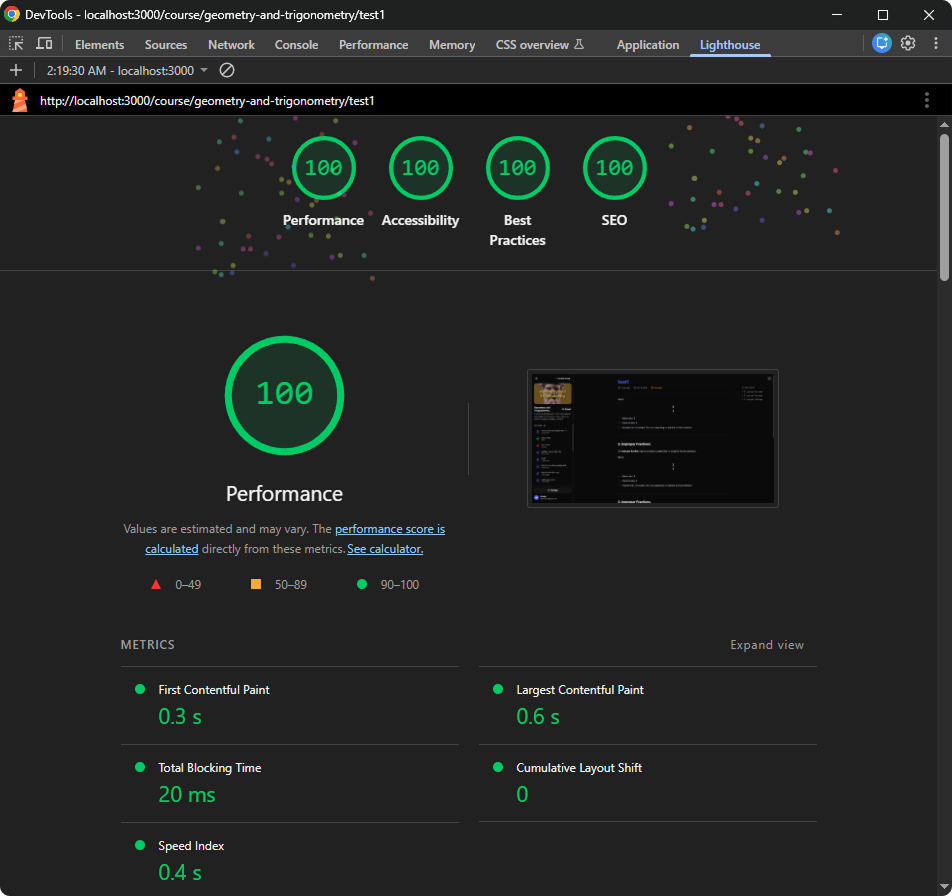
In paid lessons, math formulas are rendered lazily on the client as it scrolls into view, preventing main-thread blocking and avoiding FPS drops on long pages with many formulas. Free lessons are fully SSGed, which requires no special optimization and also benefits SEO.
Pages are also automatically split into semantic <section> tags. Each section uses content-visibility: auto, allowing the browser to skip rendering off-screen content until it is needed.
Illustrations used in this project are from Storyset, modified for personal use.
📚 Next.js 16 platform for selling math courses, with a headless CMS, auth, video lessons, quizzes, LaTeX, interactive graphs, and an MCP server for AI-assisted content management.
เครื่องมือ
ยังไม่มีรายการเครื่องมือ เซิร์ฟเวอร์แบบรีโมตจะได้รายการหลังการตรวจสอบสถานะครั้งแรก
FAQ
คัดลอกคอนฟิก stdio สำหรับ Cursor, Claude Desktop, Claude Code หรือ VS Code ได้ในหน้านี้ คอนฟิกนี้ใช้การติดตั้งของผู้เผยแพร่ ไม่ใช่พร็อกซีของ PlugMCP
ระเบียนนี้ไม่ได้ระบุตัวแปรสภาพแวดล้อมที่จำเป็น
Nextjs Math Course ทำงานแบบโลคัลผ่าน stdio
ตรวจสอบล่าสุดเมื่อ 2026-10-27 📚 Next.js 16 platform for selling math courses, with a headless CMS, auth, video lessons, quizzes, LaTeX, interactive graphs, and an MCP server for AI-assisted content management.
