Docker MCP Server
docker
docker pull docker.cnb.cool/masx200/docker_mirror/docker_mcp_server:latest
Building and Running with Docker
Build Docker Image
To build the Docker image locally:
Power your agent
การติดตั้งจากผู้เผยแพร่ ไม่ใช่เอนด์พอยต์ของ PlugMCP
URL แบบรีโมตหรือคำสั่งบนเครื่องของคุณ? การติดตั้งสองแบบต่างกันอย่างไร
รันบน PlugMCP
A new server you create. It is not this listing's official endpoint. Use the publisher install when you want their URL and their credentials.
เปิดจากผู้เผยแพร่
docker pull docker.cnb.cool/masx200/docker_mirror/docker_mcp_server:latest
To build the Docker image locally:
https://github.com/makbn/docker_mcp_server
docker build -t docker-mcp-server .
After building the image, you can run it:
# Basic run
docker run -d -p 3000:3000 --name docker-mcp-server docker-mcp-server

# With Docker socket mounted (for Docker operations)
docker run -d -p 3000:3000 \
  -v /var/run/docker.sock:/var/run/docker.sock \
  --name docker-mcp-server docker-mcp-server

# With custom configuration
docker run -d -p 8080:3000 \
  -v /var/run/docker.sock:/var/run/docker.sock \
  -e DOCKER_HOST=unix:///var/run/docker.sock \
  --name docker-mcp-server docker-mcp-server
Once the container is running, the Docker MCP Server will be available through the HTTP bridge:
http://localhost:3000/mcp/dockerhttp://localhost:3000/ws/dockerhttp://localhost:3000/sse/dockerHere's how to configure the Docker MCP Server with Claude Desktop:
{
  "mcpServers": {
    "docker": {
      "url": "http://localhost:3000/mcp/docker",
      "transport": "streamable-http"
    }
  }
}
Or with WebSocket:
{
  "mcpServers": {
    "docker": {
      "url": "ws://localhost:3000/ws/docker",
      "transport": "ws"
    }
  }
}
For easier deployment, you can use the provided docker-compose.yml file:
# Start the service
docker-compose up -d

# Stop the service
docker-compose down

# View logs
docker-compose logs -f
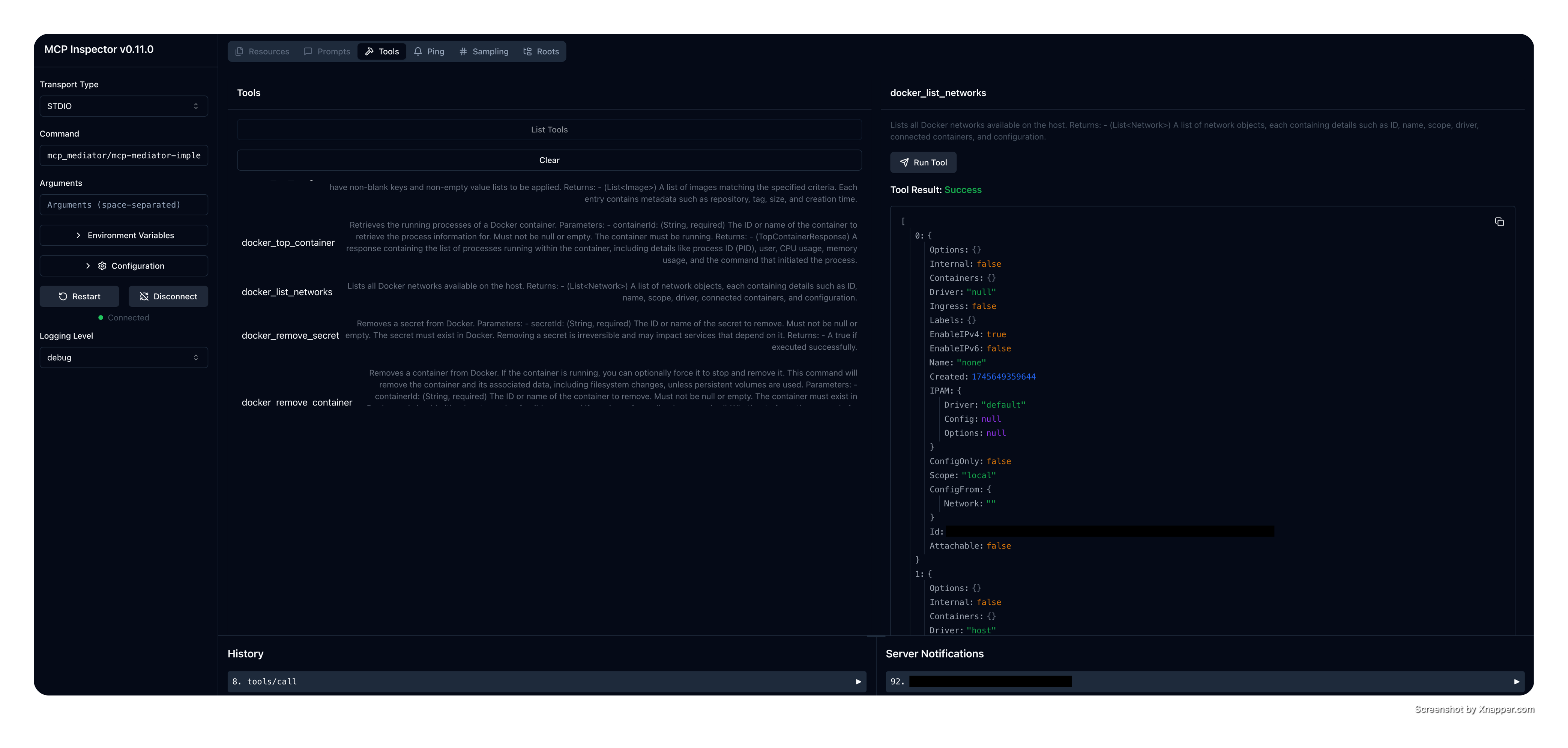
This module provides an implementation of a Model Context Protocol MCP server for Docker commands, powered by the
mcp_mediator core framework.
The Docker MCP Server utilizes the automatic server generation feature of MCP Mediator to expose existing Docker
commands as MCP Tools.
Each command is optionally annotated with @McpTool along with a minimal description to enhance tool discoverability
and usability.
👉 See the full list of supported commands here.
[!IMPORTANT]
This is part ofmcp_mediatorproject: https://github.com/makbn/docker_mcp_server To build or modify, clone the parent repository:git clone --recurse-submodules https://github.com/makbn/docker_mcp_server.git
java -jar docker-mcp-server.jar \
  --docker-host=tcp://localhost:2376 \
  --tls-verify \
  --cert-path=/etc/docker/certs \
  --server-name=my-server \
  --server-version=1.0.0 \
  --max-connections=150 \
  --docker-config=/custom/docker/config
To run Docker MCP Server with Claude Desktop with java -jar:
{
  "mcpServers": {
    "my_java_mcp_server": {
      "command": "java",
      "args": [
        "-jar",
        "docker-mcp-server.jar"
        "--docker-host=tcp://localhost:2376",
        "--tls-verify", # not required
        "--cert-path=/etc/docker/certs", # required only if --tls-verify is available
        "--server-name=my-docker-mcp-server",
        "--server-version=1.0.0",
        "--max-connections=150",
        "--docker-config=/custom/docker/config"
      ]
    }
  }
}
Or create the native image (see the steps below) and use the standalone application:
{
  "mcpServers": {
    "my_java_mcp_server": {
      "command": "docker-mcp-server-executable",
      "args": [
        "--docker-host=tcp://localhost:2376" // rest of args
      ]
    }
  }
}
To build the executable:
mvn clean compile package
This command creates a jar file under target folder mcp-mediator-implementation-docker-[version].jar. You can stop
here and use the jar file and execute it
using java -jar command. Or, you can create a standalone executable application using GraalVM native image:
native-image -jar mcp-mediator-implementation-docker-[version].jar
and this command creates an executable file: 'mcp-mediator-implementation-docker-[version] that can be executed.
This project integrates with MCP Mediator to automatically generate MCP Tools
from existing Docker services.
Each method in the Docker service class can optionally be annotated with @McpTool to explicitly define the tool’s *
name*, description, and other metadata.
However, annotation is not required—MCP Mediator supports automatic generation for non-annotated methods by
inferring details from the method, class, and package names. To enable this behavior, set createForNonAnnotatedMethods
to true:
DefaultMcpMediator mediator = new DefaultMcpMediator(McpMediatorConfigurationBuilder.builder()
        .createDefault()
        .serverName(serverName)
        .serverVersion(serverVersion)
        .build());

mediator.

registerHandler(McpServiceFactory.create(dockerClientService)
        .

createForNonAnnotatedMethods(true)); // Enables support for non-annotated methods
Check io.github.makbn.mcp.mediator.docker.server.DockerMcpServer for the full Mcp Mediator configuration.
Environment variables:
Work in progress, more to be added.
Check the DockerClientService class for the full list of available and planned tools (to be implemented)
[!IMPORTANT]
Almost all the MCP Tools' descriptions and names are generated automatically using AI agent!
This project is a Git subtree module of the parent repository
makbn/mcp_mediator. It is kept in its own repository to support independent
versioning, CI, and release processes, while remaining integrated into the main mcp_mediator mono-repo.
If you're working in the context of the full mcp_mediator system:
`git clone --recurse-submodules https://github.com/makbn/docker_mcp_server.git`
Contributions are welcome! Please feel free to submit a Pull Request. Read this first!
This project is licensed under the GPL3 License—see the LICENSE file for details.
https://github.com/makbn/docker_mcp_server
เครื่องมือ
ยังไม่มีรายการเครื่องมือ เซิร์ฟเวอร์แบบรีโมตจะได้รายการหลังการตรวจสอบสถานะครั้งแรก
FAQ
คัดลอกคอนฟิก stdio สำหรับ Cursor, Claude Desktop, Claude Code หรือ VS Code ได้ในหน้านี้ คอนฟิกนี้ใช้การติดตั้งของผู้เผยแพร่ ไม่ใช่พร็อกซีของ PlugMCP
ระเบียนนี้ไม่ได้ระบุตัวแปรสภาพแวดล้อมที่จำเป็น
Docker ทำงานแบบโลคัลผ่าน stdio
ตรวจสอบล่าสุดเมื่อ 2026-10-28 https://github.com/makbn/docker_mcp_server
