mcp-browser-dev-tools
Let an AI agent work in a real browser with fewer back-and-forths. It sends a whole sequence of clicks, typing, waits, and checks in one tool call and gets every result back together, in your Chrome, Edge, or Firefox.
Power your agent
คำสั่งของผู้เผยแพร่เอง ไม่ใช่เอนด์พอยต์ของ PlugMCP
Host a copy with our keys and logs.
npx -y [email protected]Claude Code ไม่มีลิงก์ติดตั้งสำหรับคำสั่งแบบโลคัล ให้คัดลอกคำสั่งด้านล่างแล้วรันในเทอร์มินัล
claude mcp add mcp-browser-dev-tools -- npx -y mcp-browser-dev-tools@0.4.1รันในเทอร์มินัล
{ "mcpServers": { "mcp-browser-dev-tools": { "command": "npx", "args": [ "-y", "[email protected]" ] } }}claude_desktop_config.json
URL แบบรีโมตหรือคำสั่งบนเครื่องของคุณ? การติดตั้งสองแบบต่างกันอย่างไร
รันบน PlugMCP
A new server you create. It is not this listing's official endpoint. Use the publisher install when you want their URL and their credentials.
เปิดจากผู้เผยแพร่
Let an AI agent work in a real browser with fewer back-and-forths. It sends a whole sequence of clicks, typing, waits, and checks in one tool call and gets every result back together, in your Chrome, Edge, or Firefox.
Browser MCP server for AI agents: batch actions, waits, and checks into one call on Chrome, Edge, or Firefox (CDP and WebDriver BiDi)
You need Node.js 24 or later. Register the server with your MCP client:
# Claude Code
claude mcp add browser-devtools --scope user -- npx -y mcp-browser-dev-tools serve

# Codex
codex mcp add browser-devtools -- npx -y mcp-browser-dev-tools serve
Cursor and other clients that use an mcpServers config:
{
  "mcpServers": {
    "browser-devtools": {
      "command": "npx",
      "args": ["-y", "mcp-browser-dev-tools", "serve"]
    }
  }
}
Then ask the agent for browser work, for example "open example.com and check the console for errors" or "attach to my open tab and find out why the form won't submit". The agent starts with ensure_browser, which reuses a browser that is already running with a debugging port, or launches one. To make launches use a particular profile, set MCP_BROWSER_USER_DATA_DIR; see Configuration for this, native Windows, WSL, and Firefox.
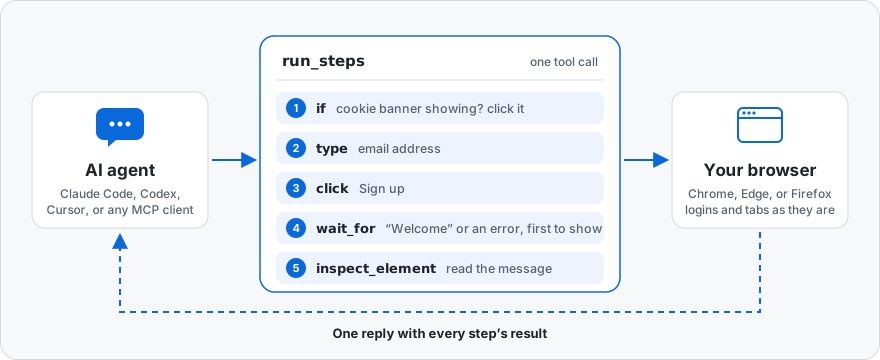
Your agent gets 45 browser tools over MCP: open or attach to tabs, click, type, drag, upload files, and navigate, read the console and network, block or mock requests, take screenshots, and save and restore sessions. At the center is run_steps: the agent sends a whole task, with branches and waits in it, and the server carries it out in the browser and replies once. run_tabs does the same in several tabs at the same time.
run_tabs opens them together and read_text brings back what they say. In our benchmark, reading five slow pages took Sonnet 5.5 8.5 s and 4 turns instead of 28 s and 6.A run_steps call that dismisses a cookie banner if one is showing, fills in and submits a form, waits for either the success or the error message, and reads it:
{
  "sessionId": "chromium:1f0c…",
  "steps": [
    {
      "tool": "if",
      "arguments": {
        "condition": { "selector": "text=Accept cookies" },
        "then": [
          {
            "tool": "click",
            "arguments": { "selector": "text=Accept cookies" }
          }
        ]
      }
    },
    {
      "tool": "type",
      "arguments": {
        "selector": "role=textbox[name=\"Email\"]",
        "text": "[email protected]"
      }
    },
    {
      "tool": "click",
      "arguments": { "selector": "role=button[name=\"Sign up\"]" }
    },
    {
      "tool": "wait_for",
      "arguments": {
        "anyOf": [
          { "selector": "#message", "textIncludes": "Welcome" },
          { "selector": "#message", "textIncludes": "error" }
        ]
      }
    },
    { "tool": "inspect_element", "arguments": { "selector": "#message" } }
  ]
}
The result has each step's outcome: which branch the if took, which anyOf alternative matched, and the message element with its text. Because the batch has actions, the result also has changes: what the batch changed on the page, as described in Tools. Locators can be CSS, text=, role= with an accessible name, or name=. The full semantics of run_steps, if, repeat, and conditions are in Tools.
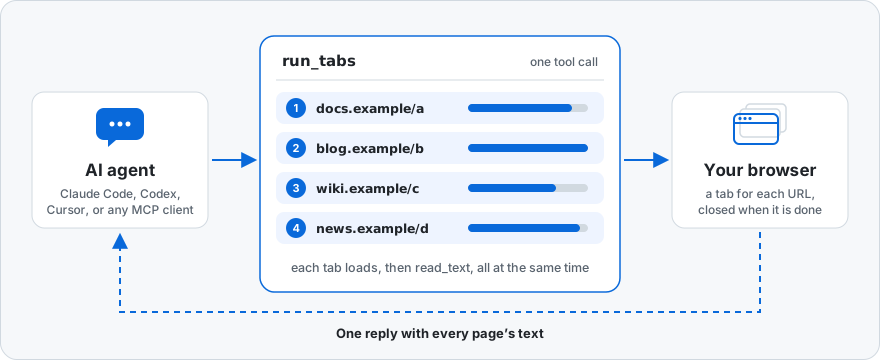
A research step usually means opening several pages and reading each one. read_text with links: true collects the result links from a search page; then one run_tabs call opens them all and reads them side by side:
{
  "browserFamily": "chromium",
  "tabs": [
    {
      "url": "https://docs.example.com/a",
      "steps": [{ "tool": "read_text", "arguments": { "maxChars": 4000 } }]
    },
    {
      "url": "https://blog.example.com/b",
      "steps": [{ "tool": "read_text", "arguments": { "maxChars": 4000 } }]
    },
    {
      "url": "https://news.example.com/d",
      "steps": [
        { "tool": "wait_for", "arguments": { "selector": "article" } },
        {
          "tool": "read_text",
          "arguments": { "selector": "article", "maxChars": 4000 }
        }
      ]
    }
  ]
}
The result lists every tab in the order given, each with its steps' results: here, each page's main text, cut to maxChars. Each tab opens a new tab, loads its URL, and runs its steps at the same time as the others, so the call takes about as long as the slowest page; the tabs close afterwards. Steps are the same as in run_steps, including if and repeat, and a tab that fails or runs past its timeoutMs does not stop the others. browserFamily picks the browser for the new tabs when the server runs in its default auto mode. The details are in Tools.
record_video records what a Chromium tab shows while the agent drives it, as an MP4. For a 1920x1080 recording, set the viewport first, then start, act, and stop:
{ "name": "set_viewport", "arguments": { "sessionId": "s1", "width": 1920, "height": 1080 } }
{ "name": "record_video", "arguments": { "sessionId": "s1", "action": "start" } }
{ "name": "click", "arguments": { "sessionId": "s1", "selector": "text=Open dashboard" } }
{ "name": "record_video", "arguments": { "sessionId": "s1", "action": "stop", "path": "/home/me/demo.mp4" } }
stop returns the file's path, durationMs, frames, width, and height. Chrome streams a frame on each repaint, and stop encodes them with ffmpeg (found on PATH, or named by MCP_BROWSER_FFMPEG) at a constant frame rate, each frame lasting as long as it was on screen. Without ffmpeg, stop keeps the frames and returns the command that encodes them. record_video is in the performance group, reached through more_tools or as a run_steps step. The details, including fps, quality, maxWidth and maxHeight, and maxDurationMs, are in Tools.
Median of 3 runs on the current build, from the benchmark in PERFORMANCE.md. "One action per call" disallows run_steps and run_tabs.
Every form run started with get_snapshot and acted by ref, without being told to. Each payment click waits for the page to settle and reports the decline or the receipt, so the agents could retry from each reply. The last row uses run_tabs. Eight models (Claude Fable 5.1, Opus 5.5, Sonnet 5.5, Haiku 5.5, and Haiku 4.5; GPT-6-Astra, GPT-6.1 Sol, and GPT-6-Luna) ran the same four tasks with the default tool set: 95 of those 96 runs passed, and PERFORMANCE.md has the time, cost, and turns for each, the charts, and how the runs were set up.
45 tools, described in docs/tools.md. The server lists the core set by default, since every model turn pays for each tool listed, and more_tools lists, describes, and calls the rest; MCP_BROWSER_TOOLS=all, or a list of groups such as network,state, lists them too (Tool Sets).
browser_status, ensure_browser, launch_browser, list_tabs, new_tab, close_tab, attach_tab, detach_tab, list_sessionsnavigate, reload, click, hover, drag, type, select, press_key, upload_file, scroll, set_viewportwait_for, run_steps, run_tabsget_page_state, get_snapshot, get_document, inspect_element, read_text, take_screenshot, evaluate_jsget_console_messages, get_network_requests, get_events, get_har, set_networkget_performance, record_trace, record_videoget_cookies, get_storage, capture_session_snapshot, restore_session_snapshot, compare_page_state, compare_selector, capture_debug_reportThe defaults work for most setups: the server finds a Chromium or Firefox debugging endpoint on loopback ports 9222–9226, or launches a browser when asked. The settings people change most:
MCP_BROWSER_FAMILY: auto (default), chromium, edge, or firefoxCDP_BASE_URL and FIREFOX_BIDI_WS_URL: fixed browser endpointsMCP_BROWSER_USER_DATA_DIR: the profile to launch browsers withMCP_BROWSER_ENABLE_EVAL=0: turn off page JavaScript from the agent (evaluate_js and expression conditions)Every setting, per-client examples, and how the server reuses or launches browsers are in docs/configuration.md. WSL with a Windows browser, and other platform walkthroughs, are in docs/setup.md.
MCP_BROWSER_ALLOW_REMOTE_ENDPOINTS=1.evaluate_js, as whoever the browser profile is signed in as. Point the server at a profile you are willing to let an agent use.MCP_BROWSER_ENABLE_EVAL=0 removes evaluate_js and the expression field of wait_for and run_steps conditions. This narrows the tool surface rather than drawing a security boundary: the other tools already read cookies and storage and can navigate anywhere. To approve page scripts one at a time, use your MCP client's tool permissions, and note that wait_for and run_steps calls can carry scripts too.Playwright is the better choice for deterministic automation and end-to-end tests, with its assertions, tracing, and CI tooling. This server is for a different job: letting an AI agent inspect and operate a live browser through MCP. The agent calls a fixed set of tools instead of writing and running scripts, can work in the tab and session you already have open, and uses the same tools on Chromium and Firefox.
run_steps in fullcorepack enable
pnpm install
pnpm run check
pnpm run pack:check
The repository uses pnpm for development and CI; the package is published to npm. See Publishing and Repository Settings for the release process.
Browser MCP server for AI agents: batch actions, waits, and checks into one call on Chrome, Edge, or Firefox (CDP and WebDriver BiDi)
{ "mcpServers": { "mcp-browser-dev-tools": { "command": "npx", "args": [ "-y", "[email protected]" ] } }}เครื่องมือ
ยังไม่มีรายการเครื่องมือ เซิร์ฟเวอร์แบบรีโมตจะได้รายการหลังการตรวจสอบสถานะครั้งแรก
FAQ
คัดลอกคอนฟิก stdio สำหรับ Cursor, Claude Desktop, Claude Code หรือ VS Code ได้ในหน้านี้ คอนฟิกนี้ใช้การติดตั้งของผู้เผยแพร่ ไม่ใช่พร็อกซีของ PlugMCP
ระเบียนนี้ไม่ได้ระบุตัวแปรสภาพแวดล้อมที่จำเป็น
MCP Browser Dev Tools ทำงานแบบโลคัลผ่าน stdio
ตรวจสอบล่าสุดเมื่อ 2026-10-28 Browser MCP server for AI agents: batch actions, waits, and checks into one call on Chrome, Edge, or Firefox (CDP and WebDriver BiDi)
