Codex Native Long Video Memory
Turn long local videos into searchable, evidence-linked memory — including events that exist only in the picture.
English · 繁體中文 · Changelog / 變更紀錄 · ·
Power your agent
การติดตั้งจากผู้เผยแพร่ ไม่ใช่เอนด์พอยต์ของ PlugMCP
URL แบบรีโมตหรือคำสั่งบนเครื่องของคุณ? การติดตั้งสองแบบต่างกันอย่างไร
รันบน PlugMCP
A new server you create. It is not this listing's official endpoint. Use the publisher install when you want their URL and their credentials.
เปิดจากผู้เผยแพร่
Turn long local videos into searchable, evidence-linked memory — including events that exist only in the picture.
English · 繁體中文 · Changelog / 變更紀錄 · ·
Local-first Codex plugin that indexes long videos with OCR/ASR and answers with timestamped, SHA-verified visual evidence.
This is not “upload a video and ask for a summary.” It is a local media pipeline, a Codex-host visual inspection loop, and a versioned evidence store designed to answer: what happened, when did it happen, and which exact frame proves it?
Long-video assistants often reduce a video to its transcript. That loses the information people usually need most:
Codex Native Long Video Memory solves this by splitting the job into two explicit halves:
The result is a reusable local memory graph with chapters, scenes, events, entities, actions, OCR/ASR spans, corrections, verification state, hashes, timestamps, and reopenable evidence.
Open a Codex task and send it this request:
Install this plugin for me: github.com/NitcanKen/Codex-native-long-video-memory
The system never pretends a two-hour video is one model input. It uses a coverage-aware loop:
flowchart LR
  V["Local video"] --> P["Probe · scenes · audio activity"]
  P --> E["Frames · contact sheets · local OCR/ASR"]
  E --> M["MCP evidence service"]
  M -->|"timestamped images"| C["Current Codex host"]
  C -->|"structured observations"| S["Versioned SQLite memory"]
  S --> R["Search · count · graph traversal"]
  R --> C
  C -->|"targeted reinspection"| M
  S --> X["Evidence report + local inspector"]
The MCP server does not contain a remote LLM/VLM client. The semantic vision model is the Codex model already running the task. Selected frames returned as MCP image content therefore enter the active Codex service boundary; this is not the same as an entirely air-gapped vision system. Local ASR/OCR/indexing do not require DashScope, Qwen, or an inference API key.
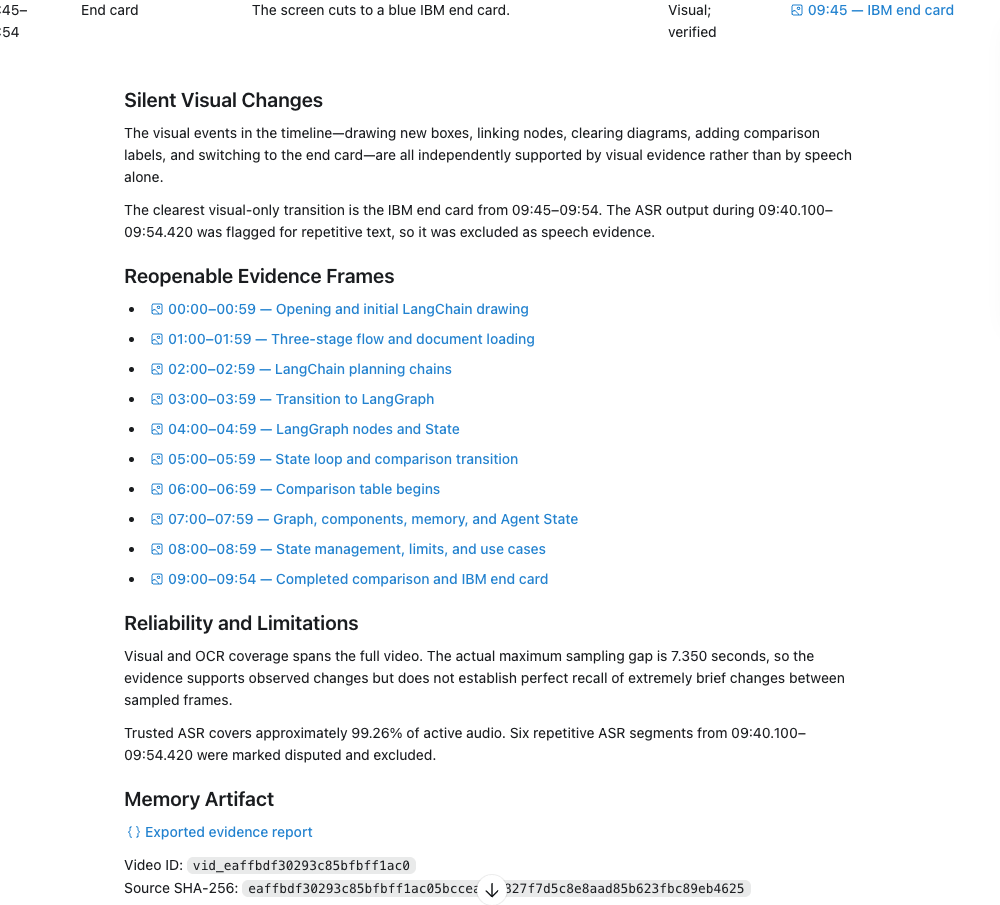
A complete memory produces more than a prose summary. It organizes the video into chapter navigation and an itemized event timeline, with timestamps, evidence status, and links back to reopenable frames.
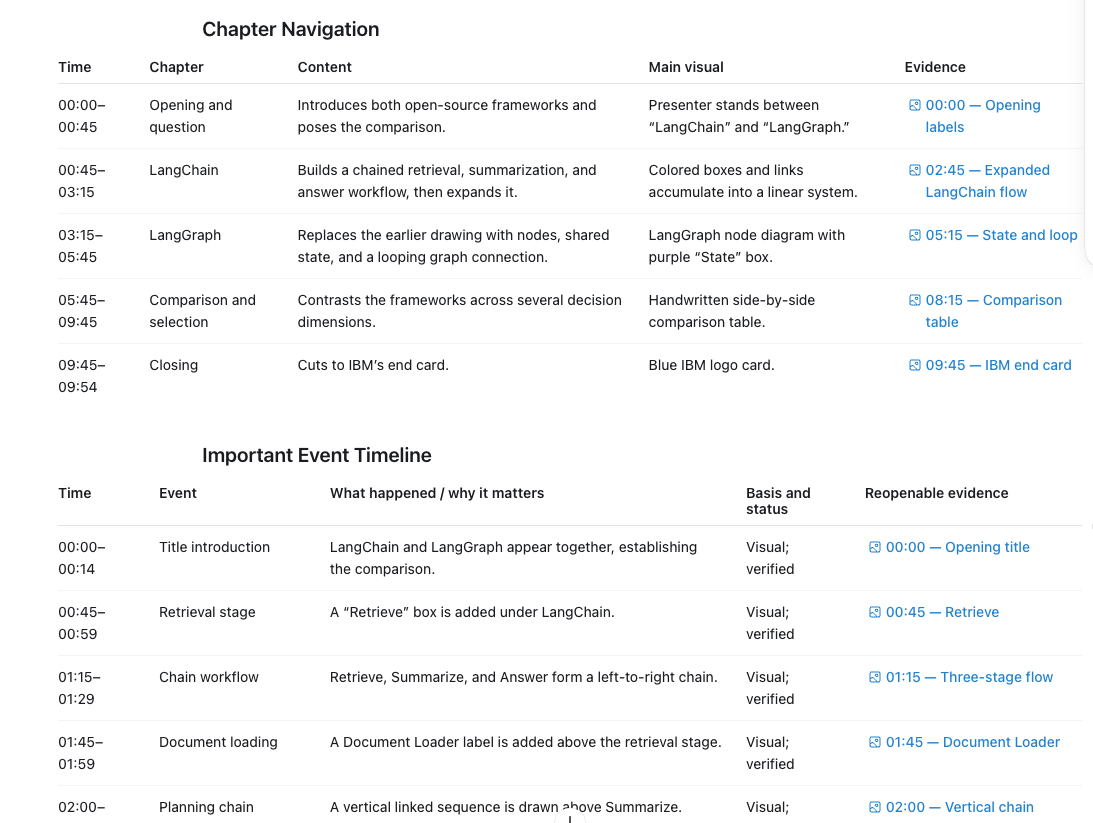
The handoff also separates silent visual changes, links frames across the full video, and states sampling gaps or excluded ASR intervals so uncertain results are not presented as established facts.
The canonical memory hierarchy is deliberately simple:
Video
└── Chapter
    └── Scene
        └── Event
            └── Evidence
Entities, aliases, actions, relations, OCR, ASR, corrections, and revisions attach to stable IDs around that hierarchy.
These are measured development results, not promises that every future video will produce the same quality. Large run artifacts, private paths, model weights, frames, audio, and transcripts are intentionally excluded from Git.
See benchmark methodology, architecture, and the privacy/threat model.
The ASR installation example in this README currently uses local MLX Whisper on Apple Silicon macOS. MLX Whisper is the documented default setup. The shared runtime requirements are:
uv, ffmpeg, ffprobe, and python3;On macOS, Apple Vision OCR is the preferred OCR path. On Windows or Linux, install the equivalent
system packages and a platform-appropriate local Whisper runtime/model separately instead of using
the MLX-specific commands below. The media layer includes Tesseract OCR and whisper.cpp ASR
backends for local processing.
Node.js is only required to run the inspector test suite, not to run the MCP server.
Install Codex first, then confirm that codex plugin commands are available. The following example
uses Homebrew on macOS. On Windows or Linux, install the corresponding packages with the platform's
package manager and install a compatible local Whisper runtime/model separately:
brew install uv ffmpeg
python3 --version
uv --version
ffmpeg -version
ffprobe -version
codex --version
git clone https://github.com/NitcanKen/Codex-native-long-video-memory.git
cd Codex-native-long-video-memory/plugins/codex-native-long-video-memory
uv sync --frozen --all-extras
The runtime and development dependencies are pinned in uv.lock. Do not install random global
Python packages to work around a failed lock sync.
Model bytes are deliberately not stored in Git. Provisioning is the only step expected to use the network; ordinary inference runs with Hugging Face/Transformers offline flags and a socket guard. The commands in this section use MLX Whisper. On Windows or Linux, install a platform-appropriate local Whisper runtime and model separately rather than running these MLX-specific commands.
ASR_OUTPUT="${CODEX_VIDEO_MEMORY_HOME:-$HOME/.codex/video-memory}/models/whisper-large-v3-turbo"

uv run --frozen --extra asr-mlx \
  python tests/real/provision_mlx_model.py \
  --repo mlx-community/whisper-large-v3-turbo \
  --revision ed1ebfc04f2b537b24133b8e09d361ee4388eab7 \
  --output "$ASR_OUTPUT"

shasum -a 256 "$ASR_OUTPUT/model/weights.npz"
Expected weights:
SHA-256  43d428f9d61dc1fe3dc823c5c77455ec5a69e846177328fb7dcb2dfb5a269477
Size     1,614,089,376 bytes
Review the generated provisioning.json. The conversion checkpoint is pinned by repository
revision and weights hash. Its repository metadata does not declare a license; the project records
the upstream OpenAI Whisper MIT license separately and does not pretend that this fills missing
conversion-repository metadata. Use a different compatible local model only after reviewing its
provenance and quality.
If you already have a compatible local MLX Whisper directory containing config.json and
weights.npz, skip the download and use that absolute directory in the next step.
CODEX_VIDEO_MEMORY_ASR_MODEL_PATH="$ASR_OUTPUT/model" ./scripts/install.sh
The installer:
uv, codex, FFmpeg/ffprobe, and Python;${CODEX_VIDEO_MEMORY_HOME:-$HOME/.codex/video-memory}/config.json with mode 0600;The model path is persisted. New Codex tasks and lower-reasoning host models do not need the path passed again.
uv run --frozen --extra asr-mlx codex-video-memory doctor
codex plugin list
doctor should report:
ok: true
semantic_inference: codex-host-only
asr.configured: true
asr.ready: true
asr.mode: automatic-for-audio
Start a new Codex task after install/update so the refreshed skill and MCP tool definitions are loaded.
Attach or reference an absolute local video path, then ask:
Use long-video-memory to analyze this video and build complete memory.
Pay special attention to every silent event where the picture changes.
When finished, give me chapters, a detailed event timeline, timestamps,
and reopenable evidence frames.
For a complete-memory job, the host contract requires a structured final report rather than a few summary bullets:
Useful follow-up questions include:
Find every time the state diagram changes and show the supporting frames.
How many times does the warning badge appear? Deduplicate overlapping detections.
Verify whether the speaker actually clicked “Deploy”, or whether that only appeared in OCR.
Show all disputed ASR spans between 20:00 and 25:00 for a raw audit.
Report storage bytes and file counts by video, plus the remaining ingest forecast.
Preview reference-safe pruning; do not apply it until I confirm the returned token.
Storage administration is also available from the local CLI:
codex-video-memory storage-report
codex-video-memory configure-storage \
  --quota-gib 500 \
  --minimum-free-gib 20 \
  --minimum-free-percent 10 \
  --estimated-gib-per-video-hour 0.20 \
  --ingest-peak-multiplier 1.75 \
  --reports-keep-latest 5 \
  --memory-archives-keep-latest 3 \
  --superseded-generation-days 7 \
  --sampled-frame-days 90 \
  --uncited-inspection-days 30 \
  --staging-days 1

# First call only previews and returns a confirmation token.
codex-video-memory prune --video-id vid_...

# Apply only the unchanged preview.
codex-video-memory prune \
  --video-id vid_... \
  --apply \
  --confirmation-token <exact-token-from-preview>
The default policy has no plugin quota, reserves 20 GiB and 10% free space, keeps the latest five reports and three memory archives, and does not retain ASR input PCM after transcription. Pruning requires the exact source SHA-256, blocks queued/running/interrupted jobs, protects current cited evidence and retained-report evidence, and writes an append-only audit record.
~/.codex/video-memory or CODEX_VIDEO_MEMORY_HOME..gitignore.Read SECURITY.md before reporting a vulnerability or sharing diagnostics.
Update a local development install and refresh the plugin cachebuster:
cd plugins/codex-native-long-video-memory
./scripts/update.sh
Run the default test gate:
./scripts/test.sh
Uninstall the plugin:
./scripts/uninstall.sh
Remove the plugin and local marketplace registration:
./scripts/uninstall.sh --remove-marketplace
Uninstall deliberately preserves video-memory data. Inspect the data root with
codex-video-memory home before deciding whether to remove any user evidence.
.agents/plugins/marketplace.json       Local Codex marketplace entry
plugins/codex-native-long-video-memory/
├── .codex-plugin/plugin.json          Plugin manifest
├── .mcp.json                          Offline MCP launch contract
├── skills/long-video-memory/          Host workflow and final-report contract
├── src/codex_video_memory/media/      Probe, scenes, frames, OCR, ASR, manifests
├── src/codex_video_memory/memory/     SQLite schema, retrieval, revisions, export
├── src/codex_video_memory/storage.py  Quota, inventory, retention plans, safe pruning
├── src/codex_video_memory/server.py   MCP tools and evidence transport
├── ui/                                Read-only local evidence inspector
├── evals/                             Evidence-linked schemas and evaluator
├── tests/                             Unit, contract, integration, UI, opt-in real media
└── docs/                              Architecture, threat model, operations, ADRs
100% temporal-window coverage is not proof that every event between
frames was observed; reports retain the actual maximum sampling gap.Issues and pull requests should include the smallest reproducible case, version information, and redacted diagnostics — never private videos, raw transcripts, credentials, or unrelated absolute paths. Security problems must follow SECURITY.md, not a public issue.
The project is licensed under Apache License 2.0. Media, model checkpoints, and other third-party assets keep their own licenses and are not relicensed by this repository.
See the project changelog for release milestones and unreleased changes.
許多「影片 AI」其實只是把字幕或逐字稿丟進模型。這種做法會遺漏最重要的資訊:
Codex Native Long Video Memory 將工作明確分成兩部分:
最後取得的不只是摘要,而是一份可重複使用的本機影片記憶:章節、場景、事件、人物/實體、 動作、關係、OCR/ASR span、修正紀錄、驗證狀態、hash、時間碼與可重新開啟的證據。
開啟一個 Codex task,直接傳送以下要求:
請為我安裝這個 plugin:github.com/NitcanKen/Codex-native-long-video-memory
系統不會假設兩小時的影片可以一次全部放入模型,而是採用 coverage-aware 流程:
flowchart LR
  V["本機影片"] --> P["探測 · 場景 · 音訊活動"]
  P --> E["影格 · contact sheets · 本機 OCR/ASR"]
  E --> M["MCP 證據服務"]
  M -->|"帶時間碼影像"| C["目前的 Codex host"]
  C -->|"結構化觀察"| S["版本化 SQLite 記憶"]
  S --> R["搜尋 · 計數 · graph traversal"]
  R --> C
  C -->|"針對性重看"| M
  S --> X["證據報告 + 本機 inspector"]
MCP server 沒有內建任何遠端 LLM/VLM client。語意視覺能力來自目前執行 task 的 Codex host。經由 MCP 明確傳回 Codex 的影格會進入目前的 Codex 服務邊界,因此不應描述為 完全 air-gapped 的視覺系統。本機 ASR/OCR/索引不需要 DashScope、Qwen 或 inference API key。
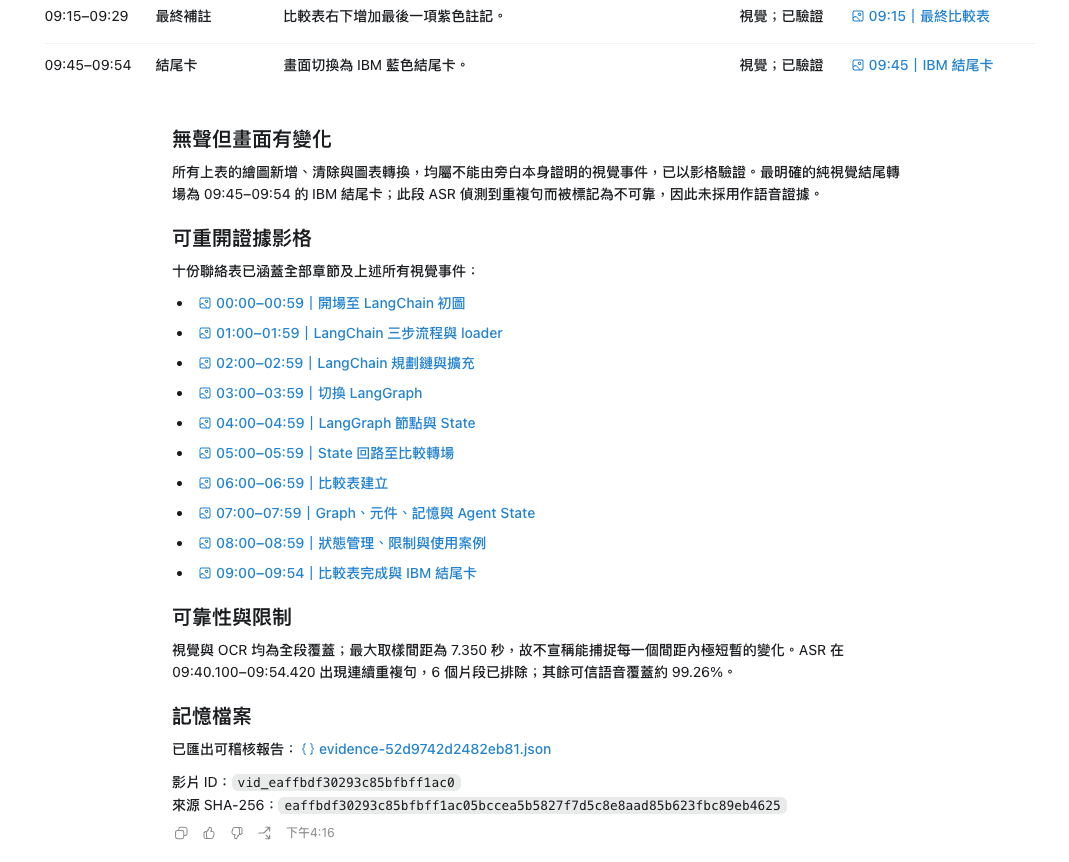
完整記憶不只提供一段摘要,而會整理出章節導航與逐項事件時間線;每個重要事件都附有時間碼、 證據狀態,以及可重新開啟的影格連結。
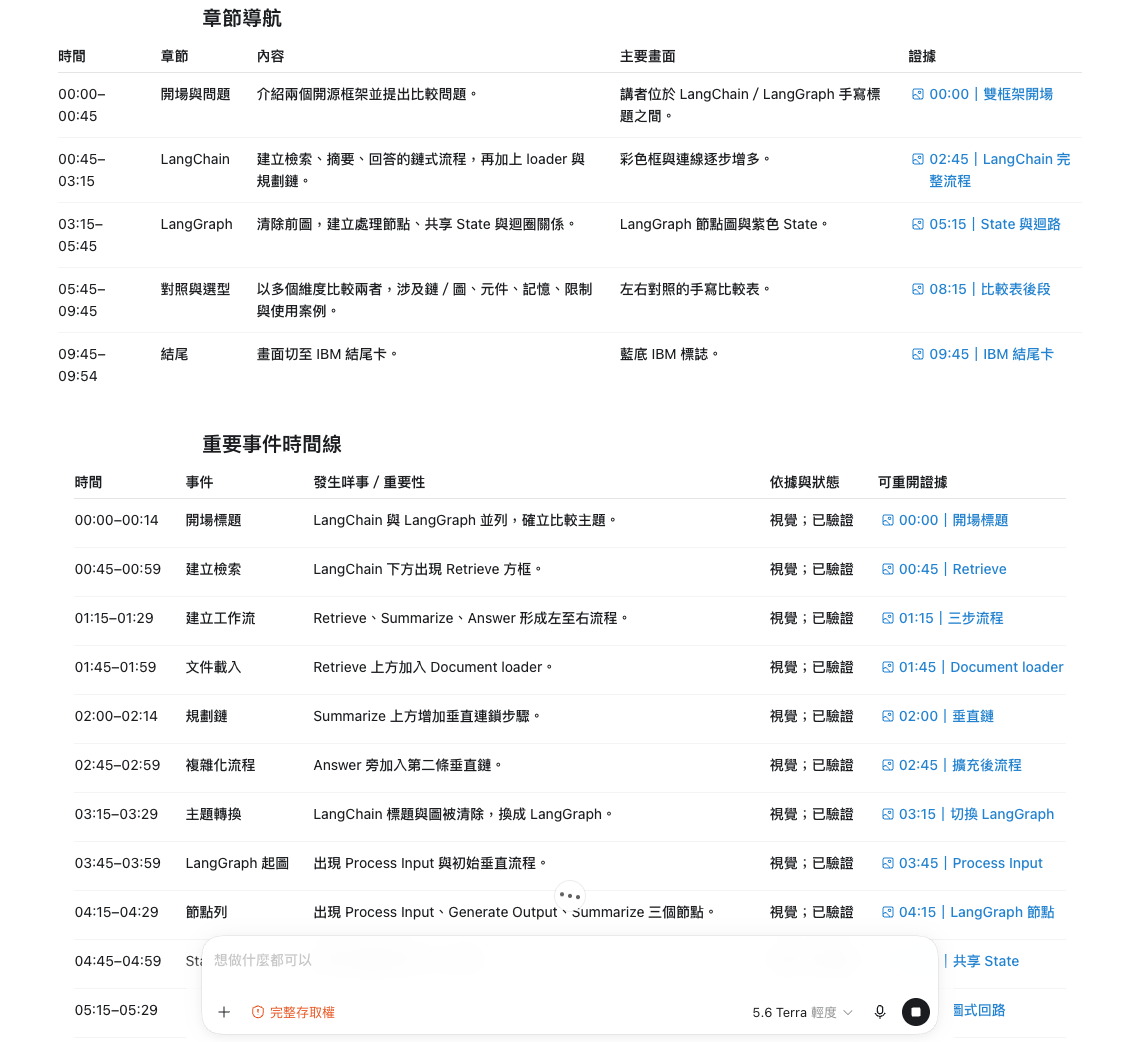
報告也會獨立列出「無聲但畫面有變化」的事件、涵蓋全片的證據影格,以及取樣間距、ASR 排除 區段等可靠性限制,避免把不確定結果包裝成確定答案。
核心資料層級如下:
影片 Video
└── 章節 Chapter
    └── 場景 Scene
        └── 事件 Event
            └── 證據 Evidence
Entity、alias、action、relation、OCR、ASR、correction 與 revision 都會用穩定 ID 連結到此結構。
以下是開發期間保存的量測結果,不代表每部新影片都一定具有相同品質。大型 run artifact、 私人路徑、模型 weights、影格、音訊與 transcript 都刻意排除在 Git 之外。
本 README 目前以 Apple Silicon macOS 上的本機 MLX Whisper 作為 ASR 安裝示例。MLX Whisper 是文件採用的預設設定。各平台共通的 runtime 需求為:
uv、ffmpeg、ffprobe、python3;macOS 主要使用 Apple Vision OCR。Windows 或 Linux 使用者請另行安裝該平台對應的 system
packages,以及合適的本機 Whisper runtime/model,不要直接套用下方 MLX 專用指令。Media
layer 亦包含供本機處理使用的 Tesseract OCR 與 whisper.cpp ASR backend。Node.js 只有執行
inspector tests 時才需要,MCP runtime 本身不需要 Node.js。
請先安裝 Codex,並確認可以使用 codex plugin 指令。以下是 macOS 的 Homebrew 示例;
Windows 或 Linux 使用者請透過所屬平台的 package manager 安裝對應套件,並另行安裝相容的
本機 Whisper runtime/model:
brew install uv ffmpeg
python3 --version
uv --version
ffmpeg -version
ffprobe -version
codex --version
git clone https://github.com/NitcanKen/Codex-native-long-video-memory.git
cd Codex-native-long-video-memory/plugins/codex-native-long-video-memory
uv sync --frozen --all-extras
Runtime 與開發依賴全部鎖定在 uv.lock。請勿使用 global pip package 掩蓋 lock sync 問題。
模型 bytes 刻意不納入 Git。Provisioning 是唯一預期需要網路的步驟;一般 inference 會強制 使用 Hugging Face/Transformers offline flags 與 socket guard。本節指令使用 MLX Whisper; Windows 或 Linux 使用者請另行安裝適合該平台的本機 Whisper runtime 與 model,不要執行這些 MLX 專用指令。
ASR_OUTPUT="${CODEX_VIDEO_MEMORY_HOME:-$HOME/.codex/video-memory}/models/whisper-large-v3-turbo"

uv run --frozen --extra asr-mlx \
  python tests/real/provision_mlx_model.py \
  --repo mlx-community/whisper-large-v3-turbo \
  --revision ed1ebfc04f2b537b24133b8e09d361ee4388eab7 \
  --output "$ASR_OUTPUT"

shasum -a 256 "$ASR_OUTPUT/model/weights.npz"
預期 weights:
SHA-256  43d428f9d61dc1fe3dc823c5c77455ec5a69e846177328fb7dcb2dfb5a269477
Size     1,614,089,376 bytes
請檢查產生的 provisioning.json。Conversion checkpoint 由 exact revision 與 weights hash 固定。
該 conversion repository metadata 沒有聲明 license;本專案只另外如實保存 upstream OpenAI
Whisper MIT license,不會將 upstream license 視為 conversion repository 自己的授權聲明。
如果你已經有一個包含 config.json 與 weights.npz 的相容本機 MLX Whisper directory,
可以跳過下載,下一步直接用該 absolute path。
CODEX_VIDEO_MEMORY_ASR_MODEL_PATH="$ASR_OUTPUT/model" ./scripts/install.sh
Installer 會執行以下步驟:
uv、codex、FFmpeg/ffprobe 與 Python;0600 權限寫入
${CODEX_VIDEO_MEMORY_HOME:-$HOME/.codex/video-memory}/config.json;Model path 持久化之後,新 Codex task、Luna/其他 host model、最低 reasoning level 都不需要 再傳一次 ASR path。
uv run --frozen --extra asr-mlx codex-video-memory doctor
codex plugin list
doctor 應該回報:
ok: true
semantic_inference: codex-host-only
asr.configured: true
asr.ready: true
asr.mode: automatic-for-audio
安裝或更新後請開啟一個新的 Codex task,讓系統重新載入 skill 與 MCP tool definitions。
附上影片或提供 absolute path,接著可以這樣要求:
使用 long-video-memory 分析這部影片,建立完整記憶;
特別注意所有沒有語音、但畫面發生變化的事件。
完成後列出章節、完整重要事件時間線、時間碼與可重新開啟的證據影格。
完整記憶任務的 host contract 會要求提供:
之後可以追問:
找出每一次 state diagram 轉變,逐項顯示證據影格。
警告 badge 一共出現幾次?請依時間重疊去除重複結果。
驗證講者是否真的按下 Deploy,或只是 OCR 讀到了這個文字。
列出 20:00–25:00 所有 disputed ASR span,進行 raw audit。
按影片列出容量、檔案數,以及剩餘可 ingest 時數預測。
先 preview 引用安全清理;在我確認傳回的 token 前不要 apply。
亦可使用本機 CLI 管理儲存:
codex-video-memory storage-report
codex-video-memory configure-storage \
  --quota-gib 500 \
  --minimum-free-gib 20 \
  --minimum-free-percent 10 \
  --estimated-gib-per-video-hour 0.20 \
  --ingest-peak-multiplier 1.75 \
  --reports-keep-latest 5 \
  --memory-archives-keep-latest 3 \
  --superseded-generation-days 7 \
  --sampled-frame-days 90 \
  --uncited-inspection-days 30 \
  --staging-days 1

# 第一次只會 preview,並傳回 confirmation token。
codex-video-memory prune --video-id vid_...

# 只 apply 完全相同、未過期的 preview。
codex-video-memory prune \
  --video-id vid_... \
  --apply \
  --confirmation-token <preview-傳回的完整-token>
預設不設 plugin quota,但會保留至少 20 GiB 與 10% free space;保留最新五份 report、三份 memory archive,ASR 完成後不保留 input PCM。Prune 必須驗證原片完整 SHA-256,遇到 active/ 可 resume job 會停止,並保護 current cited evidence 與 retained-report evidence;成功後會寫入 append-only audit record。
~/.codex/video-memory 或 CODEX_VIDEO_MEMORY_HOME。.gitignore 排除。報告漏洞或分享 diagnostics 前,請先閱讀 SECURITY.md。
更新 development install 與 plugin cachebuster:
cd plugins/codex-native-long-video-memory
./scripts/update.sh
執行預設測試:
./scripts/test.sh
卸載 plugin:
./scripts/uninstall.sh
同時移除本機 marketplace registration:
./scripts/uninstall.sh --remove-marketplace
卸載會刻意保留 video-memory data。決定刪除證據前,請先使用 codex-video-memory home
確認實際 data root。
100% temporal-window coverage 不代表 frame 與 frame 之間的
每個瞬間都已被觀察;報告會保留真實的 maximum sampling gap。Issue/PR 請提供最小的 reproducible case、版本資料,以及已移除私人內容的 diagnostics;請勿 上傳私人影片、完整 transcript、credential 或無關的 absolute path。安全問題請依照 SECURITY.md 回報,不要開啟 public issue。
程式碼採用 Apache License 2.0。影片、model checkpoint 與其他第三方資產保留 各自的 license,不會因為放在本 repository 的相關流程中而被重新授權。
版本 milestone 與尚未發布的變更請參閱變更紀錄。
Local-first Codex plugin that indexes long videos with OCR/ASR and answers with timestamped, SHA-verified visual evidence.
เครื่องมือ
ยังไม่มีรายการเครื่องมือ เซิร์ฟเวอร์แบบรีโมตจะได้รายการหลังการตรวจสอบสถานะครั้งแรก
FAQ
คัดลอกคอนฟิก stdio สำหรับ Cursor, Claude Desktop, Claude Code หรือ VS Code ได้ในหน้านี้ คอนฟิกนี้ใช้การติดตั้งของผู้เผยแพร่ ไม่ใช่พร็อกซีของ PlugMCP
ระเบียนนี้ไม่ได้ระบุตัวแปรสภาพแวดล้อมที่จำเป็น
Codex Native Long Video Memory ทำงานแบบโลคัลผ่าน stdio
ตรวจสอบล่าสุดเมื่อ 2026-10-28 Local-first Codex plugin that indexes long videos with OCR/ASR and answers with timestamped, SHA-verified visual evidence.
