Matrix Chat CLI & MCP Server
Simple command-line Matrix chat client with integrated authentication, plus an MCP server for AI agent integration.
Matrix Chat Client Features
- Integrated authentication: No separate token generation step required
Power your agent
การติดตั้งจากผู้เผยแพร่ ไม่ใช่เอนด์พอยต์ของ PlugMCP
URL แบบรีโมตหรือคำสั่งบนเครื่องของคุณ? การติดตั้งสองแบบต่างกันอย่างไร
รันบน PlugMCP
A new server you create. It is not this listing's official endpoint. Use the publisher install when you want their URL and their credentials.
เปิดจากผู้เผยแพร่
chatcli.py - Interactive chat client for unencrypted Matrix messagingmatrix-chatmatrix_mcp_server.py - MCP server exposing Matrix messaging tools for AI agentsmatrix-mcp-serverdocs/MCPDESIGN.mdpyproject.toml - Project configuration and dependenciesThis project uses uv for dependency management and packaging.
# Install uv if you don't have it
curl -LsSf https://astral.sh/uv/install.sh | sh

# Install dependencies and create virtual environment
uv sync

# Install in editable mode for development
uv pip install -e .
You can run the chat client directly with uv:
# Basic usage - password will be prompted securely (uses matrix.org by default)
uv run matrix-chat <username>
# Example: uv run matrix-chat poolagent

# With password on command line
uv run matrix-chat <username> --password <password>
# Example: uv run matrix-chat poolagent --password mypass

# With custom device name
uv run matrix-chat <username> --device-name <device_name>
# Example: uv run matrix-chat poolagent --device-name "laptop-client"

# All options combined
uv run matrix-chat <username> -p <password> -d <device_name>
# Example: uv run matrix-chat poolagent -p mypass -d "laptop-client"

# Custom homeserver
uv run matrix-chat <username> <homeserver>
# Example: uv run matrix-chat poolagent https://custom.matrix.server
Or activate the virtual environment and use the installed console script:
source .venv/bin/activate  # Linux/macOS
# or .venv\Scripts\activate  # Windows

matrix-chat <username>
matrix-chat <username> --password <password>
matrix-chat <username> --device-name <device_name>
matrix-chat <username> <homeserver>  # for custom homeserver
# Add runtime dependency
uv add <package-name>

# Add development dependency
uv add --dev <package-name>
This project currently relies on manual testing. To test the functionality:
Run the chat client:
uv run matrix-chat your_username
# Password will be prompted securely (uses matrix.org by default)
Test basic functionality:
/join #test:matrix.org/switch #another:matrix.org/rooms/help# Build the package
uv build
# Install from built package
uv pip install dist/matrix_chat-1.0.0-py3-none-any.whl
Install the tools globally using uv:
uv tool install .
Then use the command directly:
# Basic usage - password prompted securely (uses matrix.org by default)
matrix-chat <username>
# Example: matrix-chat poolagent

# With password on command line
matrix-chat <username> --password <password>
# Example: matrix-chat poolagent --password mypass

# With custom device name
matrix-chat <username> --device-name <device_name>
# Example: matrix-chat poolagent --device-name "laptop-client"

# Custom homeserver
matrix-chat <username> <homeserver>
# Example: matrix-chat poolagent https://custom.matrix.server
For development or one-time usage:
# Basic usage - password prompted securely (uses matrix.org by default)
uv run matrix-chat <username>
# Example: uv run matrix-chat poolagent

# With options
uv run matrix-chat <username> --password <password> --device-name <device_name>
# Example: uv run matrix-chat poolagent --password mypass --device-name "dev-client"

# Custom homeserver
uv run matrix-chat <username> <homeserver>
# Example: uv run matrix-chat poolagent https://custom.matrix.server
username: Required. Matrix username (e.g., poolagent or @poolagent:matrix.org)homeserver: Optional. Matrix homeserver URL (default: https://matrix.org)--password / -p: Optional. Matrix password (if not provided, prompted securely)--device-name / -d: Optional. Device name for session (default: "chatcli")Use matrix-chat --help to see all available options.
Once connected, use these commands in the chat interface:
/help - Show available commands/join <room> - Join a room/switch <room> - Switch to different room/rooms - List joined rooms/quit - Exit clientThe MCP server (matrix-mcp-server) exposes Matrix messaging capabilities as tools for AI agents like HuggingFace SmolAgents.
send_message - Send messages to Matrix roomswait_for_response - Send message and wait for human response (with timeout)list_rooms - List joined Matrix rooms with names and aliases# Required environment variables
export MATRIX_USERNAME="[email protected]"
export MATRIX_PASSWORD="your-password"
export MATRIX_ROOMID="#room:matrix.org"
# Optional environment variables
export MATRIX_HOMESERVER="https://matrix.org" # default
export MATRIX_DEVICE_NAME="mcp-server" # default
# Global installation
uv tool install .
matrix-mcp-server

# Local development
uv run matrix-mcp-server
from smolagents import CodeAgent, InferenceClientModel, ToolCollection

# Load Matrix MCP tools
model = InferenceClientModel()
matrix_tools = ToolCollection.from_mcp("matrix-mcp-server")

agent = CodeAgent(tools=matrix_tools, model=model)

# Agent can now send Matrix messages
result = agent.run("Send a status update to #ops room when analysis is complete")
# Agent sends completion notification
send_message(
    room_id="#ops:company.com",
    message="🤖 Data analysis completed successfully!"
)
# Agent requests approval and waits for response
response = wait_for_response(
    room_id="#approvals:company.com",
    message="🤖 Ready to deploy to production. Reply 'approve' to proceed.",
    timeout_seconds=600,
    response_from="@admin:company.com"
)
The MCP Inspector provides a web-based interface to test your Matrix messaging tools interactively.
Set your environment variables:
export MATRIX_USERNAME="[email protected]"
export MATRIX_PASSWORD="your-password"
export MATRIX_ROOMID="#test:matrix.org"
Start the MCP development server:
mcp dev matrix_mcp_server.py
You'll see output like this:
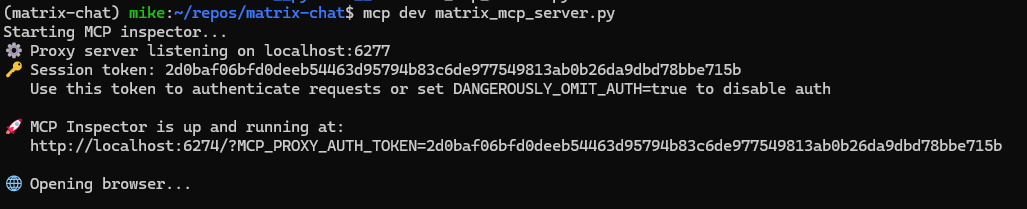
The server will:
The web interface shows all available tools and lets you test them interactively:
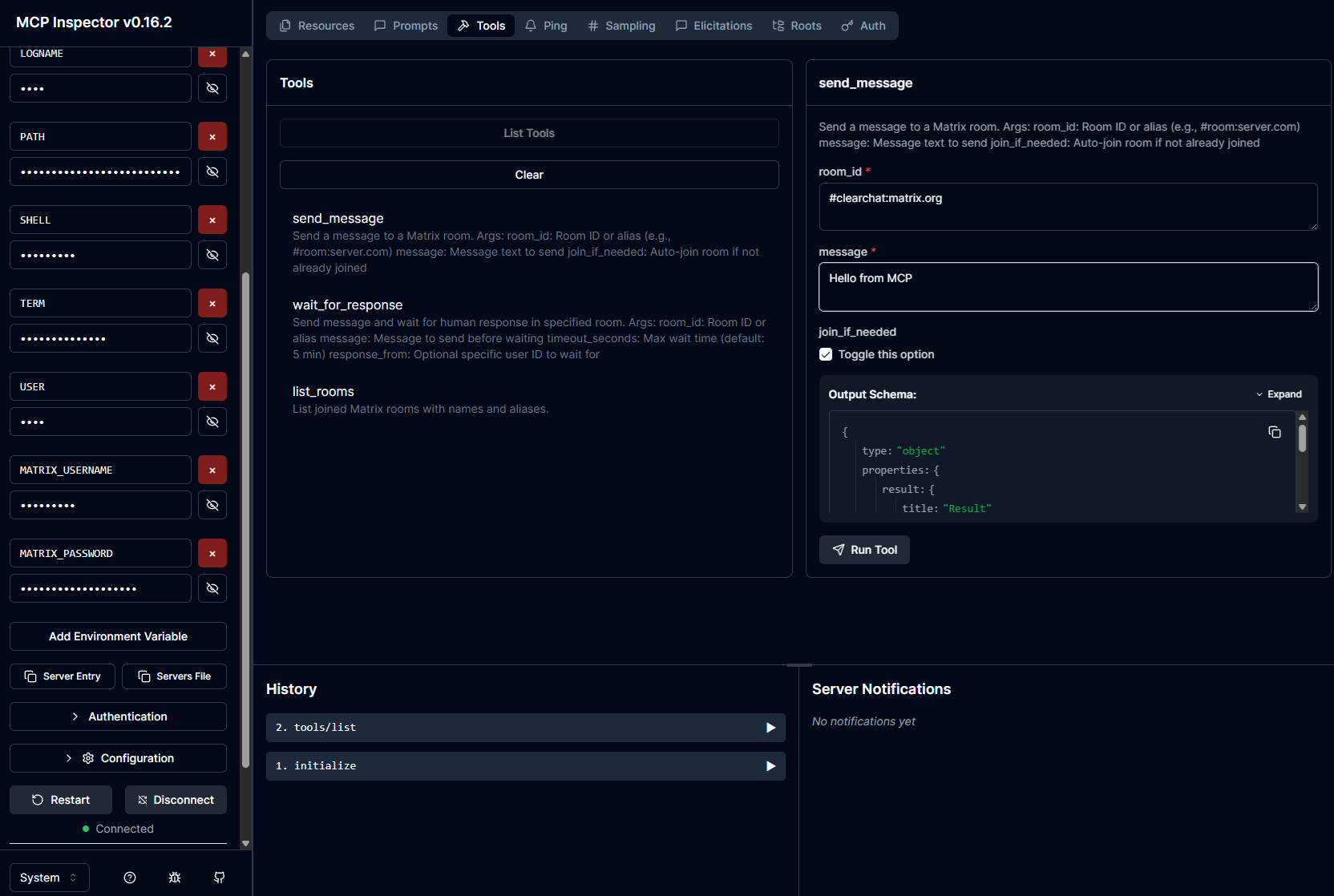
Available tools:
Testing send_message:
send_message tool#clearchat:matrix.org)Messages sent via the MCP tools appear instantly in Matrix clients:
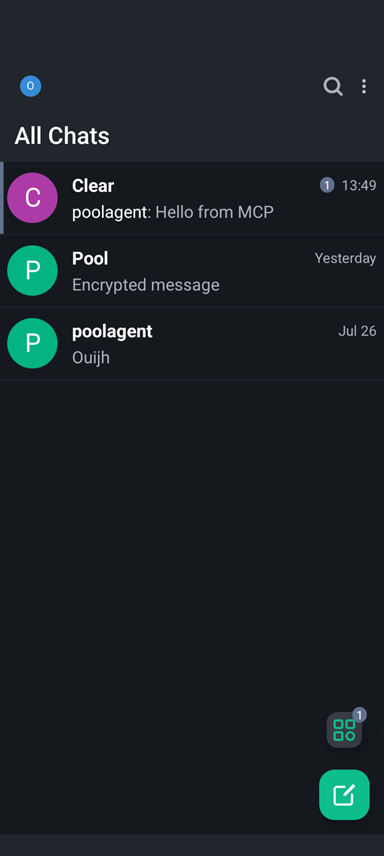
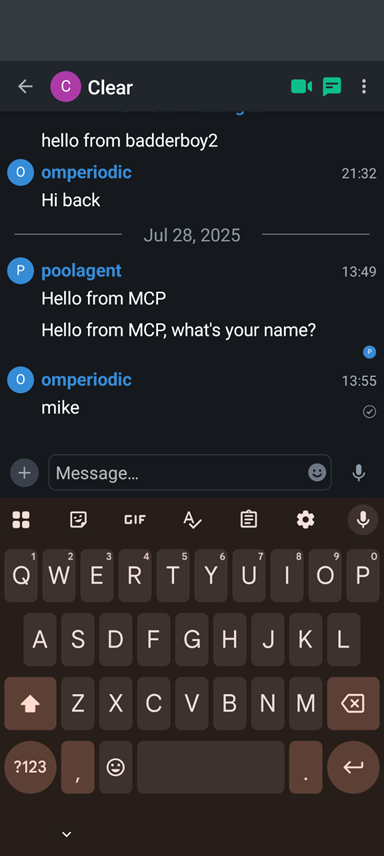
The screenshots show:
The message appears in the Matrix chat list showing successful integration.
Test the wait_for_response tool:
This enables approval workflows and human-in-the-loop AI systems.
The project includes two example SmolAgents scripts that demonstrate Matrix messaging integration:
Install the package:
uv tool install .
Install SmolAgents:
pip install smolagents
Set environment variables:
export MATRIX_USERNAME="[email protected]"
export MATRIX_PASSWORD="your-password"
export MATRIX_ROOMID="#test:matrix.org"
Verify setup:
python setup_verification.py
quote_agent_example.py)Sends a single random inspirational quote to Matrix and exits:
python quote_agent_example.py
Features:
interactive_quote_agent.py)A more advanced bot that can run in different modes:
1. Interactive Mode (default):
python interactive_quote_agent.py
2. Oneshot Mode - Ask for Category:
python interactive_quote_agent.py --oneshot
3. Oneshot Mode - Direct Category:
python interactive_quote_agent.py --oneshot --category motivation
python interactive_quote_agent.py --oneshot --category wisdom
python interactive_quote_agent.py --oneshot --category creativity
python interactive_quote_agent.py --oneshot --category perseverance
python interactive_quote_agent.py --oneshot --category random
The interactive quote bot works seamlessly across Matrix clients:
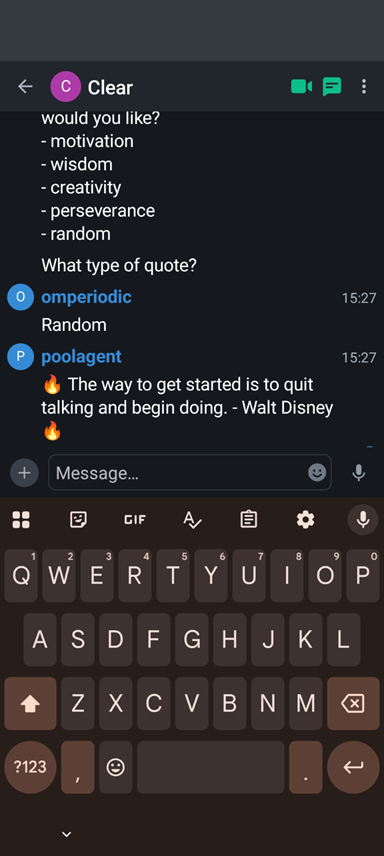
The screenshot shows:
The oneshot modes are perfect for:
Example cron job for daily motivation:
# Send a daily motivational quote at 9 AM
0 9 * * * /usr/bin/python3 /path/to/interactive_quote_agent.py --oneshot --category motivation
CLI Chat using Matrix including MCP server
เครื่องมือ
ยังไม่มีรายการเครื่องมือ เซิร์ฟเวอร์แบบรีโมตจะได้รายการหลังการตรวจสอบสถานะครั้งแรก
FAQ
คัดลอกคอนฟิก stdio สำหรับ Cursor, Claude Desktop, Claude Code หรือ VS Code ได้ในหน้านี้ คอนฟิกนี้ใช้การติดตั้งของผู้เผยแพร่ ไม่ใช่พร็อกซีของ PlugMCP
ระเบียนนี้ไม่ได้ระบุตัวแปรสภาพแวดล้อมที่จำเป็น
Matrix Chat ทำงานแบบโลคัลผ่าน stdio
ตรวจสอบล่าสุดเมื่อ 2026-10-28 CLI Chat using Matrix including MCP server

