PermLang
Know what your code can touch, before it ships.
Power your agent
คำสั่งของผู้เผยแพร่เอง ไม่ใช่เอนด์พอยต์ของ PlugMCP
Host a copy with our keys and logs.
npx -y [email protected]Claude Code ไม่มีลิงก์ติดตั้งสำหรับคำสั่งแบบโลคัล ให้คัดลอกคำสั่งด้านล่างแล้วรันในเทอร์มินัล
claude mcp add permlang -- npx -y permlang@0.4.3รันในเทอร์มินัล
{ "mcpServers": { "permlang": { "command": "npx", "args": [ "-y", "[email protected]" ] } }}claude_desktop_config.json
URL แบบรีโมตหรือคำสั่งบนเครื่องของคุณ? การติดตั้งสองแบบต่างกันอย่างไร
รันบน PlugMCP
A new server you create. It is not this listing's official endpoint. Use the publisher install when you want their URL and their credentials.
เปิดA safety check for TypeScript projects. It notices when a change makes your code contact a new server, read or write files, use a secret, or change your database, and makes sure someone sees it before it's merged.
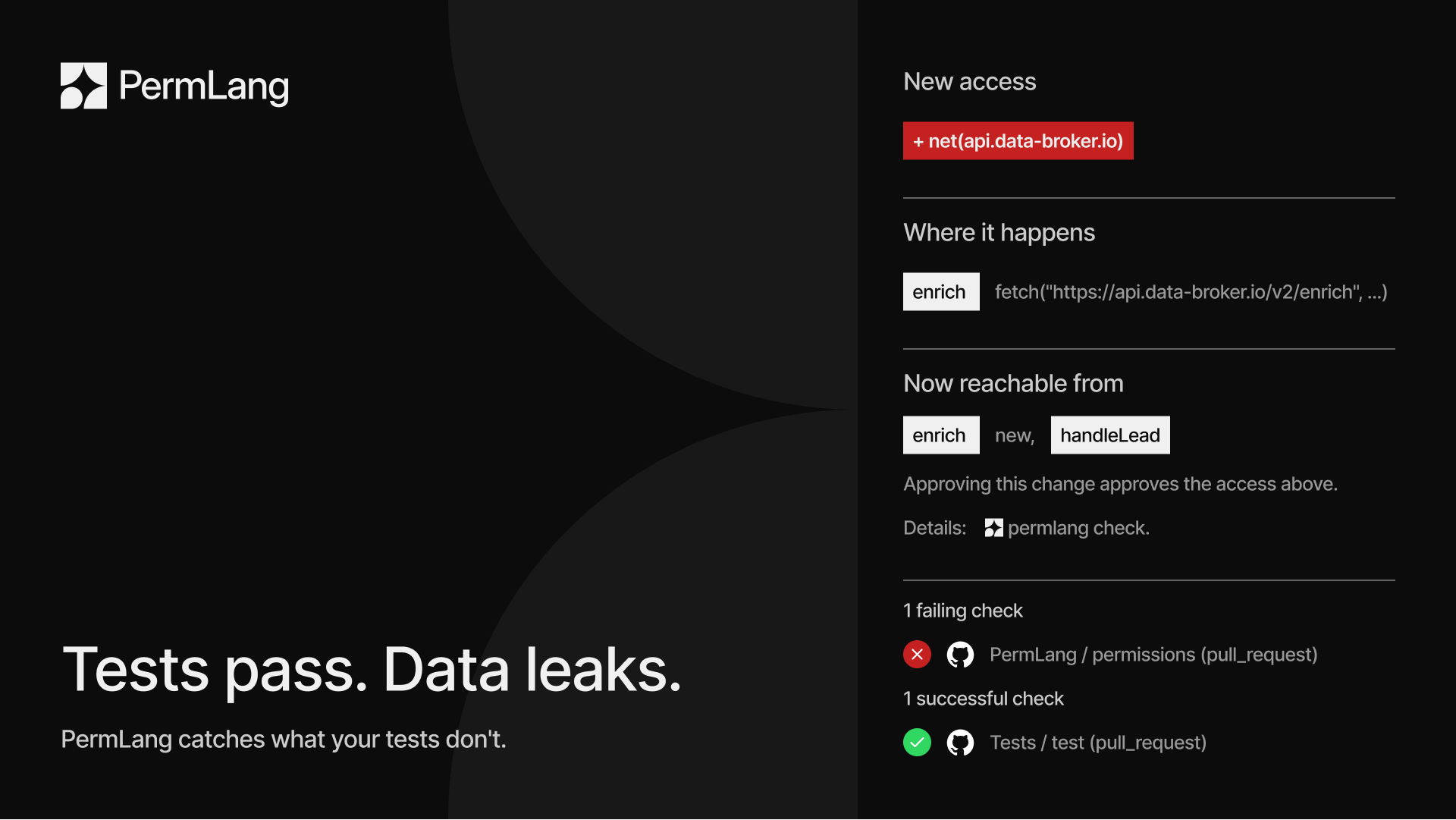
Code gets written faster than ever, much of it by AI assistants. One added line can send customer data to an unknown website, and in a pull request with hundreds of changed lines, that line is easy to miss.
PermLang works like the permission prompts on your phone ("This app wants to use your location"), but for your codebase. It keeps an inventory of what every part of your code can reach. When a change reaches something new, PermLang flags it, in plain view, on the pull request.
The image at the top is a real pull request: it adds an enrich helper that
sends each lead's email and phone number to api.data-broker.io. The tests still
pass. PermLang fails the check, marks the line, and comments with what's new.
In words: this change makes the code send data to api.data-broker.io from
enrich, and handleLead can now trigger it too.
See the pull request.
It also flags two things code review rarely catches:
The inventory catches anything new. To also set limits, developers write a one-line note above a function saying what it's allowed to do:
/** @perm net(api.stripe.com), db.write(orders), env(STRIPE_KEY) */
export async function chargeCustomer(order: Order) { ... }
If a later change makes that function do more, the build stops and says exactly where, and how to fix it:
src/billing.ts:9:9 error PERM001: chargeCustomer calls fetch("https://data-broker.io/enrich", ...)
  but its declared permissions do not include net(data-broker.io).
  -> add net(data-broker.io) to @perm, or remove the call.
PermLang follows calls between functions and files, so moving the access into a helper function doesn't get around it.
Start gentle and tighten up when you're ready.
In a TypeScript project:
npm install --save-dev permlang
npx permlang init src --workflow
This creates the inventory, a settings file, and a GitHub workflow that checks every pull request. Commit all three. The getting started guide walks through the rest in about ten minutes.
[!NOTE] PermLang is new (v0.x). Feedback, false positives, and missed access are all welcome as issues. See the changelog for what each release changes.
Upgrading from 0.3? The check fails with one error until you update PermLang (
npm install --save-dev permlang@^0.4.0), runnpx permlang lockwith the same paths as your check, review the updated inventory, and commit it (details).
PermLang is upfront about its blind spots, and reports them instead of hiding them:
eval, is reported.
At the default strictness it's an error until a developer marks it as
reviewed and gives a reason. Every such exception is listed.Does it work with code from AI coding assistants? Yes. It checks the code, whoever wrote it: GitHub Copilot, Cursor, another AI assistant, or a person. It's built for the pull request nobody reads line by line.
How do I see what my MCP server's tools can do?
Run npx permlang check src. The report lists every tool registered with MCP,
the Vercel AI SDK, the OpenAI SDK, OpenAI Agents, LangChain, LlamaIndex, Genkit,
and the other frameworks it recognizes, what each can reach,
and warns when a model could use one to run commands, write data, send to any
address, or read any file or secret it names.
More on AI tools.
How is it different from CodeQL or Semgrep? Those scanners look for known-bad patterns, such as SQL injection. PermLang tracks what your code can reach and flags anything new, even when it looks perfectly normal, like a call to an unfamiliar server. They work well together: PermLang's own repository runs CodeQL too.
Does it run my code or send it anywhere?
No. It reads your source with the TypeScript compiler and never runs it. Your
code stays on your machine or CI runner: the command-line tool makes no network
calls. The GitHub Action downloads what it needs to build PermLang (from npm),
and sends GitHub only its results, which quote short lines of code, for the
pull-request comment and annotations (and code scanning, if you turn that on).
The workflow init writes passes your installed packages, not your code, from
the job that installs them to the job that checks, as an artifact kept for a day.
Is it free? Yes. PermLang is open source under the Apache 2.0 license.
Apache License 2.0. See LICENSE and NOTICE. The license covers the code; it grants no rights to the PermLang name or marks (Section 6).
Build-time permission checker for TypeScript and AI agents. Fails the pull request when code starts reaching a new server, file, secret, database table, or CI permission, and flags risky MCP and other
{ "mcpServers": { "permlang": { "command": "npx", "args": [ "-y", "[email protected]" ] } }}ภาพรวม
Build-time permission checker for TypeScript and AI agents. Fails the pull request when code starts reaching a new server, file, secret, database table, or CI permission, and flags risky MCP and other AI tools.
เครื่องมือ
ยังไม่มีรายการเครื่องมือ เซิร์ฟเวอร์แบบรีโมตจะได้รายการหลังการตรวจสอบสถานะครั้งแรก
FAQ
คัดลอกคอนฟิก stdio สำหรับ Cursor, Claude Desktop, Claude Code หรือ VS Code ได้ในหน้านี้ คอนฟิกนี้ใช้การติดตั้งของผู้เผยแพร่ ไม่ใช่พร็อกซีของ PlugMCP
ระเบียนนี้ไม่ได้ระบุตัวแปรสภาพแวดล้อมที่จำเป็น
Permlang ทำงานแบบโลคัลผ่าน stdio
ตรวจสอบล่าสุดเมื่อ 2026-10-28 Build-time permission checker for TypeScript and AI agents. Fails the pull request when code starts reaching a new server, file, secret, database table, or CI permission, and flags risky MCP and other AI tools.
