Remind
Agent-driven memory layer for LLMs. Remind is a deterministic memory substrate with temporal facts, semantic retrieval, and structured curation — the calling agent is the only intelligence.
· ·
Power your agent
การติดตั้งจากผู้เผยแพร่ ไม่ใช่เอนด์พอยต์ของ PlugMCP
URL แบบรีโมตหรือคำสั่งบนเครื่องของคุณ? การติดตั้งสองแบบต่างกันอย่างไร
รันบน PlugMCP
A new server you create. It is not this listing's official endpoint. Use the publisher install when you want their URL and their credentials.
เปิด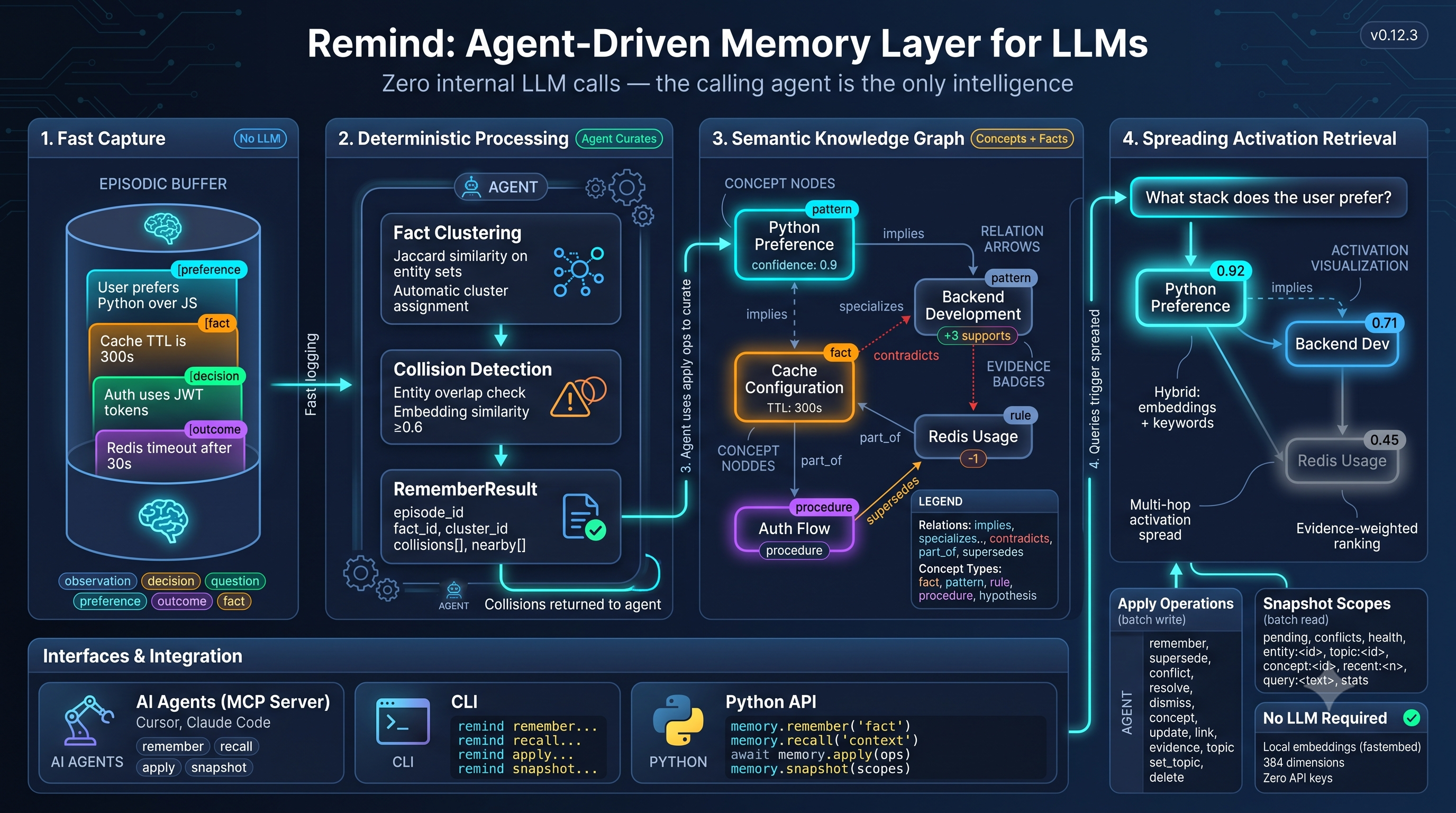
pip install remind-mcp
No configuration required — Remind uses local embeddings by default (fastembed, no API key).
remind remember "This project uses React with TypeScript"
remind remember "Chose PostgreSQL for the database" -t decision
remind remember "Cache TTL is 600 seconds" -t fact -e concept:caching
remind recall "What tech stack are we using?"
Local memory is stored as deterministic JSON records in .remind/memory/. Commit those files with the code; memories follow branch checkout and merge normally. .remind/cache/ and .remind/runtime/ hold ignored indexes, embeddings, logs, and recovery data. Existing local databases migrate automatically with a retained backup. Explicit sqlite://, PostgreSQL, and MySQL URLs continue selecting SQL directly.
remind --store ./my-memory remember "User prefers concise answers"
remind remember "Cache TTL is 600 seconds" -t fact --json --idempotency-key ttl-change
remind recall "cache configuration" --json --explain
remind doctor
remind export memory.json                # complete portable knowledge
remind export backup.json --mode backup  # also include embeddings and usage
Edits now require revisions from snapshot; CLI apply accepts --revisions '{"<id>":"<revision>"}', MCP/Python apply accepts expected_revisions. Read-only recall returns a structured RecallResult in Python; use .text for prompt context. Storage and migration describes the breaking changes.
Local evaluations cover capture → curation → restart → recall through Python, CLI, MCP, and REST. Run remind-eval --suite operational, remind-eval --suite retrieval (real local embeddings), or remind-eval --suite agent --agent-command '<runner command>'. See evals/README.md for datasets, gates, and the external runner contract. No internal LLM calls or CI are introduced.
Remind stores episodes (raw experiences) and concepts (generalized knowledge). You capture and curate memories explicitly using CLI commands or MCP tools.
For facts (-t fact), Remind automatically:
Fact row with validity trackingapply commandsFor any remember call, the output also surfaces the top-5 nearest episodes and concepts semantically, so you can catch contradictions before they go unnoticed.
For patterns and concepts, you use remind apply to create them from episodes:
remind apply --revisions '<ID-to-revision JSON from snapshot>' << 'EOF'
concept from=ep:11,ep:12 title="Retry-with-backoff for resilience" "Exponential backoff resolves flaky deploys and API timeouts."
processed ids=ep:11,ep:12
EOF
remind snapshot — Read stateremind snapshot stats pending conflicts health # Full overview
remind snapshot entity:concept:caching # Everything about an entity
remind snapshot concept:abc123 # Concept detail with history
# Browse scopes (for exploring memory)
remind snapshot concepts # All concepts
remind snapshot episodes:20 # Recent 20 episodes
remind snapshot entities:person # Entities filtered by type
remind snapshot labels # All labels with counts
remind snapshot decisions questions # Episodes by type
remind snapshot bootstrap # Query-free stable context
Returns JSON. Combinable scopes:
remind events — Poll the change feedremind events # All events from the start
remind events --since 42 # Only events after seq 42
remind events --kind conflict_opened --since 42
Every write (remember, supersede, conflict, resolve, dismiss, concept, update, label, unlabel, delete, restore, processed) appends an append-only row atomically with the write it describes. Returns {since_seq, count, events, next_since_seq} — pass next_since_seq back in as --since on the next poll instead of re-scanning snapshot pending.
remind apply — Write changesremind apply << 'EOF'
remember as=f1 t=fact e=concept:cache "Cache TTL is 600 seconds"
supersede old=fact:old123 new=$f1
concept as=c1 from=ep:1,ep:2 title="Pattern name" "Summary"
evidence concept=$c1 episode=ep:3 type=supports strength=0.8 "confirms pattern"
resolve id=conflict:7 winner=fact:abc "confirmed by alice"
processed ids=ep:1,ep:2
EOF
All operations run in a single transaction. --dry-run validates without executing.
Operations:
Install skills to teach AI agents how to use Remind:
remind skill-install
remind skill-install --agent claude       # Use .claude/skills instead
remind skill-install --dir ~              # Install into ~/.agents/skills
remind skill-install --agent cursor --dir /path/to/project
By default, skills go into .agents/skills under the current working directory.
Use --agent agents|claude|cursor|codex|opencode to select a layout and --dir
to choose any base folder. Codex uses .agents/skills; OpenCode uses
.opencode/skills in projects and .config/opencode/skills when targeting home.
Re-running the command overwrites installed skill files with the bundled versions.
Three skills:
For IDE agents (Cursor, Claude Desktop, etc.):
remind-mcp --port 8765
{
  "mcpServers": {
    "remind": {
      "url": "http://127.0.0.1:8765/sse?db=my-project"
    }
  }
}
Tools: remember, recall, snapshot, apply, plus conflict/entity management.
Web UI at http://127.0.0.1:8765/ui/, REST API at /api/v1/.
key=value tags on episodes/concepts, pushed down as a pre-filter into vector search (recall -l key=value), not just a post-filterevents table written atomically with every write; poll with remind events --since <seq> instead of re-scanning pending statesnapshot bootstrap returns deterministic, stable context (top concepts + conflicts + stats) with no embedding call, cheap enough to inject every turn--as-of)apply commandsremember call returns the top-k semantically nearest episodes and concepts for immediate conflict triagesupports, contradicts, qualifies); more evidence = higher recall rankpattern, rule, procedure, hypothesis, or any domain-specific labelreshape (change type), merge (combine overlapping), split (separate concerns), all with lineage trackingapply runs all operations atomicallyentity_relationLocal embedding is the default (384-dim all-MiniLM-L6-v2). For cloud embeddings:
pip install "remind-mcp[openai]"   # OpenAI embeddings
pip install "remind-mcp[rerank]"   # Cross-encoder reranking
{
  "embedding_provider": "openai",
  "openai": { "api_key": "sk-..." }
}
Local JSON records are the default; SQLite is used for disposable indexes. Explicit SQL URLs select a database backend. For PostgreSQL or MySQL:
pip install "remind-mcp[postgres]"   # PostgreSQL (psycopg v3 + pgvector)
pip install "remind-mcp[mysql]"      # MySQL (PyMySQL)
export REMIND_DB_URL="postgresql+psycopg://user:pass@localhost:5432/mydb"
Core
  remember     Add an episode (-t type, -e entity, -l key=value label, --asserted-by, --source-ref)
  recall       Semantic or entity-based retrieval (-k, --episode-k, -l label filter, --as-of)
  snapshot     Read memory state as JSON (combinable scopes)
  apply        Apply a batch changeset transactionally

Inspection
  inspect      List or detail concepts; use --episodes for episodes
  stats        Memory statistics
  entities     List entities or show details

Episode types
  decisions    Show decision episodes
  questions    Show open question episodes

Conflicts
  conflicts list/resolve/dismiss

Editing
  update-episode/update-concept
  delete-episode/restore-episode/purge-episode
  delete-concept/restore-concept/purge-concept

Embeddings
  embed-episodes  Backfill embeddings
  re-embed        Recompute embeddings (--episodes/--concepts/--entities/--all)

Import / Export
  export/import

Skills
  skill-install  Install Remind skills

UI
  ui           Launch the web UI
Entity types: file, function, class, module, subject, person, project, tool — format is type:name (e.g., file:src/auth.ts, person:alice, tool:redis, concept:caching)
Full documentation at sandst1.github.io/remind:
Apache 2.0 (LICENSE)
A memory layer for AI Agents
เครื่องมือ
ยังไม่มีรายการเครื่องมือ เซิร์ฟเวอร์แบบรีโมตจะได้รายการหลังการตรวจสอบสถานะครั้งแรก
FAQ
คัดลอกคอนฟิก stdio สำหรับ Cursor, Claude Desktop, Claude Code หรือ VS Code ได้ในหน้านี้ คอนฟิกนี้ใช้การติดตั้งของผู้เผยแพร่ ไม่ใช่พร็อกซีของ PlugMCP
ระเบียนนี้ไม่ได้ระบุตัวแปรสภาพแวดล้อมที่จำเป็น
Remind ทำงานแบบโลคัลผ่าน stdio
ตรวจสอบล่าสุดเมื่อ 2026-10-28 A memory layer for AI Agents