
squirrelscan
The website QA tool for your coding agent
squirrelscan is an Open Source cli tool that audits websites for SEO, performance, security, accessibility, agent experience and other issues, and gives your coding agent exact fixes. Run it from the CLI, inside your coding agent, in the cloud, or over MCP.
Combine your coding agent with a deterministic and extensible audit tool.

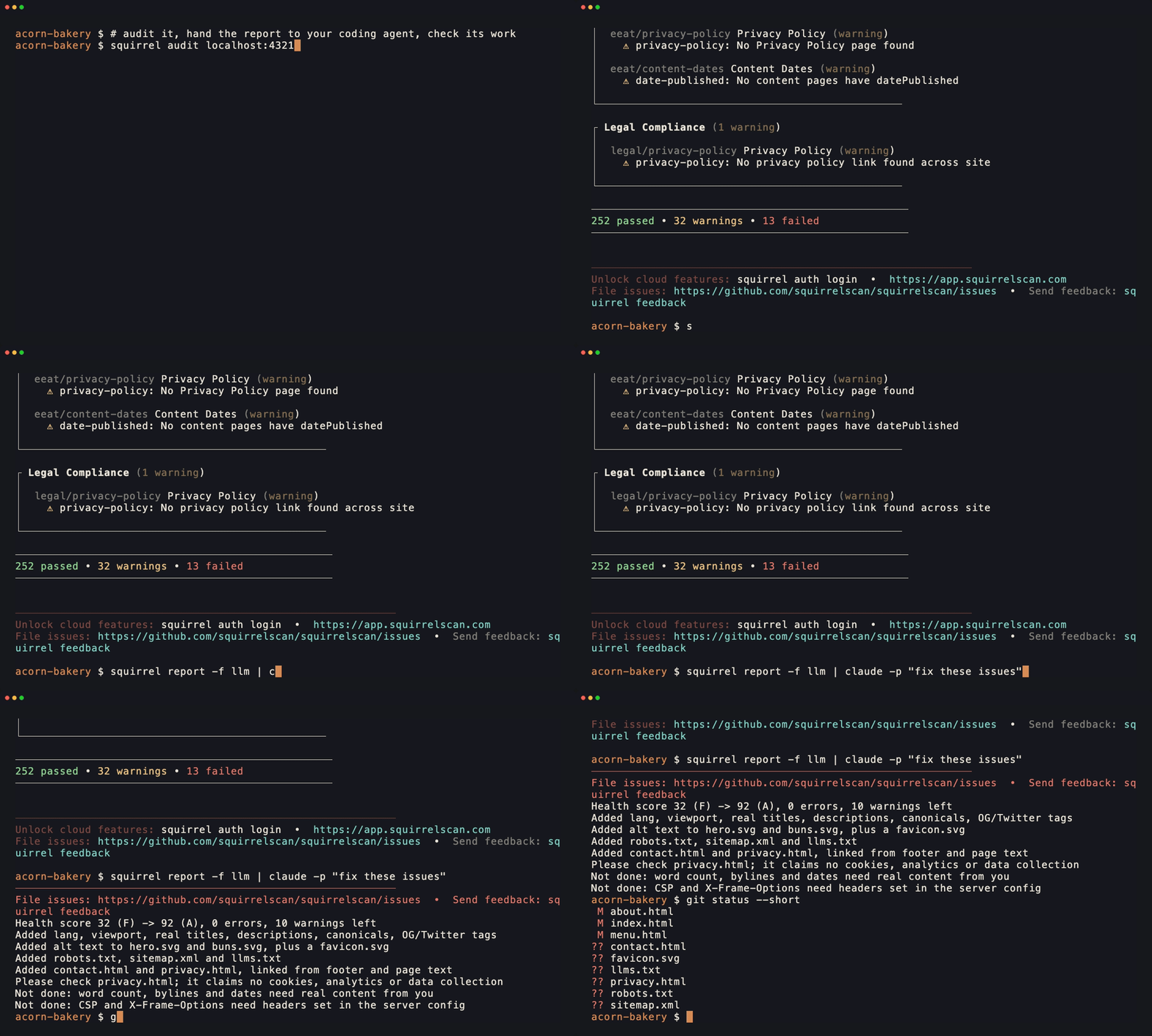
A real run on a tiny test site, with the released CLI (signed out, so free) and Claude Code. We cut the two minutes the agent spent working, because nobody wants to watch an agent think.
Features
- Built for coding agents - Skills for Claude Code, Cursor, Codex and any coding agent run the audit, fix and re-audit loop. Connect over the CLI, the hosted or local MCP server, or the API.
- Enriched fixes for you and your coding agent - Every finding says how to fix it, in LLM-optimized output your agent can apply, and every rule has its own docs page. Signed in, the report adds an editor's summary of what to fix first and the technology stack the site runs on.
- 300+ rules, 22 categories - Audit coverage across SEO, accessibility, performance, security, content and more.
- Agent experience - Audit how well AI agents can read, discover and act on your site: llms.txt, AGENTS.md, Markdown responses, and what AI crawlers are served.
- Link checking and monitoring - Perch, the cloud link checker, tells a broken link from a blocked one and confirms a failure before reporting it. On Pro and Team, scheduled audits email you when a link breaks.
- Security and site integrity - Detect phishing kits, injected pages, leaked credentials and missing security headers.
- Entity map - Your site's JSON-LD collapsed into one graph: one identity, or a new one on every page.
- Browser rendering in the cloud - Signed in, pages are rendered in a real browser in the cloud, so single-page apps and JavaScript-heavy sites are audited as visitors see them, at no extra cost per page.
- Cloud audits - AI page analysis, scheduled audits, a per-website issue tracker and shareable reports.
- Smart crawling - Fast and memory efficient, incremental with ETag, Last-Modified and content hashing, and resumable from checkpoints.
- Crawl history and changes - Track site evolution, compare crawls, spot regressions.
Rule categories
Ordered by how much a failure usually costs you, not by how many rules each one has.
Total: 300+ rules across 22 categories
See the rules reference for full details.
CLI
Installation
Paste into your coding agent (Claude Code, Codex, Cursor, opencode and friends):
Fetch and follow the setup instructions for squirrelscan at https://docs.squirrelscan.com/agent-setup/prompt.md
Your agent installs the CLI, connects MCP and runs a first audit. You can read exactly what it will follow first.
macOS / Linux:
curl -fsSL https://install.squirrelscan.com | bash
Windows:
iwr -useb https://install.squirrelscan.com/install.ps1 | iex
Homebrew (macOS):
brew install --cask squirrelscan/tap/squirrel
The cask installs a launcher that runs the regular installer on first use. The CLI then updates itself with squirrel self update; brew upgrade leaves it alone.
npm (all platforms):
npm install -g squirrelscan
npx (run without installing):
npx squirrelscan audit example.com
Quick start
# Audit a website
squirrel audit example.com

# Generate HTML report
squirrel audit example.com -f html -o report.html

# Pipe to Claude for AI analysis
squirrel audit example.com --format llm | claude

# Quick audit for a fast first look (other levels: surface, full)
squirrel audit example.com --level quick

# run only agent experience and performance rules
squirrel audit example.com --rule-include ax,performance

# login for cloud audits and cloud rendering
squirrel auth login
Reports
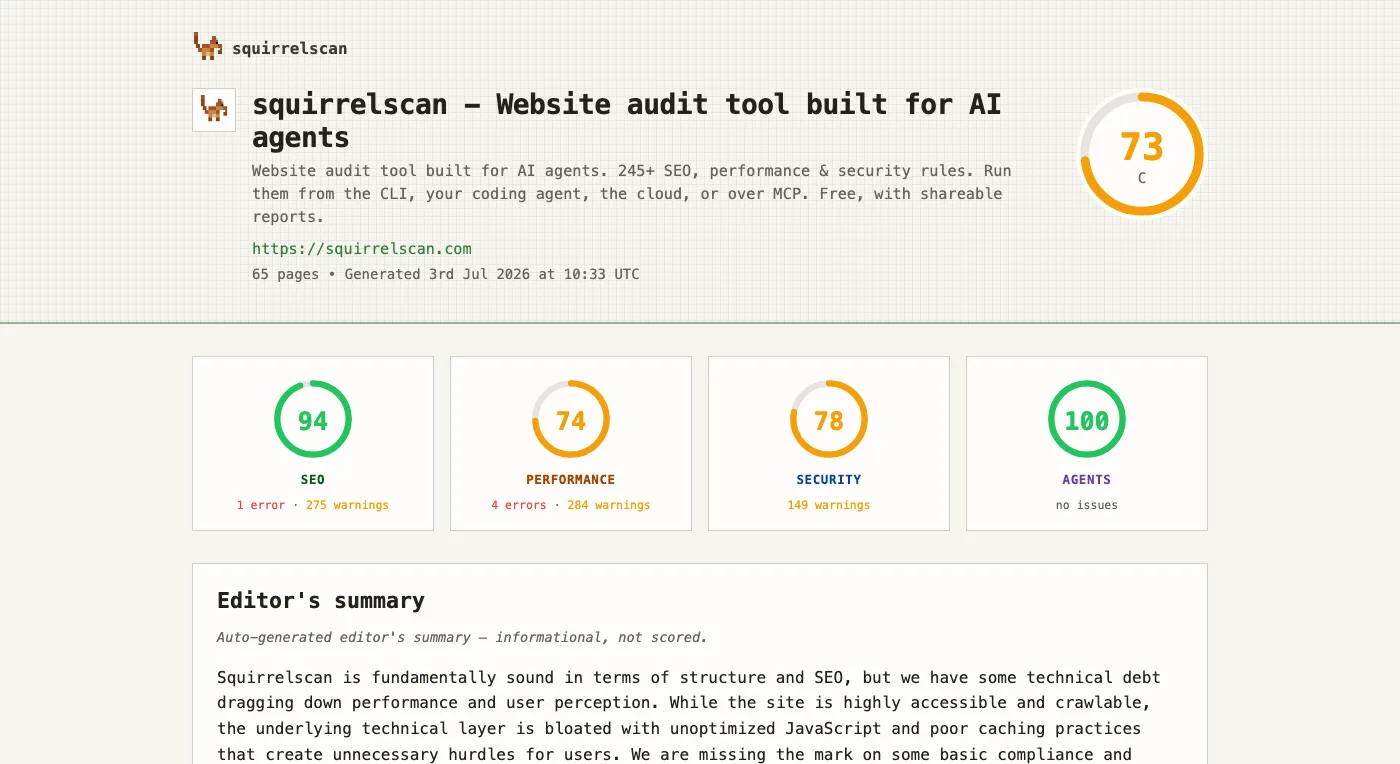
Category scores for SEO, performance, security and Agent Experience (AX). Publish reports to the web to share with team members or coding agents (fix instructions are embedded)
Add to your coding agent
squirrelscan ships as an MCP server (hosted at mcp.squirrelscan.com), skills (autonomous audit + fix workflows), and a plugin for Claude Code and Cursor. Cursor installs in one click from the badge above; the rest are a single copy-paste.
Cursor
Click the Add to Cursor badge above, or add it manually to ~/.cursor/mcp.json:
{
  "mcpServers": {
    "squirrelscan": { "url": "https://mcp.squirrelscan.com/mcp" }
  }
}
Skills: squirrel skills install
Claude Code
Install the plugin (bundles skills + the MCP server):
/plugin marketplace add squirrelscan/skills
/plugin install squirrelscan@squirrelscan
Or add just the MCP server:
claude mcp add --transport http squirrelscan https://mcp.squirrelscan.com/mcp
OpenAI Codex
Add the server to ~/.codex/config.toml:
[mcp_servers.squirrelscan]
url = "https://mcp.squirrelscan.com/mcp"
Codex reads Agent Skills from ~/.agents/skills, so skills work too: squirrel skills install
opencode
Add the server to opencode.json:
{
  "$schema": "https://opencode.ai/config.json",
  "mcp": {
    "squirrelscan": {
      "type": "remote",
      "url": "https://mcp.squirrelscan.com/mcp",
      "enabled": true
    }
  }
}
Any MCP client
squirrelscan is in the MCP Registry as com.squirrelscan/squirrelscan. Point any client at the remote server:
https://mcp.squirrelscan.com/mcp
Authentication is per-user OAuth (or pass a squirrelscan API key as a Bearer token). Skills follow the Agent Skills standard: squirrel skills install puts them in ~/.agents/skills/ and ~/.claude/skills/.
Skills
Two skills drive agent workflows. They live in squirrelscan/skills, along with the Claude Code, Cursor and Agent Plugins packages that bundle them with the MCP server. squirrel skills install downloads and verifies them itself, and from v0.0.99 squirrel's auto-update keeps them current. Installs made earlier with npx skills are taken over.
squirrelscan- operating the CLI: install, login, keys, credits, running audits, publishing reports, the entity map, MCP setup, config, troubleshooting.audit-website- the full fix loop: audit, map issues to source files, fix in batches, re-audit until the site scores well.
squirrel skills install
Then, in your agent:
Use the audit-website skill to audit this site and fix all issues but only crawl 10 pages
Output formats
Source and development
The complete local CLI, crawler, audit engine, rules, report generators, CLI-facing cloud clients, and documentation site are open source in this repository. The hosted API, website, dashboard, and cloud worker implementations are separate private services.
Prerequisites: Bun 1.4.0 and Git.
git clone https://github.com/squirrelscan/squirrelscan.git
cd squirrelscan
bun install --frozen-lockfile
bun run dev -- audit https://example.com --max-pages 10
Run the same checks used in pull requests:
bun run format:check
bun run lint
bun run typecheck
bun test
bun run build
bun run docs:check
bun run docs:build
See CONTRIBUTING.md before opening a pull request. Contributions require a Developer Certificate of Origin sign-off (git commit -s).
Telemetry
Telemetry is enabled by default and is deliberately minimal: event name, CLI version, a random install ID, and bounded error categories. It does not send credentials, URLs, report contents, or raw error messages, and telemetry requests are never authenticated.
Disable it permanently with:
squirrel self settings set telemetry false
Or disable all telemetry and install registration for any invocation by defining NO_TELEMETRY. Any defined value works, including an empty value, 0, or false:
NO_TELEMETRY=1 squirrel audit https://example.com
Links
- Website
- Documentation
- Coding agent integration
- Share feedback
- Bugs, issues and feature requests
- Twitter/X
If squirrelscan caught something your agent missed, a star on GitHub helps other developers find it.
License
The CLI and the repository contents are licensed under the MIT License. squirrelscan names and logos are covered by TRADEMARKS.md.