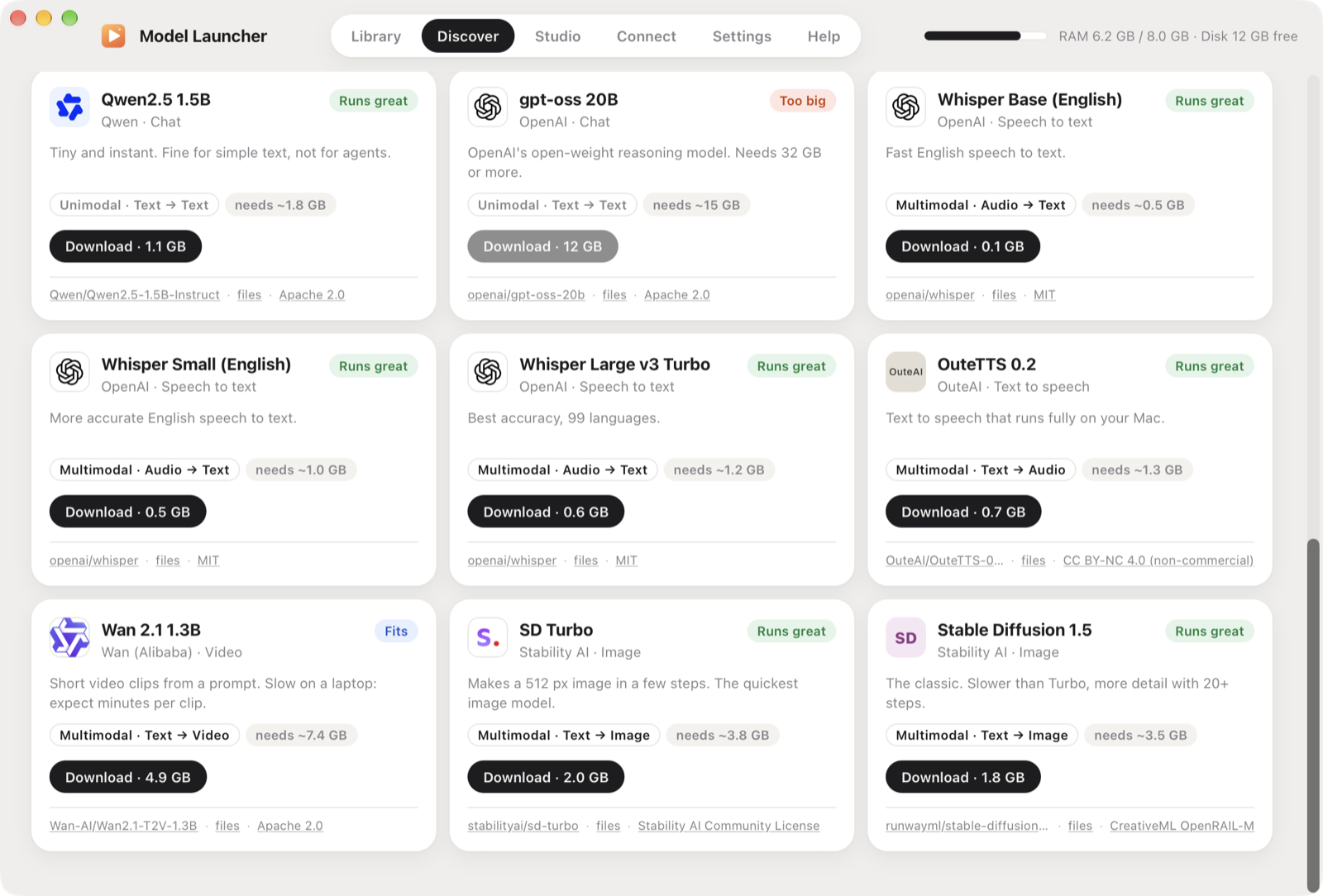
Model Launcher keeps your local models in one folder, shows which ones your Mac can run well, and starts one with a click. Any app that speaks the OpenAI API or MCP (Claude, Cursor, VS Code and others) can use the models it runs.
Power your agent
Yayıncıdan kurulum. PlugMCP uç noktası değildir.
Host a copy with our keys and logs.
Registry'de henüz paketlenmiş bir sürüm yok. Deponun README dosyasını izleyin.
Uzak URL mi, yoksa makinenizde bir komut mu? İki kurulum arasındaki fark
PlugMCP’de çalıştır
A new server you create. It is not this listing's official endpoint. Use the publisher install when you want their URL and their credentials.
BaşlatYayıncıdan
Model Launcher keeps your local models in one folder, shows which ones your Mac can run well, and starts one with a click. Any app that speaks the OpenAI API or MCP (Claude, Cursor, VS Code and others) can use the models it runs.
Launch open-source chat, voice, image and video models on your Mac (Linux in preview). Rust core, RAM limits with Run anyway and SSD offload, web access, computer-use benchmarks, OpenAI-compatible API and MCP server.
.gguf model (llama.cpp), including vision models that read images.~/Models/{Chat,Voice,Image,Video}/<model>/.Download the latest Model Launcher.dmg from Releases, open it and drag the app to Applications. Apple Silicon, macOS 13 or later.
The first time a model needs an engine, Model Launcher installs it: llama.cpp and whisper.cpp through Homebrew, and stable-diffusion.cpp from its official release.
Linux (preview): download the .deb (Ubuntu, Debian) or the .AppImage (any distro) from the same page. Engines come from the official llama.cpp, whisper.cpp and stable-diffusion.cpp releases: the Vulkan builds when your GPU supports Vulkan (NVIDIA, AMD or Intel), the CPU builds otherwise. Voice input needs ffmpeg, and the file picker uses zenity or kdialog. Settings, engines and logs live in ~/.local/share/Model Launcher, and models in ~/Models as on the Mac. The RAM budget covers system RAM; a separate GPU's video memory is managed by llama.cpp. The Linux build is new, so please open an issue if something's off.
The Benchmark page tests whether a model can use a computer. With Computer Use installed, the model works the Mac by itself, seeing the screen and clicking. The built-in test gives it 10 minutes to open Chrome, go to x.com and post a tweet. Press + New benchmark to write your own: what the model should do, the question you'll answer to check it, and a time limit. Afterwards you say whether it really worked, and the report (benchmark, model, Mac, time, every tool call) is saved to ~/Documents/Computer Use Benchmarks, ready to share on X or as an issue. Your benchmarks are files in its tasks folder, so you can share them too. Prefer the terminal? Computer Use's python3 scripts/benchmark.py does the same and writes to the same folder. See the guide.
API (OpenAI-compatible, on this Mac only):
curl http://127.0.0.1:11500/v1/chat/completions \
  -H "Content-Type: application/json" \
  -d '{"model": "qwen3-vl-8b", "messages": [{"role": "user", "content": "Hello!"}]}'
from openai import OpenAI
client = OpenAI(base_url="http://127.0.0.1:11500/v1", api_key="local")
Endpoints: /v1/models, /v1/chat/completions (streaming too), /v1/audio/transcriptions, /v1/audio/speech, /v1/images/generations, and /v1/videos/generations (not part of OpenAI's API; same shape as images).
MCP: in the app, open Connect and press Connect next to Claude, Claude Code, Cursor or Windsurf. Or add it to any MCP client by hand:
{ "mcpServers": { "model-launcher": { "command": "/Applications/Model Launcher.app/Contents/MacOS/model-launcher-mcp" } } }
Tools: list_models, chat, transcribe, speak, generate_image, generate_video, load_model, unload_model.
Models run in their own processes (llama.cpp, whisper.cpp, stable-diffusion.cpp), so a model can never crash the app, and quitting the app always frees their memory.
Issues and pull requests are welcome: new catalog models, Windows and Linux support, more engines (MLX, Kokoro TTS, FLUX) and UI polish. See docs/development.md.
Model Launcher stands on llama.cpp and whisper.cpp (ggml.ai, MIT), stable-diffusion.cpp (leejet, MIT) and Tauri (MIT/Apache 2.0). Every catalog model downloads straight from Hugging Face (https://huggingface.co/<repo>/resolve/main/<file>), and each card in the app shows the maker's logo and links its source and license. Logos are the makers' own Hugging Face avatars, shown to credit them:
Model weights aren't part of this repo and keep their own licenses. Check them before commercial use.
Model Launcher is free and open source. If it's useful to you:
Model Launcher's code is MIT.
Launch open-source chat, voice, image and video models on your Mac (Linux in preview). Rust core, RAM limits with Run anyway and SSD offload, web access, computer-use benchmarks, OpenAI-compatible API
Genel bakış
Launch open-source chat, voice, image and video models on your Mac (Linux in preview). Rust core, RAM limits with Run anyway and SSD offload, web access, computer-use benchmarks, OpenAI-compatible API and MCP server.
Araçlar
Henüz araç listesi yok. Uzak sunucular ilk sağlık kontrolünden sonra bir liste alır.
SSS
Bu sayfadan Cursor, Claude Desktop, Claude Code veya VS Code için stdio yapılandırmasını kopyalayın. PlugMCP proxy'sini değil, yayıncının kurulumunu kullanır.
Bu kayıtta gerekli bir ortam değişkeni listelenmiyor.
Model Launcher yerel olarak stdio üzerinden çalışır.
Son kontrol: 2026-11-05. Launch open-source chat, voice, image and video models on your Mac (Linux in preview). Rust core, RAM limits with Run anyway and SSD offload, web access, computer-use benchmarks, OpenAI-compatible API and MCP server.
