-
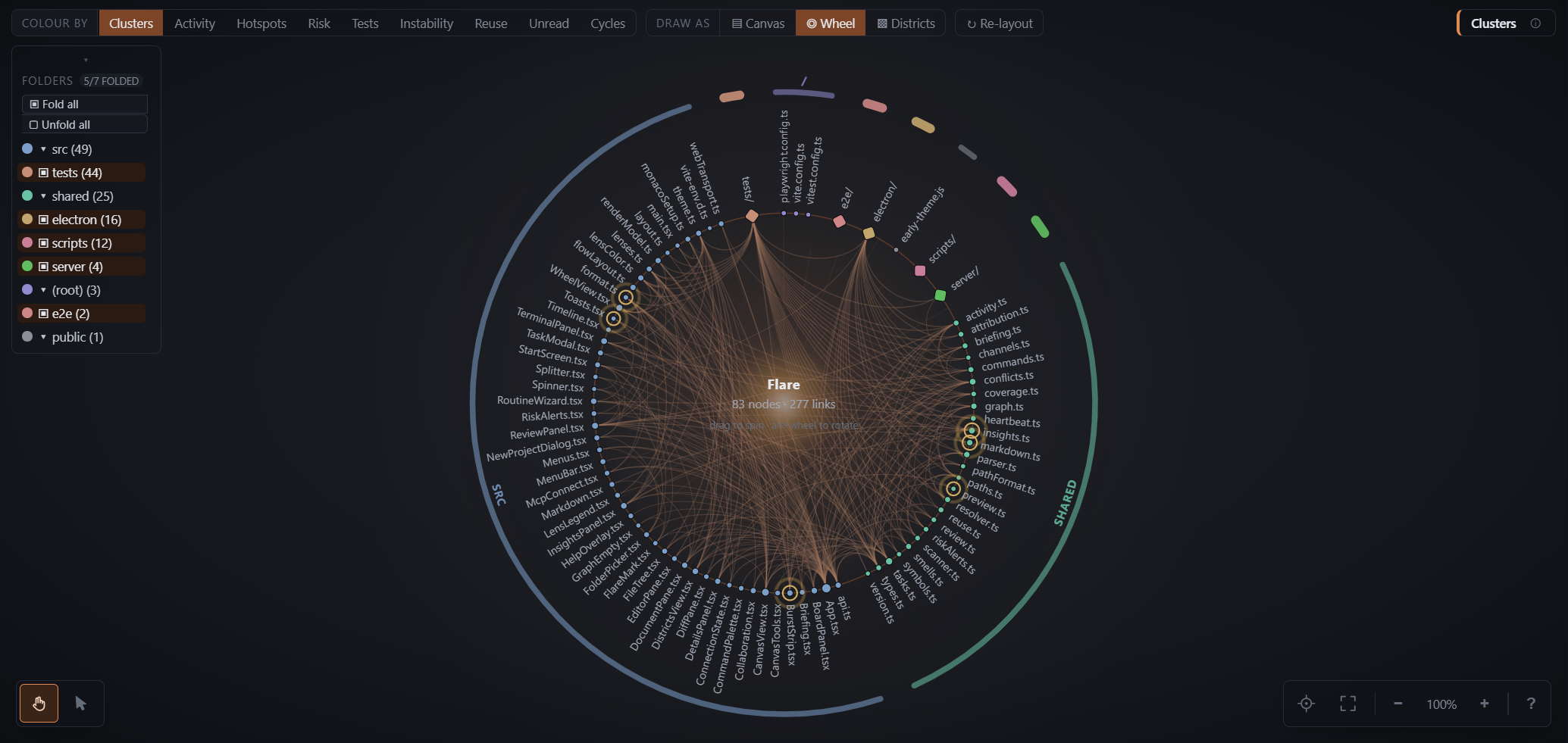
Folders that open one level at a time — a folder card holding more files
than fits on a screen unfolds into its sub-folders, not into four hundred
cards. A src/ that is 90% of the repo therefore has a middle state: it opens
into src/app, src/features, src/libs… with the dependencies between them
drawn, and each of those opens again. Folding it back remembers how far you
had drilled.
-
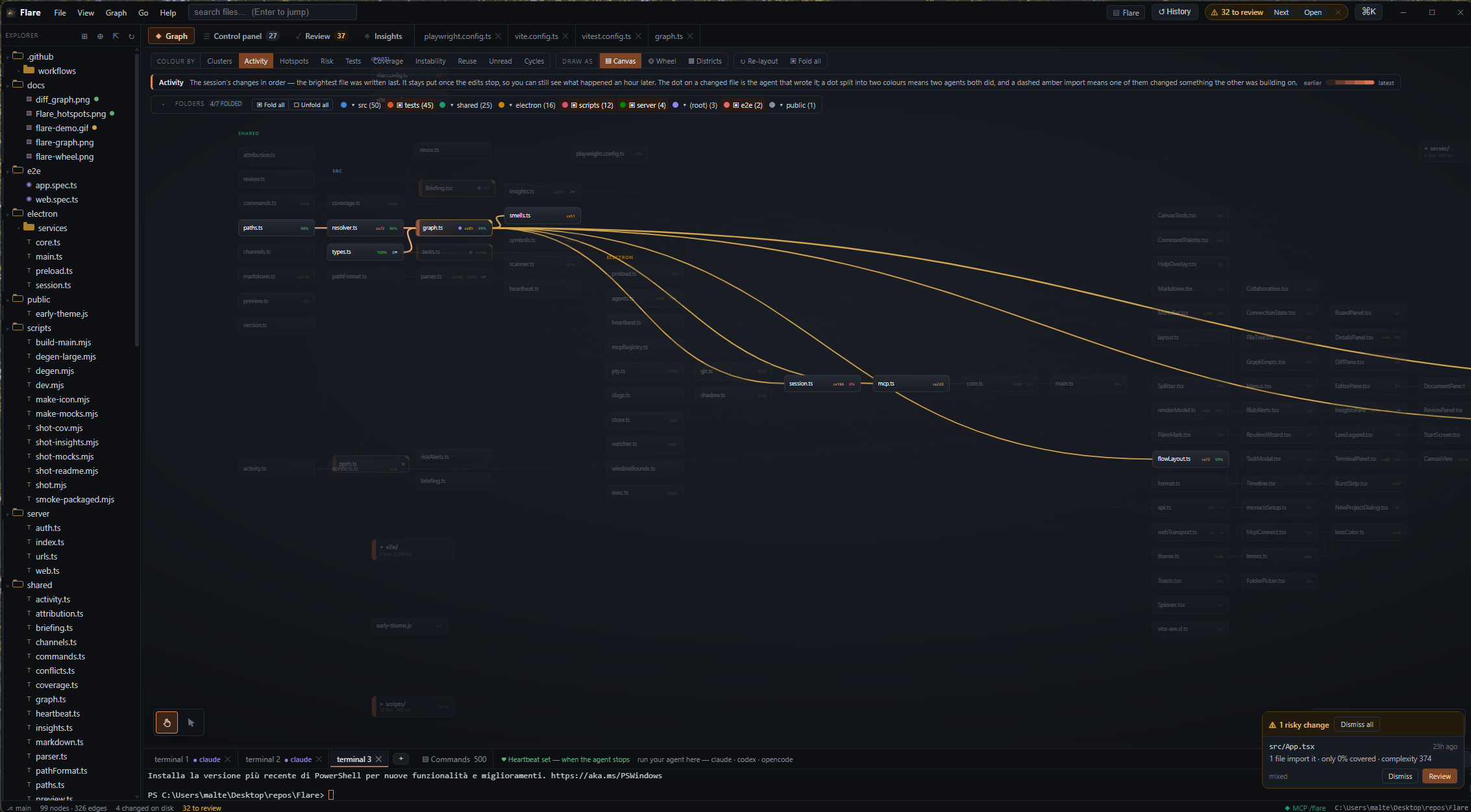
Lenses — recolour the same layout by Clusters, Activity, Hotspots
(churn × complexity), Risk, Tests, Coverage, Instability, Reuse, Unread or
Cycles. Whichever is active, a strip under the toolbar explains how to read
the colours and shows the matching scale.
-
Everything is discoverable — a VS Code-style File / View / Graph / Go /
Help menu bar, a ? cheat sheet listing every click, drag and shortcut for
the current view, and a tooltip on every control saying what it does rather
than what it is called. What acts on the view — pointer mode bottom-left;
centre, fit, zoom and the cheat sheet bottom-right — sits on the canvas
corners rather than in a toolbar strip above it.
-
Control panel — the collaboration, in three sections. Tasks is a
kanban of work written to be handed to an agent: a card's primary action is
Copy for agent, which emits the brief plus the files it names plus what
the graph knows about them ("29 files downstream, 0% covered, in an import
cycle"), so the agent starts from the map instead of spending half its
context rediscovering it. File a card straight from a graph selection with
right-click → New task with these files. Lanes are yours — add, rename,
reorder or remove them; removing one rehomes its tasks rather than dropping
them.
Design decisions is for the architectural calls an agent makes without
being asked — a module boundary, a dependency taken on, a data shape that
will spread, a refactor across several files. It records them with
decision_record before the code that assumes them and they land as
proposed, for you to agree or decline with a reason; an agent cannot
agree with its own proposal. Whether it then keeps building on one or leaves
the work that rests on it is your call, set in the routine.
Questions is what it needs from you, parked rather than blocking. Each
question names the tasks it holds up, so the rest of the board stays
workable; the agent picks up something else and halts only when everything
left is waiting on an answer. Answer it in the panel and the agent reads it
back over MCP.
All three are queryable over MCP, so an agent can run its own loop:
tasks_list (optionally by lane) to pick up work, task_get for the exact
brief a human would have pasted, task_update to log progress and move the
card to review, task_create to file follow-up work it finds but shouldn't
do now, decision_record, question_ask, and working_agreement when it is
unsure whether to keep going. Everything shows up in the panel live.
-
A routine, so it doesn't stop at the first question — the ⚙︎ Routine
wizard sets what the assistant does when it runs out of work: check the board
again rather than stopping, record design decisions you have not agreed to —
and either keep building on them or park the work that rests on them — and
park questions instead of halting on them, plus any house rules you type. It
renders the working agreement the agent actually reads — generated from the
switches, so turning one off removes its rule, and editable, because the
switches cover what every project wants and nothing of what yours wants said
in its own words. It stores it with the project, where working_agreement
returns it along with the state of the board: how many cards are waiting to
be picked up, how many are already in progress, how many are blocked, what is
waiting on you, and which card to take next.
That last part is written for more than one agent at a time. A card is only
offered if it is still sitting in the first lane — moving it to in-progress
is how an agent claims it, and no agent is ever pointed at a card another one
has started.
The last switch is the one that doesn't depend on the agent remembering any
of the others: check the board when it tries to stop. Flare answers your
assistant's stop hook with the state of the board, so a session that tries to
end while a card is still workable is handed that card instead, by name. It
adds a Stop hook to .claude/settings.local.json — local to your machine,
not committed — and takes it out again when you switch it off. Only ever
once per stop, so a session can always end, and never a card someone else has
already started.
Several agents on one board is the case all of this is built for: the panel
and every agent write through one place, and a write made against a board
that has moved on since is rebased rather than believed — so a click in the
panel cannot delete the card an agent filed a second earlier.
-
Channel — a room the agents talk in — several agents on one repo do not
collide because they are careless; they collide because nothing tells them
what the others are already inside. Each one sees a clean tree, opens the
file its task points at, and finds out about the other when you read a diff
where two changes have been folded together with no seam.
Flare cannot lock the file. It watches a filesystem rather than sitting in
front of one, so a lock could only be a request an agent is free to ignore —
and one that silently fails open is worse than none, because everyone
downstream believes it held. What it can do is give them somewhere to talk,
and then draw what was said on the map. The Channel tab is that room:
Claude 2  taking   shared/graph.ts, shared/resolver.ts
                   moving the workspace lookup out of the resolver
Codex 1   asking   @Claude 2 — is shared/graph.ts free? I need the edge
                   builder for the cycle fix
Claude 2  done     shared/resolver.ts — all yours
Three habits, and the tool descriptions ask for all three: say what you are
taking before you start (chat_post with kind: "taking" and the paths —
files or whole folders), read the room when you finish something
(chat_read, which hands back only what you missed), and ask by name
when you want a file someone has spoken for. You are in the room on the same
terms: type into it from the panel and the agents read it back over MCP.
Nothing is refused. Two agents may both say they are taking the same file —
and when they do it is drawn as contention rather than resolved behind their
backs, at the top of the tab and as a two-tone mark on the graph, because the
two of them settling it is the only thing that actually settles it. An agent
that writes a file another agent had spoken for is not blocked either; the
crossing lands in the review with both names on it. Everything an agent says
lapses on its own, so a session that is killed mid-edit does not hold a
folder for the rest of the afternoon.
It reads as a chat, because it is one: bubbles, consecutive lines from one
speaker grouped under one name, your own posts on the right, and each agent
carrying a geometric mark — ● ◆ ▲ — assigned with its colour and never apart
from it, so the ▲ agent is the same amber one on the card, in the review and
in the room. The tool descriptions ask the agents to write prose a colleague
could read rather than status codes, and the prose is what the bubble leads
with.
Every line about files also opens. Everything said here is a claim, and
Flare is the only participant that watched what followed — so a turn expands
into what actually happened to the files it named: which the speaker went on
to write and when, which it never touched, and who else wrote one of them
afterwards. That last line cannot be got any other way, and the message it
crossed is where you are already looking when you want it.
-
Claude 1, Claude 2, Codex 1 — the identity everything above rests on. A
process list cannot tell two claude sessions apart (both are equally
"running" in every sample) and neither can the board (it attributes by path,
so an agent editing a file on someone else's card is recorded as them). The
MCP session can: it is minted on initialize, echoed back on every request,
and impossible for another client to answer to. Flare names each one from the
tool it says it is plus the next free number, and that name then follows it
everywhere — the ring on a node, the author of a change burst, the parties in
a crossing, the row in the roster. Numbers are never reused inside a session,
because a "Claude 1" that becomes a different agent halfway through would
merge two of them in every sentence that mentions it.
In the review, that shows up as a chip per agent above the change list —
name, files written, how many of its changes nothing has checked — and
clicking one narrows the list to that agent's work. One agent leaving all of
its changes unverified is a fact about that agent, and it is invisible when
its bursts are interleaved with two others' down a scrolling list.
-
Review cockpit — the tab that answers the questions a file-by-file diff
can't. Changes are grouped into bursts (one batch of writes by one author),
and each burst shows:
-
what actually checked it. The IDE sees both the file writes and the
commands run in its terminals, so it can say "the tests ran, then two more
files were edited and nothing re-ran" — the states are verified / failed /
checked, then edited again / never checked, always quoting the output
line the verdict came from.
-
who did it. Not "an agent" — Claude 2, in its own colour, with what
it was doing beside the name. With three of them on one repo that is the
difference between a list of changes and a list you can act on.
-
what it was trying to do. Agents call the record_intent MCP tool
before editing — or say it in the channel, which counts as the same thing;
otherwise the burst says so plainly, because reviewing an agent's diff
makes you the first human to see that code with nothing explaining why it
exists.
-
what the session was about. Everything else in the panel is derived
from what Flare watched; this is the one thing it has to be told, because
the answer does not exist in any single burst. It exists as a story, and
the only participant who knows the story is the agent that lived it — so
it is asked for, over MCP, before the session ends. session_summary
takes a headline and chapters: a line of prose per piece of work and the
files each one covers, and they sit at the top of the review, over the
diff they are about.
Not on trust, though. Flare watched the writes, so it binds every chapter
to the bursts underneath it and reports the three ways a story and a
session disagree: a chapter naming files that never changed (work
described that did not happen — the one kind of wrong you cannot catch
from a diff, because there is no diff to catch it in), files that changed
and no chapter accounts for, and chapters covering work nothing has
verified. That audit goes back to the agent in the tool's reply as well
as onto the screen, so the usual outcome is that it fixes its own summary
before anyone reads it:
Your chapters account for 2 of the 3 files you changed.
  "Left the workspace cache alone" names shared/cache.ts, which never
  changed — say what you actually did to it, or drop it.
  Not mentioned anywhere: src/components/ReviewPanel.tsx.
-
which files deserve attention. Every file is tiered read carefully /
read / skim from blast radius, coverage, cycles and complexity, with the
reason spelled out ("9 files break if this is wrong", "no test covers it"),
so a 30-file change doesn't get 30 equal glances. The tier is a heading
over its group rather than a badge on every row, and on a big change the
skim group starts folded.
-
Risky changes come and find you — the review tab is a tab, so a load-
bearing file rewritten while you were reading the graph goes unnoticed until
you go and look. Those changes queue behind a chip in the top bar instead,
beside the review count: a number you can see from across the room, and the
cards one click under it, newest first, staying put until answered.
Review opens the change on its row in the review panel, Dismiss stops
that card, Dismiss all clears the queue. Dismissing an alert is not
approving the change — the file stays flagged, unread and exactly as the
agent left it.
It is a chip rather than a floating panel because there is no corner for one.
The bottom-right is the terminal, where a card hides the output of the very
agent whose change it is reporting on; the top-right is where every tab keeps
its own controls, so a panel there sits on + Lane, on Re-layout, on the
channel's composer, and swallows the clicks meant for them. A queue that is
usually non-empty during an agent session cannot be a panel. The transient
toasts keep that corner — they have no controls at all, so the whole stack is
click-through and can never eat the next thing you press. The bar is the
careful tier plus something absolute (real dependents, a cycle, real
complexity, no test at all), so a repo where nothing is load-bearing stays
quiet rather than popping a card for its least boring file.
-
Comprehension debt, measured — the Unread lens paints every file that
changed this session and no human has opened since; approving does not clear
it, opening the file does. Insights shows the repo-level percentage.
-
Every command classified — the command log labels each observed command
read / writes / verify / network / destructive, filterable, with the
pass/fail verdict next to verification runs. Destructive commands
(rm -rf, git reset --hard, push --force, npm publish, …) raise an
alert and trigger a snapshot.
-
Coverage ingestion — drop an lcov.info (vitest/jest --coverage, nyc,
pytest-cov…) in coverage/ or the project root and it's picked up live: a
Coverage lens appears, per-file percentages land in the details panel and
hover cards, and real coverage replaces the test-linkage heuristic inside
the review-risk score.
-
Drill-downs — collapse any directory into an aggregate meta-node (click
its legend chip or double-click the node); expand any file into its
functions/classes with symbol-level edges. Shift-click two nodes to highlight
the import path between them.
-
Cross-agent tracking — the process tree of every terminal is watched for
claude / codex / opencode / aider / …; changes made while an agent runs are
attributed to it (coloured node rings, trails on the graph, "changed by" in
details), and every shell command run in the terminals lands in the
Commands log (▤ button in the terminal bar, persisted per project). That
is the terminal half of it — the MCP half, which is what tells two claudes
apart and puts a mark on the files each of them is inside, is the room above.
-
Command palette — Ctrl+K: fuzzy-jump to any file, > for commands,
recent projects. Ctrl+B sidebar, Ctrl+W close tab, Ctrl+0 fit graph,
Ctrl+=/− zoom, Esc collapses focus/drill-down. Full list under
> keyboard shortcuts.
-
Insights — a unified metrics + issues view: per-file risk/hotspot/
refactor composites, blast radius, churn (git + session), coverage, TODOs,
co-change coupling; severity-ranked rules (regression-risk, god-file,
agent-thrash, coverage-gap, cycles, dead code…) with a critical-alert badge
and toasts.
-
Reuse — how cleanly each file would come out if you lifted it into a
package, 0–100, plus one number for the whole repo. It counts the four
things that actually stop you: talking to the host (fs, sockets, a
database), being bound to a framework, dragging a large share of the repo
along, and sitting in an import cycle. Being widely imported is not a
penalty — a util forty files depend on is the most reusable thing you have,
which is the opposite of how risk reads the same number. Unlike the other
composites it is an absolute scale rather than a ranking within the repo: if
everything imports fs, the least-bad file has not become reusable. The
mixed-concerns rule points at the files where logic is trapped behind the
plumbing and worth separating.
-
MCP server for your agents — one shared, localhost-only endpoint for
the whole machine, however many Flare windows are open. Each instance
runs a private ephemeral server and registers in a per-pid file registry;
whichever instance holds the well-known port (default 7345,
FLARE_MCP_PORT) acts as the gateway and routes …/mcp/<slug> — the same
stable per-project slug the browser server uses — to the owning instance,
proxying when needed and taking over the port when the holder exits. Bare
/mcp works with a single session; with several it points the agent at
list_projects. Connect agent, in the terminal bar, opens a dialog with
the two steps — and they are genuinely two. Registering the server is a
config change you make once per machine, and it is different for each of the
three: a command for Claude Code, a command for Codex, JSON in a file of its
own for opencode.
claude mcp add --transport http flare http://127.0.0.1:7345/mcp/<slug>
The second step is the one that is easy to skip and shouldn't be: the line
you open the agent with. Attaching the tools does not make an agent read
them, and everything this project expects — taking a card before starting it,
saying in the channel which files it is about to edit, writing the session
down before it stops — comes back from one call. So the dialog hands you a
message to paste, with the endpoint in it, that says to make that call first:
This project is open in Flare, which is on MCP at http://127.0.0.1:7345/mcp/<slug>.

Start by calling `working_agreement` — it says how this project wants you to
work, what is on the board, and who else is in here. Then take the card it
points you at.
It is deliberately short. A paragraph restating the protocol would be a
second copy of it, going stale the moment you change the ⚙︎ Routine — and the
agent is about to be handed the current version by the tool itself.
Tools: graph_overview, file_info, dependents, dependencies,
find_path, issues, top_files, search, impact_of (what breaks +
which tests to run before changing files), recent_activity,
verification_status (did my changes actually get checked?),
record_intent (state the goal before editing, so the human reviewing the
diff isn't reconstructing it), the board tools — tasks_list, task_get,
task_update, task_create — the collaboration tools: decision_record,
decisions_list, , , and
for what to do next — and the tools for working alongside other agents:
, and . The agent asks the IDE about the
codebase instead of re-deriving it.
-
Workspace restore — tabs, lens, active view, panel sizes, collapse
state, node positions and window bounds all persist per project.
-
Live change tracking — a debounced watcher re-parses changed files and
patches the graph in place. Changed-but-unreviewed nodes are marked in
warning-orange with a heat decay, so an agent's progress is visible as it
works.
-
Review queue — every file changed since your last checkpoint is flagged.
Nothing is gated: an agent writes straight to disk, so reviewing is deciding
what to keep. Dismiss clears the marker and changes nothing; revert puts the
files back. Review next walks them worst-risk first, and each node shows its
blast radius (transitive dependents), import counts and symbols.
-
Shadow history ("git of local changes") — a hidden git repo (separate
GIT_DIR, your worktree) auto-commits every change burst. Timeline panel lists
snapshots; diff any file against any snapshot, revert one file or restore the
whole tree. Your real repo is never touched.
-
Git integration — branch + per-file status in the tree and graph, diff vs
HEAD in a Monaco diff editor.
-
IDE basics — file tree, Monaco editor (VS Code's editor) with Ctrl+S save
and external-change reload, multiple terminals (xterm.js + node-pty) running
real shells.
-
Light and dark — View ▸ Theme, following your desktop unless you pin
one. A theme is a single block of tokens in src/styles.css: the neutral
ramp runs surface→ink rather than dark→light, so the ~460 places the
stylesheet names a step do not change when a theme is added. The three
things that draw outside CSS — the graph, the editor and the terminal —
read those same tokens rather than carrying palettes of their own, and
tests/palette.test.ts holds the line: colours only inside a palette, none
in the roles, and every theme declaring the same tokens so a half-written
one fails loudly instead of rendering with holes in it.