🧠 rm-brain
A local-first "second brain" for your handwritten reMarkable notebooks — searched through a normal Claude Desktop conversation.
Power your agent
Yayıncıdan kurulum. PlugMCP uç noktası değildir.
Host a copy with our keys and logs.
Registry'de henüz paketlenmiş bir sürüm yok. Deponun README dosyasını izleyin.
Uzak URL mi, yoksa makinenizde bir komut mu? İki kurulum arasındaki fark
PlugMCP’de çalıştır
A new server you create. It is not this listing's official endpoint. Use the publisher install when you want their URL and their credentials.
BaşlatBuilt by Gabriel Anhaia · ☕ Buy me a coffee
The local web app — dashboard · search · notebooks · page detail · entities. Fictional example data.
rm-brain quietly syncs the notebooks you drop into a Brain folder on your reMarkable, transcribes and classifies the handwriting with the Claude API, and stores everything in a local SQLite database. You then search and explore your notes as an ordinary conversation in Claude Desktop — no separate app, no hosted service, using your existing Claude subscription.
You: "What did I decide about the Acme pricing model?" Claude: Pulls it from your notes and answers with receipts — notebook name, page number, date, and the scanned page.
It's designed to feel less like a search box and more like a system that quietly organizes itself and surfaces things you forgot about.
flowchart TD
    A["☁️ reMarkable Cloud"] -->|"rmapi: list Brain folder · stat · get"| B["📦 .rmdoc archive<br/>(.rm v6 vector files)"]
    B -->|rmc| C["🖼️ per-page SVG"]
    C -->|rsvg-convert| D["🏞️ page PNGs"]
    D -->|"Claude vision · 1 call/page"| E["✍️ Extraction<br/>text · type · entities · open loops"]
    E --> F[("🗄️ SQLite + FTS5<br/>~/.rm-brain")]
    CLI["⌨️ CLI<br/>sync · search · backup"] --> F
    F <--> G["🔌 MCP server"]
    G <--> H["💬 Claude Desktop"]
    G <--> H2["🤖 ChatGPT"]
    G <--> H3["✦ Gemini"]
    F --> W["🖥️ Web app<br/>browse · search (localhost)"]

    classDef cloud fill:#e8f0fe,stroke:#4285f4,color:#1a1a1a;
    classDef local fill:#e9f7ef,stroke:#27ae60,color:#1a1a1a;
    classDef ai fill:#f3e8fd,stroke:#8e44ad,color:#1a1a1a;
    class A cloud;
    class B,C,D,F,CLI,W local;
    class E,G,H,H2,H3 ai;
The MCP server speaks the open Model Context Protocol, so any MCP-capable assistant can use your notes — Claude Desktop (the primary, best-tested target), ChatGPT, Gemini, and others. See docs/mcp.md.
reMarkable notebooks are stored as proprietary .rm v6 vector files (not PDFs), so pages are
rendered with rmc + rsvg-convert. See
ARCHITECTURE.md for the full design.
db.sqlite, page images, and the manifest live in one folder
(~/.rm-brain by default) and never leave your machine as a whole.sync, and (b) individual queries + retrieved snippets sent through MCP
while you search in Claude Desktop.sync prunes
it from your local index — pages and images included./^\./, /private/i, or
/noindex/i is skipped entirely, even inside the Brain folder — and so is anything filed under
a subfolder with such a name (e.g. Brain/private/…).list / stat /
get); it never uploads or modifies anything.✅ No jailbreak, rooting, developer mode, or SSH hacks — ever. rm-brain works entirely through reMarkable's official cloud sync (via
rmapi). Your tablet stays completely stock, stock firmware, and under warranty. Nothing is installed on or modified on the device.
# 1. Install
git clone https://github.com/gabrielanhaia/remarkable-brain.git
cd remarkable-brain
npm install && npm run build
npm link            # puts `rm-brain` on your PATH

# 2. Guided setup (pairs rmapi, saves your API key, wires Claude Desktop)
rm-brain setup

# 3. On the tablet: create a "Brain" folder, move a notebook in, let it sync
rm-brain sync

# 4. Fully quit & reopen Claude Desktop, then just ask it about your notes
The setup wizard checks your tools, pairs rmapi, prompts for your API key once and saves
it (to ~/.rm-brain/config.json, chmod 600 — no re-export needed), helps you pick the
Brain folder, offers to run the first sync, and can write your Claude Desktop config
automatically. Re-run it anytime — it's idempotent.
Once a notebook is indexed and Claude Desktop is connected, just talk to Claude:
Prefer to see your notes? rm-brain ships a local-first, read-only web app — an alternative way to browse and search your indexed notebooks and view the actual scanned handwriting in the browser. Its design is a quiet, fountain-pen-ink-on-fine-paper reading room that follows your system light/dark theme (scans always stay light paper, so handwriting never inverts). It complements the conversation, it doesn't replace it: asking questions still happens in Claude Desktop (over MCP); the web app is for seeing and searching.
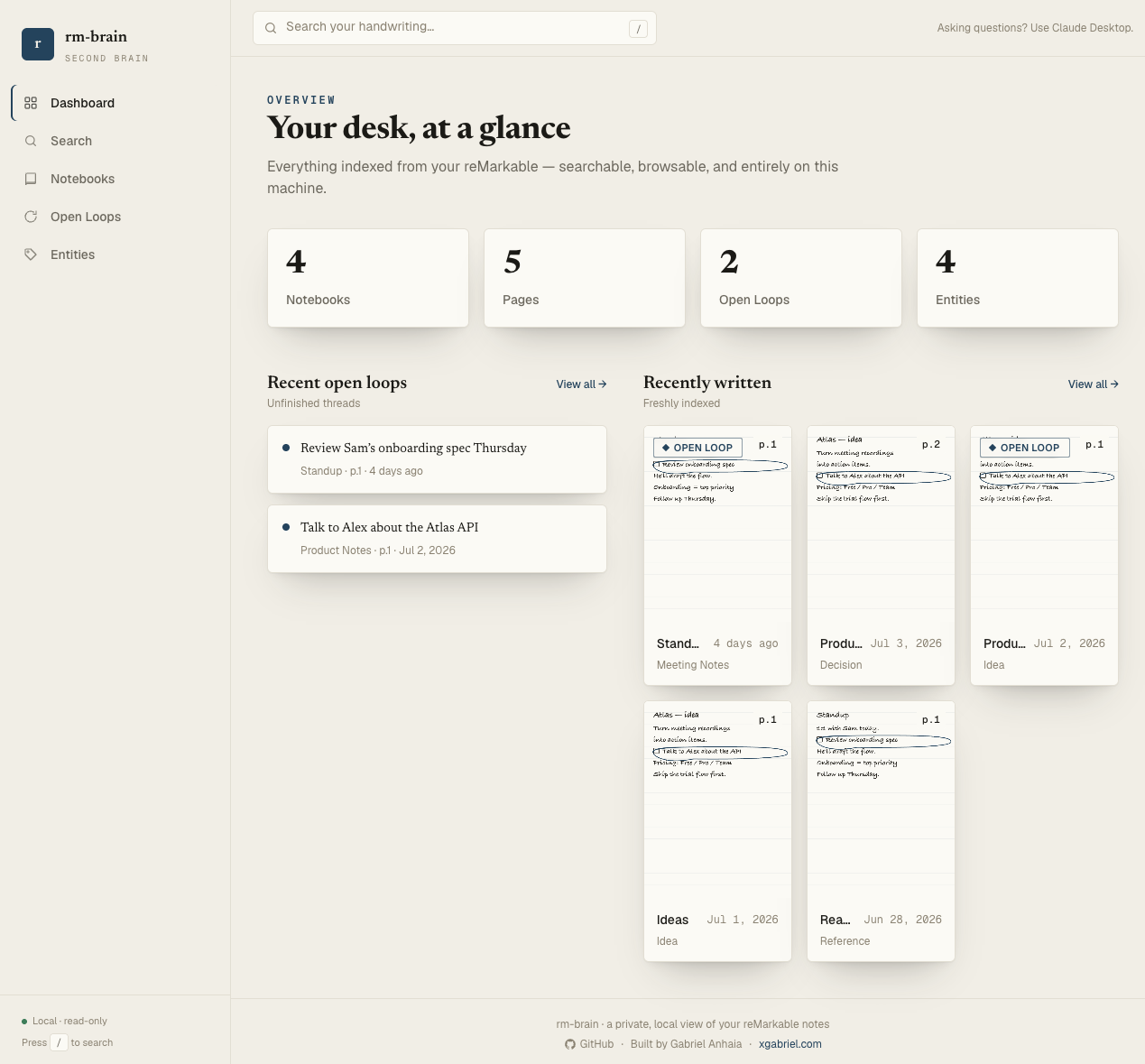 Screens shown with fictional example data. Everything runs on your machine.
rm-brain web                       # builds nothing — opens http://localhost:4123 in your browser
rm-brain web --port 8080           # pick a different port
rm-brain web --host 127.0.0.1      # bind address (localhost only, by design)
rm-brain web --no-open             # don't auto-open the browser
It serves the Dashboard (counts + recent open loops and pages), forgiving search — word forms (meeting/meetings), partial words, and small misspellings all match — with filters (notebook, page type, open-loop only), a Notebooks grid grouped by reMarkable subfolder, per-page detail (scanned image side-by-side with the transcription), Open Loops, and Entity timelines.
Same guarantees as the rest of rm-brain: it binds 127.0.0.1 only, exposes GET endpoints only,
has no auth surface, and makes no outbound network calls. The frontend ships prebuilt (in
web/dist), so there's no build step for end users — just run rm-brain web.
All config is via environment variables (env wins) or the saved store (~/.rm-brain/config.json).
The whole index is one self-contained folder, so:
rm-brain backup [dest.tar.gz], or just copy ~/.rm-brain.RM_BRAIN_HOME at a Dropbox/iCloud/Syncthing folder.RM_BRAIN_HOME at it.Your reMarkable account is on the newer sync protocol. Use the
ddvk sync15 build of rmapi (a release binary is
easiest), not the original juruen/rmapi. Then re-run rm-brain doctor.
Claude Desktop launches the MCP server once at startup and keeps it running. After any
rm-brain update, fully quit Claude Desktop (⌘Q, not just close the window) and reopen it
so it reloads the server.
Add a one-line personal instruction in Claude Desktop → Settings → Profile / Custom Instructions: "I keep my handwritten notes in rm-brain. For anything about my tasks, plans, or notes, use the rm-brain tools first." The server also ships proactive instructions, but a personal instruction is the most reliable nudge.
Make sure it's inside the Brain folder (case-insensitive) and that the tablet has synced
to the cloud (Wi-Fi on). Then run rm-brain sync. Notebooks named private/noindex/dotted
are skipped by design.
A normal sync skips pages whose image is unchanged. Run rm-brain reindex to re-extract
everything.
Search is FTS5 keyword by default (stemmed, typo-tolerant, order-independent), with optional on-device semantic search you can turn on locally (see docs/search.md) — no cloud search, ever. No notifications or daily digests. The web app is a read-only way to see and search your notes — asking questions stays in Claude Desktop, so this remains a tool you reach for, not one that reaches for you. Ideas and PRs welcome — see CONTRIBUTING.md.
Want to understand how it works under the hood?
Contributions are very welcome! Please read CONTRIBUTING.md to get set up, and CODE_OF_CONDUCT.md. Security issues: SECURITY.md.
If rm-brain is useful to you, consider supporting development — it genuinely helps and keeps the project going: You can also ⭐ star the repo — it helps others discover it.
Local-first second brain for your handwritten reMarkable notebooks, searched through Claude Desktop.
Araçlar
Henüz araç listesi yok. Uzak sunucular ilk sağlık kontrolünden sonra bir liste alır.
SSS
Bu sayfadan Cursor, Claude Desktop, Claude Code veya VS Code için stdio yapılandırmasını kopyalayın. PlugMCP proxy'sini değil, yayıncının kurulumunu kullanır.
Bu kayıtta gerekli bir ortam değişkeni listelenmiyor.
Remarkable Brain yerel olarak stdio üzerinden çalışır.
Son kontrol: 2026-10-28. Local-first second brain for your handwritten reMarkable notebooks, searched through Claude Desktop.