And plenty more:
Power your agent
Yayıncıdan kurulum. PlugMCP uç noktası değildir.
Host a copy with our keys and logs.
Registry'de henüz paketlenmiş bir sürüm yok. Deponun README dosyasını izleyin.
Uzak URL mi, yoksa makinenizde bir komut mu? İki kurulum arasındaki fark
PlugMCP’de çalıştır
A new server you create. It is not this listing's official endpoint. Use the publisher install when you want their URL and their credentials.
BaşlatYayıncıdan
And plenty more:
Open-source runtime for grounded, model-agnostic computer-use agents with verifiable action receipts.
| rewrites the text you've selected, right where it is |
| "remind me to call the dentist at 4" · "set a 10 minute tea timer" | Reminders, Notes and timers that ping you |
| "turn on dark mode" · "volume 30" · "run my Log Water shortcut" | Mac settings and your Apple Shortcuts |
| "what does this error mean?" | reads it off your screen and explains it |
| "remember I prefer aisle seats" | adds it to what Plip knows about you |
Open the .dmg and drag Plip into Applications.
Open Plip from Applications. It's signed and notarized by Apple, so macOS only asks once whether to open an app from the internet: click Open.
A one-minute welcome turns on the permissions Plip needs (what each is for) and connects your AI with one click:
Already signed in to one of these? Plip finds it.
Hold control + option, ask, let go. No sign-up needed.
Something broken? Click Report a bug in Plip's menu bar, or open an issue.
Plip needs three macOS permissions, and a fourth is optional. The welcome asks for each and opens the right page in System Settings.
What leaves your Mac
MCP_VISION_NO_ANALYTICS=1 or DO_NOT_TRACK=1 in Plip's environment. For the app,
run launchctl setenv MCP_VISION_NO_ANALYTICS 1 and reopen Plip (it lasts until you restart your Mac).What stays on your Mac: what Plip knows about you (~/.config/mcp-vision/memory.json, readable only by you),
plus your history, usage and action log (~/.local/share/mcp-vision). Screenshots aren't kept. Passport, card,
Social Security and similar numbers stay in memory, and the AI only ever sees their label, never the number.
What Plip won't do on its own: your AI can only answer in words. Plip runs it in an empty, throwaway folder with its tools switched off (read-only for Codex), stops it if it reaches for one, and does every action itself. It asks you first before anything that buys, sends, submits, posts or deletes, before opening a file that can run things (an app, script or installer), and before tidying your desktop (which "undo" puts back).
~/.config/mcp-vision/account.json (readable only by you) keeps your name, email, Google picture and
the session, which Plip renews once each launch. The account server (Supabase Auth) keeps the account's name, email,
sign-in provider, when you joined and when you last signed in.src/mcp_vision/buddy/account.py.curl -fsSL https://raw.githubusercontent.com/hussainn7/plip-oss/main/scripts/install.sh | bash
plip # Plip moves into your notch; the dashboard opens on first run
Run from a terminal, macOS checks the terminal's permissions, not Plip's: turn on Terminal (or iTerm, or your
editor) under System Settings → Privacy & Security → Accessibility, or the shortcut hears nothing. Plip says so
when it starts. plip doctor checks brains, keys and permissions. Prefer another shortcut than
control + option? Pick one in Settings → General.
plip ask --image screenshot.png "where's the export button?"
plip ask --engine codex --json "find my lease pdf"     # prints what Plip said, did, and pointed at
Paste them in the dashboard, or see .env.example.
Listening on your Mac with Parakeet. Under Voice → Listening, pick Parakeet for NVIDIA's Parakeet Unified 0.6B instead of Apple's recognizer: it catches more of what you say, with punctuation, and nothing leaves your Mac. It's a one-time 663 MB download (pinned, checksummed, resumable); Apple's keeps listening until it's done.
Activity. The Activity tab's Usage view shows every request from this Mac: per day, when you ask, how it ended, which brain and plan, and what it would cost at API prices (what your plan is worth). It stays on your Mac.
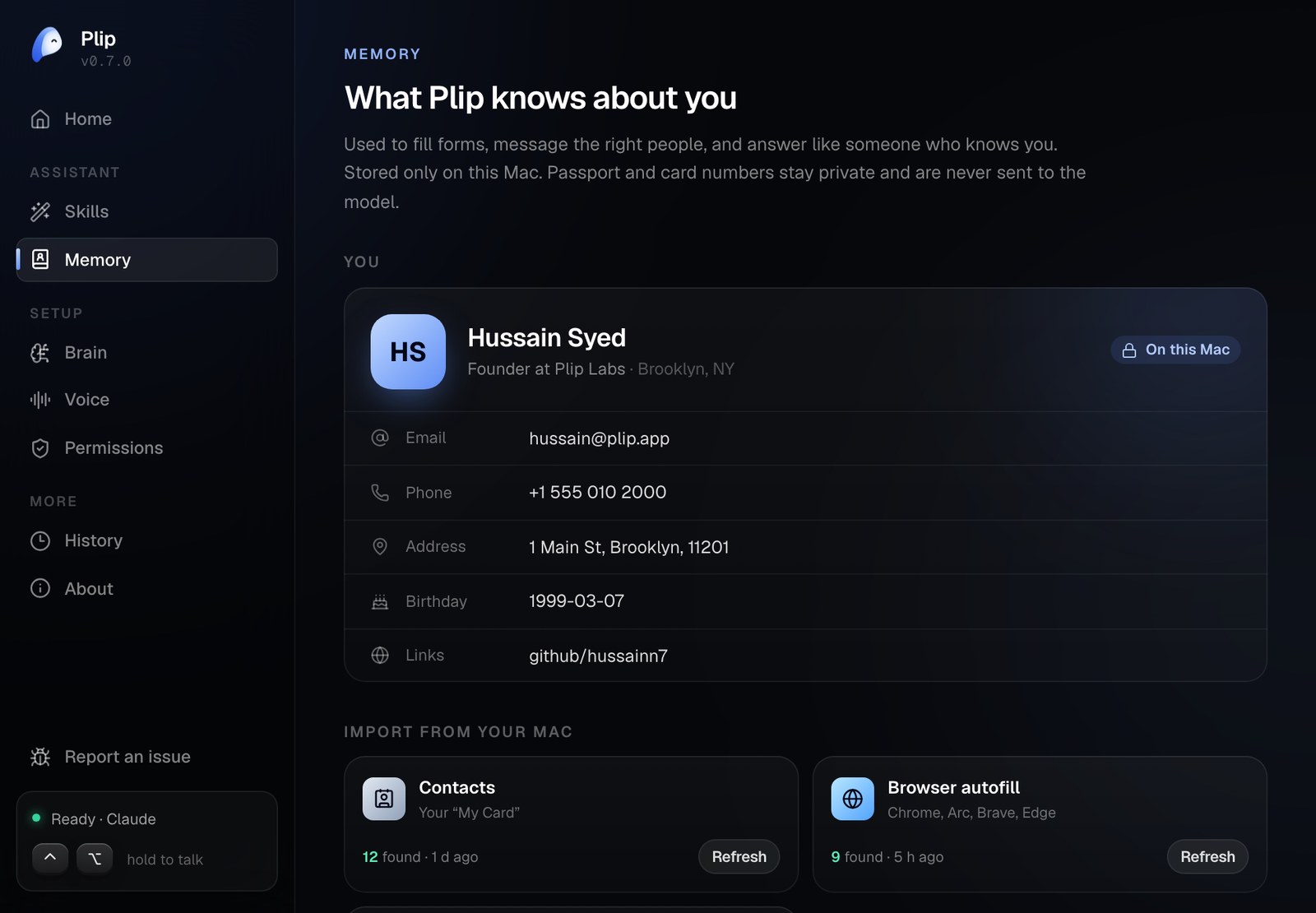
Plip keeps a small knowledge panel about you on your Mac and answers like someone who knows you. Import it in a few seconds from what's already there:
From the terminal: plip memory import contacts, plip memory show, plip memory prompt.
⌃⌥ ──▶ mic ──▶ AssemblyAI / Apple Speech ──▶ transcript ──▶ notch island (live)
                                               │
 screenshots (prefetched) ─┐                   ▼
 Accessibility screen map ─┼──▶ Jev router (needs screen? which monitor? walkthrough?)
 what Plip knows about you ┘
                           ▼
   your brain (Claude Code / Codex / Cursor / Gemini / API), streamed
     ├─▶ sentences ──▶ TTS queue (speaks sentence 1 while 2 is synthesized)
     ├─▶ [POINT:x,y:label]       ──▶ snap to the real control ──▶ Plip slips out of the notch to it
     ├─▶ [STEPS:n] [PLAN: a | b] ──▶ checklist in the notch; Plip watches the screen and gives the next step
     └─▶ [DO:name {json}]        ──▶ action engine ──▶ preview + your yes (if it moves files) ──▶ done
                                       └──▶ results (search hits, a loaded page) go back for one more turn
[DO:…] tags. Plip runs them itself on your Mac (open, Spotlight,
AppleScript, Shortcuts, Accessibility), with timeouts, an undo history, and a local log.Everything above the windows is platform-neutral and tested, including the CLI engines (through real subprocesses)
and a full plip CLI run against a fake Claude Code. The macOS layer is three WKWebViews (island, mascot, dashboard)
rendering one React bundle, plus an event tap and audio glue. See docs/BUDDY.md.
python3.12 -m venv .venv && source .venv/bin/activate
pip install -e '.[dev]'
ruff check . && python -m pytest

cd ui && npm install && npm run build      # React 19 + Tailwind 4 + Motion → src/mcp_vision/buddy/web/index.html
npm run dev                                # #showcase for the fake desktop, #settings, #island; /film.html plays the demo above
npm run e2e                                # clicks through the island and dashboard in Chromium
npm run film                               # renders docs/img/plip-demo.gif and the use-case pictures (needs ffmpeg)
More in CONTRIBUTING.md.
MIT
Open-source runtime for grounded, model-agnostic computer-use agents with verifiable action receipts.
Araçlar
Henüz araç listesi yok. Uzak sunucular ilk sağlık kontrolünden sonra bir liste alır.
SSS
Bu sayfadan Cursor, Claude Desktop, Claude Code veya VS Code için stdio yapılandırmasını kopyalayın. PlugMCP proxy'sini değil, yayıncının kurulumunu kullanır.
Bu kayıtta gerekli bir ortam değişkeni listelenmiyor.
Plip Oss yerel olarak stdio üzerinden çalışır.
Son kontrol: 2026-10-28. Open-source runtime for grounded, model-agnostic computer-use agents with verifiable action receipts.
