Anamnesis
Cross-machine memory for Claude Code
Power your agent
Yayıncının kendi komutu. PlugMCP uç noktası değildir.
Host a copy with our keys and logs.
uvx anamnesis-memory==0.1.3Claude Code'un yerel komutlar için kurulum bağlantısı yok. Aşağıdaki komutu kopyalayın ve bir terminalde çalıştırın.
claude mcp add io.github.oscardvs-anamnesis -- uvx anamnesis-memory==0.1.3Bir terminalde çalıştırın.
{ "mcpServers": { "io.github.oscardvs-anamnesis": { "command": "uvx", "args": [ "anamnesis-memory==0.1.3" ] } }}claude_desktop_config.json
Uzak URL mi, yoksa makinenizde bir komut mu? İki kurulum arasındaki fark
PlugMCP’de çalıştır
A new server you create. It is not this listing's official endpoint. Use the publisher install when you want their URL and their credentials.
Başlatuv tool install anamnesis-memory && anamnesis init
ἀνάμνησις (anamnesis): Greek for recollection, the act of calling knowledge back to mind.
Anamnesis is a local-first, file-based memory layer for Claude Code that syncs across your own machines. What Claude learns about your projects (conventions, architecture decisions, fixes that worked, what you did yesterday) is stored as plain markdown, indexed locally for search, and kept in sync over your private network.
Claude Code's own memory stays on the machine where it was written. Copying a SQLite index through a cloud folder such as Dropbox or iCloud corrupts it. Anamnesis syncs the markdown with git instead and rebuilds the index on each machine, so a note written on your desktop is searchable from your laptop.
No cloud account is required. The memory stays on your machines, version-controlled and human-readable.
  ┌─────────────┐        git over your private mesh        ┌─────────────┐
  │  desktop    │  ◄────────────  (Tailscale)  ────────►   │  laptop     │
  │             │                                          │             │
  │  Claude Code│                                          │  Claude Code│
  │     ▼       │                                          │     ▼       │
  │  MCP server │   markdown (source of truth)             │  MCP server │
  │     ▼       │   + SQLite FTS index (rebuilt locally)   │     ▼       │
  │ ~/.anamnesis│                                          │ ~/.anamnesis│
  └─────────────┘                                          └─────────────┘
~/.anamnesis/memory/, readable and git diff-able.
The markdown is the source of truth; everything else is derived from it.anamnesis merge consolidates near-duplicates. Generated
notes carry provenance and confidence in their front-matter. merge --apply is gated on your eval set so
it does not lower recall, and anamnesis eval measures reflection before and after on a sandbox copy.Prereqs: Claude Code, uv, and git.
uv tool install anamnesis-memory && anamnesis init
anamnesis init registers the MCP server with Claude Code at user scope, installs the SessionStart,
SessionEnd, and PreCompact hooks, configures the store at ~/.anamnesis, and runs a first sync. It is
idempotent: it backs up settings.json and does not duplicate hooks. --print shows the full plan without
writing anything, and --local-only skips the remote until you want one.
Claude Code gets five tools: memory_search, memory_list, and memory_status (read-only, safe to
auto-approve), plus memory_write and memory_sync. Full reference:
CLI ·
MCP tools ·
configuration.
git clone https://github.com/oscardvs/anamnesis && cd anamnesis/server
uv venv --python 3.12
uv pip install -e ".[mcp,dev]"
uv run anamnesis init --print
The repo also ships a project-scoped .mcp.json. Claude Code launches MCP servers with a filtered
environment, so ANAMNESIS_HOME / ANAMNESIS_MACHINE_ID / ANAMNESIS_GIT_REMOTE belong in its "env"
block, not your shell. Server internals: server/README.md.
Memory is a git repo (~/.anamnesis/memory/) synced over your private
Tailscale mesh, or any git remote you control. Set it up once:
Put every machine on the same tailnet (install Tailscale,
tailscale up). Pick one always-on machine to host the shared repo; tailscale status prints its
MagicDNS name (for example host.your-tailnet.ts.net).
Create one shared bare repo on the host:
git init --bare -b main ~/anamnesis-memory.git
Point each machine at it:
anamnesis init --remote '[email protected]:anamnesis-memory.git'
The host itself uses the local path: --remote "$HOME/anamnesis-memory.git".
Sync runs commit -> pull --rebase -> push and rebuilds the local index after pulling, so a note written on
one machine is searchable on the others within a sync cycle. If you started with --local-only, re-run
init --remote ... later; the store attaches to the remote and pushes its history.
anamnesis init installs three Claude Code hooks:
Two more commands build on them:
anamnesis config set reflection.provider ... at an OpenAI-compatible
model and anamnesis reflect distills accumulated session notes into durable conventions. With
reflection.auto set, it runs at session end once a project has enough unreflected notes.
anamnesis merge consolidates near-duplicates and only applies if recall on your eval set holds.anamnesis import copies Claude Code's own per-project memory into the store, so notes you
already wrote for it are included.To set the hooks up by hand instead of with init, copy
examples/hooks.settings.json into ~/.claude/settings.json and point it
at your install.
bench/cross-machine-tokens/ runs one scripted task on a fresh machine
twice: once without Anamnesis, where the agent explores the project to learn its conventions, and once with
the real SessionStart memory block injected. It drives the Claude Code CLI headlessly on a synthetic project,
so a Pro/Max subscription is enough and no API key is needed.
The committed result.json (3 runs per arm on claude-opus-4-8) shows about 8% fewer total input tokens
with memory, 366k versus 336k on average, with output tokens and turn count about the same. The conventions
were known from the first turn instead of being rediscovered. An earlier version of the scenario used a
5-file project and showed no difference; that null result is documented in the same README.
A web GUI for the memory store: browse and full-text search every note, edit markdown with per-note history, see every machine (which one wrote what and when it last synced), and run reflection from the browser. Provenance badges show where each note came from: you, a session capture, reflection, or import.
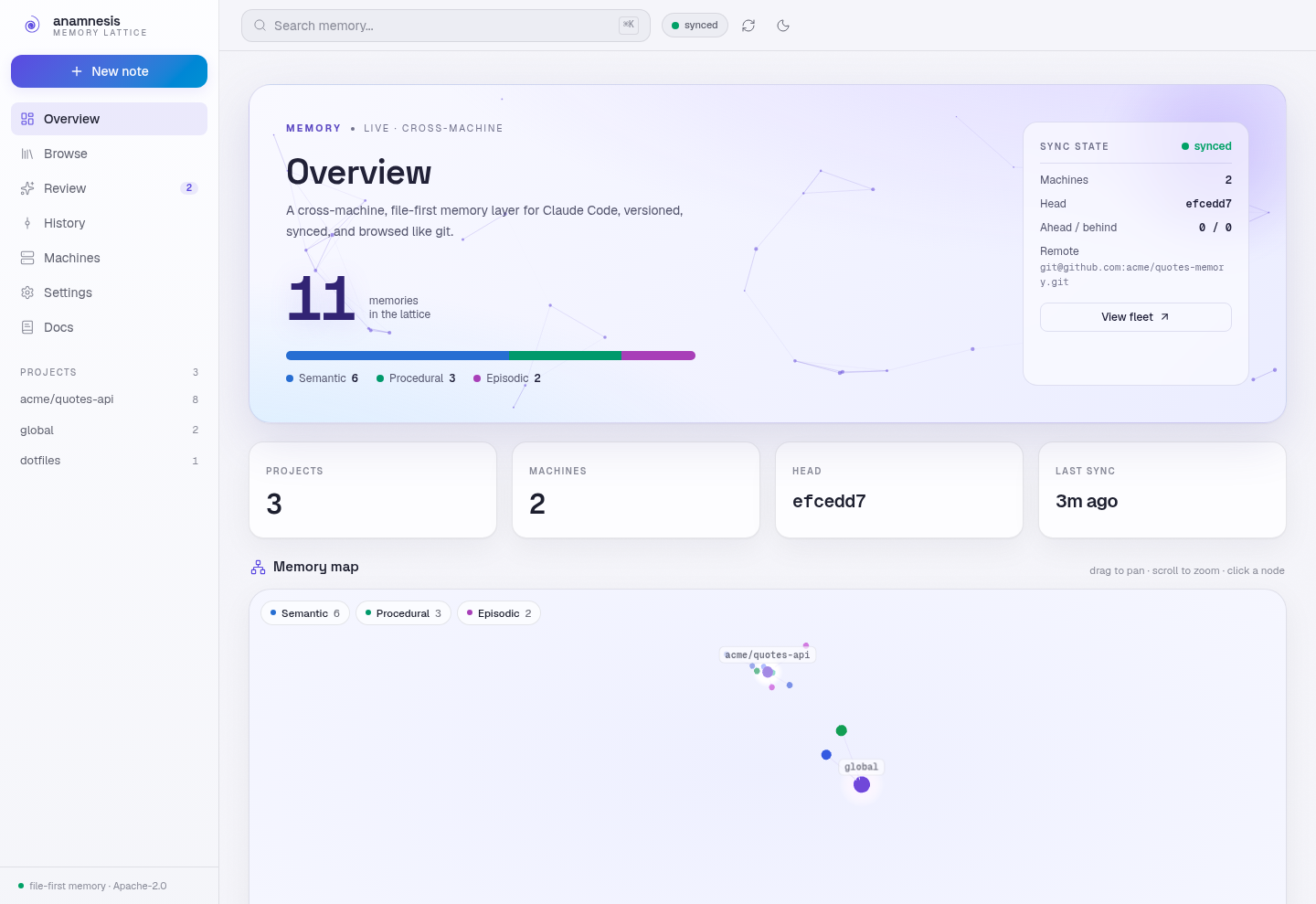
npx anamnesis-dashboard # http://localhost:3000
or, from the CLI you already have:
anamnesis dashboard
Needs Node 20 or newer. From a repo clone, cd dashboard && npm run dev works for development.
It is a thin read/write client over the same local store the MCP server uses: it reads the SQLite index
directly and shells out to the anamnesis CLI for writes and sync. Use --port, --store, and
--no-open to adjust how it serves. See dashboard/README.md for configuration
and design notes.
September 2026: v0.1.3 is on PyPI. The local-first core is done and has been used across a real multi-machine setup: the store, the MCP server, the hooks, git sync, the one-command install, the reflection and merge passes with their eval harness, and the dashboard. APIs may still change between releases.
Next: a hosted relay for people without their own mesh (the server already ships anamnesis relay commands
behind a [relay] extra, but they are not documented yet) and team memory.
Issues and discussion are welcome. If the install is rough on your machine, open an issue with the exact command you ran and its output.
Apache License 2.0. See NOTICE.
Cross-machine, file-first memory for Claude Code: markdown + SQLite FTS5, synced with git
{ "mcpServers": { "io.github.oscardvs-anamnesis": { "command": "uvx", "args": [ "anamnesis-memory==0.1.3" ] } }}Araçlar
Henüz araç listesi yok. Uzak sunucular ilk sağlık kontrolünden sonra bir liste alır.
SSS
Bu sayfadan Cursor, Claude Desktop, Claude Code veya VS Code için stdio yapılandırmasını kopyalayın. PlugMCP proxy'sini değil, yayıncının kurulumunu kullanır.
Bu kayıtta gerekli bir ortam değişkeni listelenmiyor.
Anamnesis yerel olarak stdio üzerinden çalışır.
Son kontrol: 2026-11-10. Cross-machine, file-first memory for Claude Code: markdown + SQLite FTS5, synced with git