execkit
Persistent, structured shell sessions for AI agents, on your laptop, your servers over SSH, and your Docker containers.
Power your agent
Yayıncıdan kurulum. PlugMCP uç noktası değildir.
Host a copy with our keys and logs.
Registry'de henüz paketlenmiş bir sürüm yok. Deponun README dosyasını izleyin.
Uzak URL mi, yoksa makinenizde bir komut mu? İki kurulum arasındaki fark
PlugMCP’de çalıştır
A new server you create. It is not this listing's official endpoint. Use the publisher install when you want their URL and their credentials.
Başlat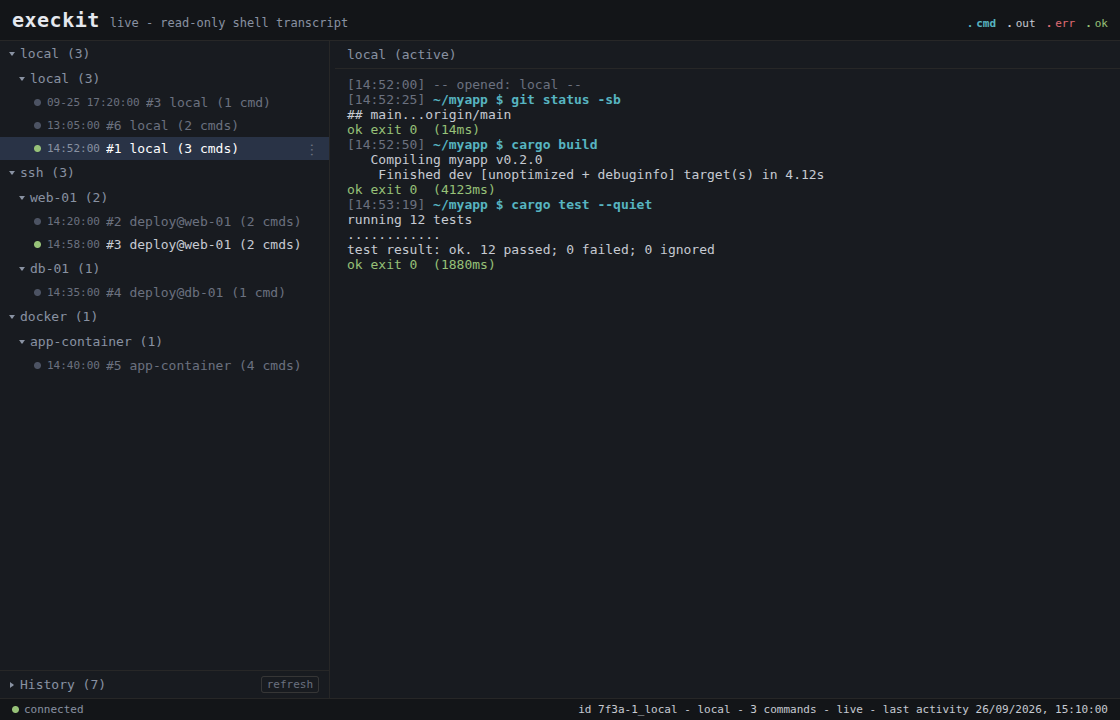
What you get that a built-in agent shell doesn't:
cd and env carry across
calls, and every command returns a structured result: split stdout/stderr,
exit code, duration, cwd.tail, head, grep, a char cap) keep a
noisy build from flooding the context window.Zero-install, with uv. Add this to your MCP client config:
{ "mcpServers": { "execkit": { "command": "uvx", "args": ["execkit-mcp"] } } }
Or install it and let execkit print the config for your client:
pip install execkit-mcp && execkit-mcp setup claude # or: cursor | gemini | codex | vscode | windsurf
Then execkit-mcp doctor checks your setup. More options (prebuilt binary,
cargo install, building from source) are in the Quickstart.
Status: early 0.x. The API may change between minor versions. Read
Limitations before pointing it at anything important.
execkit complements your agent's built-in shell or sandbox; it does not replace it. Use it when the agent needs to work on a remote host or inside a container, when you want a record of what ran, or when you want to undo file changes on a remote workspace.
The agent is the adversary. The LLM driving execkit can be prompt-injected by anything it reads, so execkit contains its own caller: a command passes the policy fence before it runs, secrets are redacted before output returns, and a changed SSH host key fails loudly instead of reconnecting into a MITM.
flowchart LR
    A([AI agent]) -->|command| F{policy fence}
    F -->|blocked| X([rejected, never runs])
    F -->|allowed| T[transport: local / SSH / Docker]
    T --> O[raw output]
    O --> R[redact secrets, bound output]
    R --> E([structured ExecResult])
    E -.-> A
The agent gets session_create (local, ssh, or docker), session_exec,
session_list and session_destroy, plus session_checkpoint /
session_checkpoints / session_restore for remote undo.
State persists across calls, and every result is parsed, not scraped from a terminal:
// session_exec {"command": "cd /app && npm ci"}   -> { "exit_code": 0, "cwd": "/app" }
// session_exec {"command": "npm run build"}        // cwd is still /app
//   -> { "stderr": "Error: Cannot find module 'webpack'",
//        "exit_code": 1, "duration_ms": 3420, "cwd": "/app",
//        "truncated": false, "timed_out": false }
Commands time out after 120 seconds by default (timeout_secs per call, up to
3600). On timeout execkit interrupts the command with Ctrl-C and returns
timed_out: true with exit code 124. The session keeps its cwd and env.
See crates/execkit-mcp/README.md for the operator
security settings (host-key verification, key dir, audit, session limits).
Set EXECKIT_MCP_AUDIT_DIR and every session is recorded. execkit-mcp watch
shows it live in the terminal, and execkit-mcp watch --serve --open opens the
read-only browser viewer shown at the top.
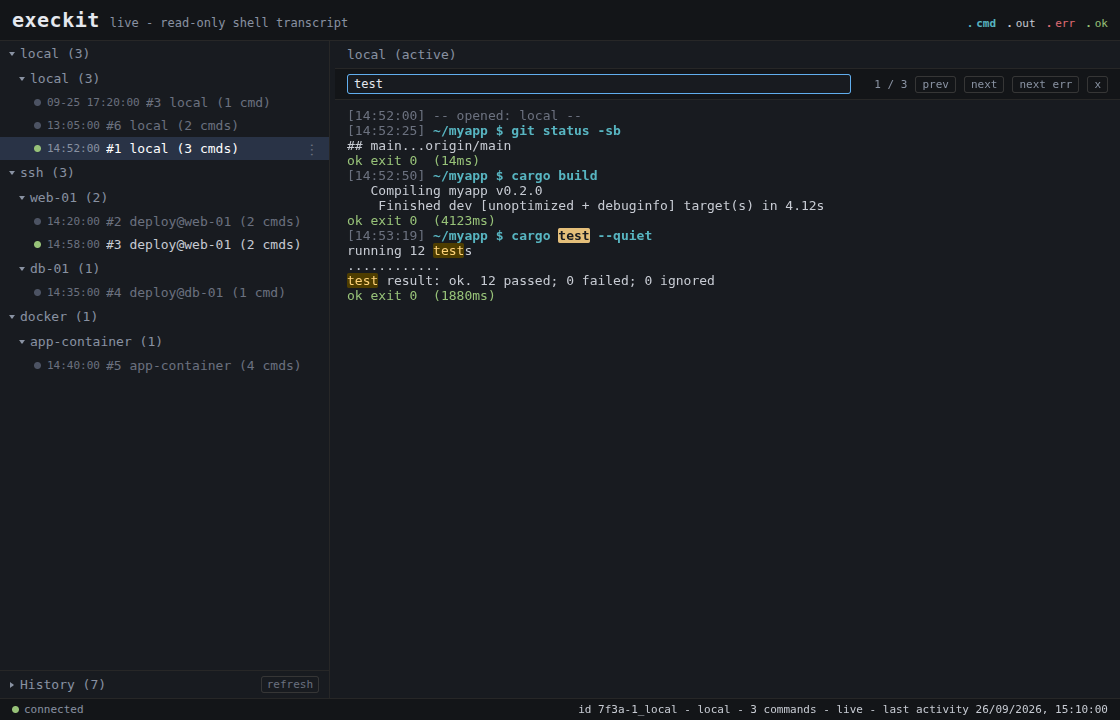 | 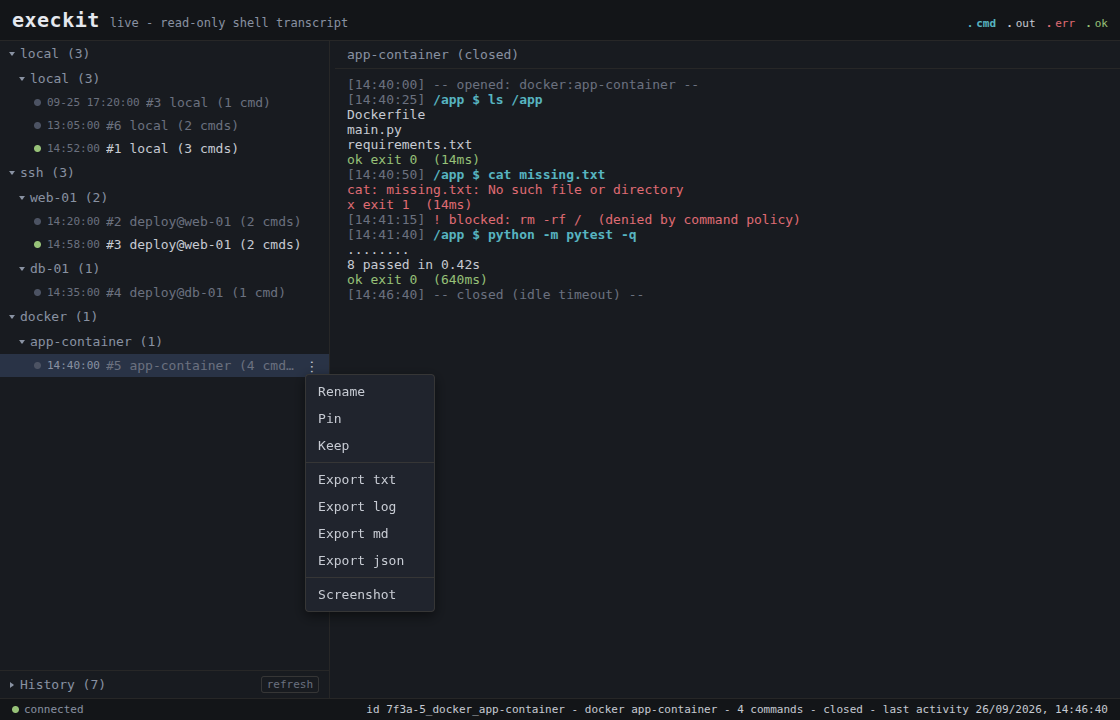 |
Search a transcript with / and jump between errors. | Rename, pin or keep a session, export it, or take a screenshot. Blocked commands show inline. |
[dependencies]
execkit = "0.9"                                           # local + SSH + Docker
# execkit = { version = "0.9", default-features = false }  # local + Docker only (no SSH; no russh/tokio)
use std::time::Duration;
use execkit::{Policy, Session};

fn main() -> Result<(), execkit::Error> {
    let mut s = Session::local()?
        .with_policy(Policy { allow: vec![], deny: vec!["rm".into()] })
        .with_timeout(Duration::from_secs(60));

    let r = s.exec("echo hi; echo err 1>&2; cd /tmp")?;
    // r.stdout == "hi"  r.stderr == "err"  r.exit_code == 0  r.cwd == "/tmp"
    println!("{} (exit {})", r.stdout, r.exit_code);

    let r = s.exec_with_timeout("sleep 30", None, Duration::from_secs(1))?;
    // r.timed_out == true  r.exit_code == 124; the session is still usable
    Ok(())
}
Runnable examples: cargo run --example local,
EXECKIT_SSH="user:password@host:22" cargo run --example ssh, and
EXECKIT_DOCKER=<container> cargo run --example docker.
The same sessions from Python. pip install execkit (native bindings, no Rust
toolchain needed):
from execkit import Session

with Session.local() as s:
    r = s.exec("echo hi; echo err >&2; cd /tmp")
    print(r.stdout, r.exit_code, r.cwd, r.stderr)   # hi 0 /tmp err
~/.ssh/config.ExecResult: split stdout/stderr, exit code, duration, cwd,
truncated, timed_out.!, trailing &, syntax
errors and long commands do not hang the session.password=/token=-style pairs, and values the session assigned to
secret-named variables. The echoed command is redacted too.tail/head/head+tail by line, a grep filter with
context, and a char cap. Per call or a session default; the result reports what
was kept.git on the remote and an
explicit workspace; files only, not side effects).cargo add, in your process; no daemon, no vendor.Breaking changes from 0.8. The details are in Upgrading to 0.9.
~/.execkit/known_hosts, not ~/.ssh/known_hosts.
Old pins are not read. The first connection re-pins, or copy them over with
mkdir -p ~/.execkit && chmod 700 ~/.execkit then
grep -E '^[^ ]+ SHA256:' ~/.ssh/known_hosts >> ~/.execkit/known_hosts.
Old pins were keyed by bare host whatever the port: rewrite a line for a
non-22 port as [host]:port, or a later port-22 connection to that host fails
as a key mismatch./dev/null for every command, and pagers are set to cat.base64.timed_out: true and keeps the session,
instead of an error that closed it. ExecResult has a new timed_out field.a3f9-1_local instead of 1_local.SshConfig has a new connect_timeout field (default 15 s). Use
SshConfig::new.deny: ["curl"] blocks curl but not env curl, sudo curl or
sh -c curl. The real control is a least-privilege environment: run the agent
and SSH user with minimal rights./dev/null, so prompts, REPLs and editors do
not work. Use non-interactive flags (sudo -n, apt-get -y). Pagers default to
cat, but running less or vim directly hangs until the timeout and closes
the session. Shell history is off.nohup CMD > /tmp/job.log 2>&1 &) and poll the log.base64. Local sessions use bash.
Windows is not supported.AcceptAny host-key mode exists for testing, behind an explicit insecure
opt-in. Never use it in production.Found something rough? Open an issue.
CONTRIBUTING.md.SECURITY.md. Please don't open a
public issue for security reports.Stateful, structured, safe command execution for AI agents - over local shells, SSH, and Docker.
Araçlar
Henüz araç listesi yok. Uzak sunucular ilk sağlık kontrolünden sonra bir liste alır.
SSS
Bu sayfadan Cursor, Claude Desktop, Claude Code veya VS Code için stdio yapılandırmasını kopyalayın. PlugMCP proxy'sini değil, yayıncının kurulumunu kullanır.
Bu kayıtta gerekli bir ortam değişkeni listelenmiyor.
Execkit yerel olarak stdio üzerinden çalışır.
Son kontrol: 2026-10-28. Stateful, structured, safe command execution for AI agents - over local shells, SSH, and Docker.