A self-hosted, cross-protocol inference proxy with a live dashboard, SQLite
history, and controls to pause, limit, or debug traffic. OpenAI Chat
Completions, OpenAI Responses, and Anthropic Messages clients can target any
configured upstream. Request metadata, timing, tokens, cost, and outcomes; body
capture is opt-in.
Self-hosted OpenAI-compatible inference proxy with a live dashboard, SQLite history, routing controls, and operator tooling. See every AI request and keep your own keys and routing.
Open http://127.0.0.1:8080/ and sign in with that
token. If the container exits, run docker compose logs --tail 50.
[!IMPORTANT]
One shared operator credential protects the dashboard and operator plane only.
Inference is transparent: it forwards your upstream key and does not use the
operator token. There are no user accounts. Keep the listener on loopback, or
put the network or ingress boundary in front. With the token unset, the
dashboard denies every request. Read Security before network
exposure.
compose.yaml publishes only on host loopback. Set
MILLIVOLT_PORT for an unused host port. Named volumes retain history and
private Settings configuration; existing saved settings are not overwritten.
The runtime is non-root with a read-only root filesystem. For bind mounts,
pre-create directories writable by UID/GID 65532:65532; see
persistent state.
Stop with docker compose stop. For image selection, configuration, backups,
updates, shutdown, or protected ingress, see
container operation and the
reverse-proxy guide.
From source
Install the Go toolchain required by go.mod, then:
git clone https://github.com/LLM-4-People/millivolt.git
cd millivolt
test -e proxy.yaml || cp proxy.example.yaml proxy.yaml
export MILLIVOLT_OPERATOR_TOKEN='replace-with-a-long-random-value'
go run ./cmd/proxy -config proxy.yaml -listen 127.0.0.1:8080
For isolated development and checks, see Contributing.
Connect a client
Point an OpenAI Chat Completions, OpenAI Responses, or Anthropic Messages
client at the proxy. The upstream URL and key stay yours; the proxy does not
register providers or keys. The request path selects the client protocol, and
X-Proxy-Format selects the upstream protocol.
API base URL:http://127.0.0.1:8080/v1
API key: your upstream key. It is forwarded through Authorization; it
does not authenticate dashboard access.
X-Proxy-Base-URL: your upstream API base URL, including its path, such
as /v1.
X-Proxy-Client: optional label for this client in the dashboard.
A JSON response means the relay worked. The request should appear in the
dashboard within a second or two. On a shared Compose network, use
http://millivolt:8080/v1 instead of loopback. /v1/chat/completions,
/v1/responses and /v1/messages are all available; any of them can target a
different upstream protocol, and a Chat client can also target the Cursor
bridge. Read
upstream compatibility
and cross-protocol translation.
Normal relay paths preserve request and response content, with documented
exceptions for buffering, retries, SSE keepalives, format translation, and
configured overrides. This is not an unconditional byte-for-byte or
exactly-once contract. See protocol.
What it looks like
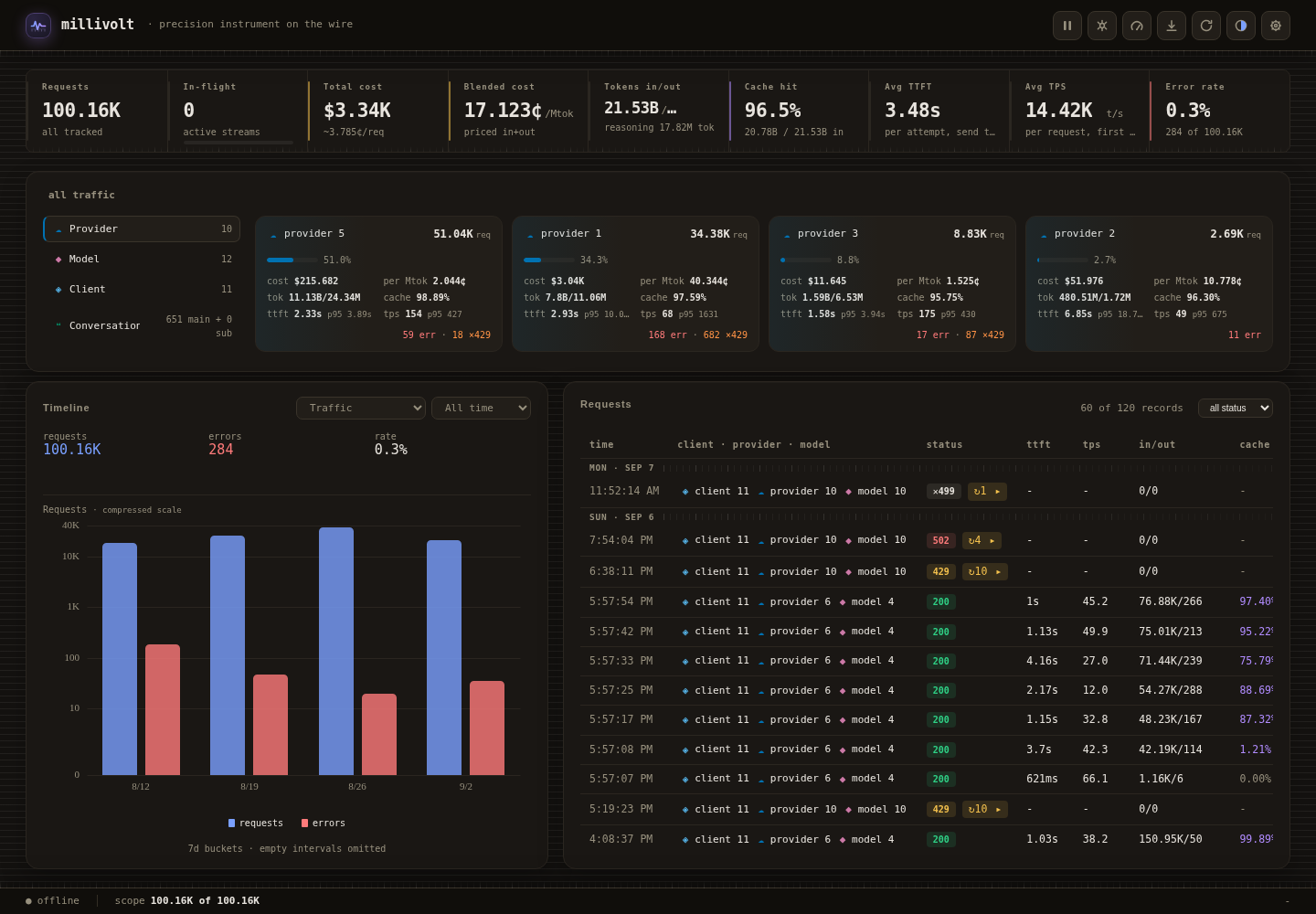
The instrument panel is a dense operator surface in either Black or Clear, not
a marketing dashboard. The product screenshots below are static captures from
an authorized redacted history snapshot; identifiers are replaced.
Dashboard overview
Global totals stay global; explorer cards, timelines, and the request log share
one selected scope. See the visual guide for focused captures
of tokens, speed and latency, cost, providers, models, conversations, and
Settings.
This capture retains recorded metrics from an authorized history snapshot with
replaced identifiers. The offline indicator reflects the capture session, not
service health. The guide explains the capture limitations.
What you get
See the request, not just the total.
Watch in-flight requests next to global request, token, and cost totals. Open a
row for TTFT, throughput, retries, queue wait, token mix, and provider-reported
cost. History stays in SQLite; an in-memory ring is available when you do not
need retention. Scope by client, provider, model, conversation, tool, status,
error, time, or key without losing the selected filter.
Pause new sends and retries by client, provider, or all traffic. Set
provider-wide concurrency, request-rate, and token-rate limits, plus an opt-in
anti-burst ramp that eases a new provider+key group up to the concurrency
target. Capture scoped debug bodies, export exactly the records you filtered,
and turn on error-storm protection with recovery probes. These are operator
actions, not per-user permissions.
Read operator workflows before
changing state. The shared operator token protects the dashboard and operator
routes. Inference is transparent and does not use it.
Keep your routing and your keys.
Choose the upstream base URL, credentials, authentication header or prefix,
path, and query on each request. Constrain accepted URL prefixes in
configuration. Optional adapters translate between OpenAI Chat Completions,
OpenAI Responses and Anthropic Messages through one canonical model; the Cursor
Connect bridge is a separate direct path that requires a Chat client and is not
an IR-translated protocol. Coverage and limits are documented, not implied.
There is no separate provider registry or API-key vault in the proxy.
One Go service with embedded dashboard assets and SQLite. The non-root image
needs no separate database server, frontend runtime, or monitoring stack. The
same 22-tool MCP server is at /mcp behind the operator token, so an LLM client
needs only the endpoint URL and its Bearer credential. See the
MCP server guide.
Operations owns configuration, persistence, exports, and
upgrades; architecture maps the implementation.
Limits and scope
millivolt is built for a single operator or small team that controls the host.
It is not a multi-tenant gateway, a billing system, or a compliance audit log.
No multi-tenant isolation. One operator credential protects the dashboard
and operator plane; inference is transparent and depends on the network or
ingress boundary. There are no per-user accounts.
Durable accounting is best-effort. Sustained overload can drop records
even when inference succeeds. Backups, capacity, and storage drops are in
storage and accounting.
The relay is not a byte-for-byte or exactly-once contract. Normal paths
preserve content, with documented exceptions. See protocol.
Observability, not billing or compliance. Cost is provider-reported; this
is not an independent invoice or a complete audit log.
Linux is the supported deployment target. See
containers for image and volume details.
Performance and footprint
The performance and resource usage page is the single
source for current image and binary size, idle and loaded footprints,
fast-response and streaming request throughput and latency, durable writer
rates, SQLite growth, projection cost, and query/metadata latency. It carries
the exact revision, host, method, reproduce commands and limitations. Small
images do not imply fixed RAM or negligible CPU. Active streams, configured
buffers, stored-history projections, and identity cardinality contribute
separate costs. Short local bursts are regressions, not deployment guarantees.
Contributing and promotion
Work lands on testing first. The full check suite and both native container
smoke tests run on all testing pull requests, code-bearing testing pushes,
manually dispatched testing gates, and manually pushed v* tags; docs and
site-only testing pushes use docs.yml instead. They also run on Dependabot's main security PRs. An
ordinary main promotion proves the head is the current testing tip, main is
already merged back into testing, and that exact commit passed the full gate,
or that only docs paths changed since the closest gated testing commit (the
proof has no commit-count bound). For a code-bearing head, let the testingcheck.yml push gate finish before opening or re-running a promotion PR;
pending runs get a short bounded wait and the proof fails closed while they
remain pending. A docs/site-only head has no canonical check.yml push run of
its own, so wait for docs.yml or only the required docs validation.
required does not repeat the suite. main is
promotion-only and protected: open a pull request from testing, wait for
required, and merge with a merge commit. A code-bearing promotion bumps
VERSION above every release tag; a docs/site-only promotion skips
that check, validates docs, workflow policy and the site, and does not rebuild
images. For a code-bearing promotion, the merged-PR release run creates the
release tag and image; a delivered main push is an idempotent fallback, and a
manually pushed v* tag still ships exactly as tagged. Never push
main or a release tag as part of feature work. See the
branch workflow for the full checklist and
versions and images for publication
behavior.
Configuration and documentation
proxy.example.yaml is the generated, documented example.
It includes enabled compatibility profiles without registering provider keys or
upstream URLs. proxy.yaml is your ignored local configuration; do not commit
it. Defaults, example profiles, and validation are defined in internal/config;
Settings uses that same schema. See operations for
overrides, reloads, backups, and restart requirements.
Self-hosted OpenAI-compatible inference proxy with a live dashboard, SQLite history, routing controls, and operator tooling. See every AI request and keep your own keys and routing.
Henüz araç listesi yok. Uzak sunucular ilk sağlık kontrolünden sonra bir liste alır.
SSS
Sorular
Millivolt nasıl kurulur?
Bu sayfadan Cursor, Claude Desktop, Claude Code veya VS Code için stdio yapılandırmasını kopyalayın. PlugMCP proxy'sini değil, yayıncının kurulumunu kullanır.
Millivolt için API anahtarı gerekiyor mu?
Bu kayıtta gerekli bir ortam değişkeni listelenmiyor.
Millivolt hangi aktarımı kullanıyor?
Millivolt yerel olarak stdio üzerinden çalışır.
Millivolt en son ne zaman kontrol edildi?
Son kontrol: 2026-10-28. Self-hosted OpenAI-compatible inference proxy with a live dashboard, SQLite history, routing controls, and operator tooling. See every AI request and keep your own keys and routing.