Power your agent
Yayıncının kendi komutu. PlugMCP uç noktası değildir.
Host a copy with our keys and logs.
npx -y [email protected]Claude Code'un yerel komutlar için kurulum bağlantısı yok. Aşağıdaki komutu kopyalayın ve bir terminalde çalıştırın.
claude mcp add mcp-api-translator -- npx -y mcp-api-translator@0.4.1Bir terminalde çalıştırın.
{ "mcpServers": { "mcp-api-translator": { "command": "npx", "args": [ "-y", "[email protected]" ] } }}claude_desktop_config.json
Uzak URL mi, yoksa makinenizde bir komut mu? İki kurulum arasındaki fark
PlugMCP’de çalıştır
A new server you create. It is not this listing's official endpoint. Use the publisher install when you want their URL and their credentials.
BaşlatAn MCP server that generates MCP servers. Give it an API definition — OpenAPI 3.0/3.1 or a Postman collection — and it scaffolds a complete, runnable, ownable TypeScript or Python MCP server for that API.
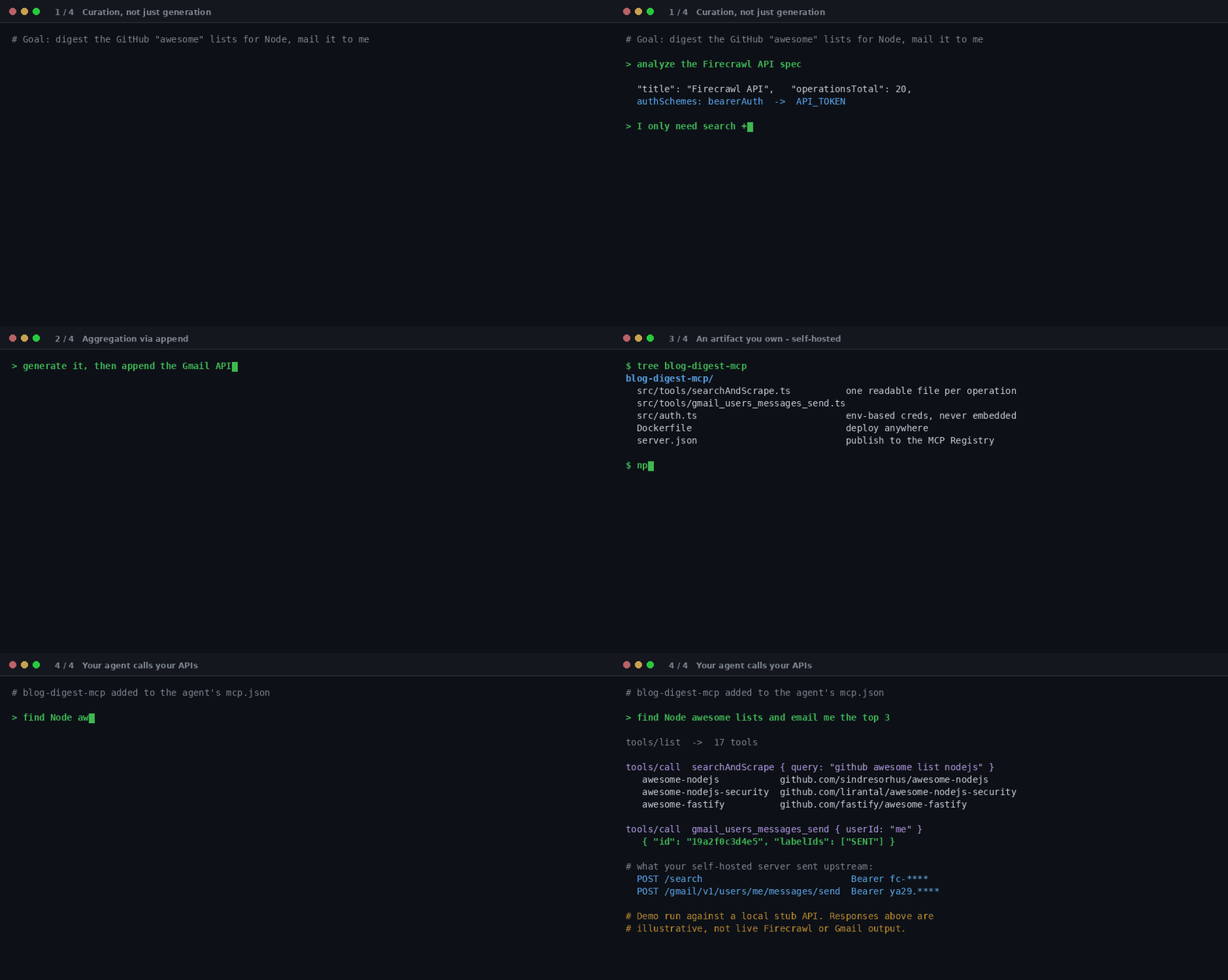
Above: curating Firecrawl's 20 operations down to 6, appending the Gmail API to the same server, then an agent calling the self-hosted result. Counts, tool names and paths come from real runs against the published Firecrawl and Gmail descriptions; the API responses are illustrative — the recording runs against a local stub, not live Firecrawl or Gmail accounts.
Turning an OpenAPI spec into MCP "tool stubs" is not novel — FastMCP's from_openapi,
Speakeasy/Gram, and several
openapi-mcp-generator projects already do the mechanical part. A naive endpoint→tool generator has
no real advantage. This project focuses on the parts those tools skip:
1. Curation, not just generation. A 200-endpoint API naively becomes 200 tools, which wrecks a
model's tool-selection accuracy and blows out context. analyze_spec previews the tool list before
anything is written, every command takes includeTags / methods / pathGlob /
excludeOperations, and you get a warning when a server grows past 40 tools.
2. Aggregation via append. extend_mcp_server adds another API's tools to an existing project,
so you can build one MCP server spanning Firecrawl + Gmail + your internal API. Credentials stay
separate: each API also reads namespaced env vars derived from its title.
3. An artifact you own. Output is a normal project, not a hosted black box — readable per-tool
files, env-based auth, a Dockerfile, and a server.json plus client snippets for publishing to the
official MCP Registry.
If you only need throwaway, in-memory exposure of one API and don't care about owning the code, FastMCP's runtime mode may suit you better — that's a deliberate non-goal here.
No install step. npx fetches and runs the latest published version — cross-platform, Node 20+.
Claude Code does not read claude_desktop_config.json — it keeps its own MCP config:
claude mcp add api-translator -- npx -y mcp-api-translator
That registers it at local scope. Use -s user for all your projects, or commit a project-scoped
.mcp.json to share it. Verify with claude mcp list.
Add to claude_desktop_config.json (macOS:
~/Library/Application Support/Claude/claude_desktop_config.json, Windows:
%APPDATA%\Claude\claude_desktop_config.json):
{
  "mcpServers": {
    "api-translator": {
      "command": "npx",
      "args": ["-y", "mcp-api-translator"]
    }
  }
}
Cursor — ~/.cursor/mcp.json (or project-scoped .cursor/mcp.json), same mcpServers shape as
Claude Desktop above.
Cline (VS Code) — sidebar → MCP Servers → Configure, same shape plus "disabled": false.
Continue.dev — ~/.continue/config.json, under
experimental.modelContextProtocolServers, as a { transport: { type: "stdio", command, args } }
entry.
Docker (no Node required):
{
  "mcpServers": {
    "api-translator": {
      "command": "docker",
      "args": ["run", "--rm", "-i", "ghcr.io/krishgok/mcp-api-translator:latest"]
    }
  }
}
To read specs from disk or write projects to a host path, mount the directory with
-v ${PWD}:/workspace and pass /workspace/... as specPath / outputDir.
MCP config is read at startup, so restart your client — quit and reopen Claude Desktop, Cursor, …, or start a new session in Claude Code.
All spec inputs accept inline text (spec) or a local path (specPath), JSON or YAML.
You don't call the tools by hand — you ask your agent, and it drives them.
1. Preview, then curate. See what a spec becomes before writing anything:
"Analyze ./petstore.yaml and show me the proposed tools." "Only the GET endpoints under /pets."
analyze_spec({ specPath: "./petstore.yaml" });
// → proposed tool list, auth scheme, and the env vars the server will need

analyze_spec({ specPath: "./petstore.yaml", methods: ["GET"], pathGlob: "/pets/**" });
// also: includeTags: ["pets"], excludeOperations: ["deletePet"]
2. Generate, with the same filters plus an output directory:
generate_mcp_server({ specPath: "./petstore.yaml", outputDir: "./petstore-mcp" });
// options: language: "python", transport: "http", auth: {...}, force: true
3. Aggregate — add more APIs to the same server:
// any second API — the sources don't have to share a format or a vendor
extend_mcp_server({
  projectDir: "./petstore-mcp",
  specPath: "./billing.postman.json",
  includeTags: ["invoices"],
});
// idempotent; hand-edited tool files are preserved
Aggregated APIs don't share credentials: each also reads namespaced env vars
(<NAMESPACE>_API_BASE_URL, <NAMESPACE>_API_KEY, … — namespace derived from the API title)
before falling back to the bare ones. The extend summary and .env.example list the exact names.
4. Run it. The output is a normal project you own:
cd petstore-mcp && npm install && npm run build
cp .env.example .env   # set API_BASE_URL + credentials (never embedded in code)
npm start
Register it with your client using the generated client-config.md, and your agent can call the
APIs directly.
Full walkthrough with sample outputs and troubleshooting: docs/usage-workflow.md.
Generate ownable code when you want a project you can hand-edit, self-host, and own — in
TypeScript (default) or Python (language: "python").
Serve a live runtime proxy when you just want an API exposed to an agent now, with no generated files to build or maintain:
mcp-api-translator serve --spec ./api.yaml
mcp-api-translator serve --spec ./a.yaml --spec ./b.yaml --methods GET,POST   # aggregate
serve runs the same request plan and env-based auth the generator emits, so behavior matches
generated output exactly — it just skips the codegen step. It speaks stdio by default, or stateless
Streamable HTTP with --transport http --port 3000. Logs are structured JSON lines on stderr in
containers, readable text on a TTY (LOG_LEVEL, LOG_FORMAT).
Known limits at a glance:
Details and the security model: docs/design.md.
npm install
npm test          # unit + integration (parsers, curation, emit, append)
npm run typecheck
npm run build
npm run e2e       # generate a sample project from the fixtures into build/e2e-out
Contributions welcome — see CONTRIBUTING.md. All commits must be signed off under
the Developer Certificate of Origin (git commit -s).
mcp-api-translator is dual-licensed — © 2026 krishgok. Full details in
LICENSING.md.
Redistributions must retain LICENSE and NOTICE. The licenses do not
grant the right to use the "mcp-api-translator" name to endorse or promote forked or derivative
works without prior written permission.
An MCP server that turns OpenAPI / Postman API definitions into runnable MCP servers, making any API discoverable to AI models.
{ "mcpServers": { "mcp-api-translator": { "command": "npx", "args": [ "-y", "[email protected]" ] } }}Araçlar
Henüz araç listesi yok. Uzak sunucular ilk sağlık kontrolünden sonra bir liste alır.
SSS
Bu sayfadan Cursor, Claude Desktop, Claude Code veya VS Code için stdio yapılandırmasını kopyalayın. PlugMCP proxy'sini değil, yayıncının kurulumunu kullanır.
Bu kayıtta gerekli bir ortam değişkeni listelenmiyor.
MCP Api Translator yerel olarak stdio üzerinden çalışır.
Son kontrol: 2026-11-14. An MCP server that turns OpenAPI / Postman API definitions into runnable MCP servers, making any API discoverable to AI models.
