Power your agent
Yayıncıdan kurulum. PlugMCP uç noktası değildir.
Host a copy with our keys and logs.
Registry'de henüz paketlenmiş bir sürüm yok. Deponun README dosyasını izleyin.
Uzak URL mi, yoksa makinenizde bir komut mu? İki kurulum arasındaki fark
PlugMCP’de çalıştır
A new server you create. It is not this listing's official endpoint. Use the publisher install when you want their URL and their credentials.
BaşlatChrome automation plugin for OpenCode via WebSocket and Chrome Extension. Gives AI agents 165+ tools covering tabs, CDP debugging, network interception, visual clicking, session management, accessibility, advanced mouse/keyboard control, testing & mocking, profiling, stealth/anti-fingerprinting, proxy management, form automation, lighthouse audits, screencast recording, and more.
The system has two parts that talk to each other over a local WebSocket connection:
OpenCode <-- stdio --> MCP Server <-- WebSocket :3002 --> Chrome Extension <-- Chrome APIs --> Browser
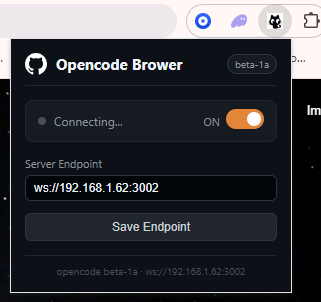
Extension popup — configure the WebSocket endpoint and toggle the connection:
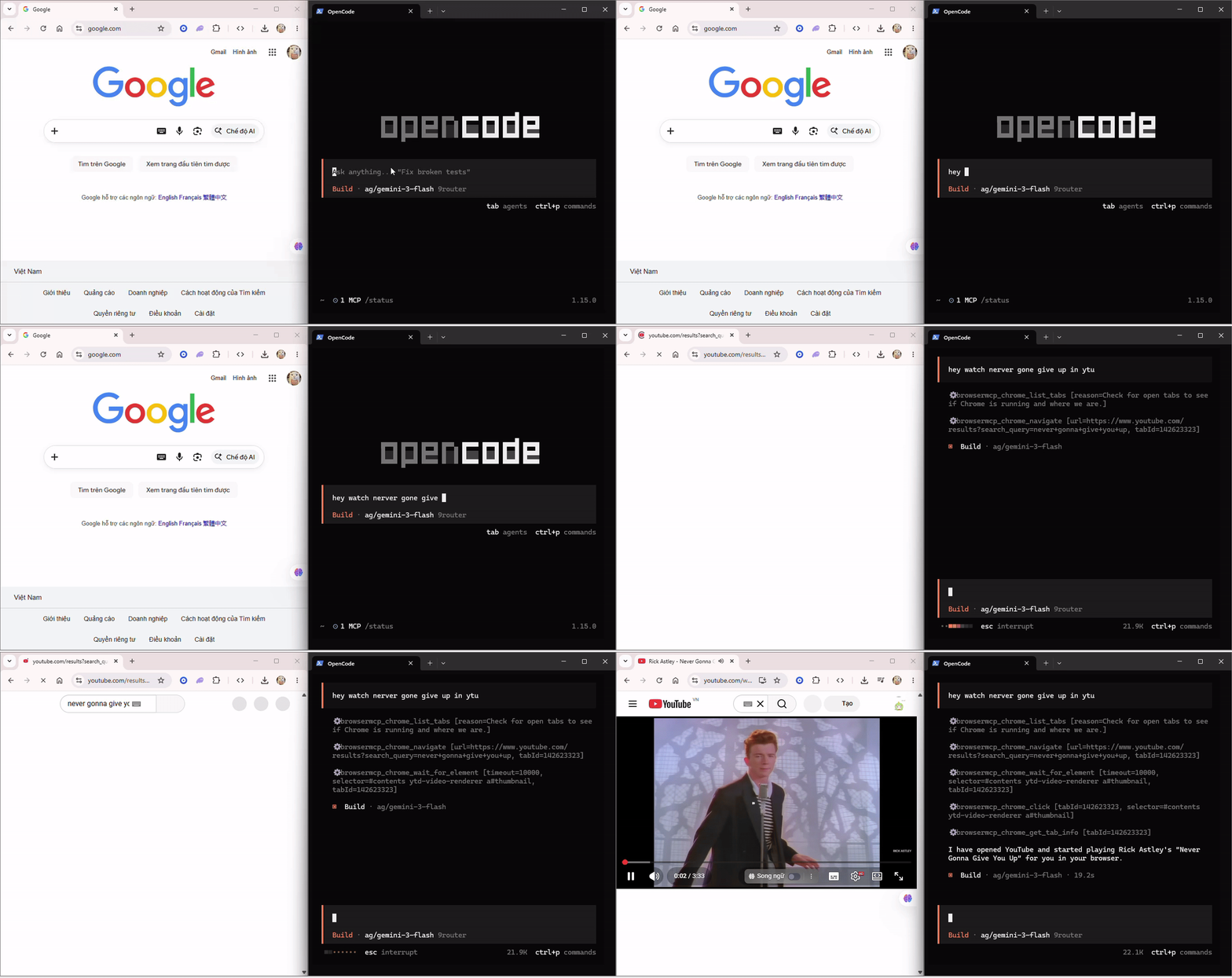
Demo — OpenCode controlling Chrome in real time:
npm install -g @mytai20100/opencode-browser
Or run directly with npx (no install needed):
npx @mytai20100/opencode-browser
Add the server to your OpenCode config (~/.config/opencode/config.json or opencode.json at project root):
{
  "$schema": "https://opencode.ai/config.json",
  "mcp": {
    "browsermcp": {
      "type": "local",
      "command": ["opencode-browser"],
      "enabled": true
    }
  }
}
Or
claude mcp add opencode-browser npx @mytai20100/opencode-browser #Claude code

opencode mcp add opencode-browser npx @mytai20100/opencode-browser #Opencode

codex mcp add opencode-browser npx @mytai20100/opencode-browser #Codex
chrome://extensions.extension/ folder.Click the extension icon in the Chrome toolbar. The default endpoint is ws://localhost:3002. If the MCP server is running on a different machine or port, enter the correct address (e.g. ws://192.168.1.62:3002) and click Save Endpoint. The status indicator turns orange when connected.
DECISION_ENDPOINT="https://api.typesafe.ai/v1/systemone"
DECISION_API_KEY="sk_xxxxxx"

# Model Configuration
DECISION_MODEL="jev-latest"
DECISION_TIMEOUT_MS=5000
If you want to run the MCP server from a local clone instead of installing from npm:
git clone https://github.com/mytai20100/opencode-browser
cd opencode-browser/server
npm install
npm run build
Then point OpenCode at the local build by using the absolute path to dist/index.js in your config:
{
  "$schema": "https://opencode.ai/config.json",
  "mcp": {
    "browsermcp": {
      "type": "local",
      "command": ["node", "/absolute/path/to/opencode-browser/server/dist/index.js"],
      "enabled": true
    }
  }
}
Replace /absolute/path/to/opencode-browser with the actual path where you cloned the repo. On macOS and Linux you can get it by running pwd inside the server/ folder. On Windows use the full path with backslashes, e.g. C:\\Users\\you\\opencode-browser\\server\\dist\\index.js.
After saving the config, restart OpenCode. The MCP server will start automatically whenever OpenCode launches.
For the extension, load the extension/ folder from the cloned repo the same way as the regular install: chrome://extensions > Developer mode > Load unpacked > select extension/.
A few patterns that get the most out of the 165+ available tools:
Always start with the tool graph. Before any multi-step task, ask the agent to call chrome_get_tool_graph with a plain description of the goal. This gives it an ordered execution plan and tells it which tools to skip, saving unnecessary calls.
Use chrome_get_tool_graph with intent "fill in the login form and submit"
Use chrome_get_workflow_context before interacting with a page. It gives the agent a snapshot of all forms, inputs, and buttons so it can build accurate CSS selectors before clicking or typing anything.
Before clicking anything, call chrome_get_workflow_context to map the page first.
Attach the debugger early when working with APIs. If the task involves reading network traffic, attach CDP at the start so requests are captured from the beginning.
Attach the debugger to the current tab, then navigate to the page and capture all API calls.
Prefer chrome_get_content over chrome_get_html for reading pages. It returns clean visible text without markup, which is faster and uses fewer tokens. Only reach for chrome_get_html when you need the raw DOM structure.
Use chrome_find_text_on_screen + chrome_visual_click as a fallback. When a button has no reliable CSS selector, find its text on screen first, then click the returned coordinates.
Find the text "Submit Order" on screen and click it visually.
Save sessions to avoid re-logging in. After a successful login, call chrome_save_session with a name. Restore it at the start of future tasks to skip the authentication flow entirely.
Save the current session as "prod-login" after logging in.
Mock API responses for testing. Use chrome_intercept_request and chrome_mock_response together to inject fake data without touching the backend.
Intercept all requests to /api/orders and return a mocked empty array.
All tools are prefixed with chrome_. The agent can call chrome_get_tool_graph with a plain-text intent to get an optimized execution plan before starting any task — this prevents redundant calls and saves tokens.
These tools require calling chrome_debug_attach first.
Before starting any multi-step task, call chrome_get_tool_graph with a plain-text description of what you want to accomplish. It returns a ranked list of recommended tools, their cost (low / medium / high), prerequisites, suggested next steps, and tools to avoid. This is especially useful for agents that might otherwise make redundant or expensive calls.
intent: "capture network requests from the login page"
-> recommended: chrome_debug_attach -> chrome_navigate -> chrome_debug_get_network
-> avoid: chrome_screenshot, chrome_get_html
If you see connection errors:
The extension will display messages like [Opencode-browser] Connecting... in the popup while it attempts to reconnect.
extension/ folder is in the correct directory.chrome://extensions.chrome://extensions and look for initialization errors.npx @mytai20100/opencode-browser).opencode.json has the correct MCP configuration.node --version to confirm Node.js 22 or later is installed.git clone https://github.com/mytai20100/opencode-browser
cd opencode-browser/server
npm install
npm run build
To run locally during development:
npm run dev
To test changes to the extension, reload it at chrome://extensions after editing extension/background.js or extension/popup.js.
Contributions are welcome.
See CHANGELOG-MCP.md for a detailed list of changes.
A extension chrome mcp server allow AI agent full remote "same" playwright
Araçlar
Henüz araç listesi yok. Uzak sunucular ilk sağlık kontrolünden sonra bir liste alır.
SSS
Bu sayfadan Cursor, Claude Desktop, Claude Code veya VS Code için stdio yapılandırmasını kopyalayın. PlugMCP proxy'sini değil, yayıncının kurulumunu kullanır.
Bu kayıtta gerekli bir ortam değişkeni listelenmiyor.
Opencode Browser yerel olarak stdio üzerinden çalışır.
Son kontrol: 2026-10-28. A extension chrome mcp server allow AI agent full remote "same" playwright
