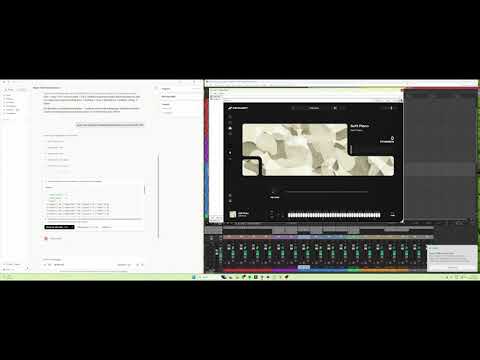
ReaperMCP connects any MCP-compatible AI assistant to REAPER, giving it full control over music production. Talk to your AI assistant and it composes, mixes, masters, and measures your music in real-time — the AI chooses every note, rhythm, and CC itself.
181 tools across 26 modules cover the full workflow: MIDI composition and patterns, a vocal-chop pipeline, FX and automatic genre-tuned mixing/mastering (35 style profiles), sends and routing, and post-production QC — batch editing, ReaScript automation, silence/click detection.
AI-powered music production and post-production in REAPER via MCP — 181 tools for composition, mixing, mastering, batch editing, audio QC, and ReaScript automation.
Yıldızlar
108
Araçlar
—
Çalışma süresi
—
No cloud. Nothing leaves your machine. ReaperMCP runs entirely locally through a file-based Lua IPC bridge inside REAPER — your project, audio, and MIDI stay on your computer. Bring whatever AI client you already use (Claude Desktop, Claude Code, Cursor, any MCP client) — ReaperMCP handles REAPER.
If this is useful to you, a star helps other people find it — that's the whole marketing budget for this project. Want to help keep it maintained? Click the Sponsor badge up top.
Deep control, not just playback. Most AI-audio integrations expose basic transport — play, stop, record. ReaperMCP exposes REAPER's actual production surface: genre-aware automatic mixing/mastering across 35 style profiles, a vocal-chop pipeline, drum-pattern and chord-progression shorthand, and post-production QC. The AI can produce a track end-to-end, not just push buttons on one you already made.
100% local. No cloud calls, no API keys, nothing leaves your machine — REAPER and the AI talk over a file-based bridge on disk, not a server you don't control.
Actively maintained. CI runs the full test suite across 3 OS × 4 Python versions on every change. Issues get read, discussed, and shipped — not just filed and forgotten.
Composable with companion tools. Pairs with SongForge-MCP (local AI music/vocal generation) and Audacity-MCP (audio cleanup, mastering, and local transcription) — generate, produce, and clean up without leaving the same AI conversation.
Quick Start
1. Get ReaperMCP
Option A: Click the green Code button above → Download ZIP → extract to a folder — works with nothing pre-installed, easiest on a brand new machine.
Option B: Clone with git (lets you git pull for updates later):
A fresh Windows install doesn't ship with git — check first:
git --version
If that says "not recognized", install it, then close and reopen your terminal:
winget install --id Git.Git -e --source winget
(winget itself ships with Windows 11 and up-to-date Windows 10. If winget isn't found either, grab the installer directly from git-scm.com.)
macOS/Linux almost always have git already — git --version to check, or brew install git / sudo apt install git if not.
Option C: Already have Python? Install the published package straight from PyPI:
pip install xdarkzx-reaper-mcp
This gives you the reaper-mcp command directly — but you'll still need
reaper_scripts/reaper_mcp_server.lua for Step 3 below, since that one
file isn't bundled into the PyPI package (grab it from the repo, or
download it directly).
2. Run the installer
Windows: either double-click install.bat in File Explorer, or — if you're already in a terminal from the git clone step above — just keep going in the same PowerShell/Command Prompt window:
cd Reaper-MCP
.\install.bat
macOS / Linux:
cd Reaper-MCP
bash install.sh
The installer installs reaper-mcp locally and optionally configures Claude Desktop — no manual JSON editing needed.
Install manually with pip install -e . from the repo folder (or pip install xdarkzx-reaper-mcp from PyPI) and add to your client's MCP config:
Check your client's MCP documentation for the config file location.
3. Load the Lua script in REAPER
Used the one-click installer? Already done — it sets up REAPER to auto-load the script on every launch. Just open (or restart) REAPER.
Manual install?
Open REAPER
Go to Actions → Show action list
Click Load ReaScript...
Navigate to reaper_scripts/reaper_mcp_server.lua and select it
Click Run
This only loads it for the current session — you'll need to re-run it each time REAPER restarts. See docs/INSTALLATION.md for the auto-start setup.
4. Start producing
Open your AI client and start talking:
"Create 4 tracks: strings, brass, piano, and drums"
"Compose an 8-bar orchestral string arrangement in D minor"
"Add ReaEQ to the piano track and cut the low end below 200Hz"
"Set the tempo to 90 BPM and loop the first 8 bars"
REAPER must be open with the Lua script running. ReaperMCP communicates through file-based IPC — it can't launch REAPER for you.
See the full Installation Guide for detailed setup on all platforms and MCP clients.
Features
181 Tools Across 26 Modules
Category
Tools
Highlights
Transport
11
Play, stop, pause, record, set BPM, time signature, playrate, toggle repeat/metronome
scan_audio_folder (parse BPM / key / role from filenames), detect_common_bpm, load_loops (batch-create tracks + load stems). Point at a sample-pack folder and the AI builds a track from it.
Vocal Chops
10
chop_pipeline — end-to-end: reorders slices from the source vocal onto a NEW track with style-specific rhythms (chillstep / future bass / porter / trap), pitches to chord tones, stutters + harmonises + fades. Primitives:item_split_at_transients, item_split_at_positions, take_set_pitch, take_set_playrate, take_set_reversed, item_duplicate. Helpers:analyze_chop_set, arrange_chops_to_chord_tones, stack_chop_layers.
Audio Analysis
7
analyze_loudness (LUFS vs. streaming/broadcast/cinema target), analyze_clipping, analyze_silence, analyze_peaks, analyze_region_qc (edit-oriented QC — silence/click candidates per region), analyze_frequency_spectrum, analyze_stereo_field. Optional extras: pip install -e ".[analysis]" (or pip install "xdarkzx-reaper-mcp[analysis]" if installed from PyPI)
Script
2
script_list, script_run — discover and execute ReaScript files in the project's Scripts tree
Demo
1
demo_edm_project — one-shot full-project demo render (smoke test + reference)
See docs/TOOLS.md for the complete tool reference with every signature and a one-line description for each tool.
Tool profiles
The default 181-tool surface is designed for full-featured frontier models. Smaller/cheaper models (Groq Llama 3 caps at 128 tools, some local models lower still) will silently truncate. Set REAPER_MCP_PROFILE in your client's server config to pick a workflow-specific subset:
35 professional style profiles drive automatic EQ, compression, reverb buses, sidechain pumping, and mastering — each tuned to industry-standard LUFS targets and character.
Tool
What It Does
engine_mix(style)
Per-track EQ + compression + reverb buses with send routing. Auto-detects FabFilter Pro-Q 3 / Pro-C 2 / Pro-R or falls back to REAPER stock (ReaEQ / ReaComp / ReaVerbate)
engine_master(style)
Master-bus chain: HP 25 Hz → bus glue comp → tonal shelf EQ → stereo width → brick-wall limiter, targeting style-specific LUFS and true-peak ceilings
engine_fix_mix(style)
Non-destructive repair pass — re-runs the mix pipeline on an existing session, preserving user tweaks where possible
setup_sidechain(source, target, amount)
Kick → bass / pad pumping via channels 3/4 + pin-mapped sidechain inputs
Smart plugin detection.fx_list_installed() inspects what's on the user's machine and reports the best-available EQ / compressor / reverb / limiter / de-esser / gate / saturator / multiband / stereo tool — covering FabFilter, Waves, iZotope, Valhalla, Softube, TDR, Slate, Melda, Soundtoys, Airwindows, REAPER stock, and common rack hosts (Waves StudioRack, Blue Cat PatchWork, Kilohearts Snap Heap). Users can pin category → plugin preferences via set_fx_preferences(...).
AI-Driven Composition
The AI writes every note, rhythm, CC curve, and keyswitch itself using the granular MIDI and FX tools above. A single 00_core.md instruction file provides the tool surface, shorthand notation, BBC Spitfire CC reference, and per-family mixing tips. Voicing, humanization, structure, and genre conventions all come from the AI's own musical knowledge.
Works well alongside SongForge-MCP
Need vocals or a full backing track and don't want to record or license anything? SongForge-MCP is a companion MCP server that generates original vocal + instrumental tracks locally (powered by ACE-Step 1.5 — no cloud service, no subscription, no account) and can split out an isolated vocal stem. Run both servers in the same Claude Desktop session: generate the track there, then import, arrange, and produce it further here without leaving the conversation.
The Python server writes commands to command.json in a shared temp directory; a Lua script inside REAPER polls, executes, and writes results to response.json. No sockets, no ports, no network exposure.
IPC directory:
Windows: %TEMP%\reaper_mcp
macOS: $TMPDIR/reaper_mcp
Linux: /tmp/reaper_mcp
Key design decisions
File-based IPC — no port allocation, no firewall surface.
Static Lua dispatch — every handler is explicit code, no load / dofile / loadstring.
Dynamic tool registration — drop a module into reaper_mcp/tools/, export register(mcp), and it's picked up automatically.
Heartbeat + timeouts — the client detects a stale REAPER (no lock-file update) and raises a typed error instead of hanging.
Conservative per-call limits — MAX_COMPOSE_TRACKS, MAX_TOTAL_NOTES_PER_CALL etc. keep any single command under ~2 s of REAPER's main thread time.
Full details — IPC protocol, request lifecycle, registration internals, mix-engine pipeline, style catalog — in docs/ARCHITECTURE.md.
ReaperMCP controls REAPER — but you need instruments loaded for the AI to compose with. The AI can create tracks and write MIDI, but it can't browse or install VST plugins for you.
Before You Start Composing
Open REAPER and create a new project
Add tracks with your desired VST instruments (Kontakt, Spitfire, LABS, etc.)
Save as a template (File → Save Project As Template) so you don't repeat this every time
The AI will use get_track_instruments to detect what's loaded and compose for those instruments automatically.
See the full Project Setup Guide for recommended instrument templates (orchestral, pop/rock, EDM) and what plugins to load.
Known limitation — multi-sample/one-shot instruments: the AI can't see which sound is mapped to which key inside a plugin's own sample browser, or whether a given key is a one-shot vs. a held/sustained sample — that's private plugin state no host can read, true of most sample-based VSTs/AUs, not specific to this project. See Project Setup Guide § multi-sample libraries for the workaround.
Troubleshooting
Problem
Fix
"No response from REAPER"
Make sure REAPER is open and the Lua script is running. Go to Actions → Show action list → find reaper_mcp_server.lua → Run.
Script not found in Actions
Click Load ReaScript... first to register it, then Run.
"Connection timeout"
REAPER is busy. Wait for it to finish, or check if the Lua script crashed (re-run it).
Works once then stops
The Lua script may have stopped. Re-run it from Actions.
Claude Desktop doesn't see ReaperMCP
Restart Claude Desktop after editing the config. Check %APPDATA%\Claude\claude_desktop_config.json (Windows) or ~/Library/Application Support/Claude/claude_desktop_config.json (macOS).
"command not found: reaper-mcp"
Run the installer again, or manually: pip install -e . from the repo folder, or pip install xdarkzx-reaper-mcp.
MIDI notes sound robotic
Make sure your AI is using the humanization instructions — ask it to "humanize the MIDI" or "add expression CC curves".
Development
# Install dev dependencies
pip install -e ".[dev]"

# Run tests
pytest tests/ -x -q

# Run lint (real bugs + security patterns, not style/formatting)
ruff check .
Adding New Tools
Create a module in reaper_mcp/tools/ (or add to an existing one)
Export a register(mcp: FastMCP) function
Define your tools with @mcp.tool() decorators
That's it — the tool registry auto-discovers it on startup
Turning this into a tool every REAPER user reaches for takes more than one person. If you're using ReaperMCP — even just trying it out — come join the Discord: share what you built, report what's broken, suggest what's missing, or just hang out with other people doing AI-driven production. Communities grow one person telling another this exists, so if you know someone who'd get value out of this, send them the link.
Support
If ReaperMCP has helped with your music production, consider sponsoring:
Your support helps keep this project maintained and free for everyone.
Hiring / Consulting
Need a custom MCP server, a native plugin/IPC integration, or a local AI pipeline built for your product? This repo and its sibling projects — Audacity-MCP, SongForge-MCP — are public, working examples of exactly that. Open to contract work: [email protected].
Documentation
Installation Guide — Detailed setup for Windows, macOS, Linux and every supported MCP client
Project Setup Guide — Setting up your REAPER project with instruments for AI composition
Tools Reference — Every tool grouped by domain, with a one-line description and signature
Want to know when a new version ships? Click Watch → Custom → Releases at the top of this repo — GitHub notifies you on every tagged Release, without the noise of every commit or issue.
Need a custom tool, plugin, or integration built like this? I take on select engineering projects — come find me on the Discord and leave a message, or open an issue here.
R
Reaper
xDarkzx·108 yıldız·
AI-powered music production and post-production in REAPER via MCP — 181 tools for composition, mixing, mastering, batch editing, audio QC, and ReaScript automation.
Henüz araç listesi yok. Uzak sunucular ilk sağlık kontrolünden sonra bir liste alır.
SSS
Sorular
Reaper nasıl kurulur?
Bu sayfadan Cursor, Claude Desktop, Claude Code veya VS Code için stdio yapılandırmasını kopyalayın. PlugMCP proxy'sini değil, yayıncının kurulumunu kullanır.
Reaper için API anahtarı gerekiyor mu?
Bu kayıtta gerekli bir ortam değişkeni listelenmiyor.
Reaper hangi aktarımı kullanıyor?
Reaper yerel olarak stdio üzerinden çalışır.
Reaper en son ne zaman kontrol edildi?
Son kontrol: 2026-10-28. AI-powered music production and post-production in REAPER via MCP — 181 tools for composition, mixing, mastering, batch editing, audio QC, and ReaScript automation.