Cdp MCP sunucusu | PlugMCP
İçeriğe geç CDP-MCP
Chrome DevTools Protocol MCP Server - A desktop application that provides browser automation capabilities through the Model Context Protocol (MCP), built with Tauri, React, and Rust.
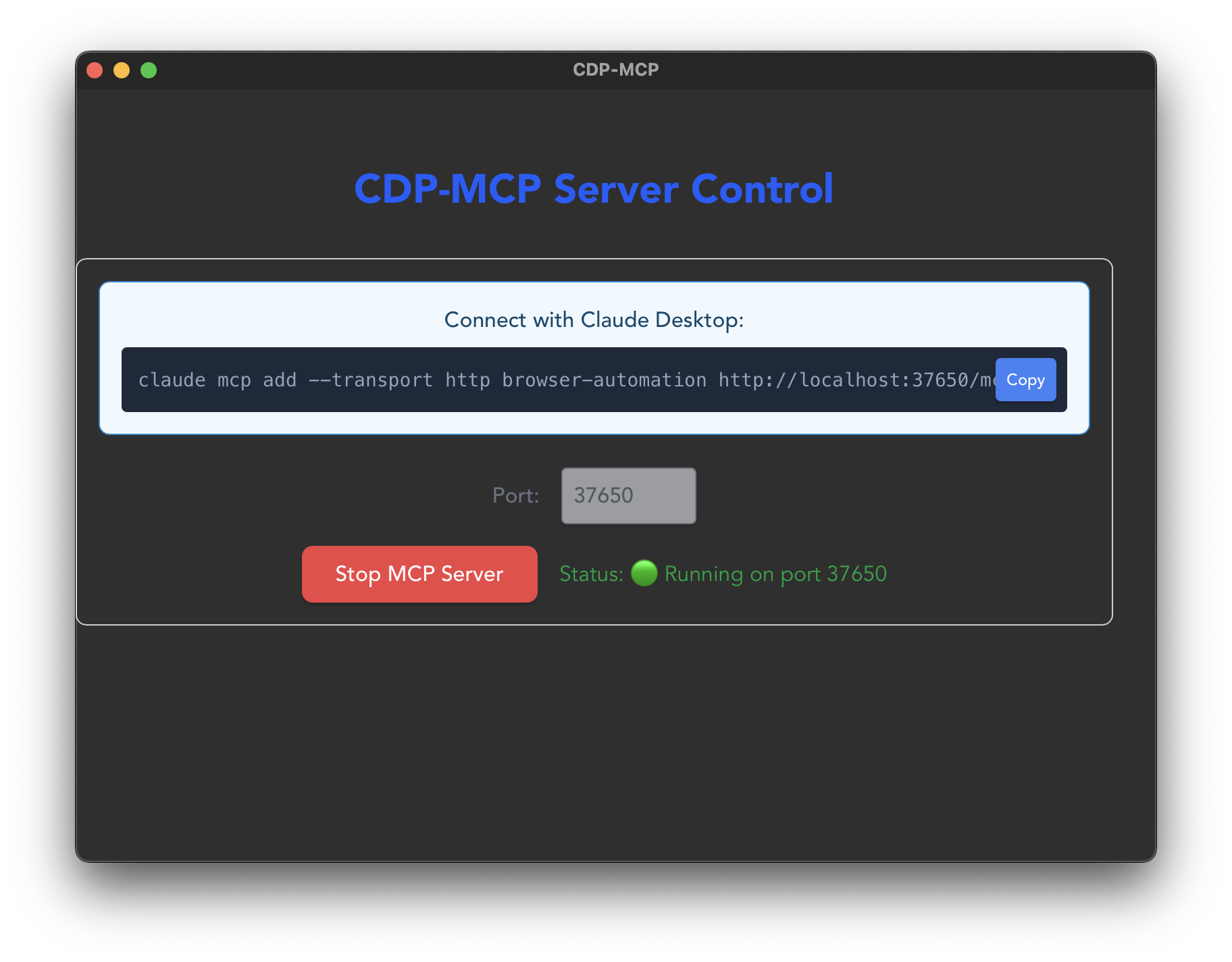
The CDP-MCP dashboard provides an intuitive interface for managing your MCP server. Simply click "Stop MCP Server" or "Start MCP Server" to control the service, and use the provided command to connect with Claude Code.
Chrome DevTools Protocol MCP Server
Her aracı her ajana bağlayın. Sunucu yazmayanlar için MCP dizini.
Ürün
Dizin
Geliştiriciler
Şirket
🚀 Features
MCP Server : Streamable HTTP server using Axum on configurable port (default: 37650)Browser Automation : Control browsers programmatically via Chrome DevTools ProtocolHeadless/Headful Mode : Run browser in background (headless) or with visible windowCross-Platform : Works on macOS, Windows, and LinuxModern UI : React-based interface with Tailwind CSS stylingReal-time Control : Start/stop MCP server from the UI
📋 Prerequisites
Node.js (v16 or higher)
Rust (latest stable)
npm/pnpm/yarn
A modern web browser (Chrome, Firefox, Safari, etc.)
🛠️ Installation git clone https://github.com/yonaka15/cdp-mcp.git
cd cdp-mcp
Start the development server:
🎮 Usage
Running as MCP Server The application runs as an MCP Streamable HTTP server using Axum:
cargo run --release --manifest-path src-tauri/Cargo.toml
The server runs on port 37650 and provides:
HTTP POST endpoint for JSON-RPC 2.0 requests
HTTP GET endpoint for Server-Sent Events (SSE) streaming
Session management via Mcp-Session-Id header
Connect with Claude Desktop Add to your Claude Desktop configuration:
{
  "mcpServers": {
    "browser-automation": {
      "url": "http://localhost:37650"
    }
  }
}
Browser Mode Configuration The browser automation tools support both headless (background) and headful (visible window) modes:
Headless mode : Browser runs in the background without a visible windowHeadful mode (default) : Browser window is visible for debugging and monitoring You must first open a browser instance before navigating:
// Step 1: Open browser (choose mode)
await browser_open({ headless: false }); // Visible browser window (default)
// or
await browser_open({ headless: true }); // Headless mode

// Step 2: Navigate to URLs
await browser_navigate({ url: "https://example.com" });

// Step 3: Interact with the page
await browser_click({ selector: "button" });
await browser_type({ selector: "input", text: "Hello" });

// Step 4: Close when done
await browser_close();
🔧 Available MCP Tools
Core Browser Controls
browser_open Opens a new browser instance in headless or headful mode.
headless (boolean, optional): Run in headless mode (default: false)
browser_navigate Navigates to a URL in the browser (requires browser_open first).
url (string, required): The URL to navigate to
browser_close Closes the browser and all tabs.
Page Interaction
browser_click Clicks an element on the page.
selector (string, required): CSS selector for the element to click
browser_type Types text into an input field.
selector (string, required): CSS selector for the input fieldtext (string, required): Text to type
browser_select_option Selects an option in a dropdown.
selector (string, required): CSS selector for the dropdownvalues (array, required): Values to select
Navigation
browser_go_back Navigates back in browser history.
browser_go_forward Navigates forward in browser history.
browser_reload Reloads the current page.
Page Content
browser_get_content Gets the HTML content of the current page.
browser_screenshot Takes a screenshot of the current page.
full_page (boolean, optional): Capture full page (default: false)
browser_snapshot Gets a snapshot of the current page state including tabs, console messages, and page info.
JavaScript Execution
browser_evaluate Executes JavaScript in the browser.
script (string, required): JavaScript code to execute
browser_wait_for Waits for an element to appear.
selector (string, required): CSS selector to wait fortimeout (number, optional): Timeout in milliseconds (default: 30000)
Tab Management
browser_tab_list Lists all open browser tabs.
browser_tab_switch Switches to a different browser tab.
index (number, required): Tab index to switch to
browser_tab_close Closes a specific browser tab.
index (number, required): Tab index to close
🏗️ Tech Stack
Frontend
React 19 - UI frameworkTypeScript - Type safetyTailwind CSS v4 - StylingVite - Build tool
Backend
Rust - Core backend languageTauri v2 - Desktop application frameworkAxum - Web framework for MCP Streamable HTTP serverChromiumoxide - Chrome DevTools Protocol clientTokio - Async runtimeTower-http - CORS and middleware supportImage crate - Image processing (JPEG compression)
Protocol
MCP Streamable HTTP - HTTP/SSE transport with AxumJSON-RPC 2.0 - Message formatServer-Sent Events (SSE) - Real-time server-to-client streamingChrome DevTools Protocol - Browser control protocol
📁 Project Structure cdp-mcp/
├── src/ # React frontend
│ ├── App.tsx # Main UI component with MCP controls
│ ├── App.css # Tailwind CSS styles
│ └── main.tsx # Application entry point
├── src-tauri/ # Rust backend
│ ├── src/
│ │ ├── lib.rs # Tauri commands and server lifecycle
│ │ ├── mcp_server.rs # MCP Streamable HTTP server (Axum)
│ │ ├── cdp_browser.rs # Chrome DevTools Protocol integration
│ │ ├── image_processor.rs # Rust image processing for screenshots
│ │ └── config.rs # Configuration management
│ ├── Cargo.toml # Rust dependencies
│ └── tauri.conf.json # Tauri configuration
├── .claude/ # Claude AI documentation
│ └── CLAUDE.md # Project context for AI assistance
├── package.json # Node.js dependencies
├── vite.config.ts # Vite configuration
└── README.md # This file
🔨 Build Build the application for production:
The built application will be available in:
macOS : src-tauri/target/release/bundle/dmg/Windows : src-tauri/target/release/bundle/msi/Linux : src-tauri/target/release/bundle/appimage/
🧪 Testing Test the MCP server endpoints:
# Run the test script
./test-mcp-server.sh
Or manually test with curl commands as shown in the Usage section.
🦀 Why Rust? CDP-MCP leverages Rust's unique advantages for browser automation:
Performance
Native Speed - Compiled to machine code for maximum performanceZero-Cost Abstractions - High-level code without runtime overheadEfficient Memory Usage - No garbage collector delays or memory bloat
Reliability
Memory Safety - Prevents segfaults and memory leaks at compile timeThread Safety - Fearless concurrency with Send/Sync traitsError Handling - Robust Result types for predictable error recovery
Integration
chromiumoxide - Native Rust CDP client for direct Chrome controlTauri v2 - Seamless desktop app integration with minimal resource usageAsync/Await - Modern async runtime with Tokio for concurrent operations
Developer Experience
Type Safety - Catch errors at compile time, not runtimePattern Matching - Elegant handling of complex browser statesCargo Ecosystem - Rich ecosystem of high-quality libraries These benefits make CDP-MCP more reliable and performant than JavaScript or Python alternatives, especially for long-running automation tasks.
🚧 Roadmap
🤝 Contributing Contributions are welcome! Please feel free to submit a Pull Request.
Fork the repository
Create your feature branch (git checkout -b feature/AmazingFeature)
Commit your changes (git commit -m 'Add some AmazingFeature')
Push to the branch (git push origin feature/AmazingFeature)
Open a Pull Request
📝 License This project is licensed under the MIT License - see the LICENSE file for details.
🙏 Acknowledgments
📞 Support For issues and questions:
Open an issue on GitHub
Check the CLAUDE.md file for detailed technical documentation
Note : The application supports both connecting to existing Chrome instances with debug port or launching new instances automatically.
Dizin puanı 6/100 Listelendi 10 / 10
Resmi MCP Registry'de 0 / 18
Bakımcısı tarafından sahiplenildi 0 / 8
Araç listesiyle yanıt veriyor 0 / 12
GitHub yıldızları 4 / 16
Haftalık indirmeler 0 / 10
Scrapling 🕷️ The BEST Web Scraping framework that handles everything from a single request to a full-scale crawl! Don't be shy, join here: https://discord.gg/EMgGbDceNQ and follow here for daily tips and trick Chrome Devtools Chrome DevTools for coding agents Chrome DevTools MCP MCP server for Chrome DevTools Chrome DevTools MCP MCP server for Chrome DevTools Chrome Devtools Chrome DevTools for coding agents UI TARS Desktop The Open-Source Multimodal AI Agent Stack: Connecting Cutting-Edge AI Models and Agent Infra Playwright Playwright MCP server Playwright Playwright MCP server Obscura The headless browser for AI agents and web scraping Cua Scale computer-use 2.0 with open-source drivers, cross-OS sandboxes, and benchmarks for training, evaluation, and data generation. Ego Lite The fastest browser for AI agents to run browser automation, built for sharing your logged-in browser state with your AI agents, like Codex or Claude Code, without disturbing you. Zero cost, zero conf SeleniumBase 📊 Python APIs for Web Automation, Testing, and Scraping. CDP Mode launches a stealth browser that bypasses bot-detection/CAPTCHAs. Adds stealth to Playwright and has an MCP server for AI agents. Browser automation MCP sunucuları En iyi Browser automation MCP sunucuları
Henüz araç listesi yok. Uzak sunucular ilk sağlık kontrolünden sonra bir liste alır.
Cdp nasıl kurulur? Bu sayfadan Cursor, Claude Desktop, Claude Code veya VS Code için stdio yapılandırmasını kopyalayın. PlugMCP proxy'sini değil, yayıncının kurulumunu kullanır.
Cdp için API anahtarı gerekiyor mu? Bu kayıtta gerekli bir ortam değişkeni listelenmiyor.
Cdp hangi aktarımı kullanıyor? Cdp yerel olarak stdio üzerinden çalışır.
Cdp en son ne zaman kontrol edildi? Son kontrol: 2026-10-28. Chrome DevTools Protocol MCP Server
Araçların açıklamaları var 0 / 6