Power your agent
Cài đặt từ nhà phát hành. Không phải endpoint của PlugMCP.
Host a copy with our keys and logs.
Chưa có bản phát hành đóng gói nào trong registry. Làm theo README của kho mã.
URL từ xa hay một lệnh trên máy của bạn? Hai cách cài đặt khác nhau thế nào
Chạy trên PlugMCP
A new server you create. It is not this listing's official endpoint. Use the publisher install when you want their URL and their credentials.
MởTừ nhà phát hành
Unity MCP Plugin (UPM) — Editor bridge for AI-assisted game development. Enables Claude, Cursor & MCP-compatible AI to control Unity Editor with 268 tools: scenes, GameObjects, components, builds, profiling, Shader Graph, Amplify Shader Editor, terrain, physics, NavMesh & more. Free & open source.
The Unity side of a workflow built for multiple projects, multiple agents and multiplayer iteration. This UPM package runs the editor bridge used by the companion AnkleBreaker MCP server.
Install · Watch demos · Dashboard · Performance · Architecture · Validation
The server also provides Hub and connection tools. Route counts describe the checked-in dispatcher; optional integrations require their own packages.
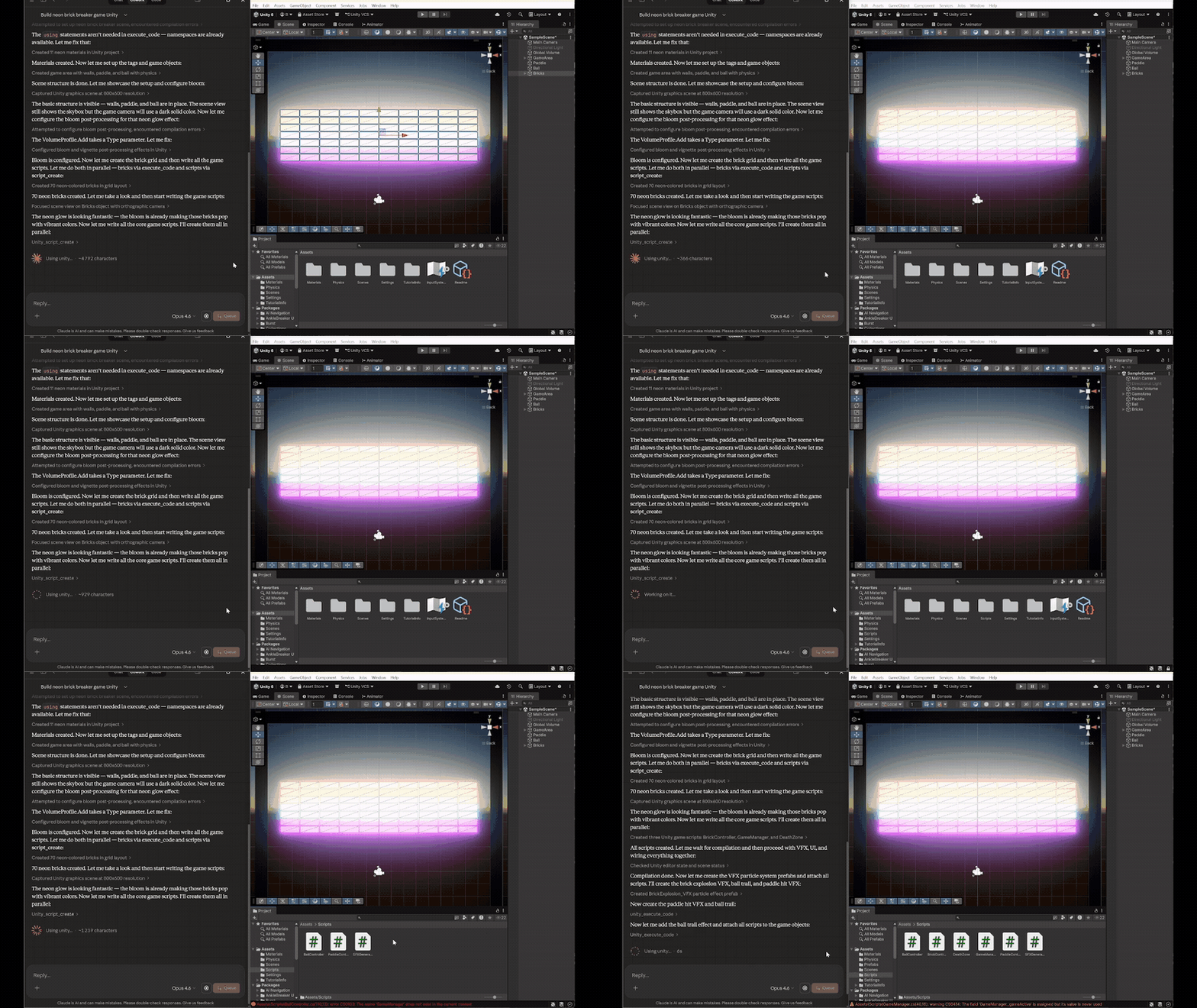
From a prompt to a playable prototype. The recorded neon brick-breaker workflow combines scene authoring, materials, C# gameplay scripts and visual iteration through Unity MCP.
Accelerated excerpts from existing recordings. The silent MP4s contain the same frames as the GIFs; their duration is not a development-time benchmark. Prompts and media details.
Install from source: the commands below install main in both repositories, including the improvements documented here. Published npm packages and version tags may lag behind main.
https://github.com/AnkleBreaker-Studio/unity-mcp-plugin.git#main.unity_list_instances, select your project, then call unity_editor_state.The default port is 7890; multiple editors can claim different ports. Discover the current project and port instead of assuming it remains the same after a restart. Browser navigation to the internal HTTP bridge is not the supported verification flow.
Server and plugin versions advance independently. Queue and legacy synchronous paths remain available; version numbers do not need to match.
The MCP status dropdown appears automatically in Unity's main toolbar after import. It shows the bridge state and active-agent count; hover for port and diagnostic details. A later manual Hide choice is respected. Show Toolbar Status restores it without resetting the rest of your layout.
The same primary destinations are available under Window → AB Unity MCP and Tools → AnkleBreaker → Unity MCP: Dashboard, Welcome, Action History, settings, self-tests and documentation. The Dashboard's MCP Menu ▼ and the history window's MCP ▼ open the complete shared dropdown, including server controls and category switches. The canonical Welcome remains the one supplied by the upstream package.
The current companion server verifies the resolved identity when selecting by name and prevents stale discovery from replacing a newer project choice. Per-agent selections stay independent; include the discovered port on concurrent editor calls. Selection behavior and evidence.
Protocol 2 adds protected submission retries and session-scoped polling. An updated server can recover the original ticket when its acknowledgement is lost. Older clients keep using their existing endpoints; their retry behavior does not change. Protocol and compatibility details.
Optional integrations include ProBuilder, UMA, Amplify Shader Editor, Shader Graph, VFX Graph, Input System, Memory Profiler and Multiplayer Play Mode. Discover their tools through unity_list_advanced_tools; the plugin reports unavailable packages or disabled categories instead of requiring every integration in every project.
UMA uses a separate assembly enabled by UMA_INSTALLED, keeping its references out of the core bridge. UMA V3.1f1 creation and rename workflows now pass on Unity 6.6, including legacy recipe references and preservation after file collisions. Actual UMA 2 execution and runtime avatar rendering remain unverified. UMA setup, evidence and reproduction.
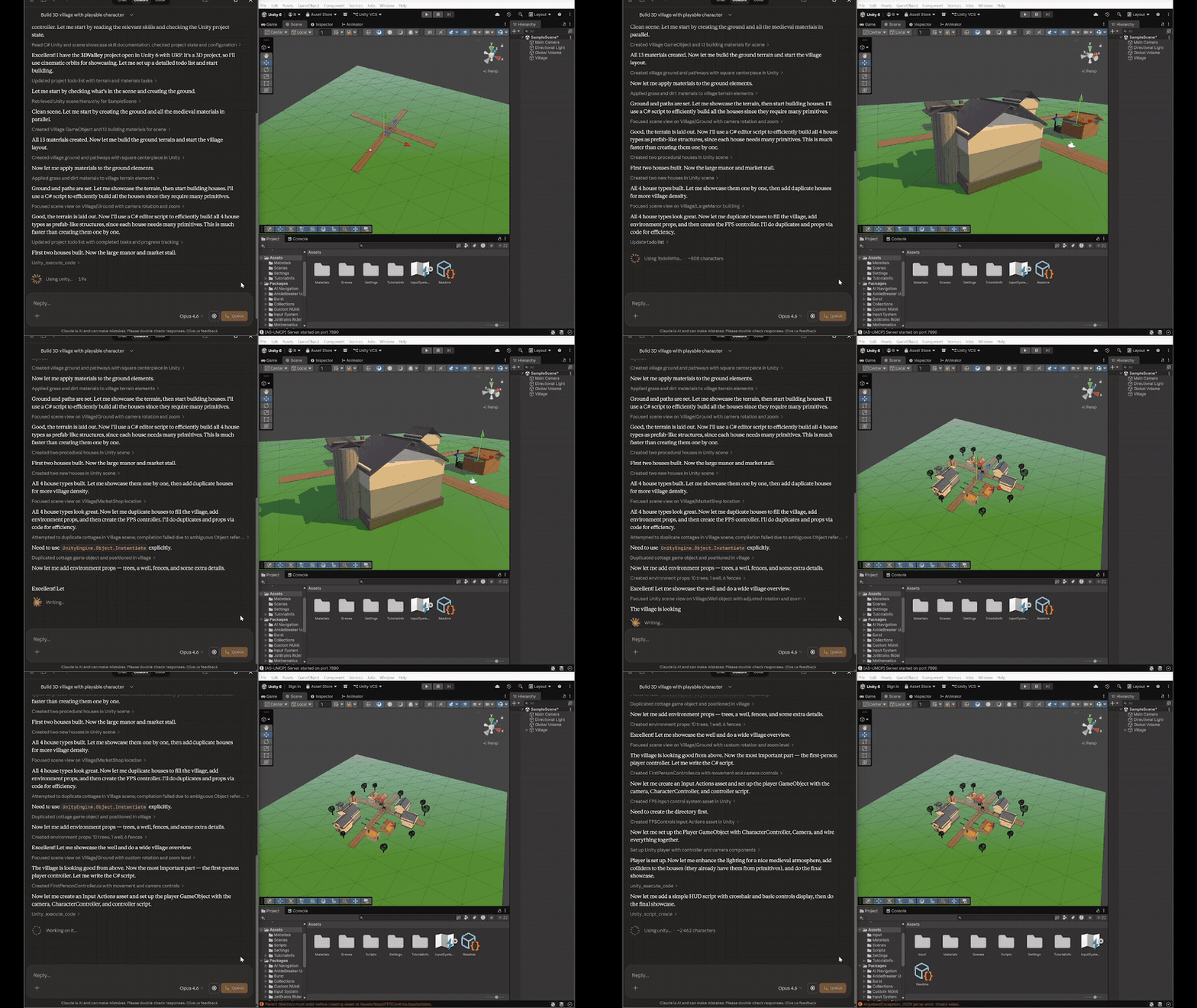
Terrain, reusable houses, materials, trees, fences and paths, created and refined in the Unity Editor.
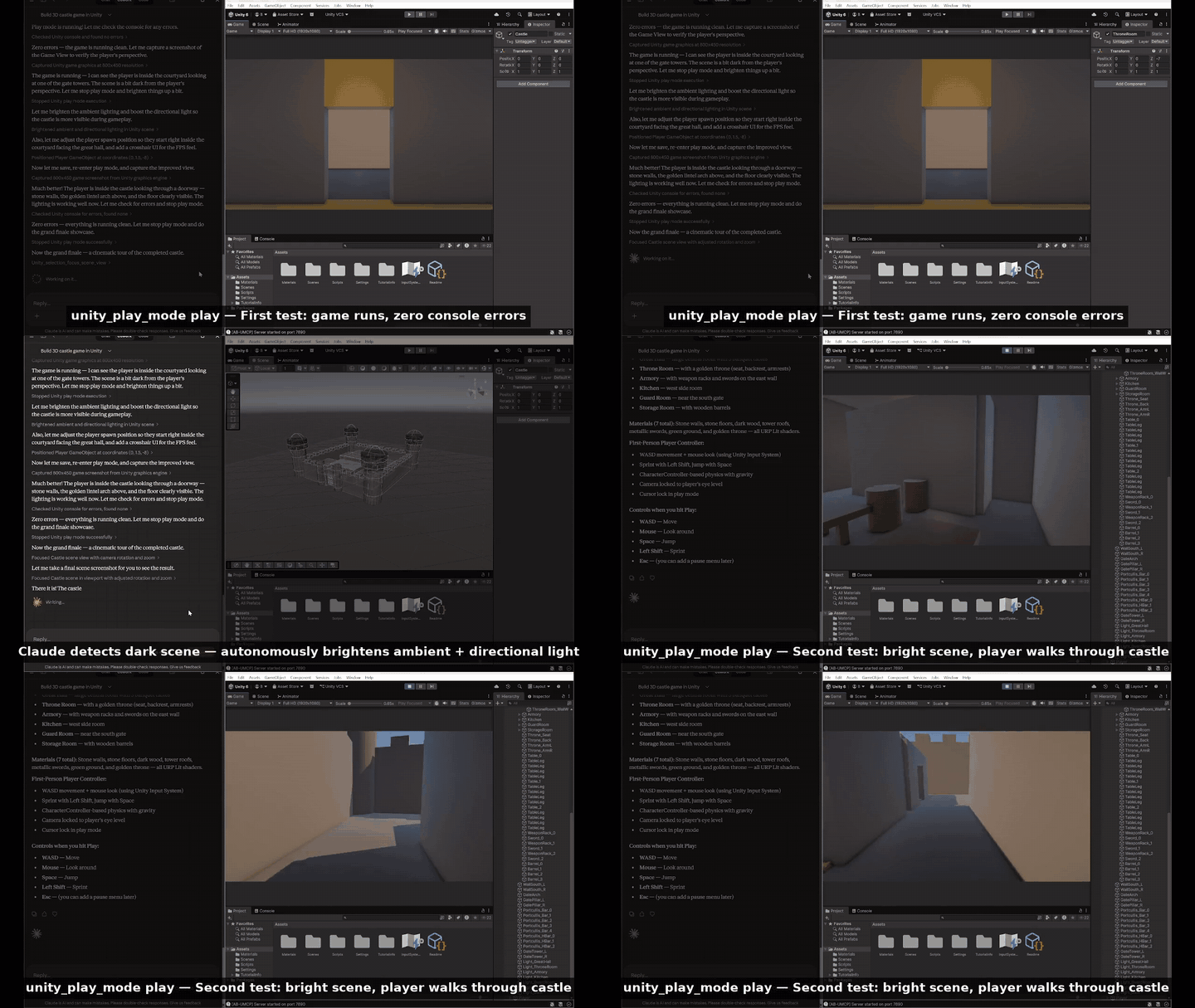
Multi-room construction, lighting adjustments and a first-person walkthrough in the recorded project.
List my running editors, select my prototype and inspect its scene and compilation errors before making changes.
Discover the multiplayer tools, inspect the configured MPPM scenario and start its Host and Client players.
Run the selected EditMode tests, keep the job ID and retrieve its results in pages. Then show me the recent actions and which supported changes can be undone.
Results depend on your model, project and installed packages. More prompts and the full tool catalog.
Captured in a validation project. Long agent/request names deliberately exercise layout; the counters show that test session.
Open Window → AB Unity MCP → Dashboard in the project you want to inspect. Bridge controls, queue activity, agent cards and recent actions come first. Sections remember their state per project; long names and requests remain available in tooltips.
HTTP Activity adds response codes, active/peak requests, body traffic, rejected input, serialization failures and handler timings. Reload counts persist for the editor session; HTTP counters reset on domain reload. These transport counters stay separate from command outcomes. Fields, limits and validation.
Cards update in place. A measured changing-agent workload records 83% fewer allocation events than the baseline; layout and rendering are excluded. Twenty small code-execution calls fell from 15.85 s to 1.01 s in a separate Unity 6.6 fixture. These are workload-specific measurements. Dashboard evidence / Execution evidence.
Outstanding work keeps a session visible. At most 1,024 sessions without outstanding work are retained, including recently completed identities; inactive sessions also expire after 30 minutes, with at most 256 retained after periodic cleanup. A returning evicted identity starts fresh counters and logs. Ticket completion is atomic, and late callbacks cannot replace a terminal result or count it twice. A timeout does not cancel work that already started or prove that no changes occurred.
EditorApplication.update processes one write or up to five explicitly classified reads, visiting agent queues fairly. Unknown routes use the write path.Pending tickets are indexed by ID, avoiding a scan across every agent queue on each status request. Supported synchronous writes get individual named undo groups. Deferred commands do not collapse undo groups across intervening work from other agents.
Each editor has its own listener, queue and project identity. The server handles request isolation and per-call routing. The plugin handles editor scheduling, history, optional integrations and reload lifecycle. Heavy Unity operations still occupy the main thread; queueing does not make arbitrary editor work non-blocking.
The bridge binds to loopback and checks incoming browser/host metadata. It is intended for the companion server on the same machine. Local code-execution tools have the authority of the editor process, so use trusted MCP clients. Queueing orders requests; it does not resolve conflicting edits by different agents. Undo applies to commands that register supported Unity undo operations, not every possible command or filesystem change.
Compiler metadata reuse, visible-row history drawing and paginated result construction remove repeated work from three different editor workflows. These are separate Unity 6000.6.2f1 / Windows fixtures with historical baselines, not whole-editor or competing-product benchmarks.
The declared minimum remains Unity 2021.3.18f1. All 78 editor sources included in the minimum-version API compiler check pass. Actual older-editor execution is deferred; current live validation uses Unity 6000.6.2f1 on Windows.
The companion server has 263 passing tests on eight CI configurations (Node 18/20/22/24, Windows/Linux); this plugin passes its 338-route registry check. Native tests and live workflows provide separate Unity evidence. The delivery summary records the source checkpoints and limits; the broad compatibility matrix and later focused checks were not all run at one final commit.
Older MPPM/ParrelSync versions, game networking, other OS/build platforms and additional optional packages need separate validation. Full evidence and follow-up limits.
From the plugin repository, with an installed editor and a disposable project directory:
./tools~/validate-unity.ps1 -EditorPath 'C:/Program Files/Unity/Hub/Editor/6000.6.2f1/Editor/Unity.exe' -ProjectPath 'C:/UnityMcpValidation/Unity66'
The runner launches Unity hidden in batch mode, refuses an unmarked existing project and writes reports under Library. Unity ignores the development tools under tools~ during package import.
Batch UI checks exclude interactive rendering. The measured empty queue loop has zero allocation events after warmup; this is not a whole-plugin allocation claim.
Verify the route registry with node tools~/generate-routes.mjs --check. The server repository contains the stdio, compatibility and concurrent-routing suites.
Your game's design lives in documents too. Nodary is the linked-document workspace AnkleBreaker Studio builds and uses on its own games: design documents, balance sheets with drop-rate simulation, string tables for Unity, Unreal and Godot, branching dialogue, moodboards and art review, on one map. Its remote MCP server lets the same assistant that drives your Unity editor read and update the design: connect https://nodary.ai/api/mcp (setup per client). Included in every Nodary plan, Free included within its limits.
Report an issue with Unity, plugin and server versions and the affected operation. Support development through GitHub Sponsors or Patreon.
Distributed under the AnkleBreaker Open License v1.0. See LICENSE for attribution requirements and restrictions on reselling the tool. AI client/model costs are separate.
Unity MCP Plugin (UPM) — Editor bridge for AI-assisted game development. Enables Claude, Cursor & MCP-compatible AI to control Unity Editor with 268 tools: scenes, GameObjects, components, builds, pro
Tổng quan
Unity MCP Plugin (UPM) — Editor bridge for AI-assisted game development. Enables Claude, Cursor & MCP-compatible AI to control Unity Editor with 268 tools: scenes, GameObjects, components, builds, profiling, Shader Graph, Amplify Shader Editor, terrain, physics, NavMesh & more. Free & open source.
Công cụ
Chưa có danh sách công cụ. Máy chủ từ xa sẽ có danh sách sau lần kiểm tra tình trạng đầu tiên.
Câu hỏi thường gặp
Sao chép cấu hình stdio cho Cursor, Claude Desktop, Claude Code hoặc VS Code trên trang này. Cấu hình dùng bản cài đặt của nhà phát hành, không phải proxy của PlugMCP.
Bản ghi này không liệt kê biến môi trường bắt buộc nào.
Unity MCP Plugin chạy cục bộ qua stdio.
Kiểm tra lần cuối: 2026-10-27. Unity MCP Plugin (UPM) — Editor bridge for AI-assisted game development. Enables Claude, Cursor & MCP-compatible AI to control Unity Editor with 268 tools: scenes, GameObjects, components, builds, profiling, Shader Graph, Amplify Shader Editor, terrain, physics, NavMesh & more. Free & open source.
