
Important context is spread across documents and conversations. ContextOS gives that material a retrieval layer. Upload a file, save a discussion, or import a chat export. Search the stored passages and ask questions with document references through an MCP client or the REST API.
ContextOS is the project identity. The GitHub repository, Python distribution, and executable retain the name personal-brain-mcp for compatibility. It is an MCP server plus a FastAPI application; it is not an operating system or an automatic recorder of every conversation.
Choose your entry point
Try the local walkthrough
The verified local example uses Python 3.12 and the repository lockfile. It needs no provider accounts or private documents. The project's declared Python range is 3.11 or later; the audio compatibility dependency for Python 3.13+ comes from the current package metadata.
git clone https://github.com/anudeepadi/personal-brain-mcp.git
cd personal-brain-mcp
uv sync --locked --python 3.12
uv run --locked python examples/offline_walkthrough.py
The walkthrough exercises the actual service functions for chunking, metadata, source references, chat serialization, and recall. A temporary in-memory adapter ranks word overlap in invented notes; embeddings and Pinecone are replaced, no LLM is called, and outbound sockets are blocked. This is an integration fixture, not offline semantic search or a measured provider benchmark.
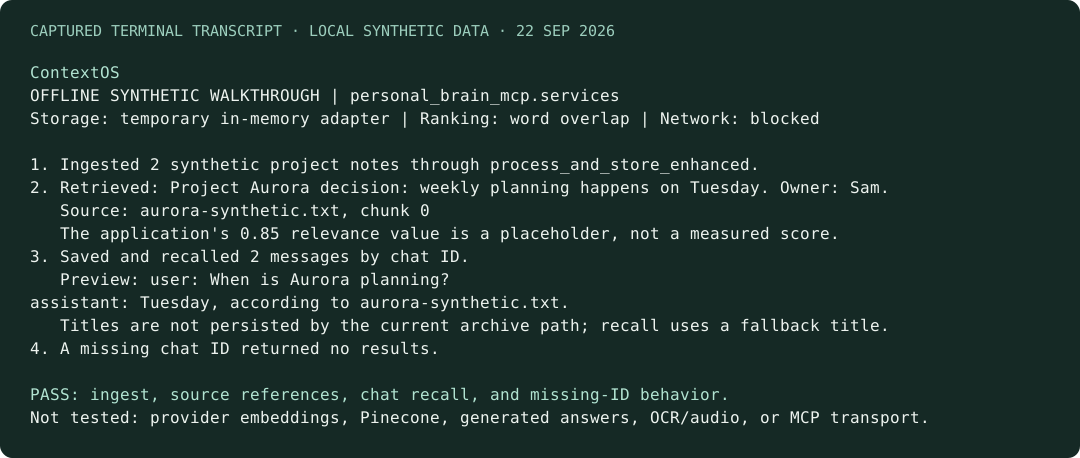
See the complete captured run and runnable source. The image renders that terminal output; it is not a screenshot of a deployed UI. To exercise the separate HTTP service implementation with the same assertions, run uv run --locked python examples/offline_walkthrough.py --entry http.
The dependency snapshot records the Python 3.12 environment used on 22 September 2026. The maintained installation resolves from uv.lock; the snapshot does not override it. These checks verify installation and local service behavior, not current provider models or production readiness.
Quickstart
Requires Python 3.11+, uv, a Google API key, and a Pinecone index and key. Anthropic is optional. The application runs on your machine; embeddings, storage, and model inference use external providers.
git clone https://github.com/anudeepadi/personal-brain-mcp.git
cd personal-brain-mcp
uv sync
cp .env.example .env
Set the three required values in .env:
GOOGLE_API_KEY=your-google-key
PINECONE_API_KEY=your-pinecone-key
PINECONE_INDEX_NAME=your-index-name
The index must match the embedding model's dimensions. Model identifiers are configured in the service code and need live provider validation before an end-to-end run; see setup and current limits.
Run the MCP server
uv run personal-brain-mcp
This starts a stdio MCP server, intended to be launched by an MCP client. It is not an interactive chat shell. Use the portable client configuration example, replacing its absolute paths with your own checkout and uv locations.
Run the API and connected UI
From the repository root:
uv run uvicorn main:app --host 127.0.0.1 --port 8000
Open http://127.0.0.1:8000 for the connected static UI, or http://127.0.0.1:8000/docs for the API schema. The separate frontend-next/ directory is a UI prototype; its controls are not wired to this API.
curl -F 'file=@examples/notes.txt' http://127.0.0.1:8000/upsert
curl --get --data-urlencode 'q=architecture decisions' \
  http://127.0.0.1:8000/search/documents
The API currently has no authentication and allows broad CORS. Bind it to localhost; add access controls before hosting it for others. See security and data handling.
What ContextOS does
Reference metadata helps you inspect an answer's sources; it does not establish that every generated statement is correct. Saving conversations is explicit, not automatic background memory.
MCP tools at a glance
Built to extend
personal_brain_mcp/   Installable MCP server, models, settings, and services
main.py              FastAPI application (run from the source checkout)
services.py          REST service implementation
frontend/            Static UI connected to the API
frontend-next/       Separate Next.js UI prototype
examples/            Offline walkthrough, portable MCP config, and sample document
scripts/             Offline repository validation and original artwork generator
docs/                Setup, architecture, tools, status, and brand assets
Older npm-package/ and nested personal-brain-mcp/ trees are historical packaging attempts. The root pyproject.toml is the maintained build entry point. This update ships GitHub distributions; it does not claim a new PyPI or npm publication.
Current status
ContextOS is a preview. Live provider compatibility, ingestion quality, and retrieval quality need further validation. Knowledge-graph search, local embeddings, automatic sync, and multi-user authentication are roadmap items, not current capabilities.
The two current service copies use the modern LangChain splitter import and ainvoke retriever method; both are exercised by the local walkthrough.
- Returned relevance scores currently contain a fixed
0.85placeholder; they are not calibrated similarities or confidence measurements. - The chat save path does not persist its supplied title; recall falls back to a generated title. Long conversations may be represented by a retrieved chunk rather than a complete reconstruction.
- Document listing uses a retrieval window rather than a full index scan. Filename/tag regular-expression filters and provider initialization across all entry paths need live validation.
- The walkthrough does not verify MCP transport, OCR/audio, provider embeddings, Pinecone, or generated answers. The separate startup tests exercise MCP initialization and tool listing, without invoking providers.
The old setup reports and architecture diagrams at the repository root are historical notes. Use the linked docs/ guides for the current supported entry points and known limitations.
- Setup and configuration
- Architecture and data flow
- Known limitations and roadmap
- Contributing · Changelog
- Security · Brand assets
License
MIT. Original license attribution is preserved. Maintained by Anudeep Adiraju.