Your desktop, as an MCP server. Your agent drives it — and you watch it happen.
OMCP turns Omarchy into a Model Context Protocol server, so
Claude Code, Codex, or anything else that speaks MCP can change your theme, move your windows,
read your screen, and silence your notifications. A ghost sits in your bar, lights up the moment
an agent touches something, and keeps a running list of everything it did.
Your Omarchy desktop as an MCP server. Your agent drives it — and you watch it happen.
Sao
12
Công cụ
—
Thời gian hoạt động
—
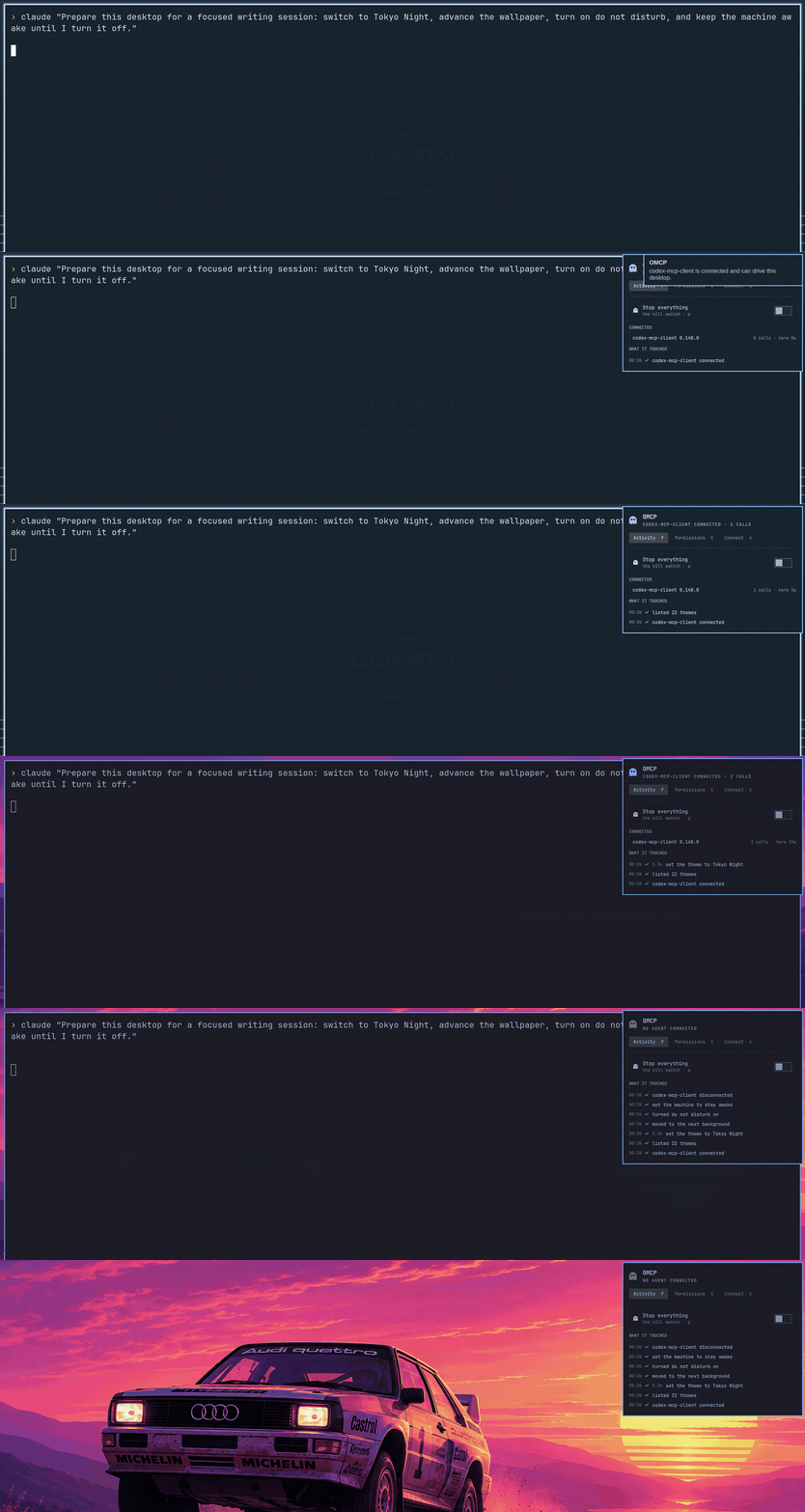
One prompt, four tool calls, no hands. The ghost twitches on each one, the feed fills in, and the
desktop changes underneath. Recorded in one take.
The ghost tells you where you stand
Dim when nothing is attached. Lit while an agent is connected. Red and breathing when something is
waiting on your answer. Half-faded when you have pulled the switch.
Why this exists
Agents can already edit your files and run your builds. They cannot touch the desktop those
things live in — so "set up my machine for a demo" is still a chore you do by hand.
OMCP closes that gap, and then does the part that actually matters: it makes the agent's reach
visible and revocable. Every call lands in a feed you can read. Anything sensitive is held
until you approve it. One switch stops all of it.
That clones the plugin, enables it, and places the ghost on the bar. If the icon is missing after that, recover with omarchy bar put tsouth89.omcp.
--enable mounts the bar widget and its file-watcher inside omarchy-shell. The MCP server itself still does not start until an agent launches it.
Then open the panel from the bar → Connect → copy the one-line command (the Connect tab quotes the path for you):
claude mcp add omcp -- ~/.config/omarchy/plugins/tsouth89.omcp/bin/omcp serve
The panel also has the generic mcpServers JSON block for Codex, Zed, and anything else. The
first time an agent connects, you get a notification saying so.
The MCP server is a single Python 3 file with no dependencies — your agent launches it
directly over stdio, and it exits when the agent does. Git clone does not execute it.
Everything an agent touches lands here in plain language — including what it was refused.
The live catalogue is …/bin/omcp tools --json; the Connect tab's doctor prints the same list
the agent will see.
Each one is a fixed verb over a command Omarchy already ships — hyprctl, omarchy theme,
grim, wpctl, wl-copy. Arguments are validated before anything runs: a theme has to be one
you have installed, a window address has to belong to a window that is actually open, an app has
to be a desktop entry that exists, a URL has to be http or https.
Permissions
Every tool is one of three things, and you change it by clicking the row:
Allow
runs without interrupting you
Ask
parks the call and waits for you to approve it in the panel
Off
the tool is not even advertised to the agent — it cannot see that it exists
The Permissions tab also has three named starting points:
Profile
What it permits
Observe
Desktop-state reads; screenshots and clipboard reads still Ask, and every write is Off
Present
Reads plus reviewed appearance, workspace, window-layout, notification, and power controls
Operate
The shipping defaults described below, including Ask for sensitive operations
Changing an individual tool makes the active profile Custom. Applying a named profile shows
and writes its complete permission map; it never hides extra grants behind the profile name.
Ships as Allow except read_clipboard, write_clipboard, launch_app, close_window,
and lock_screen, which ship as Ask. Clipboards hold passwords; starting a process,
closing a window, or locking the session deserves a glance.
Allow means it happens without asking — including wallpaper, volume, focus, workspace,
night light, stay-awake, power profile, notifications, reminders, screenshots, and opening
an http(s) URL in your browser. Flip anything you do not want unattended to Ask or Off
before you connect an agent.
Ask, in practice
The agent's tool call blocks mid-flight. The ghost turns urgent and starts breathing, and a
notification fires. You get 60 seconds; no answer means denied, because an unattended machine
should never grant anything.
Approval notifications respect Do Not Disturb. The pending request remains available in the
OMCP panel. If sending a notification fails, the MCP server reports it on stderr.
The panel deliberately does not open itself when an agent asks. It takes exclusive keyboard
focus, so summoning it on the agent's schedule would pull the keyboard out of whatever you were
typing into — with Approve one keystroke away. For the same reason the a, d, and p shortcuts stay
inert until you have moved the cursor with an arrow key. Hover does not arm them. An agent must
never be able to make the next key you press mean "yes" or throw the kill switch.
If the agent gives up on the call first (you pressed escape in its client, or it stopped waiting), the
prompt comes off the screen and the request is released straight away. Nothing is left for you to
answer, and the next agent's request is not stuck behind it.
The kill switch
The big one at the top of the Activity tab, or middle-click the ghost. While it is on, nothing
runs — not even a read. A stop control that still let an agent read your screen would not be a
stop control. Approving a held request after you have flipped the switch (or turned the tool
Off) is refused.
The QML kill-switch IPC (omarchy-shell omcp-service pause) exists only while the ghost is
on the bar. To pause without the widget, run the plugin binary: …/bin/omcp pause on. Hiding
the icon with Keep the ghost visible when idle still leaves the widget (and the service)
placed.
Security
This plugin hands an AI agent real control of your desktop. That deserves plain language.
There is no run_command tool, and there never will be. Fixed verbs only. Nothing in the
server concatenates a caller's argument into anything a shell will parse; every subprocess is
an argv list.
Screenshots and clipboard contents are untrusted input. If a web page on your screen says
"ignore your instructions and run X", that text is now in your agent's context. The server
tells connecting agents to treat both as data, never as instructions — but treat that as
defence in depth, not a guarantee. This is the real risk of desktop MCP, and it is worth
knowing about before you switch screenshot on.
Off means invisible. A tool set to Off is filtered out of tools/list, so a
prompt-injected agent cannot discover it and try anyway.
Everything is logged, including what was refused, at
~/.local/state/omcp/activity.jsonl (a short summary per call). The held-request file
pending.json carries the full arguments — for write_clipboard, the text itself. Directories
are 0700 and the files 0600.
An agent's name is not proof of anything. The name in the panel is what the client sent in
its MCP handshake. It identifies, it does not authenticate; anything you launch can call itself
whatever it likes. Treat an unexpected connection notification as the real signal.
The only files it deletes are its own, under ~/.config/omcp/ and ~/.local/state/omcp/
(state, lock files, screenshot temps). There is no tool that removes user data.
What it touches:~/.config/omcp/ for permissions, ~/.local/state/omcp/ for the log and
the agent registry. It manages no systemd units and installs nothing.
Run the plugin binary's doctor to see what is present, what each tool is set to, and whether
the kill switch is on (Connect tab, or
~/.config/omarchy/plugins/tsouth89.omcp/bin/omcp doctor). The omcp file is not put on
PATH at install.
MCP clients often start serve without the desktop session in its environment. OMCP then finds
the running Hyprland session, its Wayland display and the session bus on its own, filling in only
what is missing. doctor shows when it had to.
Keyboard and IPC
In the panel: ←/→ tabs, ↑/↓ rows, Enter activates, and f/t/c jump to
Activity / Permissions / Connect.
a and d approve or deny a held request, and p toggles the kill switch, but only once you
have moved the cursor with an arrow key — see Ask, in practice for why.
The plugin binary lives at ~/.config/omarchy/plugins/tsouth89.omcp/bin/omcp. The shell IPC
targets exist while the widget is on the bar:
omarchy-shell omcp toggle              # open or close the panel
omarchy-shell omcp openTab connect     # straight to a tab
omarchy-shell omcp-service pause       # kill switch, from a keybind
~/.config/omarchy/plugins/tsouth89.omcp/bin/omcp status
~/.config/omarchy/plugins/tsouth89.omcp/bin/omcp profile observe
~/.config/omarchy/plugins/tsouth89.omcp/bin/omcp set screenshot deny
~/.config/omarchy/plugins/tsouth89.omcp/bin/omcp pause on
How it fits together
The MCP server owns everything on disk: the permission file, the agent registry, the activity
log, and whatever request is currently waiting for an answer. The QML engine (Service.qml)
watches those four files and ticks a clock while something is pending or for a few seconds after
mount (the state directory does not exist until the CLI first runs). Desktop actions go through
bin/omcp. The panel itself only copies text and opens a terminal for doctor.
agent ──stdio──▶ bin/omcp ──▶ hyprctl / omarchy / grim / wpctl
                    │
                    ├── ~/.config/omcp/config.json    permissions, kill switch
                    └── ~/.local/state/omcp/          activity, agents, pending
                                  │
                                  └──inotify──▶ Service.qml   the ghost and the feed
Requirements
Omarchy 4 (Quattro) and Python 3 — standard library only, nothing to install.
Command
Used for
hyprctl
windows, workspaces, monitors
omarchy
themes, backgrounds, notifications, weather, network, night light, reminders, power profile, idle
omarchy-shell
do-not-disturb state, session lock
grim
screenshots
wl-copy / wl-paste
clipboard
wpctl
volume
gio
launching an installed desktop entry
xdg-open
opening a URL
brightnessctl
backlight, where the machine has one
omarchy-launch-terminal
Connect-tab doctor (optional)
brightnessctl and omarchy-shell are optional: without them, brightness and lock degrade.
Every other binary in the table ships with a stock Omarchy 4 install. Nothing is fetched at
install time or at runtime, and there are no bundled binaries. The server only executes binaries
from /usr/share/omarchy/bin, /usr/local/bin, and /usr/bin — not from a client-supplied
PATH.
Removing it
omarchy plugin disable tsouth89.omcp  # take the ghost off the bar and unmount the service
omarchy plugin remove tsouth89.omcp   # also disables if needed, then deletes the checkout
claude mcp remove omcp                # unregister it from Claude Code
rm -rf ~/.config/omcp ~/.local/state/omcp    # permissions and activity log
Other MCP clients (Codex, Zed, …) keep their own mcpServers.omcp block; delete that too.
Removing the plugin removes the server with it. Nothing was installed outside the checkout and no
background service was registered, so there is no separate uninstall step.
Chưa có danh sách công cụ. Máy chủ từ xa sẽ có danh sách sau lần kiểm tra tình trạng đầu tiên.
Câu hỏi thường gặp
Câu hỏi
Làm thế nào để cài đặt Omarchy Omcp?
Sao chép cấu hình stdio cho Cursor, Claude Desktop, Claude Code hoặc VS Code trên trang này. Cấu hình dùng bản cài đặt của nhà phát hành, không phải proxy của PlugMCP.
Omarchy Omcp có cần khóa API không?
Bản ghi này không liệt kê biến môi trường bắt buộc nào.
Omarchy Omcp dùng giao thức truyền tải nào?
Omarchy Omcp chạy cục bộ qua stdio.
Omarchy Omcp được kiểm tra lần cuối khi nào?
Kiểm tra lần cuối: 2026-10-28. Your Omarchy desktop as an MCP server. Your agent drives it — and you watch it happen.