
Power your agent
Lệnh của chính nhà phát hành. Không phải endpoint của PlugMCP.
Host a copy with our keys and logs.
npx -y @cloudburn/[email protected]Claude Code không có liên kết cài đặt cho lệnh cục bộ. Sao chép lệnh bên dưới và chạy trong terminal.
claude mcp add cloudburn-mcp -- npx -y @cloudburn/mcp@0.1.9Chạy trong terminal.
{ "mcpServers": { "cloudburn-mcp": { "command": "npx", "args": [ "-y", "@cloudburn/[email protected]" ] } }}claude_desktop_config.json
URL từ xa hay một lệnh trên máy của bạn? Hai cách cài đặt khác nhau thế nào
Chạy trên PlugMCP
A new server you create. It is not this listing's official endpoint. Use the publisher install when you want their URL and their credentials.
MởTừ nhà phát hành
CloudBurn MCP server for AWS cost scans of IaC and live accounts
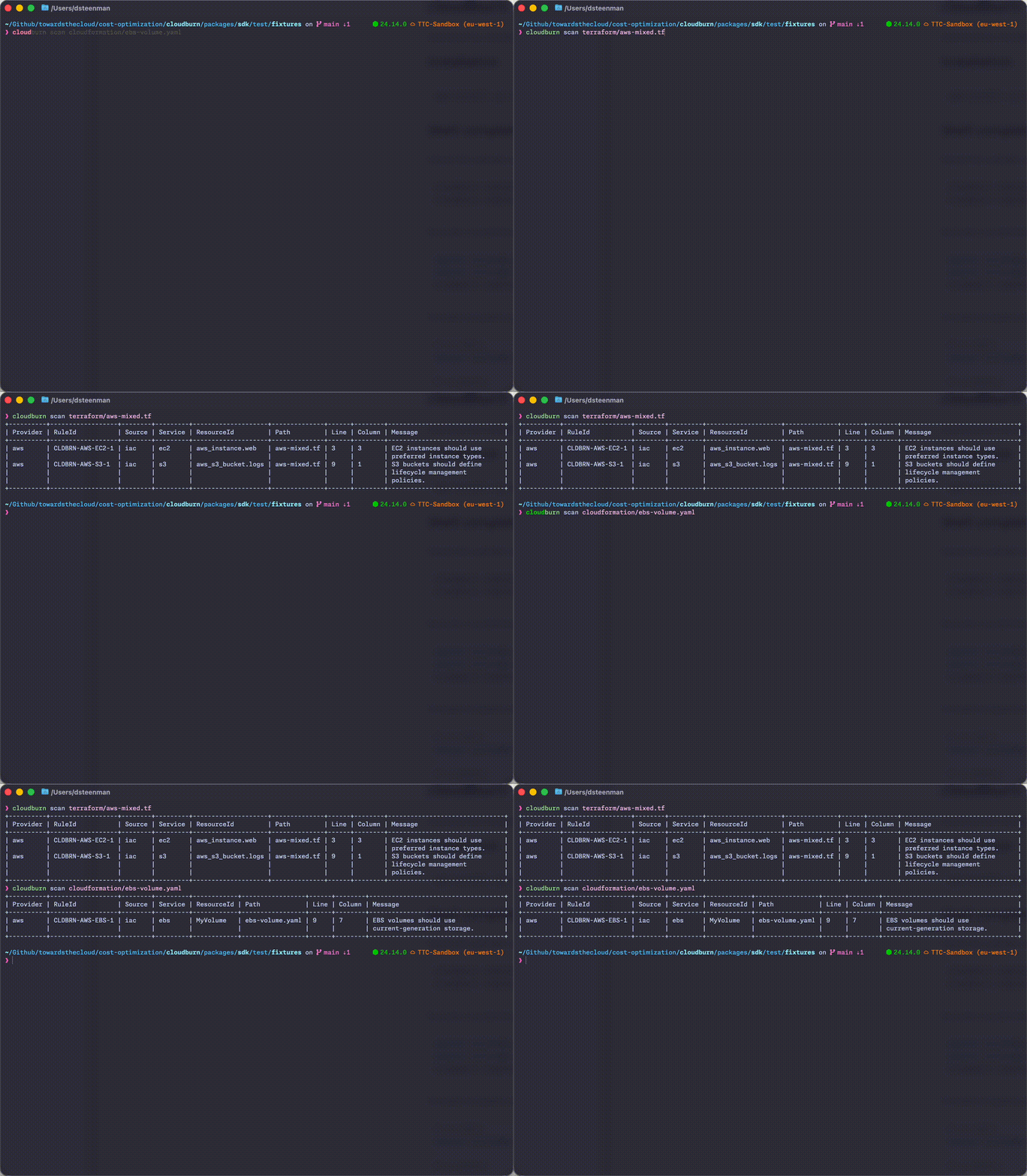
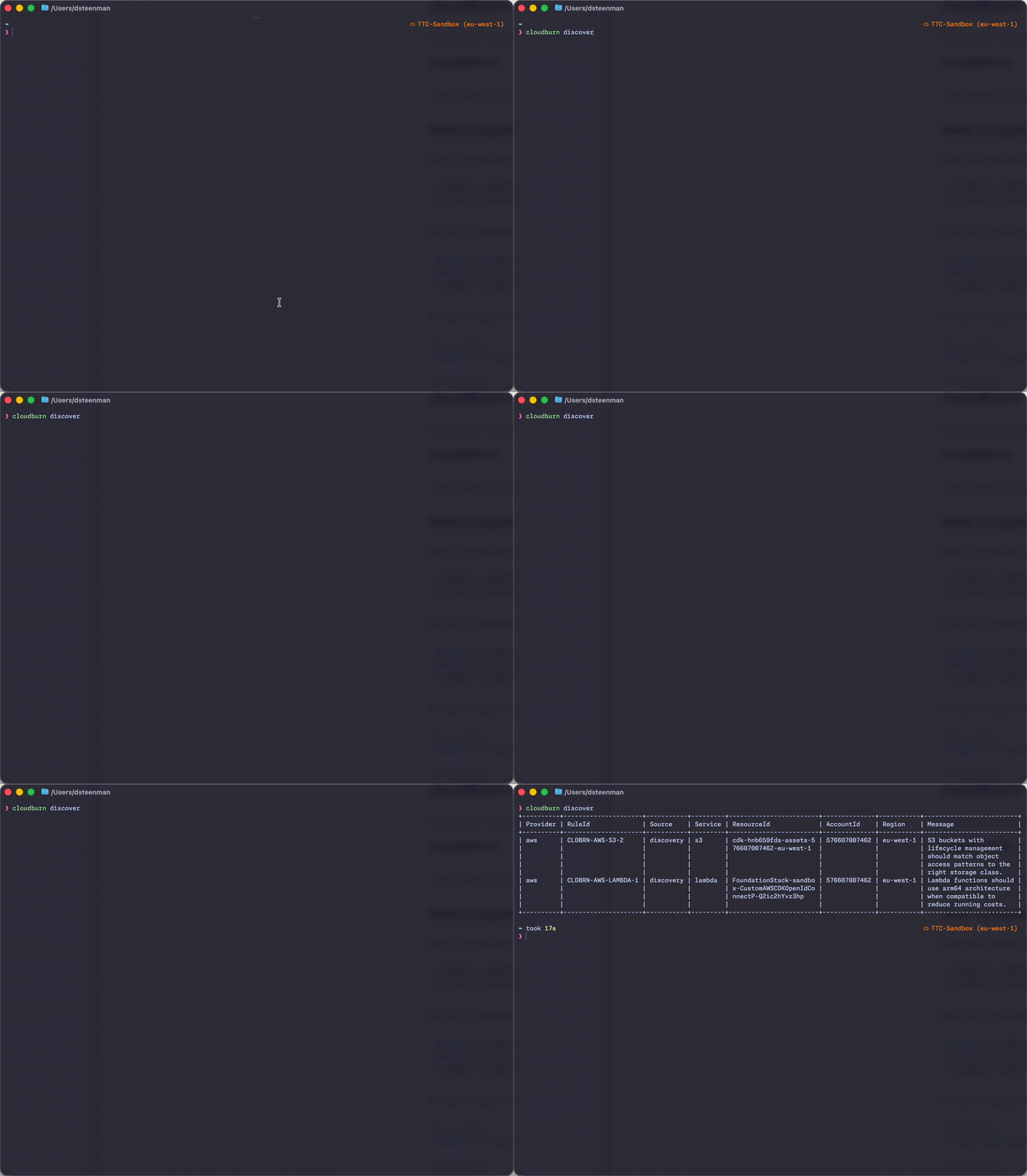
CloudBurn runs deterministic cost rules against your Terraform and CloudFormation with scan, then runs those same rules against your live AWS account with discover. Wire it into CI to catch waste before deploy. Point it at a running account to find what's still burning money.
json and table formats.
brew install towardsthecloud/tap/cloudburn
This installs Node.js automatically if you don't have it.
Requires Node.js 24+.
npm install --global cloudburn
Or run it without installing:
npx cloudburn scan ./main.tf
Get the CloudBurn Scan action from the GitHub Marketplace. It scans your Terraform and CloudFormation in a workflow, annotates findings on the pull request, posts a sticky comment, and can fail the job by severity. No Node.js setup or CLI install is needed.
- uses: towardsthecloud/cloudburn-action@v1
  with:
    path: .
    fail-on: high
See the GitHub Action documentation for all inputs, outputs, and examples.
Install the CloudBurn plugin to let your agent scan IaC and live accounts through a local MCP server. It needs Node.js 24 or later.
# Claude Code
claude plugin marketplace add towardsthecloud/cloudburn-plugin
claude plugin install cloudburn@towardsthecloud

# Codex
codex plugin marketplace add towardsthecloud/cloudburn-plugin
codex plugin add cloudburn@towardsthecloud

# Skill only, for agents supported by skills.sh
npx skills add towardsthecloud/cloudburn-plugin
See the MCP server README for the tools and for adding the server to other MCP clients.
Config is optional. By default, CloudBurn runs the AWS Core preset for the mode you use. Account-wide rules such as CLDBRN-AWS-TAGGING-1 are opt-in through enabled-rules because they require an accessible Resource Explorer aggregator.
Create a starter config:
cloudburn config --init
Inspect the current discovered config file:
cloudburn config --print
Inspect the starter template without writing a file:
cloudburn config --print-template
CloudBurn reads .cloudburn.yml or .cloudburn.yaml. By default it searches upward from the current directory until it finds a config file or reaches the git root. In CI, implicit config discovery is skipped entirely; use --config <path> on scan or discover to opt into an exact file instead.
iac:
  enabled-rules:
    - CLDBRN-AWS-EBS-1
    - CLDBRN-AWS-RDS-1
  disabled-rules:
    - CLDBRN-AWS-EC2-2
  format: table
  fail-on: high

discovery:
  enabled-rules:
    - CLDBRN-AWS-EBS-1
  disabled-rules:
    - CLDBRN-AWS-S3-1
  format: json
  fail-on: medium
enabled-rules when you want a mode to run only a specific set of rules.disabled-rules when you want to subtract a few rules from the active set.CLDBRN-AWS-EBS-1; review the rule ID compatibility policy when upgrading pinned configuration.--config <path> if you want scan or discover to load a specific config file.fail-on to make CI fail for findings at or above high, medium, or low severity.Point scan at your IaC files. It checks Terraform (.tf) and CloudFormation (.yaml, .json).
cloudburn scan ./main.tf
cloudburn scan ./template.yaml
cloudburn scan ./iac --exit-code
cloudburn scan ./iac --fail-on high
cloudburn --format json scan ./iac
Suppress an accepted finding on one Terraform or CloudFormation resource with a comment immediately above or inside that resource. Include a reason after the rule ID when useful:
# cloudburn-ignore CLDBRN-AWS-EBS-1 migration scheduled
resource "aws_ebs_volume" "legacy" {
  type = "gp2"
}
Use cloudburn-ignore-all <reason> for a resource-wide exception. Suppressed findings remain in JSON output under
suppressed for auditability and never trigger --exit-code or --fail-on. CloudFormation JSON cannot carry comments,
so inline suppressions are supported in Terraform and CloudFormation YAML only.
discover runs the same rules against live AWS resources. Initialize AWS Resource Explorer first, then run against the current AWS region or one explicit region.
cloudburn discover init
cloudburn discover
cloudburn discover --region eu-central-1
cloudburn discover --service ec2,s3
cloudburn discover --enabled-rules CLDBRN-AWS-TAGGING-1
cloudburn discover --fail-on high
cloudburn --debug discover --region eu-central-1
The CLI targets one region at a time. Multi-region discovery remains available through the SDK.
CLDBRN-AWS-TAGGING-1 is opt-in and requires an accessible Resource Explorer aggregator; a local-only setup cannot run account-wide tagging discovery.
Use --debug to relay SDK and provider execution trace details to stderr while keeping normal command output on stdout.
Generate a starter config with cloudburn config --init. Full details in the config reference.
CloudBurn needs Resource Explorer read/write access plus read-only permissions for the services behind the rules you enable (EC2, EBS, RDS, S3, Lambda, CloudTrail, CloudWatch, etc.). discover init uses resource-explorer-2:UpdateView to enable tag visibility for the opt-in global tagging rule. Which permissions you need depends on which rules you're running.
Want to help? Start with CONTRIBUTING.md.
CloudBurn MCP server for AWS cost scans of IaC and live accounts
{ "mcpServers": { "cloudburn-mcp": { "command": "npx", "args": [ "-y", "@cloudburn/[email protected]" ] } }}Công cụ
Chưa có danh sách công cụ. Máy chủ từ xa sẽ có danh sách sau lần kiểm tra tình trạng đầu tiên.
Câu hỏi thường gặp
Sao chép cấu hình stdio cho Cursor, Claude Desktop, Claude Code hoặc VS Code trên trang này. Cấu hình dùng bản cài đặt của nhà phát hành, không phải proxy của PlugMCP.
Bản ghi này không liệt kê biến môi trường bắt buộc nào.
@cloudburn/mcp chạy cục bộ qua stdio.
Kiểm tra lần cuối: 2026-10-28. CloudBurn MCP server for AWS cost scans of IaC and live accounts