Matrix Chat CLI & MCP Server
Simple command-line Matrix chat client with integrated authentication, plus an MCP server for AI agent integration.
Matrix Chat Client Features
- Integrated authentication: No separate token generation step required
Power your agent
Cài đặt từ nhà phát hành. Không phải endpoint của PlugMCP.
Host a copy with our keys and logs.
Chưa có bản phát hành đóng gói nào trong registry. Làm theo README của kho mã.
URL từ xa hay một lệnh trên máy của bạn? Hai cách cài đặt khác nhau thế nào
Chạy trên PlugMCP
A new server you create. It is not this listing's official endpoint. Use the publisher install when you want their URL and their credentials.
MởTừ nhà phát hành
chatcli.py - Interactive chat client for unencrypted Matrix messagingmatrix-chatmatrix_mcp_server.py - MCP server exposing Matrix messaging tools for AI agentsmatrix-mcp-serverdocs/MCPDESIGN.mdpyproject.toml - Project configuration and dependenciesThis project uses uv for dependency management and packaging.
# Install uv if you don't have it
curl -LsSf https://astral.sh/uv/install.sh | sh

# Install dependencies and create virtual environment
uv sync

# Install in editable mode for development
uv pip install -e .
You can run the chat client directly with uv:
# Basic usage - password will be prompted securely (uses matrix.org by default)
uv run matrix-chat <username>
# Example: uv run matrix-chat poolagent

# With password on command line
uv run matrix-chat <username> --password <password>
# Example: uv run matrix-chat poolagent --password mypass

# With custom device name
uv run matrix-chat <username> --device-name <device_name>
# Example: uv run matrix-chat poolagent --device-name "laptop-client"

# All options combined
uv run matrix-chat <username> -p <password> -d <device_name>
# Example: uv run matrix-chat poolagent -p mypass -d "laptop-client"

# Custom homeserver
uv run matrix-chat <username> <homeserver>
# Example: uv run matrix-chat poolagent https://custom.matrix.server
Or activate the virtual environment and use the installed console script:
source .venv/bin/activate  # Linux/macOS
# or .venv\Scripts\activate  # Windows

matrix-chat <username>
matrix-chat <username> --password <password>
matrix-chat <username> --device-name <device_name>
matrix-chat <username> <homeserver>  # for custom homeserver
# Add runtime dependency
uv add <package-name>

# Add development dependency
uv add --dev <package-name>
This project currently relies on manual testing. To test the functionality:
Run the chat client:
uv run matrix-chat your_username
# Password will be prompted securely (uses matrix.org by default)
Test basic functionality:
/join #test:matrix.org/switch #another:matrix.org/rooms/help# Build the package
uv build
# Install from built package
uv pip install dist/matrix_chat-1.0.0-py3-none-any.whl
Install the tools globally using uv:
uv tool install .
Then use the command directly:
# Basic usage - password prompted securely (uses matrix.org by default)
matrix-chat <username>
# Example: matrix-chat poolagent

# With password on command line
matrix-chat <username> --password <password>
# Example: matrix-chat poolagent --password mypass

# With custom device name
matrix-chat <username> --device-name <device_name>
# Example: matrix-chat poolagent --device-name "laptop-client"

# Custom homeserver
matrix-chat <username> <homeserver>
# Example: matrix-chat poolagent https://custom.matrix.server
For development or one-time usage:
# Basic usage - password prompted securely (uses matrix.org by default)
uv run matrix-chat <username>
# Example: uv run matrix-chat poolagent

# With options
uv run matrix-chat <username> --password <password> --device-name <device_name>
# Example: uv run matrix-chat poolagent --password mypass --device-name "dev-client"

# Custom homeserver
uv run matrix-chat <username> <homeserver>
# Example: uv run matrix-chat poolagent https://custom.matrix.server
username: Required. Matrix username (e.g., poolagent or @poolagent:matrix.org)homeserver: Optional. Matrix homeserver URL (default: https://matrix.org)--password / -p: Optional. Matrix password (if not provided, prompted securely)--device-name / -d: Optional. Device name for session (default: "chatcli")Use matrix-chat --help to see all available options.
Once connected, use these commands in the chat interface:
/help - Show available commands/join <room> - Join a room/switch <room> - Switch to different room/rooms - List joined rooms/quit - Exit clientThe MCP server (matrix-mcp-server) exposes Matrix messaging capabilities as tools for AI agents like HuggingFace SmolAgents.
send_message - Send messages to Matrix roomswait_for_response - Send message and wait for human response (with timeout)list_rooms - List joined Matrix rooms with names and aliases# Required environment variables
export MATRIX_USERNAME="[email protected]"
export MATRIX_PASSWORD="your-password"
export MATRIX_ROOMID="#room:matrix.org"
# Optional environment variables
export MATRIX_HOMESERVER="https://matrix.org" # default
export MATRIX_DEVICE_NAME="mcp-server" # default
# Global installation
uv tool install .
matrix-mcp-server

# Local development
uv run matrix-mcp-server
from smolagents import CodeAgent, InferenceClientModel, ToolCollection

# Load Matrix MCP tools
model = InferenceClientModel()
matrix_tools = ToolCollection.from_mcp("matrix-mcp-server")

agent = CodeAgent(tools=matrix_tools, model=model)

# Agent can now send Matrix messages
result = agent.run("Send a status update to #ops room when analysis is complete")
# Agent sends completion notification
send_message(
    room_id="#ops:company.com",
    message="🤖 Data analysis completed successfully!"
)
# Agent requests approval and waits for response
response = wait_for_response(
    room_id="#approvals:company.com",
    message="🤖 Ready to deploy to production. Reply 'approve' to proceed.",
    timeout_seconds=600,
    response_from="@admin:company.com"
)
The MCP Inspector provides a web-based interface to test your Matrix messaging tools interactively.
Set your environment variables:
export MATRIX_USERNAME="[email protected]"
export MATRIX_PASSWORD="your-password"
export MATRIX_ROOMID="#test:matrix.org"
Start the MCP development server:
mcp dev matrix_mcp_server.py
You'll see output like this:
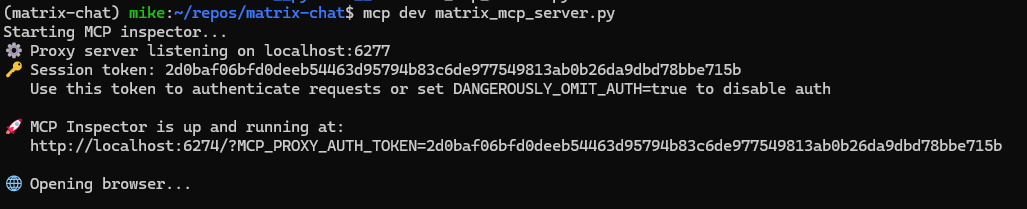
The server will:
The web interface shows all available tools and lets you test them interactively:
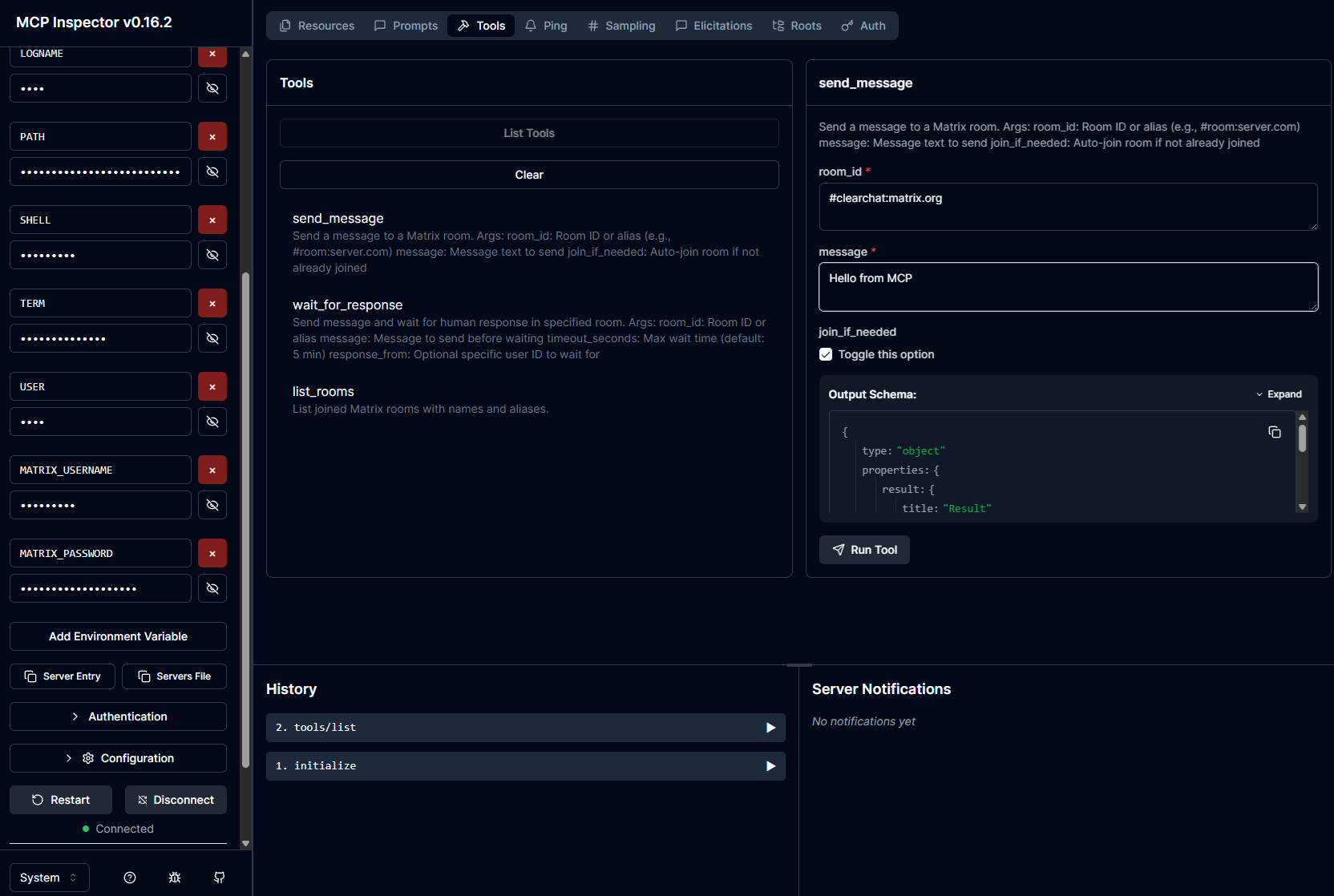
Available tools:
Testing send_message:
send_message tool#clearchat:matrix.org)Messages sent via the MCP tools appear instantly in Matrix clients:
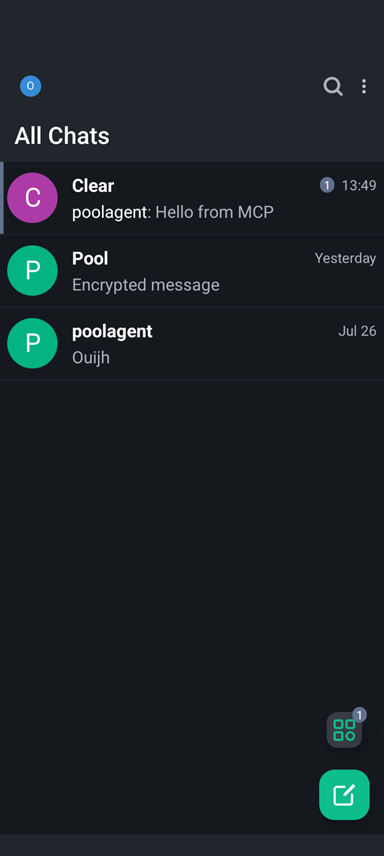
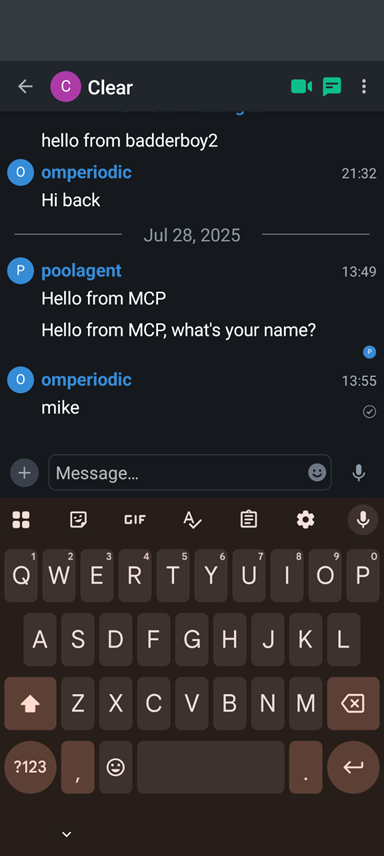
The screenshots show:
The message appears in the Matrix chat list showing successful integration.
Test the wait_for_response tool:
This enables approval workflows and human-in-the-loop AI systems.
The project includes two example SmolAgents scripts that demonstrate Matrix messaging integration:
Install the package:
uv tool install .
Install SmolAgents:
pip install smolagents
Set environment variables:
export MATRIX_USERNAME="[email protected]"
export MATRIX_PASSWORD="your-password"
export MATRIX_ROOMID="#test:matrix.org"
Verify setup:
python setup_verification.py
quote_agent_example.py)Sends a single random inspirational quote to Matrix and exits:
python quote_agent_example.py
Features:
interactive_quote_agent.py)A more advanced bot that can run in different modes:
1. Interactive Mode (default):
python interactive_quote_agent.py
2. Oneshot Mode - Ask for Category:
python interactive_quote_agent.py --oneshot
3. Oneshot Mode - Direct Category:
python interactive_quote_agent.py --oneshot --category motivation
python interactive_quote_agent.py --oneshot --category wisdom
python interactive_quote_agent.py --oneshot --category creativity
python interactive_quote_agent.py --oneshot --category perseverance
python interactive_quote_agent.py --oneshot --category random
The interactive quote bot works seamlessly across Matrix clients:
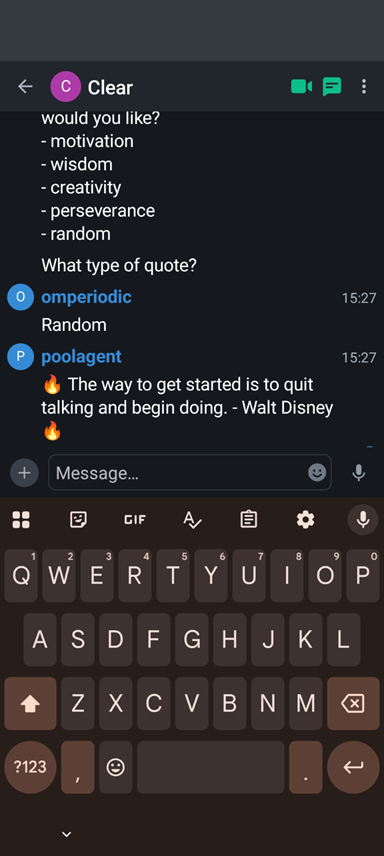
The screenshot shows:
The oneshot modes are perfect for:
Example cron job for daily motivation:
# Send a daily motivational quote at 9 AM
0 9 * * * /usr/bin/python3 /path/to/interactive_quote_agent.py --oneshot --category motivation
CLI Chat using Matrix including MCP server
Công cụ
Chưa có danh sách công cụ. Máy chủ từ xa sẽ có danh sách sau lần kiểm tra tình trạng đầu tiên.
Câu hỏi thường gặp
Sao chép cấu hình stdio cho Cursor, Claude Desktop, Claude Code hoặc VS Code trên trang này. Cấu hình dùng bản cài đặt của nhà phát hành, không phải proxy của PlugMCP.
Bản ghi này không liệt kê biến môi trường bắt buộc nào.
Matrix Chat chạy cục bộ qua stdio.
Kiểm tra lần cuối: 2026-10-28. CLI Chat using Matrix including MCP server

