AI Code Toolkit
接入你的智能体
發布者自己的指令。不是 PlugMCP 端點。
用我們的金鑰與日誌託管一份副本。
npx -y @agiflowai/[email protected]Claude Code 沒有本機指令的安裝連結。複製下方指令並在終端機中執行。
claude mcp add agiflow-aicode-toolkit -- npx -y @agiflowai/scaffold-mcp@2.0.1在終端機中執行。
{ "mcpServers": { "agiflow-aicode-toolkit": { "command": "npx", "args": [ "-y", "@agiflowai/[email protected]" ] } }}claude_desktop_config.json
遠端 URL 還是本機指令? 兩種安裝方式的差異
This repo provides:
As projects scale, conventions in docs like CLAUDE.md, AGENTS.md, and style guides become hard to keep concise and consistently applied by AI agents. This toolkit moves those conventions into reusable template configs (scaffold.yaml, architect.yaml, RULES.yaml) so agents can discover only the relevant guidance when needed.
For toolkit users who prefer an agent plugin, install only the workflows you need: aicode-bootstrap (project creation), aicode-develop (features and patterns), aicode-review (rules-based review), aicode-admin (authoring reusable configuration), or aicode-design (frontend discovery). Self-contained plugin roots are under plugins/ and work with the Claude Code/Cowork marketplace, Codex marketplace, and local Gemini extension installation; Cursor/Grok and Cowork's local stdio runtime still need client acceptance tests. Read the installation and compatibility guide before use. These bundles group workflows rather than restrict tool access.
Initialize the consumer project before starting a scaffold-backed plugin with interactive npx -y @agiflowai/[email protected] init --skip-mcp; plugin installation does not supply templates. Keep MCP server cwd in the consumer workspace. Published style-system 0.2.0 currently ignores some discovery filters until the dispatch fix is released. See compatibility.
Requirements:
# Existing project
npx @agiflowai/aicode-toolkit init

# New project
npx @agiflowai/aicode-toolkit init --name my-app --project-type monolith
This creates templates/ and .toolkit/settings.yaml. Projects reference templates through sourceTemplate in project.json or .toolkit/settings.yaml.
init can configure MCP automatically. For manual setup, add the servers you need to your agent config.
Example for Claude Code:
{
  "mcpServers": {
    "scaffold-mcp": {
      "command": "npx",
      "args": ["-y", "@agiflowai/scaffold-mcp", "mcp-serve", "--admin-enable"]
    },
    "architect-mcp": {
      "command": "npx",
      "args": [
        "-y",
        "@agiflowai/architect-mcp",
        "mcp-serve",
        "--admin-enable",
        "--design-pattern-tool",
        "codex",
        "--review-tool",
        "gemini-cli"
      ]
    },
    "style-system": {
      "command": "npx",
      "args": ["-y", "@agiflowai/style-system", "mcp-serve"]
    }
  }
}
Useful flags:
--admin-enable: enable admin/template-authoring tools--design-pattern-tool <tool>: use an LLM to filter design patterns--review-tool <tool>: use an LLM for review outputAsk the agent:
What boilerplates are available?
It should call list-boilerplates. If not, restart the agent.
AI agent
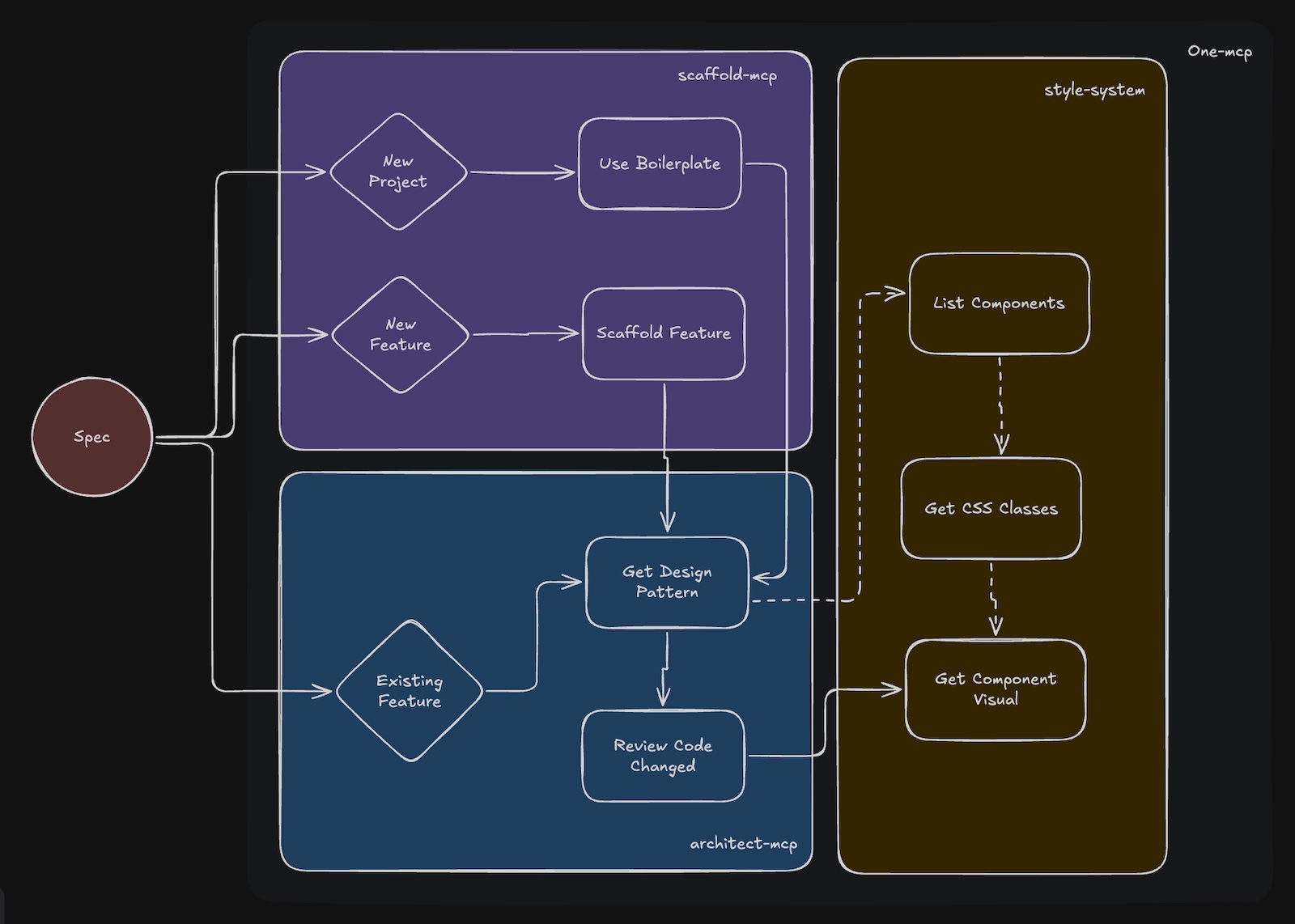
  ├─ scaffold-mcp
  ├─ architect-mcp
  ├─ style-system
  └─ one-mcp
        ↓
     templates/
       ├─ scaffold.yaml
       ├─ architect.yaml
       └─ RULES.yaml
Generates projects and feature boilerplate from templates.
Core tools:
list-boilerplatesuse-boilerplatelist-scaffolding-methodsuse-scaffold-methodAdmin tools:
generate-boilerplategenerate-feature-scaffoldgenerate-boilerplate-fileProvides file-specific patterns before edits and reviews changes against RULES.yaml.
Core tools:
get-file-design-patternreview-code-changeAdmin tools:
add-design-patternadd-ruleProvides theme, CSS class, and component discovery tools.
Core tools:
list_themesget_css_classesget_component_visuallist_shared_componentslist_app_componentsProvides progressive tool discovery to reduce MCP prompt overhead.
User: "Create a Next.js app called dashboard"

Agent:
1. list-boilerplates
2. use-boilerplate
3. Project is generated
User: "Add a products API route"

Agent:
1. list-scaffolding-methods
2. use-scaffold-method
3. Feature files are generated
User: "Add a products page"

Agent:
1. get-file-design-pattern
2. edit the file using the returned patterns and rules
3. review-code-change
4. fix any violations
User: "Style the button with our theme colors"

Agent:
1. get_css_classes
2. list_shared_components
3. update the component
4. get_component_visual
templates/
└── nextjs-15/
    ├── scaffold.yaml
    ├── architect.yaml
    ├── RULES.yaml
    └── boilerplate/
scaffold.yamlDefines boilerplates and feature scaffolds.
boilerplates:
  - name: nextjs-15-app
    description: 'Next.js 15 with App Router'
    targetFolder: apps
    includes:
      - boilerplate/**/*

features:
  - name: add-route
    description: 'Add route with page and layout'
    variables_schema:
      name: { type: string, required: true }
    includes:
      - features/route/**/*
architect.yamlDefines file-level patterns that should be shown before edits.
patterns:
  - name: server-component
    description: 'Default for page components'
    file_patterns:
      - '**/app/**/page.tsx'
    description: |
      - Use async/await for data fetching
      - Keep components focused on rendering
      - Move business logic to server actions
RULES.yamlDefines review rules. Rules can be inherited from a global templates/RULES.yaml.
version: '1.0'
template: typescript-lib
rules:
  - pattern: src/services/**/*.ts
    description: Service Layer Implementation Standards
    must_do:
      - rule: Create class-based services with single responsibility
        codeExample: |-
          export class DataProcessorService {
            async processData(input: string): Promise<ProcessedData> {
              // Implementation
            }
          }
      - rule: Use dependency injection for composability
    must_not_do:
      - rule: Create static-only utility classes - use functions
        codeExample: |-
          // ❌ BAD
          export class Utils {
            static format(s: string) {}
          }

          // ✅ GOOD
          export function format(s: string): string {}
Each project references its template in project.json.
my-workspace/
├── apps/
│   └── web-app/
│       └── project.json
├── packages/
│   └── shared-lib/
│       └── project.json
└── templates/
Monoliths use .toolkit/settings.yaml.
version: '1.0'
projectType: monolith
sourceTemplate: nextjs-15
Included templates:
For template authoring, start from an existing repo or template and use the admin prompts:
/generate-boilerplate
/generate-feature-scaffold
For design/rule authoring, use:
add-design-patternadd-ruleSee CONTRIBUTING.md.
Toolkit for Coding Agents to work reliably with repo of any size.
{ "mcpServers": { "agiflow-aicode-toolkit": { "command": "npx", "args": [ "-y", "@agiflowai/[email protected]" ] } }}工具
尚無工具清單。遠端伺服器會在首次健康檢查後取得工具清單。
常見問題
在本頁複製適用於 Cursor、Claude Desktop、Claude Code 或 VS Code 的 stdio 設定。它使用發布者的安裝方式,而不是 PlugMCP 代理伺服器。
這筆記錄未列出必要的環境變數。
Aicode Toolkit 透過 stdio 在本機執行。
上次檢查時間:2026-11-05。 Toolkit for Coding Agents to work reliably with repo of any size.