Gemini Function Calling + Model Context Protocol(MCP) Flight Search
接入你的智能体
從發布者安裝。不是 PlugMCP 端點。
遠端 URL 還是本機指令? 兩種安裝方式的差異
來自發布者
Model Context Protocol (MCP) with Gemini 2.5 Pro. Convert conversational queries into flight searches using Gemini's function calling capabilities and MCP's flight search tools
This project demonstrates how to use Google's Gemini 2.5 Pro with function calling capabilities to interact with the mcp-flight-search tool via Model Context Protocol (MCP). This client implementation shows how to:
mcp-flight-search) using stdio communicationmcp-flight-search tool via stdioBefore running this client, you'll need:
mcp-flight-search package installedThis project relies on several Python packages:
google-generativeai: Google's official Python library for accessing Gemini 2.5 Pro and other Google AI models.
mcp-sdk-python: Model Context Protocol (MCP) SDK for Python.
ClientSession for managing MCP communicationStdioServerParameters for configuring server processesmcp-flight-search: A flight search service built with MCP.
asyncio: Python's built-in library for writing asynchronous code.
json: Python's built-in JSON encoder and decoder.
Clone the Repository:
git clone https://github.com/arjunprabhulal/mcp-gemini-search.git
cd mcp-gemini-search
Install Dependencies:
# Install required Python libraries
pip install -r requirements.txt
# Install the MCP flight search tool
pip install mcp-flight-search
Set Environment Variables:
export GEMINI_API_KEY="YOUR_GEMINI_API_KEY"
export SERP_API_KEY="YOUR_SERPAPI_API_KEY"
Replace the placeholder values with your actual API keys:
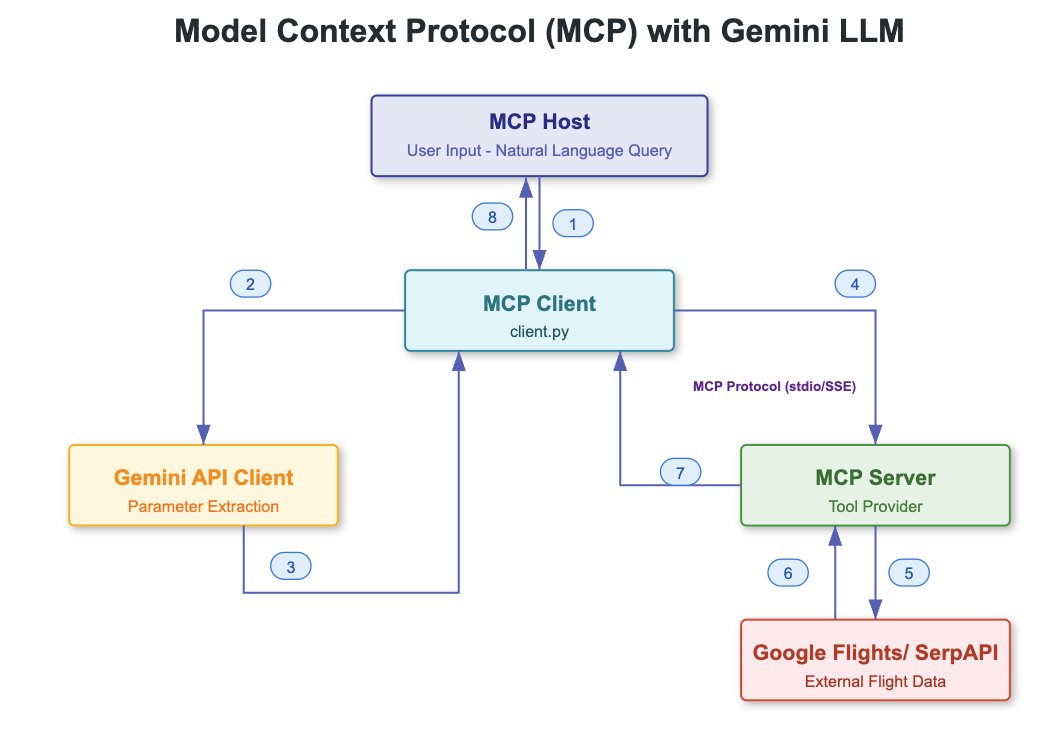
This project integrates multiple components to enable natural language flight search. Here's how the system works:
User to Client
client.py) processes the inputClient to MCP Server
mcp-flight-search)Client to Gemini 2.5 Pro
Client to MCP Tool
MCP Server to SerpAPI
Input Processing
User Query → Natural Language Text → Gemini 2.5 Pro → Structured Parameters
Flight Search
Parameters → MCP Tool → SerpAPI → Flight Data → JSON Response
Result Handling
JSON Response → Parse → Format → Display to User
Client ↔ MCP Server
MCP Server ↔ SerpAPI
Client ↔ Gemini 2.5 Pro
The integration includes error handling at multiple levels:
Run the client:
python client.py
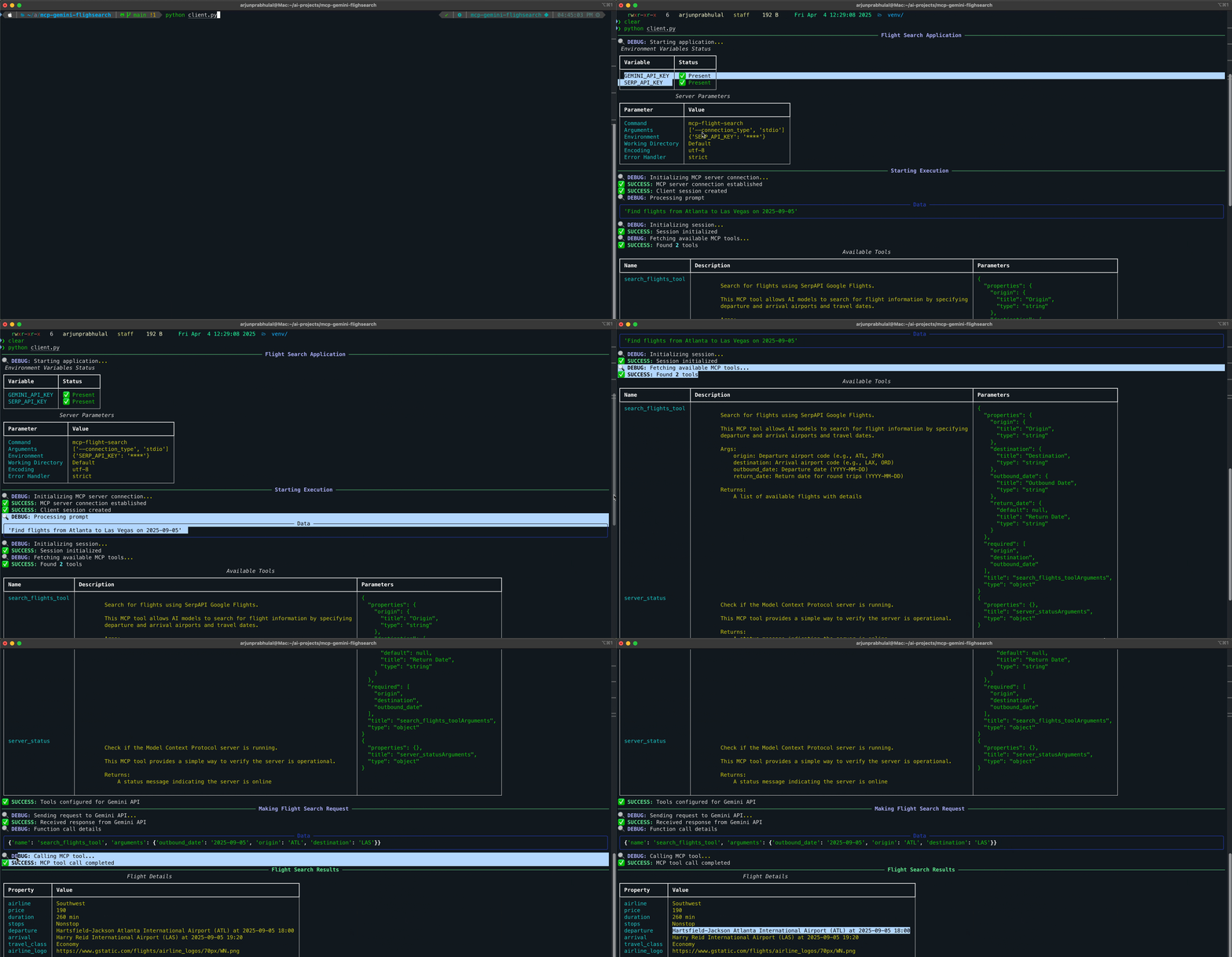
The script will:
This client uses the mcp-flight-search tool, which is available at:
For more articles on AI/ML and Generative AI, follow me on Medium: @arjun-prabhulal
This project is licensed under the MIT License.
Model Context Protocol (MCP) with Gemini 2.5 Pro. Convert conversational queries into flight searches using Gemini's function calling capabilities and MCP's flight search tools
工具
尚無工具清單。遠端伺服器會在首次健康檢查後取得工具清單。
常見問題
在本頁複製適用於 Cursor、Claude Desktop、Claude Code 或 VS Code 的 stdio 設定。它使用發布者的安裝方式,而不是 PlugMCP 代理伺服器。
這筆記錄未列出必要的環境變數。
MCP Gemini Search 透過 stdio 在本機執行。
上次檢查時間:2026-10-27。 Model Context Protocol (MCP) with Gemini 2.5 Pro. Convert conversational queries into flight searches using Gemini's function calling capabilities and MCP's flight search tools
