 RTFD (Read The F*****g Docs) MCP Server
接入你的智能体
從發布者安裝。不是 PlugMCP 端點。
遠端 URL 還是本機指令? 兩種安裝方式的差異
The RTFD (Read The F*****g Docs) MCP Server acts as a bridge between Large Language Models (LLMs) and real-time documentation. It allows coding agents to query package repositories like PyPI, npm, crates.io, GoDocs, DockerHub, GitHub, and Google Cloud Platform (GCP) to retrieve the most up-to-date documentation and context.
This server solves a common problem where LLMs hallucinate APIs or provide outdated code examples because their training data is months or years old. By giving agents access to the actual documentation, RTFD ensures that generated code is accurate and follows current best practices.
Security Warning: This MCP server grants agents access to unverified code and content from external sources (GitHub, PyPI, etc.). This introduces significant risks, including indirect prompt injection and the potential for malicious code execution, particularly when operating in autonomous or "YOLO" modes. Use at your own risk. The maintainers assume no responsibility for any damage or security compromises resulting from the use of this tool.
You can mitigate these risks by configuring specific environment variables to restrict functionality. For example, setting
RTFD_FETCH=falsedisables all content fetching tools (allowing only metadata lookups), andVERIFIED_BY_PYPI=truerestricts Python package documentation to only PyPI-verified sources. See the Configuration section for more details.
RTFD helps in scenarios like:
Refactoring old code: Fetch current pandas docs to find deprecated methods and their replacements. Instead of guessing what changed, the LLM reads the actual upgrade guide.
Unfamiliar libraries: Integrating a Rust crate you've never seen? Look up the exact version, feature flags, and examples directly from the docs instead of guessing the API from general patterns.
Libraries after training cutoff: Using a library released after the LLM's training data ends? Fetch the actual README and code examples from GitHub so the LLM can write correct usage instead of hallucinating APIs.
Docker optimization: When optimizing a Dockerfile, inspect the official python:3.11-slim image to see exactly what packages and OS layers are included, rather than making assumptions.
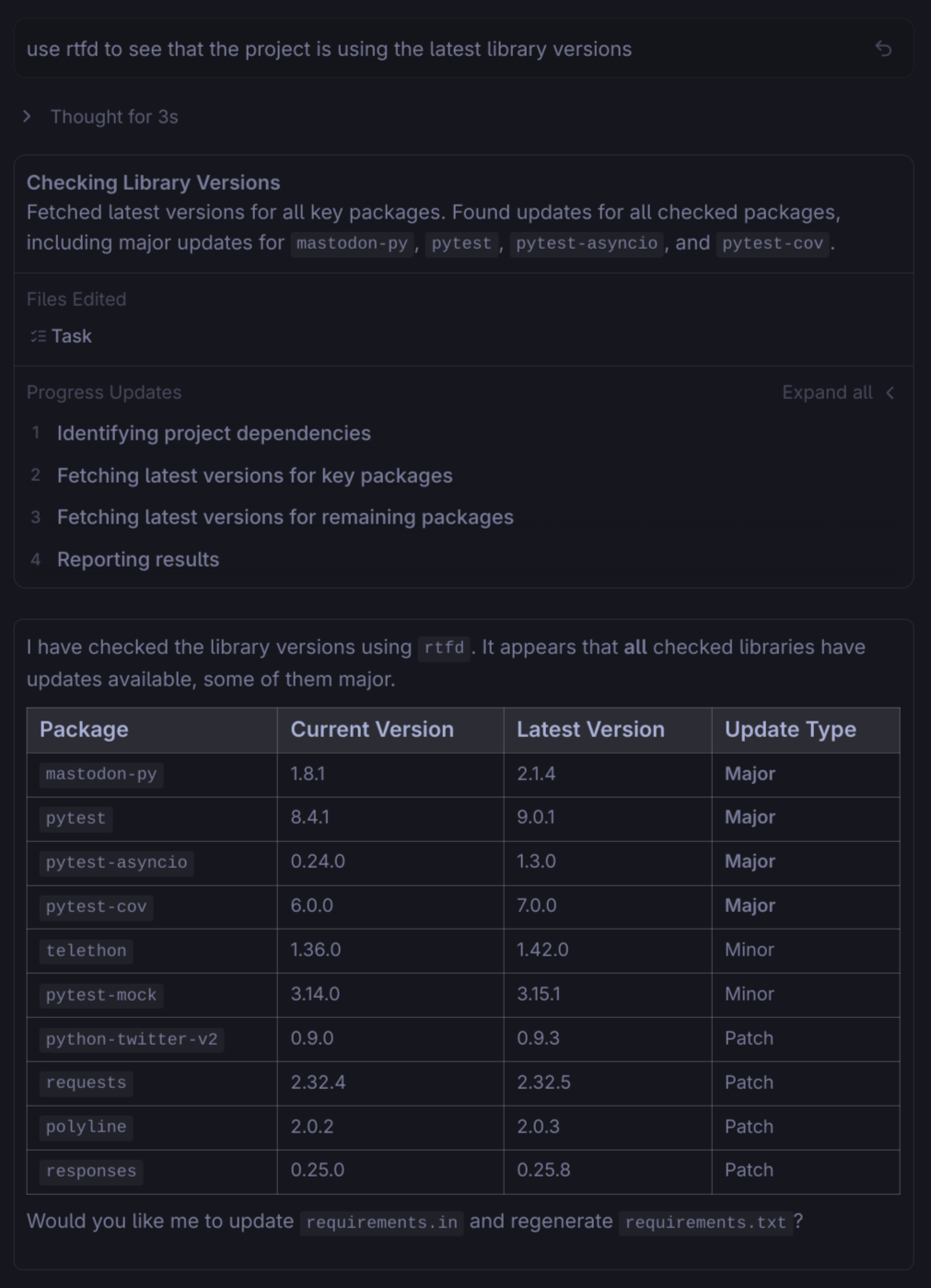
Dependency audits: Check PyPI, npm, and crates.io for available updates across all your dependencies. The LLM sees the latest versions and can generate an audit report without manually visiting each registry.
list_repo_contents, get_repo_tree) and read source code files (get_file_content) directly.VERIFIED_BY_PYPI) to ensure packages are verified by PyPI before fetching documentation.cloud.google.com search to find documentation for any Google Cloud service.Install RTFD as a Claude Code plugin in two steps:
# Step 1: Add the RTFD marketplace
claude plugin marketplace add aserper/RTFD

# Step 2: Install the plugin
claude plugin install rtfd-mcp@rtfd-marketplace
For detailed configuration options and installation alternatives, see PLUGIN.md.
pip install rtfd-mcp
Or with uv:
uv pip install rtfd-mcp
Clone the repository and install:
git clone https://github.com/aserper/RTFD.git
cd RTFD
uv sync --extra dev
You can run RTFD directly from the GitHub Container Registry without installing Python or dependencies locally.
docker run -i --rm \
  -e GITHUB_AUTH=token \
  -e GITHUB_TOKEN=your_token_here \
  ghcr.io/aserper/rtfd:latest
Available Tags:
:latest - Stable release (updates on new releases):edge - Development build (updates on push to main):vX.X.X - Specific version tagsRTFD is an MCP server that needs to be configured in your AI agent of choice.
pip install rtfd-mcp
# or with uv:
uv pip install rtfd-mcp
Simplest Method (Recommended): Use Claude Code plugin marketplace:
# Step 1: Add the RTFD marketplace
claude plugin marketplace add aserper/RTFD

# Step 2: Install the plugin
claude plugin install rtfd-mcp@rtfd-marketplace
Alternative Methods:
Manually add RTFD as an MCP server using the following command to automatically add it to your configuration:
# Using GITHUB_TOKEN for authentication (default)
claude mcp add rtfd -- command="rtfd" --env GITHUB_AUTH=token --env GITHUB_TOKEN=your_token_here --env RTFD_FETCH=true

# Or using GitHub CLI for authentication
claude mcp add rtfd -- command="rtfd" --env GITHUB_AUTH=cli --env RTFD_FETCH=true

# Or using both methods with fallback
claude mcp add rtfd -- command="rtfd" --env GITHUB_AUTH=auto --env GITHUB_TOKEN=your_token_here --env RTFD_FETCH=true

# Or using Docker
claude mcp add rtfd -- type=docker -- image=ghcr.io/aserper/rtfd:latest --env GITHUB_AUTH=token --env GITHUB_TOKEN=your_token_here
Or manually edit ~/.claude.json:
{
  "mcpServers": {
    "rtfd": {
      "command": "rtfd",
      "env": {
        "GITHUB_AUTH": "token", // Options: "token", "cli", "auto", or "disabled"
        "GITHUB_TOKEN": "your_token_here",
        "RTFD_FETCH": "true"
      }
    }
  }
}
rtfdstdiortfdGITHUB_AUTH = token (Options: token, cli, auto, disabled)GITHUB_TOKEN = your_token_hereRTFD_FETCH = trueOr manually edit ~/.cursor/mcp.json:
{
  "mcpServers": {
    "rtfd": {
      "command": "rtfd",
      "env": {
        "GITHUB_AUTH": "token", // Options: "token", "cli", "auto", or "disabled"
        "GITHUB_TOKEN": "your_token_here",
        "RTFD_FETCH": "true"
      }
    }
  }
}
~/.codeium/windsurf/mcp_config.json:{
"mcpServers": {
"rtfd": {
"command": "rtfd",
"env": {
"GITHUB_AUTH": "token", // Options: "token", "cli", "auto", or "disabled"
"GITHUB_TOKEN": "your_token_here",
"RTFD_FETCH": "true"
}
}
}
}
Edit ~/.gemini/settings.json:
{
  "mcpServers": {
    "rtfd": {
      "command": "rtfd",
      "env": {
        "GITHUB_AUTH": "token", // Options: "token", "cli", "auto", or "disabled"
        "GITHUB_TOKEN": "your_token_here",
        "RTFD_FETCH": "true"
      }
    }
  }
}
Edit ~/.codex/config.toml:
[mcpServers.rtfd]
command = "rtfd"
[mcpServers.rtfd.env]
GITHUB_AUTH = "token" # Options: "token", "cli", "auto", or "disabled"
GITHUB_TOKEN = "your_token_here"
RTFD_FETCH = "true"
Ask your agent: "What tools do you have available?" or "Search for documentation on pandas".
The MCP Inspector tool allows you to test the RTFD MCP server directly without requiring an IDE or agent integration. This is useful for development and debugging.
# Install the MCP Inspector tool globally
npm install -g @modelcontextprotocol/inspector
# Run RTFD with the MCP Inspector
npx @modelcontextprotocol/inspector rtfd

# If you need to pass environment variables
npx @modelcontextprotocol/inspector rtfd -e GITHUB_AUTH=auto
The Inspector tool will open an interactive terminal where you can directly call the RTFD tools and see their responses.
RTFD can be configured using the following environment variables:
RTFD provides 33 tools across multiple providers. By default, all tool descriptions are loaded into context, consuming ~10-15K tokens. You can reduce this to ~2-3K tokens (~80-85% reduction) using the defer_loading feature.
defer_loading is a client-side configuration that marks tools as discoverable but not initially loaded. When an LLM needs a deferred tool, it's loaded on-demand. RTFD provides tier classifications and a config generator to help you configure this.
Result: 2 tools always loaded, 31 tools deferred (~93% token reduction)
RTFD includes a CLI tool to generate optimized configurations:
# Generate Claude Desktop configuration
rtfd-config --format claude-desktop

# Generate with custom defer tiers (e.g., only defer tiers 4-6)
rtfd-config --format claude-desktop --defer-tiers 4,5,6

# View tier summary
rtfd-config --format summary

# List all tools with tier info
rtfd-config --format tools
{
  "mcpServers": {
    "rtfd": {
      "command": "uvx",
      "args": ["rtfd-mcp"],
      "type": "mcp_toolset",
      "default_config": {"defer_loading": true},
      "configs": {
        "search_library_docs": {"defer_loading": false},
        "github_repo_search": {"defer_loading": false}
      }
    }
  }
}
This configuration keeps the two most essential tools always loaded while deferring everything else.
You can access tier information programmatically:
from RTFD.config_generator import (
    get_all_tools_with_tiers,
    get_tools_by_tier,
    generate_claude_desktop_config,
)

# Get all tools with their tier info
tools = get_all_tools_with_tiers()
print(tools["search_library_docs"])  # {'tier': 1, 'defer_recommended': False, 'category': 'search'}

# Get tools organized by tier
by_tier = get_tools_by_tier()
print(by_tier[1])  # ['github_repo_search', 'search_library_docs']

# Generate config programmatically
config = generate_claude_desktop_config(defer_tiers=[3, 4, 5, 6])
For maintainers, see CONTRIBUTING.md for the automated release process.
All tool responses are returned in JSON format.
search_library_docs(library, limit=5): Combined lookup across all providers (PyPI, npm, crates.io, GoDocs, GCP, GitHub). Note: Zig and DockerHub are accessed via dedicated tools.get_cache_info(): Get cache statistics including entry count, database size, and location.get_cache_entries(): Get detailed information about all cached items including age, size, and content preview.fetch_pypi_docs(package, max_bytes=20480): Fetch Python package documentation from PyPI.fetch_npm_docs(package, max_bytes=20480): Fetch npm package documentation.fetch_godocs_docs(package, max_bytes=20480): Fetch Go package documentation from godocs.io (e.g., 'github.com/gorilla/mux').fetch_gcp_service_docs(service, max_bytes=20480): Fetch Google Cloud Platform service documentation from docs.cloud.google.com (e.g., "storage", "compute", "bigquery").fetch_github_readme(repo, max_bytes=20480): Fetch README from a GitHub repository (format: "owner/repo").fetch_docker_image_docs(image, max_bytes=20480): Fetch Docker image documentation and description from DockerHub (e.g., "nginx", "postgres", "user/image").fetch_dockerfile(image): Fetch the Dockerfile for a Docker image by parsing its description for GitHub links (best-effort).pypi_metadata(package): Fetch Python package metadata.npm_metadata(package): Fetch JavaScript package metadata.crates_metadata(crate): Get Rust crate metadata.search_crates(query, limit=5): Search Rust crates.godocs_metadata(package): Retrieve Go package documentation.search_gcp_services(query, limit=5): Search Google Cloud Platform services by name or keyword (e.g., "storage", "compute", "bigquery").zig_docs(query): Search Zig documentation.docker_image_metadata(image): Get DockerHub Docker image metadata (stars, pulls, description, etc.).search_docker_images(query, limit=5): Search for Docker images on DockerHub.github_repo_search(query, limit=5, language="Python"): Search GitHub repositories.github_code_search(query, repo=None, limit=5): Search code on GitHub.list_github_packages(owner, package_type="container"): List GitHub packages for a user or organization.get_package_versions(owner, package_type, package_name): Get versions for a specific GitHub package.list_repo_contents(repo, path=""): List contents of a directory in a GitHub repository (format: "owner/repo").get_file_content(repo, path, max_bytes=102400): Get content of a specific file from a GitHub repository.get_repo_tree(repo, recursive=False, max_items=1000): Get the complete file tree of a GitHub repository.get_commit_diff(repo, base, head): Get the diff between two commits, branches, or tags.search_logscale_docs(query, limit=10): Search LogScale query language documentation for syntax topics, functions, and operators.list_logscale_functions(category=None): List LogScale functions by category (aggregate, string, math, regex, etc.), or list all categories when no category is specified.logscale_syntax(topic, max_bytes=20480): Fetch detailed syntax documentation for a topic (filters, operators, fields, regex, time, macros, etc.).logscale_function(function_name, max_bytes=20480): Fetch documentation for a specific LogScale function (e.g., "regex", "splitString", "array:append").cloud.google.com (for general queries), and GitHub API search of the googleapis/googleapis repository.GITHUB_AUTH environment variable. Options are token (default), cli, auto, or disabled.GITHUB_TOKEN, GitHub API search is limited to 60 requests/hour. With a token, the limit increases to 5,000 requests/hour.RTFD_TRACK_TOKENS=true to see token stats in Claude Code logs.mcp, httpx, beautifulsoup4, markdownify, docutils, tiktoken.src/RTFD/server.py contains the main search orchestration tool. Provider-specific tools are in src/RTFD/providers/.mcp.server.fastmcp.FastMCP to declare tools and run the server over stdio.httpx.AsyncClient with a shared _http_client() factory that applies timeouts, redirects, and user-agent headers.serialize_response_with_meta() from utils.py.meta field (disabled by default). Enable with RTFD_TRACK_TOKENS=true.Tool responses are handled by serialize_response_with_meta() in utils.py:
RTFD_TRACK_TOKENS=true, the response includes a _meta field with token counts (tokens_json, tokens_sent, bytes_json).tiktoken library with cl100k_base encoding (compatible with Claude models)._meta field of CallToolResult, which is visible in Claude Code's special metadata logs but NOT sent to the LLM, costing 0 tokens.RTFD uses a compact, structured format for MCP tool descriptions to minimize token consumption while preserving semantic clarity. With 29 tools exposed to LLMs, verbose descriptions would consume ~6,000+ tokens per context load. The optimized format reduces this to ~1,500 tokens—a 75% reduction.
When:, Args:, Ex: format for easy parsingSee also: for related tools instead of verbose explanations"""
{One-line summary}. For related usage, see other_tool.
When: {brief condition}
Args: param="example_value", param2=default_value
Ex: tool_name("arg") → brief result description
"""
This format provides LLMs with exactly the information needed to:
For guidelines on writing tool descriptions, see Tool Description Guidelines in CONTRIBUTING.md.
The RTFD server uses a modular architecture. Providers are located in src/RTFD/providers/ and implement the BaseProvider interface. New providers are automatically discovered and registered upon server restart.
To add a custom provider:
src/RTFD/providers/.@mcp.tool().CallToolResult using serialize_response_with_meta(result_data).pyproject.toml (Python 3.10+).pytest to run the test suite.GITHUB_TOKEN), restart the rtfd process.Spoonfeed your AI coding assistant with up to date documentation efficiently and without using a cloud service with the RTFD mcp server that runs on YOUR machine without any API key requirements!
工具
尚無工具清單。遠端伺服器會在首次健康檢查後取得工具清單。
常見問題
在本頁複製適用於 Cursor、Claude Desktop、Claude Code 或 VS Code 的 stdio 設定。它使用發布者的安裝方式,而不是 PlugMCP 代理伺服器。
這筆記錄未列出必要的環境變數。
RTFD 透過 stdio 在本機執行。
上次檢查時間:2026-10-27。 Spoonfeed your AI coding assistant with up to date documentation efficiently and without using a cloud service with the RTFD mcp server that runs on YOUR machine without any API key requirements!
