接入你的智能体
從發布者安裝。不是 PlugMCP 端點。
遠端 URL 還是本機指令? 兩種安裝方式的差異
The Architecture Review Agent is an open-source AI agent sample that reviews software architectures and generates interactive diagrams - automatically. Feed it any architectural description (YAML, Markdown, plain text, code, design docs) and it returns a structured review with risk analysis, actionable recommendations, and an Excalidraw diagram you can edit and share.
For a structured docs map (setup, deployment, scripts, scenarios, testing), see docs/README.md.
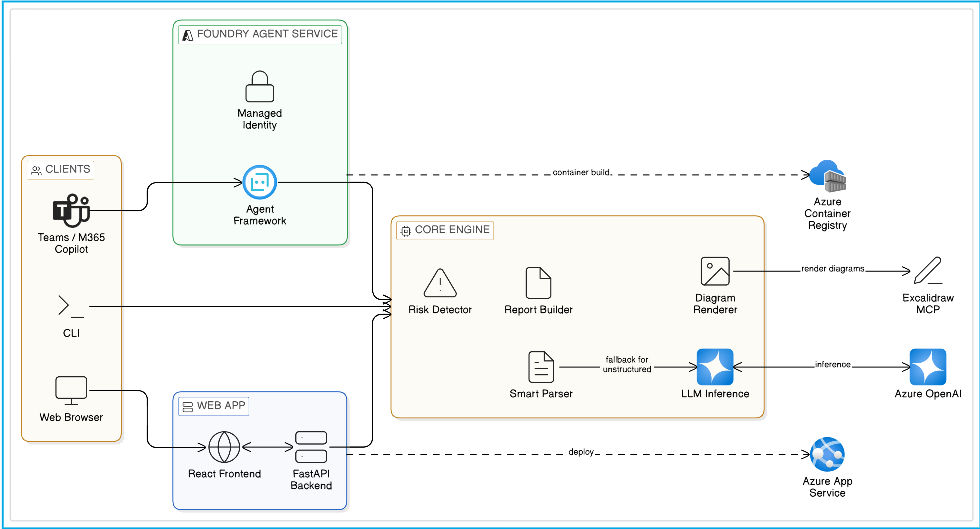
Clients (Teams/M365 Copilot, CLI, Web Browser) → Foundry Agent Service or Web App → Core Engine (Smart Parser, Risk Detector, Report Builder, Diagram Renderer, LLM Inference) → Azure OpenAI / Excalidraw MCP / ACR / Azure App Service
flowchart TB
    subgraph Agent["Architecture Review Agent<br/>"]
        review_architecture
        infer_architecture
    end

    subgraph Tools["tools.py"]
        Parser["Parser<br/>YAML / MD / Plaintext"]
        LLMInference["LLM Inference<br/>AzureOpenAIChatClient"]
        RiskDetector["Risk Detector<br/>Template + LLM"]
        DiagramRenderer["Diagram Renderer<br/>Excalidraw + PNG"]
        ComponentMapper["Component Mapper"]
        ReportBuilder["Report Builder"]
        MCPClient["MCP Client<br/>(Excalidraw Server)"]
    end

    review_architecture --> Tools
    infer_architecture --> Tools
    Tools --> LocalOutputs[".excalidraw / .png / .json"]
    MCPClient --> ExcalidrawMCP["Excalidraw MCP<br/>(Interactive View)"]
Microservices Banking Architecture — full end-to-end review: file upload → risk detection → interactive Excalidraw diagram → recommendations.
If the video does not render inline, download and watch it here.
This sample ships with two production deployment paths. Both share the same core analysis engine (tools.py) choose the one that fits your operational model.
A traditional full-stack web application: FastAPI backend + React frontend, packaged in a single Docker image and deployed to Azure App Service.
/api/review, /api/infer, etc.)Best for: Teams that want a custom UI, need to embed the API in existing tooling, or prefer full control over infrastructure and scaling.
Key files: api.py · Dockerfile.web · frontend/ · scripts/windows/deploy-webapp.ps1
A managed agent deployed to Microsoft Foundry's Hosted Agent infrastructure via the VS Code Foundry extension. The platform handles containerisation, identity, scaling, and API compliance.
/responses endpointBest for: Teams that want a managed, scalable API with zero infrastructure overhead, or need to publish the agent to Teams / M365 Copilot channels. The extension-based deployment flow is more reliable than script-based approaches and provides real-time feedback.
Key files: main.py · agent.yaml · Dockerfile · docs/deployment.md
Tip: You can run both simultaneously use the Web App for your internal team's browser-based reviews, and the Hosted Agent for API consumers and Teams/Copilot integration.
Setup scripts are provided that create a .venv virtual environment, install all dependencies, and initialise the .env file in one step:
Windows (PowerShell):
# Clone the repository
git clone https://github.com/Azure-Samples/agent-architecture-review-sample
cd agent-architecture-review-sample

# Run the setup script (creates .venv, installs deps, copies .env.template → .env)
.\scripts\windows\setup.ps1
Linux / macOS (Bash):
# Clone the repository
git clone https://github.com/Azure-Samples/agent-architecture-review-sample
cd agent-architecture-review-sample

# Run the setup script
chmod +x scripts/linux-mac/setup.sh
bash scripts/linux-mac/setup.sh
If you prefer to set things up manually:
# Clone the repository
git clone https://github.com/Azure-Samples/agent-architecture-review-sample
cd agent-architecture-review-sample

# Create virtual environment
python -m venv .venv

# Activate virtual environment
# Windows (PowerShell):
.\.venv\Scripts\Activate.ps1
# Windows (cmd):
.\.venv\Scripts\activate.bat
# Linux/macOS:
source .venv/bin/activate

# Upgrade pip & install dependencies
python -m pip install --upgrade pip
pip install -r requirements.txt

# Create .env from template
cp .env.template .env   # then edit .env with your settings
# Copy the template
cp .env.template .env
Edit .env with your settings:
# Microsoft Foundry / OpenAI Configuration
# Use PROJECT_ENDPOINT for Microsoft Foundry projects, or AZURE_OPENAI_ENDPOINT for Azure OpenAI
PROJECT_ENDPOINT=https://your-project.services.ai.azure.com/api/projects/your-project
AZURE_OPENAI_ENDPOINT=https://your-resource.openai.azure.com/
MODEL_DEPLOYMENT_NAME=gpt-4.1
AZURE_OPENAI_API_KEY="your-azure-openai-api-key"

# SSL: Set to "1" if behind a corporate proxy or experiencing SSL certificate errors
# ARCH_REVIEW_NO_SSL_VERIFY=1
Note: The
ARCH_REVIEW_NO_SSL_VERIFY=1flag disables SSL verification for the Excalidraw MCP server connection. Use this if you're behind a corporate proxy or firewall that intercepts HTTPS traffic. You can also set it inline:# PowerShell $env:ARCH_REVIEW_NO_SSL_VERIFY="1"# Bash export ARCH_REVIEW_NO_SSL_VERIFY=1
The local runner executes the full pipeline parse, risk analysis, diagram generation, component mapping, and structured report output.
# Analyse a YAML architecture file (rule-based parser)
python run_local.py scenarios/ecommerce.yaml

# Analyse a Markdown architecture file
python run_local.py scenarios/event_driven.md

# Inline plaintext (chained arrows supported)
python run_local.py --text "Load Balancer -> Web Server -> App Server -> PostgreSQL DB"

# With Excalidraw MCP server rendering (interactive diagram)
python run_local.py scenarios/ecommerce.yaml --render

# Feed ANY file - auto-falls back to LLM inference if not structured
python run_local.py README.md
python run_local.py design_doc.txt

# Force LLM inference (requires Azure OpenAI configured in .env)
python run_local.py some_readme.md --infer
python run_local.py --infer "We have a React frontend, Kong gateway, three microservices, and PostgreSQL"
python run_local.py --text "We have a React frontend, Kong gateway, three microservices, and PostgreSQL" --infer
Outputs (saved to output/):
architecture.excalidraw - Excalidraw file for local viewingarchitecture.png - High-resolution PNG diagramreview_bundle.json - Full structured review report (JSON)For the web app workflow, use the OS-specific scripts in scripts/README.md. For the hosted-agent workflow, use docs/azd-local.md for local azd runs and docs/deployment.md for Foundry deployment.
This sample requires a deployed model (GPT-4.1 recommended) on Azure OpenAI or Microsoft Foundry.
https://<project>.services.ai.azure.com).gpt-4.1).PROJECT_ENDPOINT=https://<your-project>.services.ai.azure.com
MODEL_DEPLOYMENT_NAME=gpt-4.1
https://<resource>.openai.azure.com/).AZURE_OPENAI_ENDPOINT=https://<your-resource>.openai.azure.com/
AZURE_AI_MODEL_DEPLOYMENT_NAME=gpt-4.1
The Architecture Review Agent supports two authentication methods:
AZURE_OPENAI_API_KEY in .env. Used automatically when present.az login), Managed Identity, and service principal env vars (AZURE_CLIENT_ID / AZURE_TENANT_ID / AZURE_CLIENT_SECRET).For local development with API key:
AZURE_OPENAI_ENDPOINT=https://your-resource.openai.azure.com/
AZURE_OPENAI_API_KEY=your-key-here
Or with Azure CLI:
az login
az account set --subscription <your-subscription-id>
The Architecture Review Agent accepts any input - structured or unstructured. Component names, types, and architectures are fully dynamic.
flowchart LR
    A["ANY INPUT<br/>(YAML, MD, README,<br/>code, prose, etc.)"] --> B{Smart Parser}
    B -- "Structured" --> C["Rule-based<br/>(fast)"]
    B -- "Unstructured" --> D["LLM Inference<br/>(auto-fallback)"]
    C --> E["Structured Architecture<br/>(components + connections)"]
    D --> E
    E --> F[Risk Analysis]
    F --> G[Diagram Generation]
    G --> H[Report]
components/connections, Markdown with ## Components headers, plaintext arrows) → fast rule-based parser.--infer flag to always use LLM inference, even on structured inputs.name: My Architecture
components:
- name: API Gateway
type: gateway
technology: Kong
replicas: 2
- name: User Service
type: service
replicas: 3
- name: User Database
type: database
technology: PostgreSQL
connections:
- from: api_gateway
to: user_service
protocol: REST
- from: user_service
to: user_database
protocol: TCP
Accepted keys: components/services/nodes and connections/edges/flows/links.
## Components

### API Gateway
- **Type:** gateway
- **Technology:** Kong
- **Replicas:** 2

### User Service
- Handles user authentication and profiles

## Connections
- API Gateway -> User Service (REST)
- User Service -> User Database (TCP)
API Gateway -> User Service -> User Database
API Gateway -> Product Service -> Product DB
Product Service -> Redis Cache
Chained arrows (A -> B -> C) are auto-expanded into individual connections.
Feed it a README, design document, code file, Terraform config, meeting notes - the LLM analyses it:
Our platform uses React for the frontend, served through CloudFront CDN.
All API calls go through a Kong API Gateway which routes to three microservices:
User Service, Order Service, and Inventory Service. Each service has its own
PostgreSQL database. Order Service publishes events to a Kafka topic that
Inventory Service consumes. We use Redis for session caching and Datadog
for monitoring.
The model will infer:
Then proceeds with full risk analysis, diagram generation, and report.
The Architecture Review Agent uses two risk engines depending on the parsing path:
Fast pattern-matching across four categories:
When the LLM infers the architecture (auto-fallback or --infer), it also produces context-aware risks with concise 1-liner issues and actionable recommendations - covering SPOFs, redundancy gaps, security concerns, observability, compliance (e.g. PCI DSS), and architecture-specific bottlenecks.
Risks are severity-bucketed: critical → high → medium → low.
When types aren't explicitly set, the Architecture Review Agent infers them from component names:
azure-ai-agentserver-agentframework) - Hosted agent runtimeAzureOpenAIChatClient (API key or DefaultAzureCredential)The Architecture Review Agent is an open-source AI agent sample that reviews software architectures and generates interactive diagrams automatically.
工具
尚無工具清單。遠端伺服器會在首次健康檢查後取得工具清單。
常見問題
在本頁複製適用於 Cursor、Claude Desktop、Claude Code 或 VS Code 的 stdio 設定。它使用發布者的安裝方式,而不是 PlugMCP 代理伺服器。
這筆記錄未列出必要的環境變數。
Agent Architecture Review Sample 透過 stdio 在本機執行。
上次檢查時間:2026-10-27。 The Architecture Review Agent is an open-source AI agent sample that reviews software architectures and generates interactive diagrams automatically.