接入你的智能体
發布者自己的指令。不是 PlugMCP 端點。
用我們的金鑰與日誌託管一份副本。
npx -y [email protected]Claude Code 沒有本機指令的安裝連結。複製下方指令並在終端機中執行。
FLW_SECRET_KEY=<secret> claude mcp add bajoski34-mcp-flutterwave -- npx -y mcp-flutterwave@1.2.0在終端機中執行。
{ "mcpServers": { "bajoski34-mcp-flutterwave": { "command": "npx", "args": [ "-y", "[email protected]" ], "env": { "FLW_SECRET_KEY": "<secret>" } } }}claude_desktop_config.json
遠端 URL 還是本機指令? 兩種安裝方式的差異
An MCP (Model Context Protocol) server that enables AI assistants to interact with the Flutterwave API — create payment links, charge customers directly, manage transfers, collect via virtual accounts, pay bills, and more.
Note: This server currently targets the Flutterwave v3 API. Support for v4 is coming soon.
Also ships with a built-in web app that connects to the MCP server and lets you talk to a Claude-powered Flutterwave assistant directly in your browser.
npm install -g mcp-flutterwave
npx mcp-flutterwave --tools=all
Pull the image:
docker pull ghcr.io/bajoski34/mcp-flutterwave:latest
The server communicates over stdio, so it must be launched by an MCP client — not run standalone. Configure Claude Desktop to use the Docker image as the MCP server:
{
  "mcpServers": {
    "flutterwave": {
      "command": "docker",
      "args": [
        "run", "--rm", "-i",
        "-e", "FLW_SECRET_KEY=YOUR_SECRET_KEY",
        "-e", "FLW_ENCRYPTION_KEY=YOUR_ENCRYPTION_KEY",
        "ghcr.io/bajoski34/mcp-flutterwave:latest"
      ]
    }
  }
}
The -i flag keeps stdin open so Claude Desktop can communicate with the server over stdio.
Requirements: Node.js 20 or later (for npm/npx).
Direct card charges are multi-step. The charge_card tool handles every stage automatically and tells Claude what to do next.
1. charge_card(card details)
        │
        ├─ mode: "pin"        → ask customer for PIN
        │       charge_card(same params + authorization: { mode: "pin", pin: "..." })
        │               │
        │               ├─ mode: "otp"      → validate_charge(flw_ref, otp)
        │               └─ mode: "redirect" → send customer to 3DS URL
        │
        ├─ mode: "avs_noauth" → ask customer for billing address
        │       charge_card(same params + authorization: { mode: "avs_noauth", city, address, ... })
        │               │
        │               ├─ mode: "otp"      → validate_charge(flw_ref, otp)
        │               └─ mode: "redirect" → send customer to 3DS URL
        │
        ├─ mode: "redirect"   → send customer to 3DS URL, then read_transaction to verify
        │
        └─ (none)             → charge complete — read_transaction to verify
When a second call is needed, pass authorization alongside the original card details:
// PIN flow
{ "authorization": { "mode": "pin", "pin": "3310" } }

// AVS flow
{ "authorization": { "mode": "avs_noauth", "city": "Lagos", "address": "12 Victoria Island", "state": "LA", "country": "NG", "zipcode": "100001" } }
American Express transactions require the card_holder_name field in addition to standard card details.
Card payloads are encrypted with 3DES-ECB using your FLW_ENCRYPTION_KEY before they are sent to Flutterwave (PCI DSS requirement). The encryption is handled automatically — set the environment variable and the server does the rest.
Virtual accounts give each customer a dedicated bank account number to make transfers into. Flutterwave notifies your webhook when a payment arrives.
{
  "email": "[email protected]",
  "currency": "NGN",
  "tx_ref": "VA-NGN-001",
  "is_permanent": true,
  "bvn": "22415929481"
}
{
  "email": "[email protected]",
  "currency": "GHS",
  "tx_ref": "VA-GHS-001",
  "amount": 500,
  "frequency": 5,
  "duration": 7
}
After creation, save the order_ref — it is the key for retrieving or updating the account via get_virtual_account and update_virtual_account.
Bill payments follow a 6-step discovery flow. Skip validate_bill_customer for airtime and mobile data.
1. get_bill_categories
        ↓ choose a category (e.g. UTILITYBILLS)

2. get_bill_providers(category)
        ↓ get biller_code (e.g. "BIL127" for IKEDC)

3. get_bill_items(biller_code)
        ↓ get item_code and amount info

4. validate_bill_customer(item_code, customer_id)   ← skip for AIRTIME / MOBILEDATA
        ↓ confirm customer name and details

5. pay_bill(biller_code, item_code, customer_id, amount)
        ↓ returns reference

6. get_bill_status(reference)
        ↓ confirms completion
          for electricity: prepaid token is in extra.token — share it with the customer
Bill payments are available for Nigeria only (
country: NG).
Currency conversion uses a two-step quote-then-trade flow. Quotes are valid for 5 minutes and available weekdays only (Monday–Friday).
1. request_fx_quote(base_currency, target_currency, quantity)
        ↓ returns quote_id, status: NEW

2. get_fx_quote(quote_id)   ← poll until READY or FAILED
        ↓ READY: contains rate, approved_quantity, total_value, expiry

3. initiate_fx_trade(quote_id, narration)
        ↓ locks in rate, returns trade_id, status: NEW

4. get_fx_trade(trade_id)   ← poll until SETTLED or FAILED
        ↓ SETTLED: converted funds credited to target currency wallet instantly
approved_quantity for reconciliationVerify a recipient's account details before sending a transfer. Always show the resolved name to the user before proceeding.
{ "account_number": "0690000040", "account_bank": "044" }
Common bank codes: 044 Access Bank · 057 Zenith Bank · 058 GTBank · 033 UBA · 011 First Bank
Identify card metadata from the first 6 digits of a card number.
{ "bin": "553188" }
// → { brand: "MASTERCARD", type: "CREDIT", issuer: "NEXUS MERCHANT BANK", country: "NIGERIA" }
AMEX cards identified via BIN require the
card_holder_namefield when callingcharge_card.
Two-step consent flow — customer must approve data sharing on the NIBSS portal.
1. initiate_bvn_verification(bvn, firstname, lastname, redirect_url)
        ↓ returns reference + single-use consent URL

2. Customer visits consent URL → approves data sharing on NIBSS portal
        ↓ webhook (bvn.completed) fires OR poll:

3. get_bvn_details(reference)
        ↓ returns name, DOB, gender, phone, NIN, state of origin, watchlist status
Requires Flutterwave account enablement — contact [email protected]. If the customer has already consented,
initiate_bvn_verificationreturnsurl: nulland you can callget_bvn_detailsimmediately.
Send USDC or USDT over the Polygon network, or convert NGN/USD fiat balances into stablecoins. Always call get_stablecoin_fee first so the user knows the net amount the recipient will receive.
1. get_stablecoin_fee(amount, currency: "USDT", debit_currency: "USDT")
        ↓ shows fee and net amount

2. send_stablecoin(wallet_address, amount, currency, debit_currency)
        ↓ returns reference and transfer status
1. get_stablecoin_fee(amount, currency: "USDC", debit_currency: "NGN")
        ↓ shows fee (percentage-based) and net USDC amount

2. convert_to_stablecoin(merchant_id, amount, currency, debit_currency: "NGN")
        ↓ deducts NGN from your fiat wallet, credits USDC/USDT
The app/ directory contains a standalone browser chat interface that wraps this MCP server with a Claude-powered conversation loop.
Browser  →  POST /api/chat
               ↓
           Claude (Sonnet) — all MCP tools injected via advanced-tool-use beta
               ↓  tool_use
           MCP Server (this repo, spawned via stdio)
               ↓
           Flutterwave API
The web app uses three Anthropic Advanced Tool Use features:
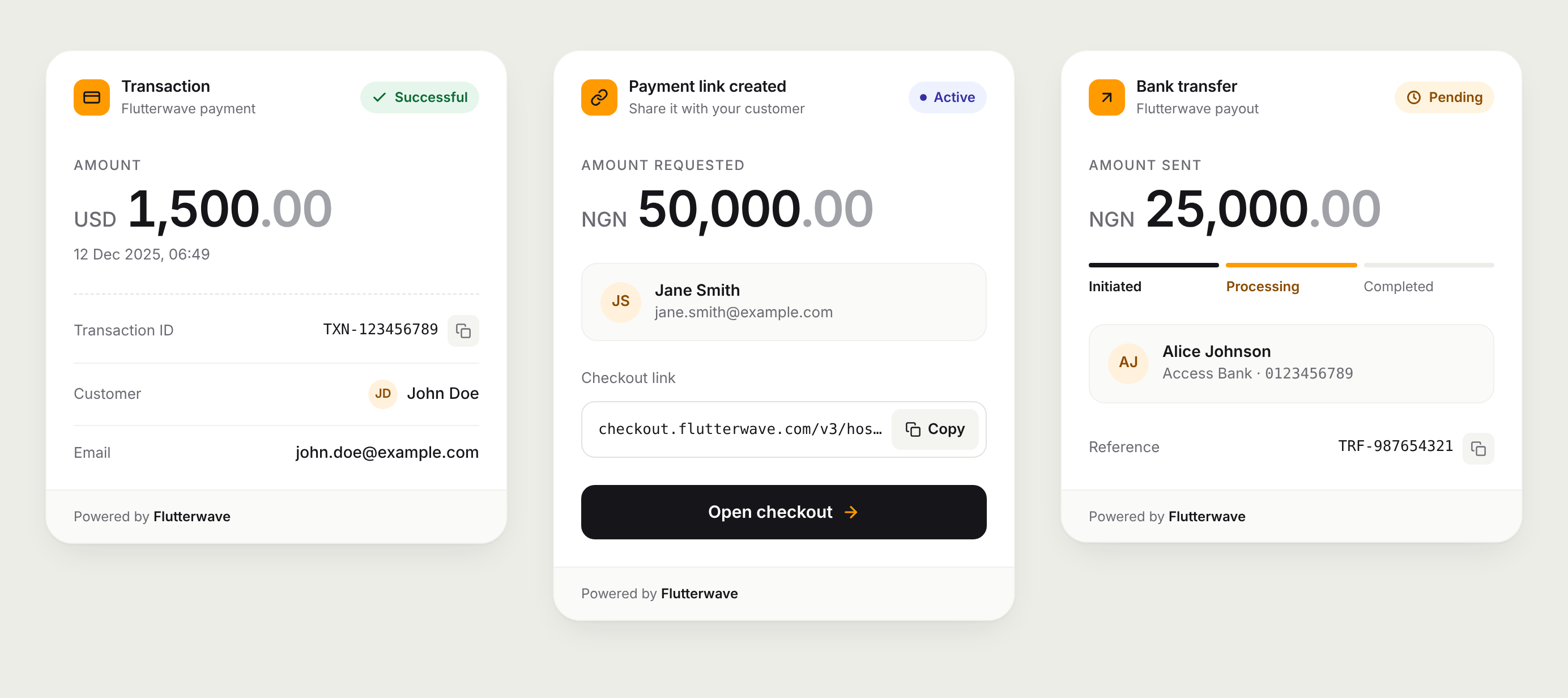
input_examples for every tool improve parameter accuracy from ~72% to ~90%The app returns a rich branded UI card for every tool response — checkout links, transaction details, charge states, transfer summaries, virtual accounts, bill receipts — rendered inline in the chat.
Prerequisites
Get your keys from the Flutterwave Dashboard under Settings → API Keys.
Get your Anthropic key from the Anthropic Console.
Build and start
# Clone and install
git clone https://github.com/bajoski34/mcp-flutterwave.git
cd mcp-flutterwave
npm install

# Build both the MCP server and the web app
npm run build:all

# Start
ANTHROPIC_API_KEY=sk-ant-... FLW_SECRET_KEY=FLWSECK_... npm run start:app
Then open http://localhost:3000.
Available scripts
Port
Set the PORT environment variable to change from the default 3000.
npm install -g mcp-flutterwave
git clone https://github.com/bajoski34/mcp-flutterwave.git
cd mcp-flutterwave
npm install
npm run build
Add the following to your claude_desktop_config.json. See the MCP quickstart for details.
Pass --tools=all to enable every tool, or supply a comma-separated list to restrict which tools are registered.
{
  "mcpServers": {
    "flutterwave": {
      "command": "mcp-flutterwave",
      "args": ["--tools=all"],
      "env": {
        "FLW_SECRET_KEY": "YOUR_SECRET_KEY",
        "FLW_ENCRYPTION_KEY": "YOUR_ENCRYPTION_KEY"
      }
    }
  }
}
{
  "mcpServers": {
    "flutterwave": {
      "command": "node",
      "args": [
        "/path/to/mcp-flutterwave/build/index.js",
        "--tools=all"
      ],
      "env": {
        "FLW_SECRET_KEY": "YOUR_SECRET_KEY",
        "FLW_ENCRYPTION_KEY": "YOUR_ENCRYPTION_KEY"
      }
    }
  }
}
"args": [
  "--tools=create_checkout,read_transaction,create_transfer"
]
Accepted tool names (use all to enable everything):
create_checkout            disable_checkout
read_transaction           read_transaction_with_reference
read_transaction_timeline  resend_transaction_webhook
create_transfer            create_beneficiary            list_beneficiaries
create_payment_plan        get_payment_plans
charge_card                charge_bank_account           charge_mobile_money
charge_mpesa               charge_ussd                   validate_charge
create_virtual_account     get_virtual_account           update_virtual_account
list_virtual_account_bulk
get_bill_categories        get_bill_providers            get_bill_items
validate_bill_customer     pay_bill                      get_bill_status
request_fx_quote           get_fx_quote
initiate_fx_trade          get_fx_trade
initiate_bvn_verification  get_bvn_details
resolve_bank_account       verify_card_bin
get_stablecoin_fee         send_stablecoin               convert_to_stablecoin
Every tool returns a rich HTML card alongside its text response, powered by @mcp-ui/server. The cards use Flutterwave's design tokens — navy #0A0E27, deep orange #FF5804, brand orange #F5A623, and the system sans-serif typeface.
The virtual account card shows the bank account number in a large, prominent box alongside the bank name, account type (Static / Dynamic), currency, expiry date, and order reference.
Both request_fx_quote/get_fx_quote and initiate_fx_trade/get_fx_trade return dark navy-themed cards:
Cards are compatible with:
app/) — rendered inline in the chatresource content type with HTMLWe welcome contributions! Please read our Contributing Guide for details on how to get started, development guidelines, and how to submit pull requests.
All notable changes are documented in GitHub Releases.
If you discover a security vulnerability, please do not open a public issue. Instead, email [email protected] directly. We will respond as quickly as possible.
MIT © Abraham Olaobaju
See LICENSE for the full text.
MCP Server to interact with flutterwave
{ "mcpServers": { "bajoski34-mcp-flutterwave": { "command": "npx", "args": [ "-y", "[email protected]" ], "env": { "FLW_SECRET_KEY": "<secret>" } } }}工具
尚無工具清單。遠端伺服器會在首次健康檢查後取得工具清單。
常見問題
在本頁複製適用於 Cursor、Claude Desktop、Claude Code 或 VS Code 的 stdio 設定。它使用發布者的安裝方式,而不是 PlugMCP 代理伺服器。
發布者列出了以下環境變數:FLW_SECRET_KEY。
MCP Flutterwave 透過 stdio 在本機執行。
上次檢查時間:2026-10-28。 MCP Server to interact with flutterwave