@boomlinkai/image-worker-mcp
接入你的智能体
從發布者安裝。不是 PlugMCP 端點。
遠端 URL 還是本機指令? 兩種安裝方式的差異
來自發布者
A fast, plug-and-play MCP server for image processing and cloud uploads, designed for AI assistants and automation workflows.
A lightweight server implementing Model Context Protocol (MCP) for automated image manipulation and uploads. It makes image resizing, converting, optimizing, and uploading seamless for devs, AI tools, or automated pipelines.
Use npm (or yarn/pnpm):
npm install -g @boomlinkai/image-worker-mcp
# or
yarn global add @boomlinkai/image-worker-mcp
# or
pnpm add -g @boomlinkai/image-worker-mcp
Or use it instantly (no install):
npx @boomlinkai/image-worker-mcp
npx @boomlinkai/image-worker-mcp
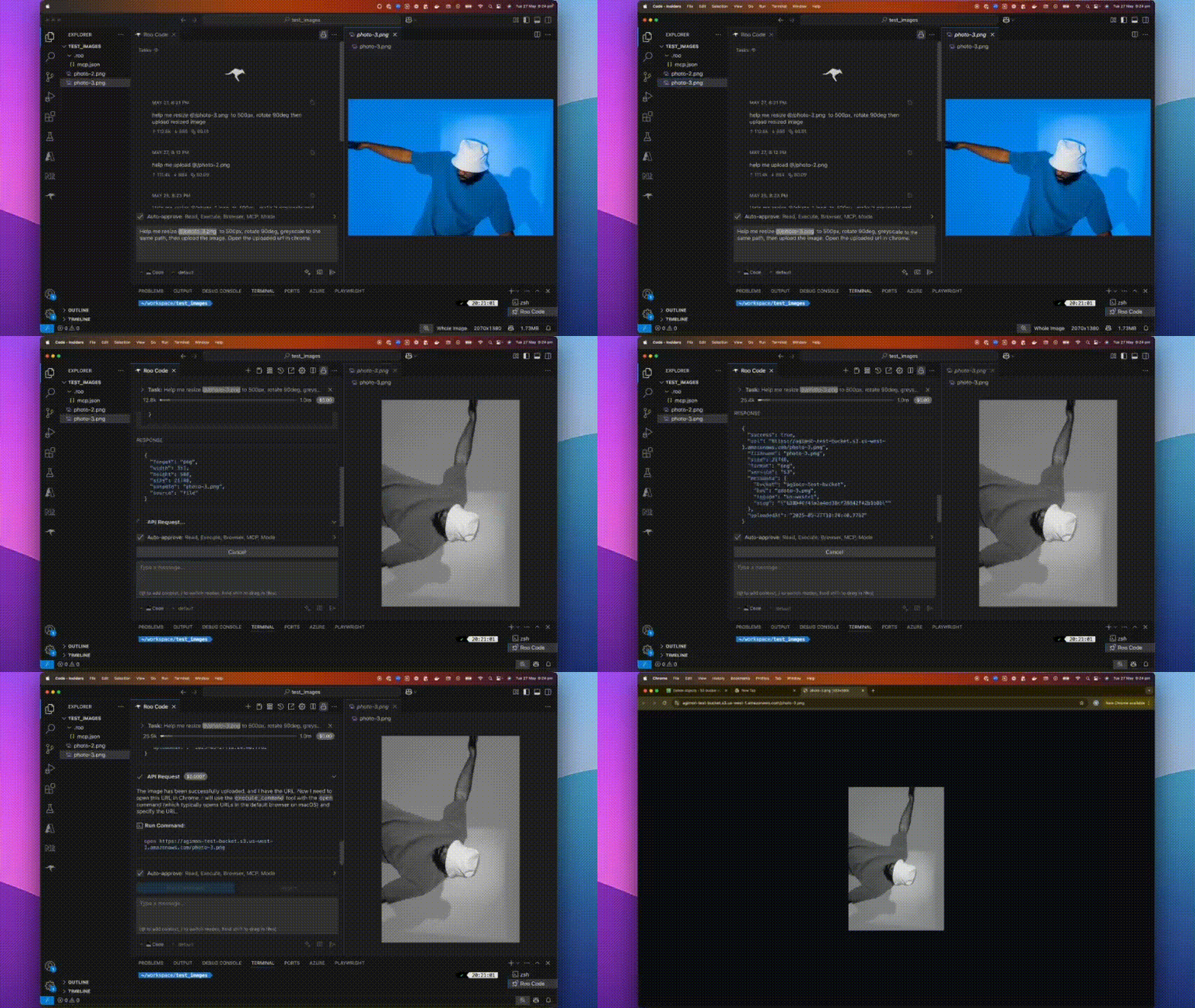
Resize an image:
{
  "tool_code": "use_mcp_tool",
  "tool_name": "resize_image",
  "server_name": "image-worker",
  "arguments": {
    "imageUrl": "https://example.com/original.jpg",
    "width": 800,
    "format": "webp",
    "outputPath": "./resized_image.webp"
  }
}
Upload an image:
{
  "tool_code": "use_mcp_tool",
  "tool_name": "upload_image",
  "server_name": "image-worker",
  "arguments": {
    "imagePath": "./resized_image.webp",
    "service": "s3",
    "filename": "my-optimized-image",
    "folder": "website-assets"
  }
}
The MCP server works via stdio, making it easy to plug into AI tools and code editors.
Add to ~/.cursor/mcp.json:
{
  "mcpServers": {
    "image-worker": {
      "command": "npx",
      "args": ["-y", "@boomlinkai/image-worker-mcp"]
    }
  }
}
resize_imageResize and transform images via:
imagePath, imageUrl, or base64Image (input)width, height, fit, format, quality, rotate, etc.upload_imageUpload any image (by path/url/base64) to:
service: s3 | cloudflare | gcloudfilename, folder, public, etc.Set these for your chosen cloud provider:
AWS S3
export AWS_ACCESS_KEY_ID=xxx
export AWS_SECRET_ACCESS_KEY=xxx
export S3_BUCKET=your-bucket
export S3_REGION=us-east-1
# Optional: S3_ENDPOINT=https://...
Cloudflare R2
export CLOUDFLARE_R2_ACCESS_KEY_ID=xxx
export CLOUDFLARE_R2_SECRET_ACCESS_KEY=xxx
export CLOUDFLARE_R2_BUCKET=your-bucket
export CLOUDFLARE_R2_ENDPOINT=https://...
Google Cloud Storage
export GCLOUD_PROJECT_ID=xxx
export GCLOUD_BUCKET=your-bucket
# Optionally: GCLOUD_CREDENTIALS_PATH=/path/to/key.json
Default upload service:
export UPLOAD_SERVICE=s3
⚠️ Never commit credentials to source control. Use environment variables or secret managers.
sharp is auto-installedbrew install vips (sharp dependency) or use Node 18+.PRs and issues welcome! Please open an issue or submit a pull request.
Vuong Ngo – BoomLink.ai
MIT

Effortlessly resize, convert, optimize, and transform images with a single MCP server—then upload them directly to S3, Cloudflare R2, or Google Cloud Storage. Ideal for AI workflows, automation script
總覽
Effortlessly resize, convert, optimize, and transform images with a single MCP server—then upload them directly to S3, Cloudflare R2, or Google Cloud Storage. Ideal for AI workflows, automation scripts, and developers who want seamless image handling in one tool.
工具
尚無工具清單。遠端伺服器會在首次健康檢查後取得工具清單。
常見問題
在本頁複製適用於 Cursor、Claude Desktop、Claude Code 或 VS Code 的 stdio 設定。它使用發布者的安裝方式,而不是 PlugMCP 代理伺服器。
這筆記錄未列出必要的環境變數。
Image Worker 透過 stdio 在本機執行。
上次檢查時間:2026-10-28。 Effortlessly resize, convert, optimize, and transform images with a single MCP server—then upload them directly to S3, Cloudflare R2, or Google Cloud Storage. Ideal for AI workflows, automation scripts, and developers who want seamless image handling in one tool.