Paste a job posting. Get an honest fit verdict.
接入你的智能体
發布者自己的指令。不是 PlugMCP 端點。
用我們的金鑰與日誌託管一份副本。
npx -y [email protected]Claude Code 沒有本機指令的安裝連結。複製下方指令並在終端機中執行。
claude mcp add career-compass-mcp -- npx -y career-compass-mcp@2.16.1在終端機中執行。
{ "mcpServers": { "career-compass-mcp": { "command": "npx", "args": [ "-y", "[email protected]" ] } }}claude_desktop_config.json
遠端 URL 還是本機指令? 兩種安裝方式的差異
Paste a job posting and your resume, and ask "Do I fit this?" You get a straight verdict (strong fit, stretch, or long shot), each of the posting's must-haves matched to evidence from your own background, and the top two gaps with how to handle them. Then Claude can tailor your résumé, write the cover letter and prep the interview without padding your history. Free, MIT-licensed, and in Claude Code and Cowork your files stay on your own computer.
Just installed it and not sure what to type? Open a new chat and send whichever of these fits where you are. Each one works on its own in claude.ai chat, Cowork and Claude Code.
You have a job in mind. Send this, with your résumé and the posting pasted or attached underneath (a PDF is fine):
Here's my résumé and a job I'm considering. Do I fit this?
You only have your résumé.
Here's my résumé. What roles does it support today, and what would a screener skip?
You have neither at hand. See a full fit check on a made-up profile first, with nothing of yours shared:
Show me a sample Career Compass fit check.
A real run: the explore_opportunity output on the bundled sample data,
and Claude's reply to it, trimmed for length (every cut is shown as "…"). Also as an
MP4; how it was made is in
docs/assets/demo/source.
Another example in text, on the same fictional Alex Rivera who ships with the package and a different made-up posting:
You:    [pastes a VP of Operations posting from a payments company]
        Do I fit this?

Claude: Stretch: strong on operations at scale, but no P&L or payments
        experience yet.

        Must-haves, with your evidence
        - 8+ years leading operations teams: Operations Manager at Apex
          Logistics, team of 42; Senior Program Manager at MedFlow, 6 PMs.
        - Scaling a process across sites: patient onboarding cut from 47 days
          to 11 across 3 acquired health systems.
        - Vendor and cost management: procurement cycle cut from 9 months to
          6 weeks; headcount costs down 18% while throughput rose 31%.

        Top two gaps
        1. P&L ownership. You ran $8M in program budgets, which isn't a P&L.
           Say what that budget covered, and ask in the screen whether the
           role owns a P&L from day one.
        2. Payments. Nothing in your history is payments or fintech. Lead
           with the healthcare compliance work as the closest thing, and
           don't claim more.

        Want me to tailor your résumé to this one, or track it?
The real reply goes on with talking points, red flags and questions to ask. A "day in the life" of the role comes only when you ask for one.
Every sentence it writes about you has to come from your history or from what you told it. When a stronger draft needs a fact it doesn't have, the draft says so in place:
- Cut patient onboarding from 47 days to 11 after the acquisition of 3
  regional health systems, leading a team of [confirm: team size] and
  eliminating $2.1M in compliance penalties over 18 months.
The sample record says what changed, not how many people did it, so the bullet asks. You fill in the bracket or cut it; nothing gets invented to sound stronger.
In the Claude app or on claude.ai, open Customize → Plugins, search for Career Compass, and add it. That's the whole install.
The commands below work in Claude Code and Cowork. In claude.ai chat, just ask in plain words ("prep me for my interview on Friday").
A few things it does once you've used it for a while: saves end with a receipt of what
changed, you can record an offer or how an interview round went, and /career-compass:today
leads with a debrief the day after an interview. When you accept an offer it switches to
closing out the search and then to your first weeks in the new job. If you want a nudge,
you can set up a morning briefing on your own
computer.
If you write code, you have a record of what you did. Ask:
"Look at my project in ~/code/billing-service and tell me what I can honestly claim on my résumé."
harvest_evidence reads that project's git history on your computer and reports counts,
each with the command that produced it. It writes nothing and sends nothing.
## What is measurably true
- Committed to billing-service across 14 distinct months, 2024-11 to 2025-12.
  - how: git log --no-merges --author=<you> --since=2024-10-07; counted distinct YYYY-MM values.
- 212 of 530 non-merge commits in this window are yours (40%).
  - how: git rev-list --count --no-merges, with and without --author. Share of commits,
    which is a measure of participation and NOT of contribution size.

## What this cannot tell you
- Did any of this ship to real users, and did anything measurable change when it did?
  That number is the résumé line; none of the above is.
Example on made-up numbers. Counts are not achievements, so Claude asks the questions the log can't answer first. Say you built the invoicing service and it shipped, and the draft keeps to that:
- Built the invoicing service in billing-service over 14 months (212 commits),
  which [confirm: what changed for users once it shipped, and by how much?].
There is no telemetry, so the only way I hear about a bad fit check is if you say so. Open a "What did your first fit check get wrong?" issue (leave out anything personal), or say what you used it for in Discussions.
More: How Career Compass works, with pages for people who were laid off, career switchers and new grads.
Everything below is for running the server yourself, outside the Claude directory: Claude
Desktop, Cursor, other MCP clients, or Claude Code without the plugin. If you installed the
plugin, skip it. Running the command below as well would register a second copy of every
tool, so install detects the plugin and leaves Claude Code alone.
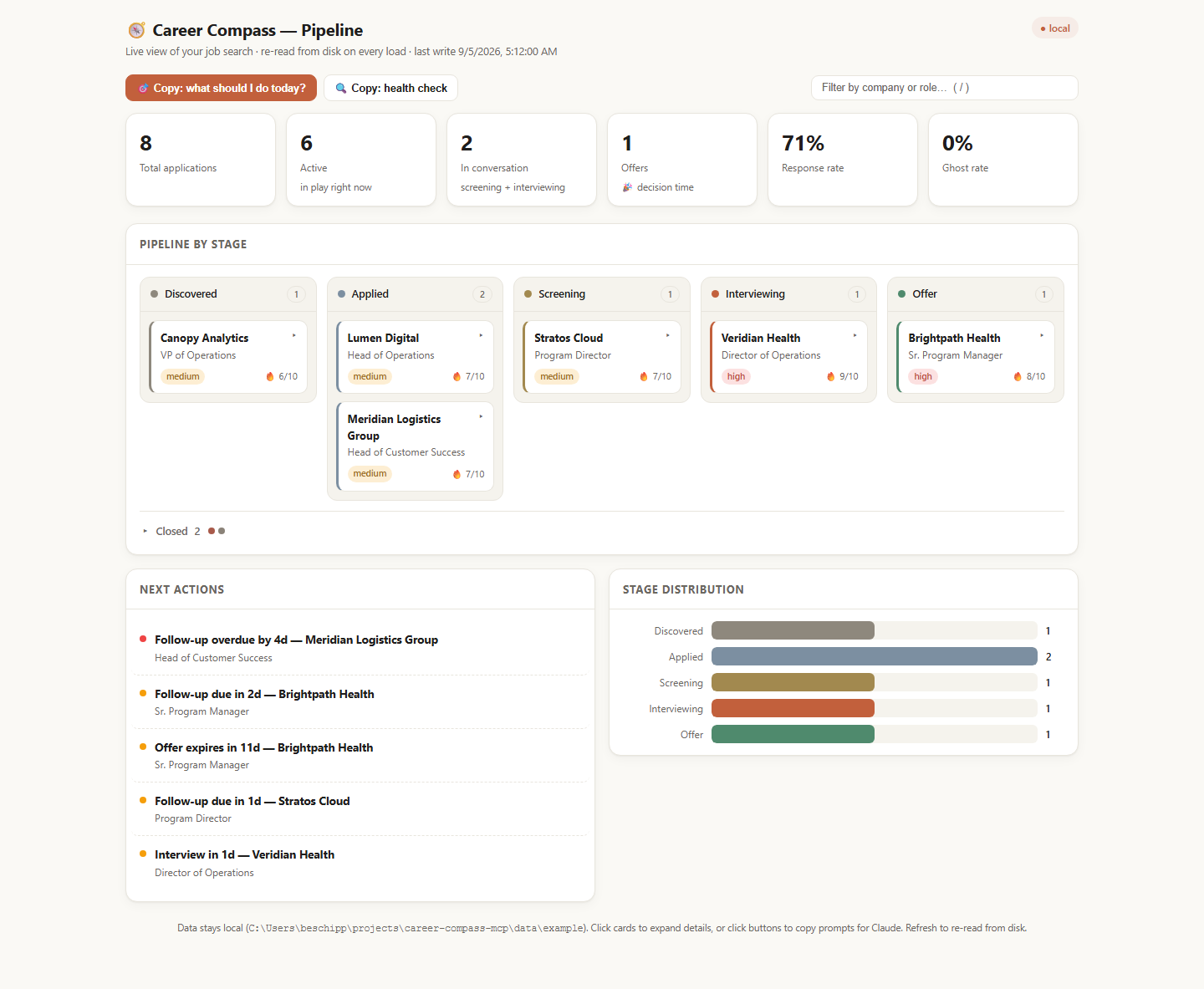
The package has 19 tools, 4 prompts, 9 resources and a local dashboard. To see the dashboard on the bundled sample first, with no install and no data of your own:
npx -y career-compass-mcp dashboard --sample
It opens in your browser, read-only, against the fictional Alex Rivera search. Nothing is written and nothing leaves your machine.
One command wires every Claude client on your machine — Claude Desktop, Claude Code, and Cursor — and tells you what to restart:
npx -y career-compass-mcp install
It backs up any config it touches, leaves your other servers alone, skips clients you don't
have, and does nothing twice. It pins the version it installs and downloads it once up front,
so no launch ever reinstalls; run it again to upgrade. --dry-run shows the plan first; --data /path/to/career-data
puts your files somewhere other than ~/.career-compass. Then say to Claude: "Run the
Career Compass setup check."
Prefer to do it by hand, or use another client? Every route below runs the same server, and none of them needs a clone or a build.
One command:
claude mcp add career-compass -s user -- npx -y career-compass-mcp
-s user installs it for every project rather than just this one. Confirm it landed with
claude mcp list.
To keep your career files somewhere other than the default ~/.career-compass:
claude mcp add career-compass -s user -e CAREER_DATA_PATH=/path/to/career-data -- npx -y career-compass-mcp
The extension bundle is the short way. Download the .mcpb file from the
Releases page, then in
Claude Desktop go to Settings → Extensions and install it. There is no JSON to edit and
nothing to install first. Set CAREER_DATA_PATH in the extension's own settings if you
want your files somewhere other than ~/.career-compass.
The bundle does not self-update: to upgrade, download the newer .mcpb, remove the
installed extension, and install the new file. Note your data path before removing it —
settings are re-entered on install, and check_setup prints the path.
Or point Claude Desktop at npx. Open Settings → Developer → Edit Config, or edit the file directly:
Add the server:
{
  "mcpServers": {
    "career-compass": {
      "command": "npx",
      "args": ["-y", "career-compass-mcp"]
    }
  }
}
Pin a version in args ("[email protected]" rather than the bare name) if you can:
Desktop starts the server twice at once, and an unpinned name reinstalls on every release,
which can leave npx's cache half-written (see On npx below). install does this for you.
Restart Claude Desktop. To choose your own data directory, add an env block alongside
args:
"env": { "CAREER_DATA_PATH": "/Users/you/career-data" }
Cursor, Windsurf, Cline, Continue and friends all take the same shape — a stdio server
with command: "npx" and args: ["-y", "career-compass-mcp"]. Drop that into whatever the
client calls its MCP config.
Zed — add to your settings.json:
{
  "context_servers": {
    "career-compass": {
      "command": {
        "path": "npx",
        "args": ["-y", "career-compass-mcp"]
      }
    }
  }
}
npm install -g career-compass-mcp
Then use "command": "career-compass-mcp" with no args, or
claude mcp add career-compass -s user -- career-compass-mcp.
Ask Claude:
"Run the Career Compass setup check."
That calls check_setup, which reports your version against the current npm release, where
your data directory is, which Career KB sections are filled in, whether your pipeline
parses, and whether the dashboard is running — each finding with the one command that fixes
it. It is read-only, so it runs without a permission prompt.
Open Claude and say:
"Set up my Career KB. Here's my résumé:" [paste your résumé]
Claude will extract your work history, achievements, and skills into structured YAML, ask
clarifying questions about gaps or vague metrics, and call save_career_section once per
section to write it to disk.
save_career_section is where your history actually lands. It saves one section at a time
(profile, experience, skills, education, projects, testimonials), validates
against the schema before touching the file, and keeps the previous version as a
timestamped .bak. It compares each save with what is stored: a save that would drop roles
or achievements is refused unless the call says to replace them, and every save ends with a
one-line receipt of what changed. Your client asks you to confirm each write; approving them
is what fills the KB.
That is the whole setup. From there every tool has full context on who you are, and the KB compounds — each posting you explore, interview you debrief, and offer you weigh can add a dated signal back to it.
Already have material lying around? Performance reviews, award emails, recommendations,
old project write-ups — paste any of them and ask Claude to pull the achievements out. That
is ingest_document. It reads and extracts but never writes; save_career_section is still
what puts the results on disk.
Career Compass is local-first by design. Your real career data — résumé history, the companies you are talking to, salary numbers, interview notes — lives in plain YAML files on your own disk.
~/.career-compass/ by default, or wherever you point
CAREER_DATA_PATH. The directory is created the first time you save something, on
your machine, and is not part of the npm package.npx … career-compass-mcp command, including the
dashboard command check_setup prints, has npm download the package from the same
registry. That is npm fetching code, and it carries none of your data.--ask-claude option runs Claude Code on your computer, which sends
the Career KB content it reads to Anthropic under your own Claude account and billing.
It is off unless you start the dashboard with it, and read-only unless you start it with
--ask-claude-writes.data/example/ — the Alex Rivera persona). A publish-time leak guard enforces that
no real career data can ride along.localhost. It is never baked into a build, never prerendered,
and never sent over the network..bak copies of previous versions (only
the newest 5 per data file are kept; older ones are deleted automatically on the next
write, and backups you make by hand are never touched), plus — only while a write is actually happening — a
.write-claim file that stops a second Career Compass process from writing at the same
time.CAREER_DATA_PATH
directory and everything is gone.Treat ~/.career-compass/ like any private notebook — back it up, and do not commit it to a
public repo. (This repo's .gitignore already excludes data/career/ and data/pipeline/.)
Full policy: PRIVACY.md · published at https://benskamps.github.io/career-compass-mcp/privacy · questions or concerns: open an issue
Career Compass never runs on a timer. If you'd like your job-search list waiting each morning, you can create a local scheduled task in the Claude Code desktop app (see desktop scheduled tasks). A local task runs on your computer, so it reaches the server and your data folder. Give it this prompt, as plain text:
Call pipeline_view with action next_actions. Lead with the Start here item in eight lines or fewer, and change nothing. If it's after 2pm, say it's a catch-up run.
Use the plain prompt rather than /career-compass:today: scheduled runs don't start
commands that only run when you type them. pipeline_view only reads, so the briefing
changes nothing. Cowork's scheduled tasks may run remotely, where your local data folder
isn't available, so try one by hand before relying on it. Cloud routines and /loop don't
fit this: cloud runs can't see your files, and /loop ends with the session.
Eighteen tools, grouped by where they land in a search. Read tools take no permission prompt in most clients; Write tools ask before touching your files.
Claude can read these directly ("read my career profile"):
They are live. Career Compass implements MCP resource subscriptions: subscribe to a resource and the server tells you when the file behind it changes on disk — whoever changed it, whether that was a tool call, the dashboard, or you in an editor. Three peers share one directory of plain files and none of them owns it. Nothing is watched until a client subscribes, so a client that never does pays nothing for the feature.
Power-user shortcuts for MCP clients that show prompts, usually as slash commands. Plugin
users get the /career-compass:… commands above instead.
Retired: daily-review, interview-coach and setup-career-kb duplicated the plugin's
/career-compass:today, /career-compass:interview-prep and /career-compass:start. Ask
for the same thing in plain words and the tools do it.
A local web view of the same YAML the tools read. It ships inside the npm package as a single self-contained HTML page with no build step, no dependencies, and no external assets — pipeline KPIs, a kanban board by stage, a next-actions panel (overdue follow-ups, upcoming interviews, expiring offers), and a stage-distribution chart.
# The bundled demo — no clone, no build, no data of your own:
npx -y career-compass-mcp dashboard --sample

# Your own data (CAREER_DATA_PATH, or ~/.career-compass if unset):
npx -y career-compass-mcp dashboard
It re-reads your YAML on every request, so a browser refresh always shows the current
state of your files. Stages change through Claude — ask it to move an application and it
calls pipeline_update; the board reflects that on the next load. Click a card to open its
detail drawer (days in stage, follow-up, posting link, contacts, interview rounds, latest
note); the drawer's button and every next-action row copy a ready-to-paste prompt for
Claude, which is where the work actually happens. Type in the filter box (or press /) to
narrow the board by company or role; the column counts follow.
--sample (alias --demo) resolves the demo inside the installed package, wherever npx
put it, so it works from any directory and any shell. The sample's dates are shifted to sit
around today each time it is read — so the pipeline always looks like a live search — and
Career Compass refuses to write into it.
Make the buttons ask Claude for you. If you have Claude Code
installed, start the dashboard with --ask-claude:
npx -y career-compass-mcp dashboard --ask-claude
Every card, next-action row, and toolbar button then asks Claude directly instead of copying a
prompt — the server runs claude headless with Career Compass as its only tool set, and the
answer streams into a panel on the page, with a Reload the board button when Claude may have
changed your files. It is opt-in, loopback-only, one question at a time, and Claude Code runs
without your user hooks, without other MCP servers, and without shell or file-editing tools.
It is read-only unless you start it with --ask-claude-writes. Prompts that need you to
paste a posting still copy. Without the flag (or without Claude Code) the buttons copy,
exactly as before.
Each question runs under your own Claude account: Claude Code sends the Career KB content it reads to Anthropic, and the usage is billed to you like any other Claude Code session.
Other flags: --port <n> (default 3141, falling back to the next free port), --no-open to
skip launching a browser, --lite to force this dashboard explicitly. Full list:
career-compass-mcp --help.
A second, frozen dashboard exists. The repo also contains a full Next.js app — kanban with a detail view, an onboarding wizard, analytics. It is not in the npm package and is frozen as a design reference rather than a product; GUI investment goes to the dashboard above. See
dashboard/FROZEN.mdfor the reasoning. An in-Claude MCP App board is deferred too: Claude renders MCP Apps only for remote HTTP connectors, not the local stdio transport this ships as.
~/.career-compass/          # or wherever CAREER_DATA_PATH points
├── career/
│   ├── profile.yaml        # who you are, what you're targeting
│   ├── experience.yaml     # roles, achievements (metrics + context + impact)
│   ├── skills.yaml         # skills with proficiency and recency
│   ├── education.yaml      # degrees, certifications, coursework
│   ├── projects.yaml       # portfolio projects
│   ├── testimonials.yaml   # quotes and recommendations
│   └── journal.yaml        # dated signals, appended over time
└── pipeline/
    └── applications.yaml   # all job applications
Optional sections (narrative.yaml, stories.yaml, people.yaml) appear in career/
the first time you save one.
This is your single source of truth — built once, enriched over time, read by every tool. You never need to edit these files by hand: paste a document and ask Claude to save it. But they are plain YAML, so you can.
data/example/ in this repo is a fully populated sample (the fictional
Alex Rivera) if you want to see the shape before writing your own.
Plugin users set the same thing in the plugin's settings as Career data folder
(data_path, default ~/.career-compass). The plugin passes it to the server as
CAREER_DATA_PATH.
If anything seems off, start here:
"Run the Career Compass setup check."
check_setup is read-only and usually answers the question before you have to debug
anything. It is also the fastest way to find out you are simply on an old version, which is
the most common cause of "this feels rough around the edges."
Your career data is never touched by an upgrade. It lives in CAREER_DATA_PATH, not in the
package, and older data directories keep working — sections added by later releases are
created when you first write them.
On npx. install pins the version it writes (career-compass-mcp@<version>), so
upgrading is running it again, then restarting your client:
npx -y career-compass-mcp@latest install
A hand-written entry with the bare name (npx -y career-compass-mcp) asks npm for the latest
version on every launch and reinstalls into one shared cache folder after each release. Claude
Desktop starts the server twice at once, and the two reinstalls can collide and leave that
folder half-written. If the server log shows Cannot find module or ENOTEMPTY under
npm-cache\_npx, delete the _npx folder inside your npm cache (npm config get cache prints
where it is; npm cache clean --force does not touch it), then run the install command above.
On a global install. npm install -g career-compass-mcp@latest, then
career-compass-mcp --version. Restart your client afterward — it keeps the old server
process alive until it does.
From source. git pull && npm install && npm run build:mcp, then restart your client. A
source checkout normally reports itself as ahead of npm in check_setup; that is
expected, not drift.
┌─────────────┐          ┌────────────────────────────────────────┐
│             │   MCP    │           MCP server (Node.js)         │
│   Claude    │◄────────►│                                        │
│             │  stdio   │  Tools ······ résumé, pipeline, prep   │
└─────────────┘          │  Resources ·· Career KB, pipeline      │
                         │  Prompts ···· slash-command shortcuts  │
                         └───────────────────┬────────────────────┘
                                             │ reads + writes
                              ┌──────────────▼───────────────┐
                              │   Plain YAML on your disk    │
                              │       CAREER_DATA_PATH       │
                              └──────────────▲───────────────┘
                                             │ re-reads per request
                              ┌──────────────┴───────────────┐
                              │ Local dashboard (localhost)  │
                              └──────────────────────────────┘
No database, no server to host, no state the model has to carry between sessions. The files are the interface.
Diagrams: docs/architecture.md has the detailed version —
the path a posting takes from paste to offer, the application state machine, what happens
during your first conversation, how three peers share one directory without stepping on
each other, and why a write cannot be left half-done.
git clone https://github.com/benskamps/career-compass-mcp.git
cd career-compass-mcp
npm install                            # MCP server deps
cd dashboard && npm install && cd ..   # only if you want the frozen Next.js app
npm run build:mcp                      # or `npm run build` to include that app
Point your MCP config at node /path/to/career-compass-mcp/build/src/index.js.
The Next.js dashboard is a separate package with its own package.json and lockfile, so it
needs its own npm install — the root install deliberately carries neither Next.js nor
React, which keeps 166 MB out of every npm i career-compass-mcp.
Common tasks:
npm run dev            # TypeScript watch mode
npm run inspect        # MCP Inspector — exercise tools interactively
npm run test:mcp       # MCP server test suite
npm test               # server + dashboard suites
npm run visuals        # regenerate the screenshots in this README
npm run pack:mcpb      # build the Claude Desktop .mcpb extension bundle
npm run dev:dashboard  # frozen Next.js app, hot reload

# Develop against the fictional sample rather than your real data
CAREER_DATA_PATH=data/example npm run dev:dashboard
Job searching is one of the highest-stakes, most document-intensive things most people ever do — and most tools treat it as a data-entry problem. Spreadsheets for tracking. Templates for résumés. Generic advice for interviews.
Career Compass treats it as a knowledge problem. Your career history is a corpus. Every application is a retrieval and synthesis task. Every interview is a pattern-match against a known dataset (the posting) and a known corpus (you).
The Career KB is the single source of truth — built once, enriched over time, read by every tool. A tailored résumé draws from it. Interview prep draws from it. Cover letters draw from it. The pipeline tracks against it. Nothing gets lost, because nothing lives in a tab you will close.
There is no telemetry in this package, so I have genuinely no idea whether it is working for anyone. Download counts are mostly registry mirrors rather than people. That is the trade: the privacy is real, and the consequence is silence.
So if Career Compass got you through a week of applications:
None of these sends me anything you have not chosen to type.
Issues and PRs welcome — bug
reports with a reproduction are especially useful, and they do get fixed.
Discussions is the place for
anything that is not a defect: questions, workflows, or a tool you wish existed. If you add a tool,
register it in src/server.ts and follow the
pattern in any existing tool file — each tool returns a structured prompt that Claude acts
on with the full KB in context. The test suite includes docs-truth guards, so a new tool or
prompt that is not documented here fails CI rather than surprising a stranger.
MIT
Part of the Brokenbranch Lab — Ben Schippers' workshop of AI-native tools and research.
AI-native career co-pilot for Claude — Career KB, resume tailoring, job pipeline, interview prep, and offer evaluation via MCP
{ "mcpServers": { "career-compass-mcp": { "command": "npx", "args": [ "-y", "[email protected]" ] } }}工具
尚無工具清單。遠端伺服器會在首次健康檢查後取得工具清單。
常見問題
在本頁複製適用於 Cursor、Claude Desktop、Claude Code 或 VS Code 的 stdio 設定。它使用發布者的安裝方式,而不是 PlugMCP 代理伺服器。
這筆記錄未列出必要的環境變數。
Career Compass 透過 stdio 在本機執行。
上次檢查時間:2026-11-16。 AI-native career co-pilot for Claude — Career KB, resume tailoring, job pipeline, interview prep, and offer evaluation via MCP
