C64 Bridge

Your AI Command Bridge for the Commodore 64.
接入你的智能体
發布者自己的指令。不是 PlugMCP 端點。
用我們的金鑰與日誌託管一份副本。
npx -y [email protected]Claude Code 沒有本機指令的安裝連結。複製下方指令並在終端機中執行。
LOG_LEVEL=<value> C64BRIDGE_CONFIG=<value> C64BRIDGE_ALLOWED_DIRS=<value> C64BRIDGE_ACCESS=<value> C64BRIDGE_HTTP_TOKEN=<secret> C64BRIDGE_DIAGNOSTICS_KEEP=<value> C64BRIDGE_VERBOSE_SCHEMA=<value> C64_MODE=<value> C64U_HOST=<value> C64U_PORT=<value> C64U_PASSWORD=<secret> U2_HOST=<value> U2_PORT=<value> U2_PASSWORD=<secret> VICE_BINARY=<value> VICE_VISIBLE=<value> VICE_WARP=<value> GITHUB_TOKEN=<secret> claude mcp add chrisgleissner-c64bridge -- npx -y c64bridge@1.2.0在終端機中執行。
{ "mcpServers": { "chrisgleissner-c64bridge": { "command": "npx", "args": [ "-y", "[email protected]" ], "env": { "LOG_LEVEL": "<value>", "C64BRIDGE_CONFIG": "<value>", "C64BRIDGE_ALLOWED_DIRS": "<value>", "C64BRIDGE_ACCESS": "<value>", "C64BRIDGE_HTTP_TOKEN": "<secret>", "C64BRIDGE_DIAGNOSTICS_KEEP": "<value>", "C64BRIDGE_VERBOSE_SCHEMA": "<value>", "C64_MODE": "<value>", "C64U_HOST": "<value>", "C64U_PORT": "<value>", "C64U_PASSWORD": "<secret>", "U2_HOST": "<value>", "U2_PORT": "<value>", "U2_PASSWORD": "<secret>", "VICE_BINARY": "<value>", "VICE_VISIBLE": "<value>", "VICE_WARP": "<value>", "GITHUB_TOKEN": "<secret>" } } }}claude_desktop_config.json
遠端 URL 還是本機指令? 兩種安裝方式的差異
C64 Bridge is an MCP server for controlling and working with a Commodore 64 from an AI client.
It lets you run programs, read and write memory, render graphics, and play sound on a C64 Ultimate, Ultimate 64, or U2-family cartridge. You can also switch to a VICE emulator session, so one MCP conversation can span hardware and emulation.
It is built on the official TypeScript @modelcontextprotocol/sdk and supports both stdio for local AI integration and an optional HTTP bridge for manual inspection.
C64 Bridge is listed in the Official MCP Registry.
C64 Bridge gives an AI agent one place to drive program execution, memory access, graphics, sound, storage, printer workflows, and knowledge retrieval for a Commodore 64 environment.
The core workflow is simple:
c64_program, c64_memory, c64_graphics, and c64_sound.c64_select_backend when both are configured.c64u (C64U/U64), u2 (U2/U2+/U2+L), and viceIf you want the shortest path, do these four things:
Linux (Ubuntu or Debian):
Recommended:
sudo apt update
sudo apt install -y curl ca-certificates
curl -fsSL https://deb.nodesource.com/setup_24.x | sudo -E bash -
sudo apt install -y nodejs
Fallback:
sudo apt install -y nodejs npm
macOS:
brew install node@24
brew link --overwrite node@24
Windows:
# winget
winget install OpenJS.NodeJS.LTS
# or Chocolatey
choco install nodejs-lts -y
Verify the installation:
node --version
Expected result: v24.x
Use one of the following entry points.
Run from npx with zero setup:
npx -y c64bridge@latest
Run from a local npm install:
mkdir -p ~/c64bridge && cd ~/c64bridge
npm init -y
npm install c64bridge
node ./node_modules/c64bridge/dist/index.js
Run from source for development or testing:
git clone https://github.com/chrisgleissner/c64bridge.git
cd c64bridge
./build install
npm start
On startup, the server probes the selected target, performs connectivity checks, and then announces that it is running on stdio.
The server can run against one or more of:
c64u)u2)vice)The detailed lookup order, merge rules, backend examples, and override model are in the Configuration section below.
C64 Bridge ships a single canonical stdio entry point that every MCP client uses:
stdio server, with the environment variables documented in Runtime Environment Variable Reference and the registry manifest in mcp.json.The startup command is the same across clients: npx -y c64bridge@latest for the published package, or node scripts/start.mjs from a local checkout. Select c64u, u2, or vice in the shared Configuration; clients only need the command.
The server reads configuration in this order:
C64BRIDGE_CONFIG, if it points to a config file.c64bridge.json in the project root~/.c64bridge.json in the home directoryConfiguration is merged per backend section while scanning those files in order.
c64u, u2, or vice) supplies that backend's configuration..c64bridge.json to define c64u while ~/.c64bridge.json defines u2 or vice.Use this for a C64 Ultimate or Ultimate 64:
{
  "c64u": {
    "host": "c64u",
    "port": 80,
    "networkPassword": "secret"
  }
}
c64u:80 with no network password.networkPassword is only needed when you enabled a password in the C64 Ultimate network settings.C64U_HOST, C64U_PORT, and C64U_PASSWORD override the configured host, port, and network password.The following operations require recently added Ultimate REST endpoints. C64 Bridge detects or explains unavailable endpoints without exposing a raw firmware error.
Before choosing an endpoint-dependent operation, read c64://platform/status. It probes machine:input safely and reports whether it is available. When native input is unavailable, use key or write_text for ordinary C64 input instead of physical matrix events. machine:menu_screen can only be confirmed after an Ultimate menu is visible; its tool returns fallback guidance rather than a transport error when no matrix can be read.
c64_input keyboard, release_all, and state, plus hardware joystick, use machine:input. They require a C64U firmware version that provides this endpoint, or U64 firmware 3.15 or later. machine:input is not available on U2-family cartridges.c64_system read_menu_screen uses machine:menu_screen; it requires a C64U firmware version that provides this endpoint, or U64/U2 firmware 3.15 or later.c64_system power_cycle verifies Tool Menu navigation with machine:menu_screen, so it has the same firmware requirement. U2-family power_cycle uses REST reboot instead.Use this profile for U2, U2+, and U2+L cartridges:
{
  "u2": {
    "host": "u2",
    "port": 80,
    "networkPassword": "secret"
  }
}
Set C64_MODE=u2 to make this the initial backend. U2_HOST, U2_PORT, and U2_PASSWORD override this profile. U2-family firmware exposes the shared REST subset; it does not provide machine input, debug-register access, power-off, or streaming. read_menu_screen requires U2 firmware 3.15 or later.
C64 Bridge can either connect to an already running VICE Binary Monitor or manage a local VICE process for you. The usual managed setup only needs the emulator binary and, when auto-detection cannot find it, the VICE resource directory:
{
  "vice": {
    "exe": "/usr/bin/x64sc",
    "directory": "/usr/local/share/vice"
  }
}
exe is optional when x64sc or x64 is on PATH. If no explicit binary is configured, the runtime prefers /usr/local/bin/x64sc when present, then falls back to x64sc or x64 on PATH.directory is optional. When omitted, C64 Bridge auto-detects a VICE resource directory by looking for the standard C64 ROM set near the emulator binary and in common system locations.host and port are optional and default to 127.0.0.1:6502, the Binary Monitor endpoint C64 Bridge starts for managed local sessions. On local endpoints, C64 Bridge first tries to reuse an already running monitor before starting its own process.visible, warp, and args are optional runtime controls. They can live in JSON config, but most users set their environment-variable equivalents from the MCP client because they are per-session preferences.VICE_PREWARM=1, C64 Bridge starts or connects VICE in the background during MCP startup.VICE_BINARY, VICE_DIRECTORY, VICE_HOST, VICE_PORT, VICE_VISIBLE, VICE_WARP, VICE_ARGS, and VICE_PREWARM override the JSON values without editing config files.Choose the window mode based on where the MCP server runs:
Minimized and headless are not the same thing. Minimized is still a visible desktop session with a real VICE window; it is simply hidden by the window manager at startup. Headless/Xvfb has no user-facing window, so it is better for automation but less convenient when you need to debug by looking at the emulator.
For normal local MCP use, prefer minimized VICE. It avoids focus stealing while preserving the ability to restore the window for visual inspection. Prefer headless/Xvfb for CI and remote or display-less environments.
FORCE_XVFB=1 forces the Xvfb path even if a graphical session is available. DISABLE_XVFB=1 disables that fallback and uses the current display, which is mainly useful for troubleshooting display detection.
Local agent session, VICE starts minimized:
{
  "servers": {
    "c64bridge": {
      "command": "npx",
      "args": ["-y", "c64bridge@latest"],
      "env": {
        "C64_MODE": "vice",
        "VICE_VISIBLE": "true",
        "VICE_ARGS": "-minimized",
        "VICE_WARP": "false"
      }
    }
  }
}
Headless automation, VICE runs without a visible desktop window:
{
  "servers": {
    "c64bridge": {
      "command": "npx",
      "args": ["-y", "c64bridge@latest"],
      "env": {
        "C64_MODE": "vice",
        "VICE_VISIBLE": "false",
        "VICE_WARP": "true"
      }
    }
  }
}
If VICE is installed outside the usual search paths, add VICE_BINARY and, if ROM/resource auto-detection fails, VICE_DIRECTORY to either example.
[!NOTE] VICE supports only the operations marked with a VICE checkmark in the MCP API Reference. Unsupported operations return
unsupported_platform.
Configure any combination of c64u, u2, and vice. C64 Bridge starts on C64_MODE (default c64u) and keeps every configured backend ready for c64_select_backend.
Use c64://platform/status to inspect the active backend and available tools. State the target in the same prompt, for example u2: list drives, c64u: run this PRG, or vice: write HELLO. On U2-family cartridges, c64_system power_cycle uses REST reboot; C64U/U64 uses verified Tool Menu navigation, and VICE starts fresh.
Prompt illustration (issued via Copilot in VS Code, using GPT 5.4 Medium):
c64u: write a small BASIC program that clears the screen and prints HELLO C64U
vice: write a small BASIC program that clears the screen and prints HELLO VICE
The screenshots below are available for the two backends that provide frame capture. C64U uses streamed video frames; VICE captures and normalizes its display. U2-family cartridges do not provide firmware streaming, so they intentionally have no screenshot row.
| Backend | Screenshot |
|---|---|
| C64 Ultimate |  |
| U2-family | Frame capture unavailable (no firmware streaming). |
| VICE |  |
This section covers the GitHub Copilot integration that ships with VS Code. For the Claude Code VS Code plugin, see Claude Code — it reads .mcp.json, not .vscode/mcp.json.
If this repository is checked out locally, open the prepared .vscode/mcp.json.
Otherwise, put the following into your own .vscode/mcp.json:
{
  "servers": {
    "c64bridge": {
      "command": "npx",
      "args": [
        "-y",
        "c64bridge@latest"
      ]
    }
  }
}
Then click the start button shown above the c64bridge entry.
Your MCP server should now be running:
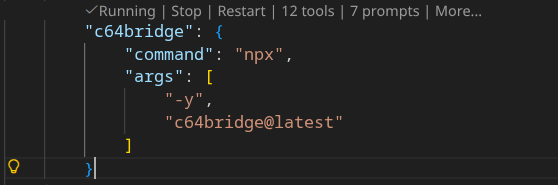
For more details, see the official VS Code MCP Server documentation.
After the server is running, switch to the C64 agent in VS Code.
This agent is preconfigured for Commodore 64 work. It steers Copilot toward c64bridge workflows for BASIC, 6502 assembly, SID audio, VIC-II graphics, memory inspection, disk operations, printing, streaming, and device control.
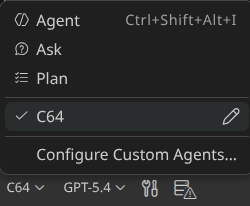
You can add env entries in .vscode/mcp.json to select a config file, override C64 Ultimate connection details, or force an initial backend:
{
  "servers": {
    "c64bridge": {
      "command": "npx",
      "args": [
        "-y",
        "c64bridge@latest"
      ],
      "env": {
        "C64BRIDGE_CONFIG": "/home/you/.c64bridge.json",
        "C64U_HOST": "192.168.1.99",
        "C64U_PORT": "80",
        "C64U_PASSWORD": "secret",
        "C64_MODE": "c64u",
        "LOG_LEVEL": "debug"
      }
    }
  }
}
C64BRIDGE_CONFIG points to a specific config fileC64U_HOST, C64U_PORT, and C64U_PASSWORD override the C64 Ultimate connection without editing config filesC64_MODE forces the initial backend to c64u, u2, or vice; U2_HOST, U2_PORT, and U2_PASSWORD override the selected U2 profile.LOG_LEVEL=debug enables verbose loggingFor VICE-specific overrides such as VICE_ARGS=-minimized, VICE_VISIBLE=false, or custom VICE paths, use the patterns in Backend Configuration: VICE.
Every runtime environment variable documented in the root mcp.json can be supplied by your MCP client configuration, including .vscode/mcp.json under servers.c64bridge.env.
When an environment variable maps to a JSON config field, the override order is always:
C64BRIDGE_CONFIG, the repo .c64bridge.json, then ~/.c64bridge.jsonWhen an environment variable has no JSON config equivalent, the order is:
That rule applies uniformly across the documented runtime environment variables below.
Example: start on minimized VICE with a specific ROM or resource directory, plus a hardware fallback that can still be selected instantly at runtime:
{
  "servers": {
    "c64bridge": {
      "command": "node",
      "args": ["${workspaceFolder}/scripts/start.mjs"],
      "type": "stdio",
      "env": {
        "C64_MODE": "vice",
        "C64U_HOST": "c64u",
        "C64U_PORT": "80",
        "VICE_BINARY": "/usr/local/bin/x64sc",
        "VICE_DIRECTORY": "/usr/local/share/vice",
        "VICE_VISIBLE": "true",
        "VICE_ARGS": "-minimized",
        "VICE_WARP": "false"
      }
    }
  }
}
Example: keep JSON config files for backend endpoints, but override diagnostics, polling, and RAG behavior from VS Code:
{
  "servers": {
    "c64bridge": {
      "command": "node",
      "args": ["${workspaceFolder}/scripts/start.mjs"],
      "type": "stdio",
      "env": {
        "C64BRIDGE_CONFIG": "/home/you/.c64bridge.json",
        "LOG_LEVEL": "debug",
        "C64BRIDGE_POLL_MAX_MS": "8000",
        "C64BRIDGE_POLL_INTERVAL_MS": "200",
        "RAG_BUILD_ON_START": "1",
        "RAG_EMBEDDINGS_DIR": "/home/you/c64bridge-data"
      }
    }
  }
}
Every runtime environment variable documented in mcp.json can be set in your MCP client configuration, including .vscode/mcp.json under servers.c64bridge.env.
Claude Code is supported as a first-class MCP client. It uses the same canonical start command and the same backend Configuration files and environment variables as every other client — only the discovery file differs.
Claude Code CLI — register the published server in one command:
claude mcp add c64bridge -- npx -y c64bridge@latest
Use --scope user to make it available across all your projects, or --scope project to write a .mcp.json next to the current repo. Backend selection (c64u, u2, or vice), host, port, and password come from the same files documented in Configuration; per-shell overrides come from the variables in Runtime Environment Variable Reference.
Project-scoped discovery — this repository ships a checked-in .mcp.json that points Claude Code at the local source via node scripts/start.mjs. When you open the repo with claude (CLI or VS Code plugin), Claude Code prompts to enable the project-scoped server on first run. Approve it once and the c64_* tools become discoverable in that workspace.
Claude Code VS Code plugin — the plugin reads the same .mcp.json and the same user-scope claude mcp add registrations as the CLI. No extra setup is required beyond installing the plugin and approving the project server prompt. The existing .vscode/mcp.json is read by GitHub Copilot, not by Claude Code; the two files coexist without conflict because they target different clients with different config schemas.
Verify it works — after registration, run claude mcp list (CLI) or open the MCP panel (plugin) and look for c64bridge. Then ask Claude Code something like “use vice: write a small BASIC program that clears the screen and prints HELLO CLAUDE” — it should call c64_select_backend and c64_program directly. If tools do not appear, confirm Node 24+ is on PATH, that the server was approved at the requested scope, and that the backend is reachable per the Configuration section.
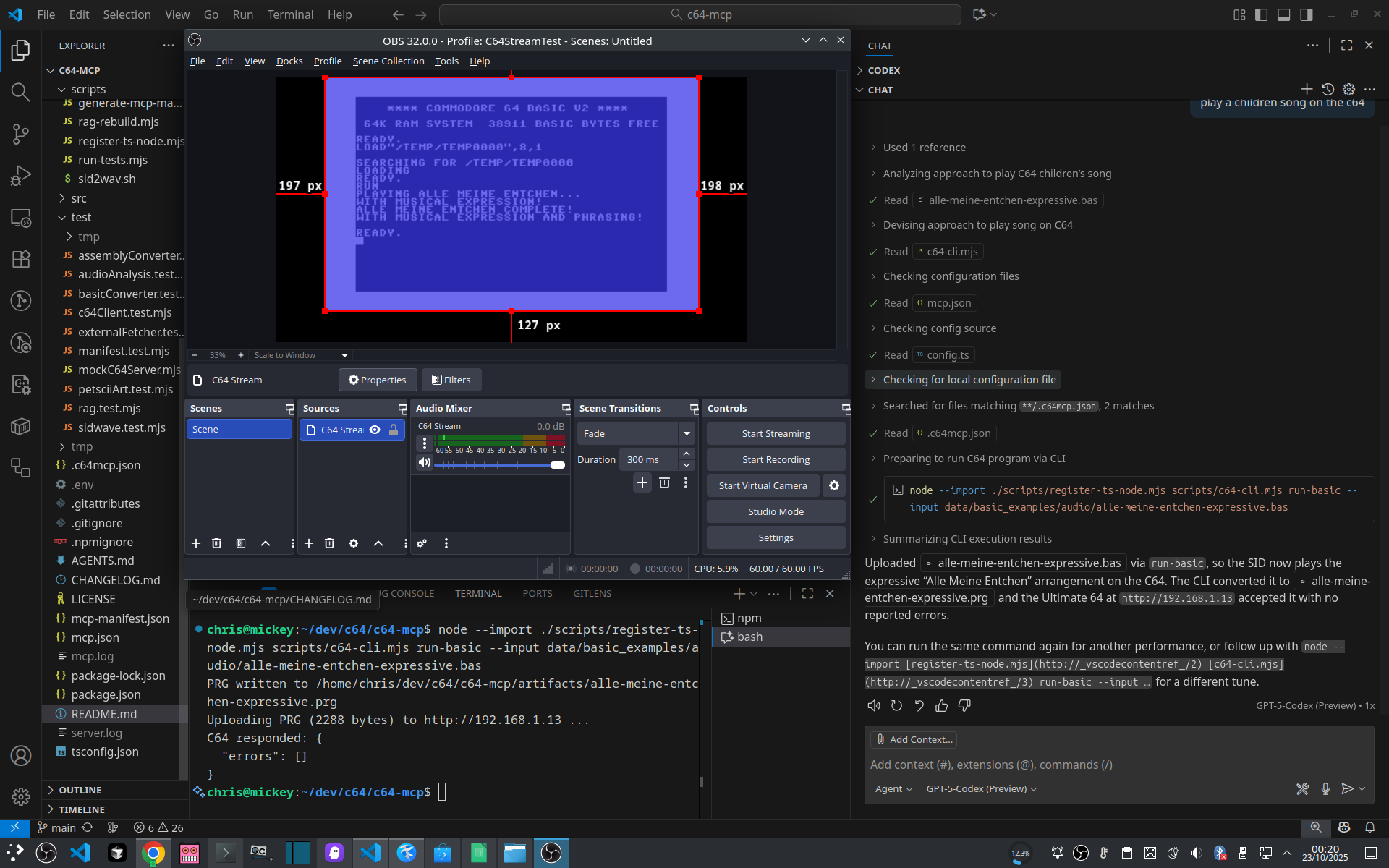
Compose a children’s song with ChatGPT and VS Code:
Then render PETSCII art for it:
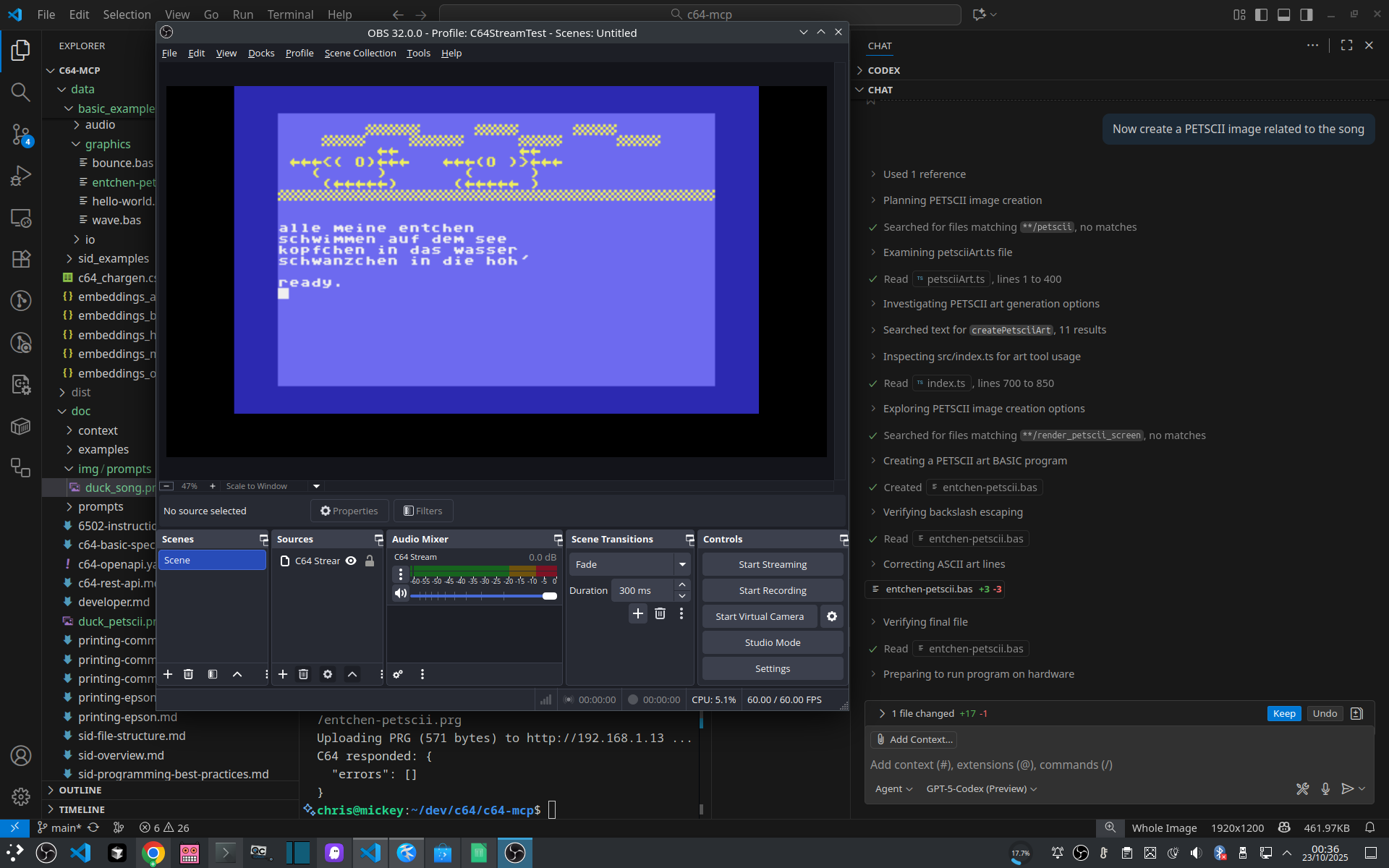
This is representative of the intended workflow:
c64_program, c64_graphics, and c64_sound to execute it.stdio.# Upload and run BASIC
curl -s -X POST -H 'Content-Type: application/json' \
-d '{"op":"upload_run_basic","program":"10 PRINT \"HELLO\"\n20 GOTO 10"}' \
http://localhost:8000/tools/c64_program | jq
# Read current screen (PETSCII→ASCII)
curl -s -X POST -H 'Content-Type: application/json' \
-d '{"op":"read_screen"}' \
http://localhost:8000/tools/c64_memory | jq
# Reset the machine
curl -s -X POST -H 'Content-Type: application/json' \
-d '{"op":"reset"}' \
http://localhost:8000/tools/c64_system
The ./build script at the project root wraps all development tasks behind a single, self-documented interface:
./build --help                                       # full command reference
./build                                              # install + build + test matrix (full CI run)
./build --skip-tests                                 # install + build only
./build build                                        # TypeScript compile + doc generation
./build test                                         # integration tests (mock backend)
./build test --real                                  # test against real hardware
./build test --platform vice --target mock           # single test leg
./build test:matrix                                  # full matrix (c64u/mock · vice/mock · vice/device)
./build coverage                                     # merged coverage report
./build coverage:single --platform c64u --target mock
./build check                                        # build + test matrix (no install)
./build rag:rebuild                                  # rebuild RAG embeddings
./build release --version 1.2.3                      # prepare a release
Starting the MCP server is not managed by
./build. Usenpm start(from source) ornpx -y c64bridge@latest(published package) as shown in the Quick Start section above.
The repository contains an auto-generated static mirror of the MCP server interface in the ./mcp folder.
This allows agents to inspect the available tools, resources, prompts, and schemas without connecting to the server.
This MCP server exposes 17 tools, 27 resources, and 10 prompts for controlling your Commodore 64.
Address range convention: address + length means start address plus byte count; startAddress + endAddress means inclusive bounds.
Execute multiple c64bridge tool calls in a single request. Reduces latency for multi-step workflows.
No operations defined.
Grouped entry point for configuration reads/writes, diagnostics, and snapshots.
Grouped entry point for VICE debugger operations (breakpoints, registers, stepping).
Grouped entry point for disk mounts, listings, image creation, and program discovery.
Grouped entry point for drive power, mode, reset, and ROM operations.
Grouped entry point for sprite/charset extraction, memory dumps, filesystem stats, and firmware health checks.
Grouped entry point for frame capture and graphics rendering workflows.
Cross-platform PETSCII typing plus native Ultimate keyboard and joystick events.
Grouped entry point for memory I/O, screen reads, and screen polling.
Grouped entry point for Commodore and Epson printing helpers.
Grouped entry point for program upload, execution, and batch workflows.
Grouped entry point for BASIC and assembly RAG lookups.
Switch the active backend between C64U/U64 hardware, U2-family cartridges, and the VICE emulator at runtime.
Grouped entry point for SID control, playback, composition, and analysis workflows.
Grouped entry point for starting and stopping Ultimate streaming sessions.
Grouped entry point for power, reset, menu, and background task control.
Grouped entry point for reading and updating selected VICE resources.
MCP server to control and program the Commodore 64 Ultimate, Ultimate 64, Ultimate II, or VICE.
{ "mcpServers": { "chrisgleissner-c64bridge": { "command": "npx", "args": [ "-y", "[email protected]" ], "env": { "LOG_LEVEL": "<value>", "C64BRIDGE_CONFIG": "<value>", "C64BRIDGE_ALLOWED_DIRS": "<value>", "C64BRIDGE_ACCESS": "<value>", "C64BRIDGE_HTTP_TOKEN": "<secret>", "C64BRIDGE_DIAGNOSTICS_KEEP": "<value>", "C64BRIDGE_VERBOSE_SCHEMA": "<value>", "C64_MODE": "<value>", "C64U_HOST": "<value>", "C64U_PORT": "<value>", "C64U_PASSWORD": "<secret>", "U2_HOST": "<value>", "U2_PORT": "<value>", "U2_PASSWORD": "<secret>", "VICE_BINARY": "<value>", "VICE_VISIBLE": "<value>", "VICE_WARP": "<value>", "GITHUB_TOKEN": "<secret>" } } }}工具
尚無工具清單。遠端伺服器會在首次健康檢查後取得工具清單。
常見問題
在本頁複製適用於 Cursor、Claude Desktop、Claude Code 或 VS Code 的 stdio 設定。它使用發布者的安裝方式,而不是 PlugMCP 代理伺服器。
發布者列出了以下環境變數:LOG_LEVEL, C64BRIDGE_CONFIG, C64BRIDGE_ALLOWED_DIRS, C64BRIDGE_ACCESS, C64BRIDGE_HTTP_TOKEN, C64BRIDGE_DIAGNOSTICS_KEEP, C64BRIDGE_VERBOSE_SCHEMA, C64_MODE, C64U_HOST, C64U_PORT, C64U_PASSWORD, U2_HOST, U2_PORT, U2_PASSWORD, VICE_BINARY, VICE_VISIBLE, VICE_WARP, GITHUB_TOKEN。
C64bridge 透過 stdio 在本機執行。
上次檢查時間:2026-11-15。 MCP server to control and program the Commodore 64 Ultimate, Ultimate 64, Ultimate II, or VICE.
