Expense Budget Tracker
Self-hosted open-source expense and budget tracker with balances, transfers, and multi-currency reporting on Postgres.
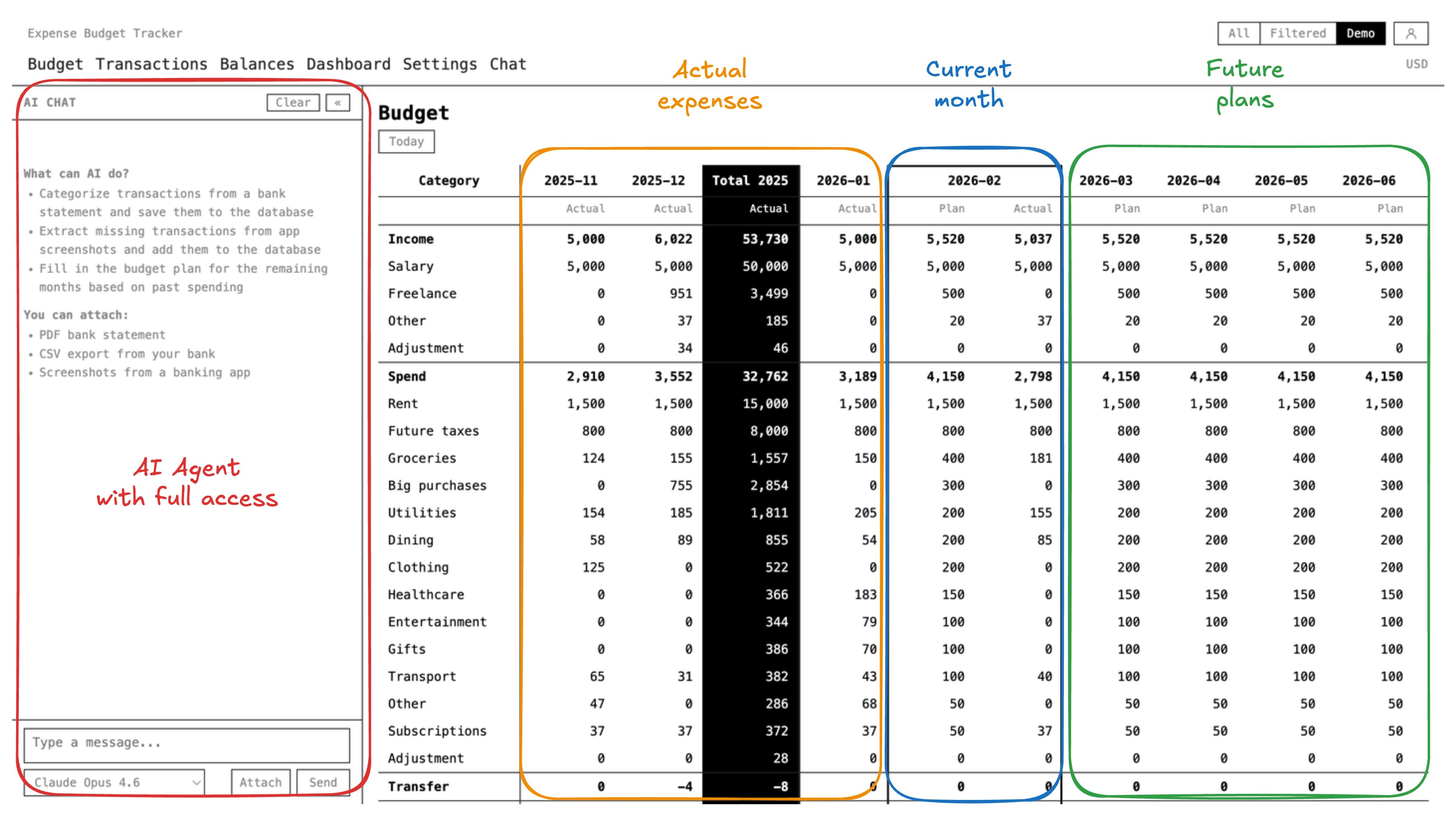
Live demo: expense-budget-tracker.com
接入你的智能体
發布者自己的 URL。不是 PlugMCP 端點。
用我們的金鑰與日誌託管一份副本。
https://mcp.expense-budget-tracker.com/mcp上方的 Claude 按鈕會開啟 Claude,並填好名稱和 URL。你仍需在那裡確認。
claude mcp add --transport http com.expense-budget-tracker-expense-budget-tracker https://mcp.expense-budget-tracker.com/mcpRun in a terminal.
{ "mcpServers": { "com.expense-budget-tracker-expense-budget-tracker": { "command": "npx", "args": [ "-y", "mcp-remote", "https://mcp.expense-budget-tracker.com/mcp" ] } }}claude_desktop_config.json
遠端 URL 還是本機指令? 兩種安裝方式的差異
來自發布者
Self-hosted open-source expense and budget tracker with balances, transfers, and multi-currency reporting on Postgres.
Live demo: expense-budget-tracker.com
Track expenses, budgets, balances, transfers, and multi-currency reports with OAuth-secured tools.
git clone https://github.com/kirill-markin/expense-budget-tracker.git
cd expense-budget-tracker
open -a Docker   # start Docker if not running (macOS)
make up          # start Postgres, run migrations, start web + worker
Open http://localhost:3000.
This local stack is unauthenticated and published on loopback only. To change any of it, copy infra/docker/.env.example to infra/docker/.env: the shell environment and that file both outrank the development defaults in infra/docker/compose.yml. AUTH_MODE=cognito is not a supported configuration of this stack: the web service wires DATABASE_URL, not the DB_HOST/DB_PASSWORD pair that mode requires. The authenticated deployment lives in AWS, which deploys from infra/aws and never reads the compose file. Details in docs/deployment.md.
Connect through either the hosted MCP server or the direct Agent API. Their credentials are separate and are not interchangeable: MCP uses OAuth Bearer access, while the Agent API uses an ApiKey.
The hosted MCP server is available directly at https://mcp.expense-budget-tracker.com/mcp. Its canonical MCP Registry identity is com.expense-budget-tracker/expense-budget-tracker; it is published there, and each later version becomes available only after its own manual publication workflow succeeds and exact-version verification completes. It exposes five OAuth-secured tools:
list_workspaces — list workspaces available to the signed-in userget_schema — inspect the allowed relations, columns, constraints, and limitsget_guide — fetch the SQL-dialect, writing-data, or query-recipes protocol before actingsql_query — run one restricted SELECT or WITH...SELECTsql_execute — run one approved INSERT, UPDATE, or DELETECompatible remote MCP clients authenticate with OAuth authorization code + PKCE and Dynamic Client Registration. The required expenses:read scope enables the four read tools; a client may also request expenses:write, which is required for sql_execute.
Start at GET https://api.expense-budget-tracker.com/v1/. The discovery response tells agents to ask for the user's email first, and the same email OTP flow covers both signup and login.
GET https://api.expense-budget-tracker.com/v1/ in your agent — it will discover the OTP onboarding flow automaticallyApiKeyFor readonly work, agents send one SELECT or WITH...SELECT statement to the primary query endpoint:
curl -X POST https://api.expense-budget-tracker.com/v1/sql/query \
  -H "Authorization: ApiKey ebta_..." \
  -H "X-Workspace-Id: workspace-id" \
  -H "Content-Type: application/json" \
  -d '{"sql": "SELECT ts, amount, currency, category FROM ledger_entries ORDER BY ts DESC LIMIT 20"}'
For an explicitly approved write, agents send one INSERT, UPDATE, or DELETE statement to the primary execute endpoint:
curl -X POST https://api.expense-budget-tracker.com/v1/sql/execute \
  -H "Authorization: ApiKey ebta_..." \
  -H "X-Workspace-Id: workspace-id" \
  -H "Content-Type: application/json" \
  -d '{"sql": "INSERT INTO ledger_entries (event_id, ts, account_id, amount, currency, kind, category, counterparty, note) VALUES ('"'"'evt-001'"'"', '"'"'2025-03-15 12:30:00+00'"'"', '"'"'chase-checking'"'"', -42.50, '"'"'USD'"'"', '"'"'spend'"'"', '"'"'groceries'"'"', '"'"'Whole Foods'"'"', '"'"'Weekly groceries'"'"')"}'
After POST /v1/workspaces/{workspaceId}/select, the API key remembers that workspace, so X-Workspace-Id becomes optional on later /v1/sql/query, /v1/sql/execute, and compatibility /v1/sql calls; send the header to override the saved selection. If the user has exactly one workspace and no saved selection yet, the API auto-saves and uses that single workspace. POST /v1/sql remains available only for compatibility when an atomic multi-statement script is required.
Deployment — local Docker Compose and AWS CDK setup
Self-hosting — run the whole product outside AWS from one compose stack behind an edge proxy
AWS deployment — full AWS CDK guide
Architecture — system overview, data model, multi-currency design
For full privacy, self-host on your own AWS account. If you deploy or use the hosted service with the AWS/CDK setup described in infra/aws/README.md, the LLM chat runtime stores transcript state in Postgres. That means chat data is available to:
If you use chat to import bank statements, screenshots, PDFs, CSVs, or other financial files, data extracted from those files can also reach OpenAI and Langfuse as part of chat processing and tracing. If you do not trust even one of these parties, do not store your financial data in this hosted deployment.
The code is already deployed, and the maintainer stores his own real finances there. Only maintainer Kirill Markin has access to the demo database. For partial privacy, sign up with an email that doesn't contain your real name. Try the demo →
Track expenses, budgets, balances, transfers, and multi-currency reports with OAuth-secured tools.
{ "mcpServers": { "com.expense-budget-tracker-expense-budget-tracker": { "url": "https://mcp.expense-budget-tracker.com/mcp", "headers": {} } }}工具
尚無工具清單。遠端伺服器會在首次健康檢查後取得工具清單。
常見問題
在本頁複製適用於 Cursor、Claude Desktop、Claude Code 或 VS Code 的 http 設定。它使用發布者的安裝方式,而不是 PlugMCP 代理伺服器。
這筆記錄未列出必要的環境變數。
Expense Budget Tracker 透過 HTTP 存取。
上次檢查時間:2026-10-23。 Track expenses, budgets, balances, transfers, and multi-currency reports with OAuth-secured tools.
