DomainScout
Domain research for AI agents. Every good .com is taken. Find the ones that aren't.

接入你的智能体
發布者自己的指令。不是 PlugMCP 端點。
用我們的金鑰與日誌託管一份副本。
npx -y @dakaio/[email protected]Claude Code 沒有本機指令的安裝連結。複製下方指令並在終端機中執行。
claude mcp add dakaio-domainscout-mcp -- npx -y @dakaio/domainscout-mcp@2.0.3在終端機中執行。
{ "mcpServers": { "dakaio-domainscout-mcp": { "command": "npx", "args": [ "-y", "@dakaio/[email protected]" ] } }}claude_desktop_config.json
遠端 URL 還是本機指令? 兩種安裝方式的差異
來自發布者
Domain research for AI agents. Every good .com is taken. Find the ones that aren't.
Domain research for AI agents: an MCP server that checks hundreds of domain names in one call (DNS, RDAP, WHOIS) and shows prices and where to buy.
DomainScout is an MCP server for bulk domain search. Your AI assistant brainstorms hundreds of names, and DomainScout checks all of them in one call: which are free, what they cost and where to buy them. It runs on your own machine. You need no account and no server of ours, and API keys are optional.
Website · npm · MCP Registry · Examples
.com, .net and .ai by default; ask for any other.DomainScout does not invent names: your assistant does that, and DomainScout tells it which of them are really free.
Node 20 or newer.
Claude Desktop: one click: download the extension and open it. Claude Desktop asks to install it, and lets you set the options below.
Claude Code: the plugin adds the server and a skill that runs the whole name search (brainstorm, check, present the free names with prices):
/plugin marketplace add JohnDaka/domainscout-mcp
/plugin install domainscout@domainscout
Or the server alone:
claude mcp add domainscout -- npx -y @dakaio/domainscout-mcp
Cursor and VS Code: use the buttons at the top, or add the server to the MCP config.
Any MCP client: add to the MCP config:
{
  "mcpServers": {
    "domainscout": {
      "command": "npx",
      "args": ["-y", "@dakaio/domainscout-mcp"],
      "env": { "DOMAINSCOUT_TLDS": "com,net,ai,io" }
    }
  }
}
On Windows, if npx is not found, use "command": "cmd" with
"args": ["/c", "npx", "-y", "@dakaio/domainscout-mcp"].
Then just ask: "Brainstorm 200 names for my coffee subscription app and tell me which .com domains are free."
From source: npm install && npm run build, then run node /path/to/domainscout-mcp/dist/index.js
in place of npx -y @dakaio/domainscout-mcp.
check_domainsChecks whether domain names are free to register, and shows prices and where to buy the free ones. Read-only: it never registers or changes anything.
It returns a short text report for the model and the same data as structured content: a summary with counts per status, one result per domain (status, note, registration dates, buy links with prices), skipped entries and warnings.
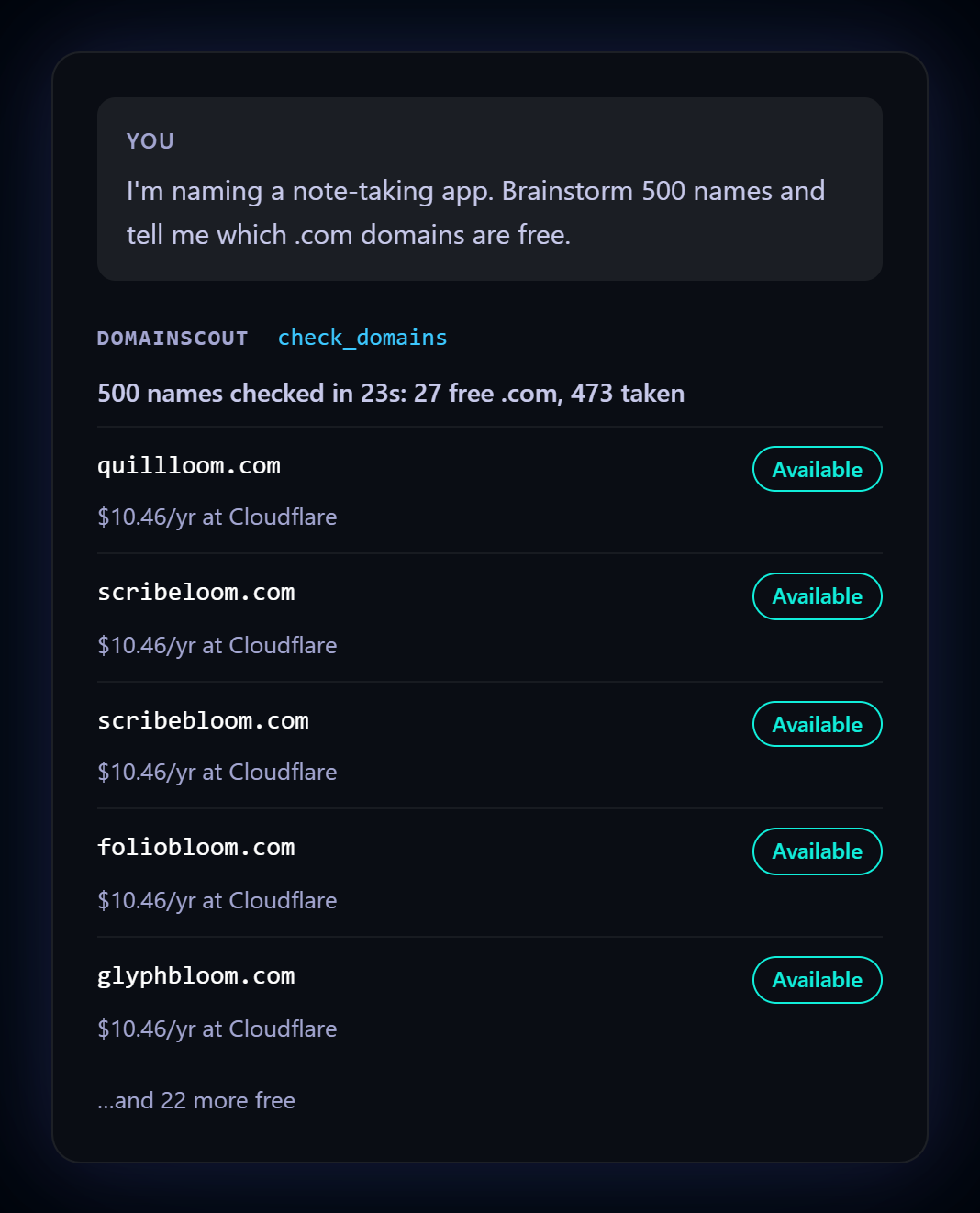
You ask your assistant "I'm naming a note-taking app. Brainstorm 500 names and tell me which .com
domains are free." The assistant calls check_domains once with all 500 names and gets back:
Checked 500 domain(s) in 23.0s: 27 available, 473 taken.

AVAILABLE (cheapest known offer for each):
- quillloom.com: $10.46/yr at Cloudflare https://www.cloudflare.com/domains/search/?q=quillloom.com
- scribeloom.com: $10.46/yr at Cloudflare https://www.cloudflare.com/domains/search/?q=scribeloom.com
- scribebloom.com: $10.46/yr at Cloudflare https://www.cloudflare.com/domains/search/?q=scribebloom.com
...
TAKEN: quillwise.com, quillnest.com, quillflow.com, quillhub.com, quillpad.com, quillbox.com,
  quillbase.com, quillkit.com, ...
Ask about a few favourites afterwards and each one gets every registrar's link and price. More real output, including the command line and JSON: examples.
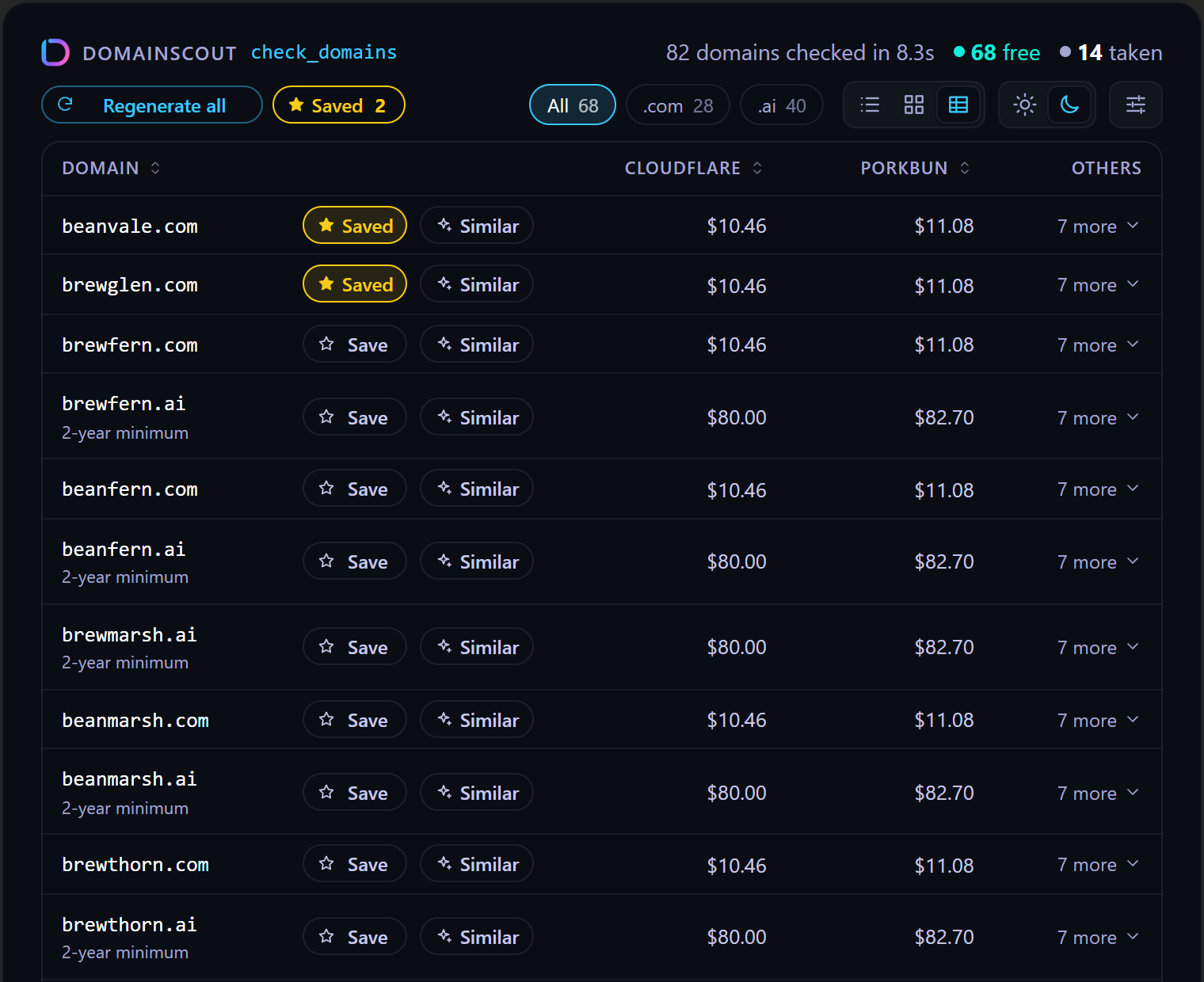
In clients that support MCP Apps (Claude on
the web and desktop, VS Code, ChatGPT and others), each check_domains call shows an interactive
panel, the same as on the website:
saved parameter), still marked as saved and listed first. "Saved 3" beside
Regenerate asks the chat to compare the saved domains; both buttons explain themselves on hover. "Try other TLDs" re-checks the taken
names elsewhere, and "Compare in chat" asks the chat to pick one of the saved names; it sees
what you saved. "Download CSV" saves the free domains with prices and links.The panel ships in the package (ui/), loads nothing from elsewhere, and uses only what the client
offers: a client that can't send messages or save files simply doesn't show those buttons. Other
clients show the text report.
For each domain, in parallel and within polite rate limits:
.io and .de) or when RDAP fails.Having no DNS never proves a domain is free: a bought but unused domain has no DNS either.
Without a registrar API key, "not in the registry" is reported as likely_available. Premium
and registry-reserved names look the same there, so the registrar's page has the final price.
None. DomainScout works without an account or API keys. Registrar API keys are optional: with one, free-looking names are confirmed by the registrar, premium names are flagged and the exact price is shown. One key is enough. With several, the APIs are asked in this order, each name only until one answers.
Each key is sent only to its own registrar's API, and it never appears in output, logs or error messages. If a registrar rejects a key, the result says so in its notes, and the check still works without that registrar.
Set these as environment variables in the MCP config. All are optional.
DOMAINSCOUT_MAX_DOMAINS, at most 10,000)
and 1,000 input entries.DOMAINSCOUT_CONFIRM_MAX names per call are confirmed. Porkbun throttles an account to 50 names
per 5 minutes for a day once it has checked about 1,800 names in 3 hours while registering few
of them; the limit keeps every call well below that. A tool call can pass confirm: false to
skip confirmation for a large list.DomainScout is free and open source under the MIT license. There is no account, subscription or usage fee. The prices it shows are the registrars' own standard prices, from public price lists, or the exact price from your registrar API.
The full policy: domainscout.dakaio.com/privacy.html.
DOMAINSCOUT_PRICES=off turns the price lists off.Some buy links may be affiliate links. When they are, the result says so, and buying through
them earns the project a commission at no extra cost to you. Links are always ordered by price
and never by commission. DOMAINSCOUT_AFFILIATE=off turns them off.
The tool is read-only, runs on your machine, and sends each API key only to its own registrar. To report a vulnerability, see SECURITY.md.
npx @dakaio/domainscout-mcp check acme getacme.io --tlds com,dev
npx @dakaio/domainscout-mcp check acme --json --no-confirm
npx @dakaio/domainscout-mcp check $(cat names.txt) --tlds com
npm run verify     # typecheck + lint (Biome) + tests with coverage thresholds
npm run build
Releases happen on merge. A pull request's title says what it is (feat: …, fix: …,
docs: …, feat!: …; .github/workflows/pr-title.yml checks it), and once it is merged into
main, .github/workflows/publish.yml decides: feat raises the minor version, fix and
perf the patch version, a ! or a line starting BREAKING CHANGE: the major one, and anything else, or a
change to nothing the package ships, releases nothing. A release raises the version in
package.json, manifest.json and server.json, adds the merged pull requests to
CHANGELOG.md, tags it, publishes to npm (trusted
publishing), creates a GitHub Release with the Claude Desktop extension, publishes to the MCP
Registry and points the Claude plugin at the new version, committing to main
as it goes. The landing page goes out on every change to site/ (.github/workflows/landing.yml).
MIT © dakaio.com
Domain research for AI agents: an MCP server that checks hundreds of domain names in one call (DNS, RDAP, WHOIS) and shows prices and where to buy.
{ "mcpServers": { "dakaio-domainscout-mcp": { "command": "npx", "args": [ "-y", "@dakaio/[email protected]" ] } }}工具
尚無工具清單。遠端伺服器會在首次健康檢查後取得工具清單。
常見問題
在本頁複製適用於 Cursor、Claude Desktop、Claude Code 或 VS Code 的 stdio 設定。它使用發布者的安裝方式,而不是 PlugMCP 代理伺服器。
這筆記錄未列出必要的環境變數。
@dakaio/domainscout 透過 stdio 在本機執行。
上次檢查時間:2026-11-17。 Domain research for AI agents: an MCP server that checks hundreds of domain names in one call (DNS, RDAP, WHOIS) and shows prices and where to buy.