AvaKit 🔺
The open-source, AI-native developer toolkit for Avalanche.
接入你的智能体
發布者自己的指令。不是 PlugMCP 端點。
用我們的金鑰與日誌託管一份副本。
npx -y @avakit/[email protected]Claude Code 沒有本機指令的安裝連結。複製下方指令並在終端機中執行。
claude mcp add dev.avakit-avalanche -- npx -y @avakit/mcp@0.1.25在終端機中執行。
{ "mcpServers": { "dev.avakit-avalanche": { "command": "npx", "args": [ "-y", "@avakit/[email protected]" ] } }}claude_desktop_config.json
遠端 URL 還是本機指令? 兩種安裝方式的差異
Scaffold a social-login dapp, deploy-ready, with agent context baked in. One core, four surfaces. No seed phrases, no boilerplate.
▶ Watch the 90-second demo — one command to a live, social-login Avalanche dapp: sign in with Google, deploy an NFT from the browser, and mint it on Fuji.
npm create avalanche-app@latest
That's it. Connect with a social login, read your balance, and send your first transaction on Avalanche in minutes.

Then deploy an NFT contract and mint it, straight from the browser, on Fuji:
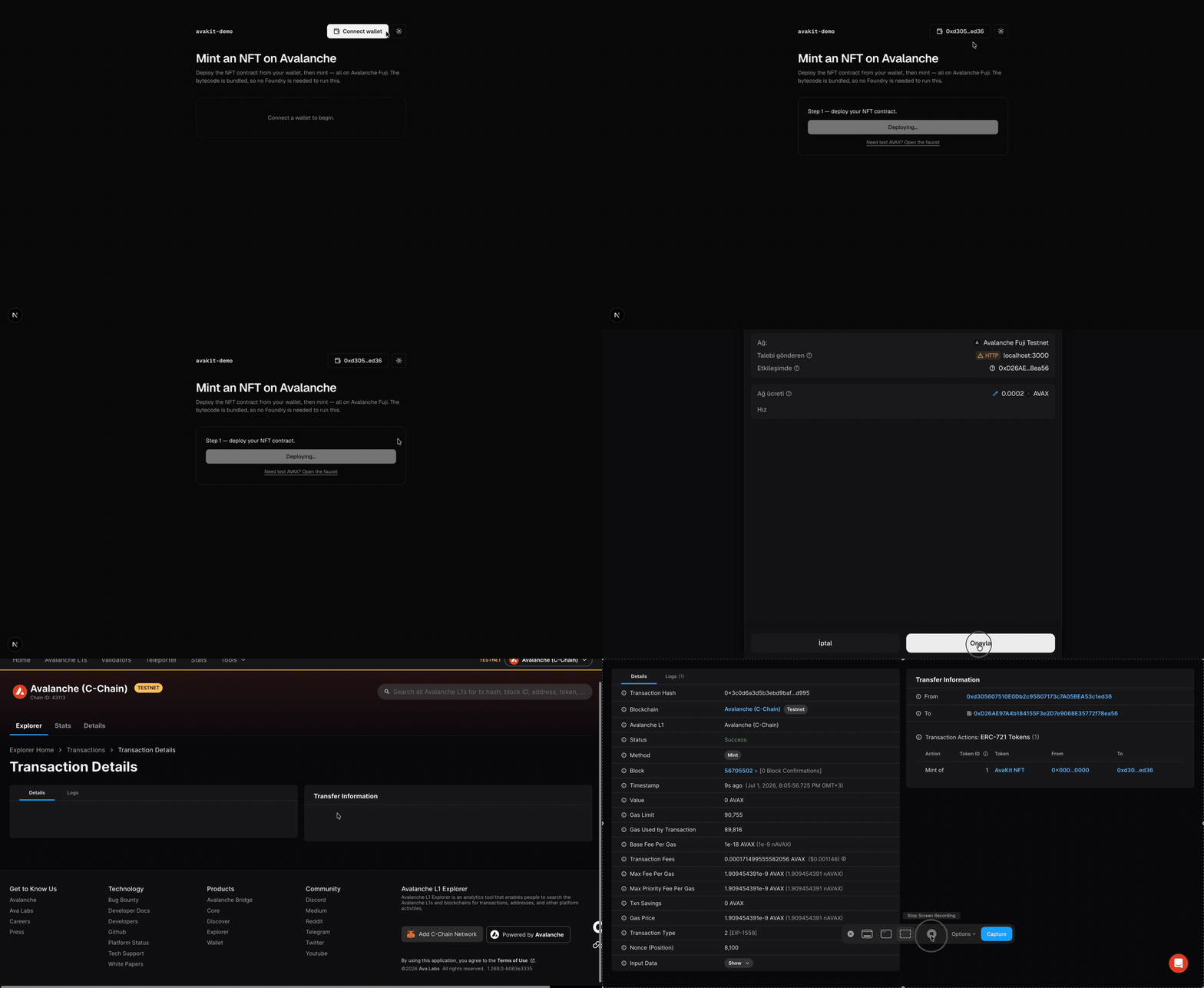
Proven live on Fuji. The mint in that clip is a real on-chain transaction; view it on Snowtrace (contract
0x7612…7786). No Foundry, no backend: the bytecode is bundled and deployed from the user's wallet.
Avalanche's C-Chain is EVM-compatible and end-user onboarding is already solved (Core wallet's seedless social login). The remaining friction is on the developer side: spinning up a modern dapp with onboarding wired up still takes hours. AvaKit removes that.
localStorage — see SECURITY.md.)CLAUDE.md, llms.txt, and .cursor/rules, and @avakit/mcp lets Claude Code / Cursor scaffold, deploy, and read chain state for you.npm create avalanche-app@latest my-app -- --template nft-mint
Every template ships with a social-login wallet, shadcn/ui (black & white, dark/light), and AI context files.
npm install @avakit/react @avakit/core viem
"use client";
import { injectedAdapter } from "@avakit/core";
import { fuji } from "@avakit/core/chains";
import { AvaKitProvider, ConnectAvalanche } from "@avakit/react";

export function App() {
  return (
    <AvaKitProvider chains={[fuji]} adapters={[injectedAdapter()]}>
      <ConnectAvalanche />
    </AvaKitProvider>
  );
}
Add social login by installing @web3auth/modal and passing web3authAdapter({ clientId }) (from @avakit/core/web3auth).
@avakit/coreand@avakit/reactare ESM-only (useimport, notrequire; Node ≥ 20.11).
Add the MCP server to Claude Code, Cursor, or Claude Desktop:
{
  "mcpServers": {
    "avakit": { "command": "npx", "args": ["-y", "@avakit/mcp"] }
  }
}
Then just ask: "Scaffold an nft-mint dapp and deploy it to Fuji."
packages/
  core/                 @avakit/core
  react/                @avakit/react
  mcp/                  @avakit/mcp
  studio/               @avakit/studio (local dashboard + MCP)
  create-avalanche-app/ scaffolder + 8 templates
apps/web/               the avakit.dev site (EN + TR)
examples/               live demo dapps (hello-avax, web3auth-demo)
docs/                   planning, PRD, architecture, ADRs, specs, security review
pnpm install
pnpm build       # all packages (Turborepo)
pnpm test        # Vitest
pnpm lint        # Biome
pnpm typecheck   # TypeScript
Requirements: Node ≥ 20.11, pnpm ≥ 10. See CONTRIBUTING.md and the design docs in docs/. Conventions: English everywhere, shadcn/ui only, Framer Motion / GSAP for animation, latest stable versions.
MIT © AvaKit contributors
Act on Avalanche from your agent: scaffold a dapp, deploy a contract, mint, and read chain state.
{ "mcpServers": { "dev.avakit-avalanche": { "command": "npx", "args": [ "-y", "@avakit/[email protected]" ] } }}工具
尚無工具清單。遠端伺服器會在首次健康檢查後取得工具清單。
常見問題
在本頁複製適用於 Cursor、Claude Desktop、Claude Code 或 VS Code 的 stdio 設定。它使用發布者的安裝方式,而不是 PlugMCP 代理伺服器。
這筆記錄未列出必要的環境變數。
Avalanche 透過 stdio 在本機執行。
上次檢查時間:2026-11-08。 Act on Avalanche from your agent: scaffold a dapp, deploy a contract, mint, and read chain state.