接入你的智能体
從發布者安裝。不是 PlugMCP 端點。
遠端 URL 還是本機指令? 兩種安裝方式的差異
Give Claude, Cursor, and Cline instant memory of your entire codebase. Written in Rust. Zero cloud dependency. Search 10,000 chunks in 0.21ms.
Install • Quick Start • Demo • Docs
The Problem: AI coding agents are powerful but forgetful. Every new conversation starts from zero — no memory of your codebase, your patterns, your architecture.
scan, query, embed, stats, remember, recall, status
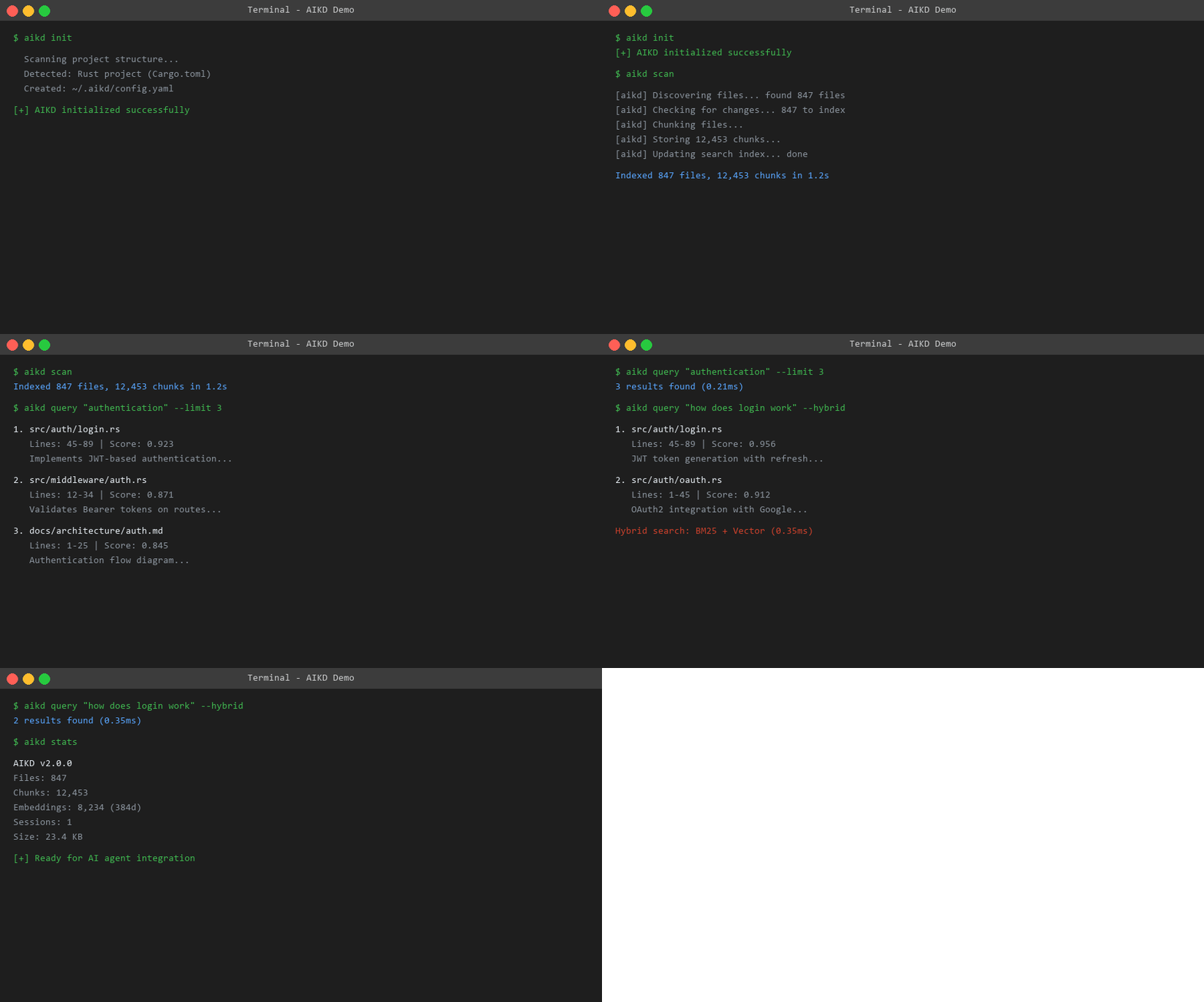
$ aikd init
✅ AIKD initialized for project

$ aikd scan
📊 Indexed 847 files, 12,453 chunks in 1.2s

$ aikd query "authentication flow"
1. src/auth/login.rs (Lines 45-89, Score: 0.923)
   Implements JWT-based authentication with refresh tokens...

2. src/middleware/auth.rs (Lines 12-34, Score: 0.871)
   Validates Bearer tokens on protected routes...

3. docs/architecture/auth.md (Lines 1-25, Score: 0.845)
   Authentication flow diagram and security considerations...
Linux / macOS:
curl -sSf https://raw.githubusercontent.com/gelutjari/aikd/main/install.sh | bash
Windows (PowerShell):
irm https://raw.githubusercontent.com/gelutjari/aikd/main/install.ps1 | iex
cargo install aikd
brew install gelutjari/tap/aikd
git clone https://github.com/gelutjari/aikd.git
cd aikd
cargo build --release
cp target/release/aikd ~/.local/bin/
docker run -v $(pwd):/workspace -p 9090:9090 ghcr.io/gelutjari/aikd:latest
cd your-project
aikd init
Creates ~/.aikd/config.yaml with smart defaults based on your project type (Rust, Node, Python, Go). It detects .git, Cargo.toml, package.json, etc. and sets appropriate file filters.
aikd scan
node_modules, .git, target, etc.)# Keyword search (fast)
aikd query "error handling"
# Semantic search (smart)
aikd query "how does login work" --hybrid
# Get JSON output for scripting
aikd query "database connection" --json
AIKD auto-registers via MCP. Just restart your AI agent after running aikd scan.
The MCP config is at ~/.aikd/mcp.json:
{
  "mcpServers": {
    "aikd": {
      "command": "aikd",
      "args": ["serve"]
    }
  }
}
# Start the daemon
aikd daemon

# Query via HTTP
curl "http://localhost:9090/api/query?q=authentication&limit=5"
                    ┌─────────────────┐
                    │   How to use    │
                    │     AIKD?       │
                    └────────┬────────┘
                             │
            ┌────────────────┼────────────────┐
            ▼                ▼                ▼
     ┌──────────┐     ┌──────────┐     ┌──────────┐
     │   CLI    │     │   MCP    │     │ REST API │
     │  Mode    │     │  Server  │     │  Daemon  │
     └──────────┘     └──────────┘     └──────────┘
     Best for:        Best for:        Best for:
     • Quick search   • AI agents      • Web apps
     • Scripts        • Claude Code    • Custom UIs
     • CI/CD          • Cursor         • Team shared
CLI Mode (default):
aikd query "rust error handling" --limit 5
aikd stats
aikd status
MCP Server (for AI agents):
aikd serve # Starts stdio MCP server
REST Daemon (background service):
aikd daemon              # Start in background
aikd daemon foreground   # Start in foreground
aikd daemon-stop         # Stop daemon
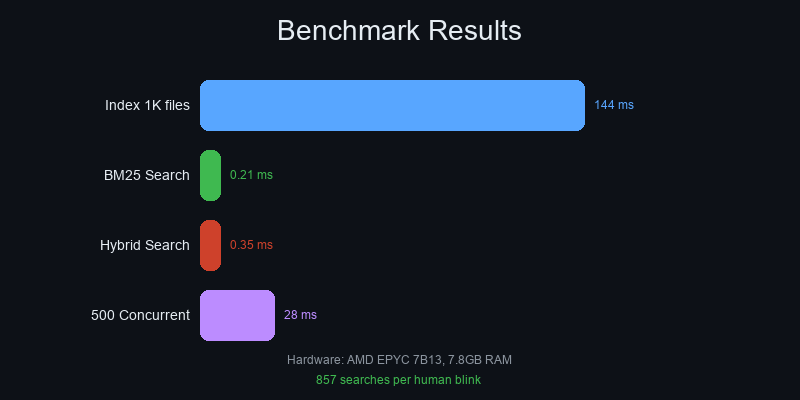
Hardware: AMD EPYC 7B13, 7.8GB RAM, NVMe SSD
Resource Usage:
CPU: ████████░░░░░░░░░░░░ 22.9%
RAM: █████░░░░░░░░░░░░░░░ 27.4%
💡 Real-world context: A human eye blink takes ~300ms. In that time, AIKD can complete 857 hybrid searches across your entire codebase.
Default config (~/.aikd/config.yaml):
version: 2.0.0
scan:
  include_paths: ["."]
  exclude_paths: ["node_modules", ".git", "target"]
  include_extensions: ["rs", "ts", "py", "md", "json"]
  follow_symlinks: false
chunk:
  max_tokens: 1000
  min_tokens: 100
embedding:
  enabled: true
  model: all-MiniLM-L6-v2
  batch_size: auto
server:
  rest_port: 9090
  auth_token: null
  cors_origins: ["*"]
embedding:
  enabled: true
  batch_size: 8
  device: cpu
resource:
  mode: Low
embedding:
  enabled: true
  batch_size: 64
  device: gpu
resource:
  mode: Max
scan:
  include_extensions: ["md", "txt", "rst"]
  exclude_paths: [".git"]
filter:
  max_file_size: 524288  # 512KB
server:
  rest_port: 9090
  auth_token: "your-secret-token"
  cors_origins:
    - "https://your-team-app.com"
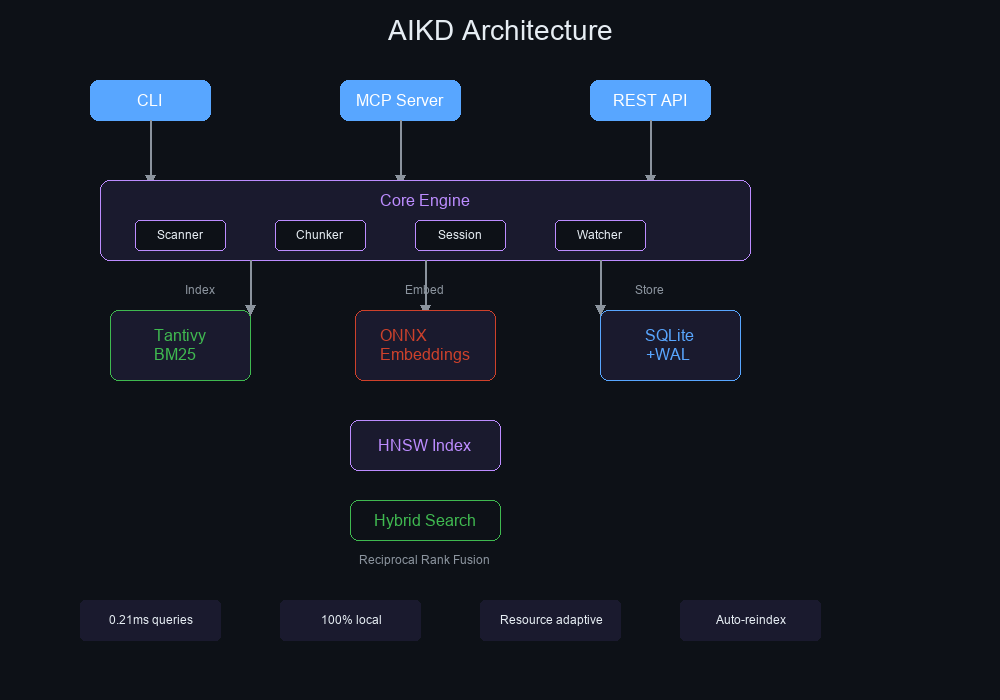
┌─────────────────────────────────────────────────────────────┐
│                        AIKD v2.0.0                          │
├─────────────────────────────────────────────────────────────┤
│                                                             │
│  ┌─────────┐  ┌─────────┐  ┌─────────┐  ┌─────────────┐  │
│  │  CLI    │  │  MCP    │  │  REST   │  │ File Watcher│  │
│  │ (clap)  │  │ (rmcp)  │  │ (axum)  │  │  (notify)   │  │
│  └────┬────┘  └────┬────┘  └────┬────┘  └──────┬──────┘  │
│       │            │            │               │          │
│       └────────────┴────────────┴───────────────┘          │
│                            │                                │
│  ┌─────────────────────────┴──────────────────────────┐    │
│  │                   Core Engine                       │    │
│  ├─────────────┬─────────────┬─────────────────────────┤    │
│  │  Scanner    │   Chunker   │      Session Manager    │    │
│  │ (walkdir)   │(pulldown-   │    (conversation DB)    │    │
│  │             │  cmark)     │                         │    │
│  └──────┬──────┴──────┬──────┴─────────────────────────┘    │
│         │             │                                      │
│  ┌──────┴──────┐ ┌────┴─────┐ ┌──────────────────────┐     │
│  │  Indexer    │ │ Embedder │ │     Storage           │     │
│  │  (Tantivy)  │ │ (ONNX)   │ │   (SQLite + WAL)     │     │
│  │  BM25 +     │ │ 384d     │ │   + r2d2 pool        │     │
│  │  HNSW ANN   │ │ MiniLM   │ │   + blake3 hashing   │     │
│  └─────────────┘ └──────────┘ └──────────────────────┘     │
│                                                             │
└─────────────────────────────────────────────────────────────┘
See docs/ARCHITECTURE.md for detailed breakdown.
Diagnostic Commands:
aikd status --json     # System info
aikd stats             # Index statistics
aikd daemon-pid        # Check if daemon running
aikd scan firstaikd stats to verify files indexedinclude_extensions in configaikd model download
This downloads ~90MB ONNX model to ~/.local/share/aikd/model/.
# Change port in config
# ~/.aikd/config.yaml
server:
  rest_port: 9091
Or stop existing process: aikd daemon-stop
Set resource mode to Low:
resource:
  mode: Low
  max_memory_mb: 512
~/.aikd/mcp.json existsaikd serve works: echo '{"jsonrpc":"2.0","method":"initialize","id":1}' | aikd serveInstall Visual C++ Redistributable.
Get Help:
Contributors:
See CONTRIBUTING.md for how to contribute.
MIT License — see LICENSE for details.
⭐ Star this repo if AIKD helps your AI agents remember!
Indexed semantic & BM25 code search for AI agents. Give your AI instant memory of your codebase. Rust | MCP Server.
工具
尚無工具清單。遠端伺服器會在首次健康檢查後取得工具清單。
常見問題
在本頁複製適用於 Cursor、Claude Desktop、Claude Code 或 VS Code 的 stdio 設定。它使用發布者的安裝方式,而不是 PlugMCP 代理伺服器。
這筆記錄未列出必要的環境變數。
Aikd 透過 stdio 在本機執行。
上次檢查時間:2026-10-28。 Indexed semantic & BM25 code search for AI agents. Give your AI instant memory of your codebase. Rust | MCP Server.
