🧠 lossless-code
DAG-based Lossless Context Management for Claude Code and Codex.
Every message preserved forever. Summaries cascade, never delete. Full recall across sessions. Works with any LLM.
接入你的智能体
從發布者安裝。不是 PlugMCP 端點。
遠端 URL 還是本機指令? 兩種安裝方式的差異
來自發布者
DAG-based Lossless Context Management for Claude Code and Codex.
Every message preserved forever. Summaries cascade, never delete. Full recall across sessions. Works with any LLM.
DAG-based Lossless Context Management for Claude Code. Every message preserved, summaries cascade as a DAG, patterns extracted via Lossless Dream — full recall and reflection across sessions.
Getting Started · MCP Server · Commands · Dream · Terminal UI · How It Works · Configuration · Contributing
Claude Code forgets. claude-mem remembers fragments. MemPalace compresses until you can't trace back. lossless-code remembers everything.
The v1.2 release delivers three composing layers on top of the v1.1 vault and dream cycle:
bundleTokenBudget) instead of a 2-5K token text dump. The agent pulls depth on demand via lcc_expand, lcc_grep, and lcc_context. Recovery-protocol line ships first so the agent knows the protocol before any content arrives.lcc codex doctor, Codex SessionStart hook config, and lcc codex start bring the same bounded bundle to Codex. The bundle leads with current task state, labels partial recall, and keeps MCP expansion as the dependable base.prefer / forbid / verify-before) the agent commits to follow next session. The dream cycle proposes them as Pending; you approve via the TUI Contracts tab (key 5, then a to approve, r to reject or retract, s to supersede). Append-only retraction trail preserved for audit; supersede atomicity wraps INSERT and UPDATE in BEGIN IMMEDIATE.parent_message_id, span_kind, tool_call_id, attributes columns on the messages table. lcc_expand accepts span_id and walks the parent chain, returning a structured-error JSON shape for span_not_found / expand_too_large / vault_corrupt so agents know how to fall back.The legacy 2-5K full-text injection from v1.1 has been removed in v1.2. To run Claude Code without lossless-code's SessionStart injection, set "bundleEnabled": false in ~/.lossless-code/config.json. The dream cycle, MCP tools, and TUI continue to work; only the SessionStart bundle is suppressed (graceful degradation).
/plugin marketplace add GodsBoy/lossless-code
/plugin install lossless-code
That's it. Start a new session and search your history:
lcc_grep "database migration"
Claude Code forgets everything between sessions. Memory tools like ClawMem, context-memory, and claude-mem use flat retrieval: keyword search over snippets, no structure, no hierarchy, no way to trace a summary back to its source conversation.
When a project spans weeks and hundreds of sessions, flat search fails. You get fragments without lineage.
lossless-code uses DAG-based lossless preservation, the same approach pioneered by lossless-claw for OpenClaw:
vault.db forever.lcc_expand traces any summary back to the exact messages that created it.SessionStart bundle injection, doctor checks, launcher fallback, and project opt-in latest-tail task state. ┌──────────────────┐
│ Claude Code │
│ Session │
└────────┬─────────┘
│
┌────────────────────────┼────────────────────────┐
│ │ │ │
┌─────▼─────┐ ┌──────▼──────┐ ┌──────▼──────┐ ┌────▼─────┐
│ Hooks │ │ Skills │ │ CLI │ │ MCP │
│ (write) │ │ (shell) │ │ Tools │ │ Server │
│ │ │ │ │ │ │ (stdio) │
│ SessionStart│ │ lcc_grep │ │ lcc_status │ │ │
│ Stop │ │ lcc_expand │ │ │ │ 7 tools │
│ PreCompact │ │ lcc_context │ │ │ │ read + │
│ PostCompact│ │ lcc_sessions│ │ │ │ contracts│
│ UserPrompt │ │ lcc_handoff │ │ │ │ │
│ │ │ lcc_contracts│ │ │ │ │
└─────┬──────┘ └──────┬──────┘ └──────┬──────┘ └────┬─────┘
│ │ │ │
└──────────────────┼────────────────┼──────────────┘
│ │
┌────────▼────────────────▼──┐
│ vault.db │
│ (SQLite) │
│ │
│ messages summaries │
│ summary_sources sessions │
│ FTS5 indexes │
└──────────────────────────────┘
Memory tools that inject context on every prompt are silently expensive. Here's why lossless-code's design saves tokens:
ClawMem injects relevant memory into 90% of prompts automatically (their stated design). claude-mem injects a context index on every SessionStart. Both approaches front-load tokens whether or not the agent needs that context.
lossless-code injects nothing by default. Context surfaces only when the agent explicitly calls an MCP tool or the PreCompact hook fires. Most coding turns (writing code, running tests, reading files) don't need historical context at all. You pay for recall only when recall matters.
Every MCP tool registered in ~/.claude.json has its schema injected into every single API call as available tools. Claude Code's own docs warn: "Prefer CLI tools when available... they don't add persistent tool definitions."
Over a 200-turn session, that difference in tool schema overhead compounds significantly.
ClawMem runs a watcher service (re-indexes on file changes) and an embed timer (daily embedding sweep across all collections). These require GGUF models (~2GB minimum) and consume CPU/GPU continuously. claude-mem runs a persistent worker service on port 37777.
lossless-code has zero background processes. Hooks fire only during Claude Code events. The vault is pure SQLite with FTS5 (built into SQLite, no external models). Nothing runs between sessions.
When Claude Code hits its context limit, it compacts: summarising earlier context to make room. With flat memory systems, compaction loses fidelity and the agent may re-explore territory it forgot, costing more tokens ("debugging in circles").
lossless-code's DAG captures the full conversation before compaction happens (PreCompact hook). After compaction, the PostCompact hook re-injects only the top-level summaries. The agent can drill down via lcc_expand if it needs detail, but the DAG ensures nothing is truly lost. This means:
MemPalace achieves ~$0.70/yr by compressing context into an AAAK dialect (~170 tokens loaded per session). This is impressive for token efficiency, but the compression is lossy — you cannot drill back to the original conversation that produced a fact.
lossless-code takes a different approach: nothing is compressed away. Every message stays verbatim in vault.db. Context is loaded on-demand, not on every prompt. With a cheap model:
lossless-code costs slightly more per session but preserves full fidelity with drill-down to original messages. For users who value the ability to trace any summary back to its source conversation, the trade-off is clear.
Fewer dependencies means less to maintain, fewer failure modes, and lower resource consumption.
/plugin marketplace add GodsBoy/lossless-code
/plugin install lossless-code
Hooks, MCP server, skill, and lcc_* shell commands are activated automatically. No manual setup needed.
git clone https://github.com/GodsBoy/lossless-code.git
cd lossless-code
bash install.sh
The installer:
~/.lossless-code/ with vault.db and scripts~/.claude/settings.json~/.claude/skills/lossless-code/Idempotent: safe to run again to upgrade.
Optional: anthropic Python package for AI-powered summarisation (falls back to extractive summaries without it).
lossless-code includes an MCP (Model Context Protocol) server so Claude Code can access the vault as native tools without shelling out to CLI commands.
If you installed via the Claude Code plugin (Option A), the MCP server is registered automatically through the plugin's .mcp.json. Nothing else to do.
If you installed standalone via install.sh (Option B), the installer:
~/.lossless-code/mcp/server.pymcp Python SDK~/.claude.json as a user-scope MCP — unless the plugin is also installed, in which case the script skips (or removes) the user-scope entry so the plugin registration is the single source of truth. This avoids the "Server defined in multiple scopes with different endpoints" warning from claude /doctor.After installation, every new Claude Code session auto-discovers 7 MCP tools:
If you need to register the MCP server manually:
// ~/.claude.json
{
  "mcpServers": {
    "lossless-code": {
      "command": "python3",
      "args": ["~/.lossless-code/mcp/server.py"]
    }
  }
}
Codex can use the same MCP server for pull-on-demand recall. Preview the registration command:
lcc codex install-mcp
Run it when you are ready to write Codex MCP config:
lcc codex install-mcp --write
Check readiness at any time:
lcc codex doctor
  Claude Code  ──stdio──▶  MCP Server  ─▶  vault.db
                            (server.py)
                            7 tools
The MCP server is read-mostly. Six of seven tools are read-only (grep, expand, context, sessions, handoff, status). The seventh, lcc_contracts, mutates the contracts table for approve/reject/retract/supersede actions; the list and show actions remain read-only. All other writes (messages, summaries, sessions) still happen through hooks (SessionStart, Stop, UserPromptSubmit, PreCompact, PostCompact). The MCP server imports the db package (scripts/db/) directly for SQLite access.
lcc_grep <query>Full-text search across all messages and summaries.
lcc_grep "database migration"
lcc_grep "auth refactor"
lcc_expand <summary_id>Expand a summary node back to its source messages. v1.2 also accepts a span id (walks the parent_message_id chain) and a file path (lists summaries that mention it).
lcc_expand sum_abc123def456                # by summary id
lcc_expand sum_abc123def456 --full         # no per-line truncation; total cap still applies
lcc_expand --span-id 4271                  # v1.2: walk the parent chain from a message id
lcc_expand --file path/to/file.py          # list recent summaries that touched this file
lcc_contextPrint the v1.2 SessionStart reference bundle for the current working directory. The bundle starts with current task state when available, then contracts, handoff, decisions, and file fingerprints, with each line carrying its own Expand instruction. Takes no arguments; the bundle shape is the same content the start hooks inject.
lcc_context
lcc codexCodex setup, diagnostics, and launcher helpers.
lcc codex doctor                         # check Codex CLI, registered SessionStart hook, MCP, vault, and bundle preview
lcc codex install-hooks                  # dry-run project hooks.json for SessionStart
lcc codex install-hooks --write          # write project .codex/hooks.json
lcc codex install-hooks --scope user     # dry-run ~/.codex/hooks.json
lcc codex install-mcp                    # print codex mcp add command
lcc codex tail-import                    # inspect project opt-in state
lcc codex tail-import --enable           # allow latest local tail task-state import for this project
lcc codex tail-import --disable          # remove this project from tail import
lcc codex start --print-context "task"   # print launcher fallback prompt
lcc codex start "task"                   # launch Codex with Lossless-Code context
The hook path is preferred once Codex has reviewed and trusted the hook. The launcher is a bridge for environments where hook setup or hook timing is not ready yet.
Tail import is project opt-in. When enabled for a project, the SessionStart hook reads only the latest matching local session tail, extracts compact task state, and stores that task-state record in imported_task_state. It does not store raw turns or full transcripts. lcc codex doctor reports whether tail import is disabled, enabled, or enabled but unable to inspect local sessions.
lcc_sessionsList recorded sessions with timestamps and handoff status.
lcc_sessions
lcc_sessions --limit 5
lcc_handoffShow or generate a session handoff.
lcc_handoff
lcc_handoff --generate --session "$CLAUDE_SESSION_ID"
lcc_statusShow vault statistics: message count, summary count, DAG depth, dream stats, and FTS index health. v1.2 adds contract counts by status, decision count, bundle state and budget, and the last dream cycle's mode (LLM, regex fallback, or failure).
lcc_status
lcc_contracts (v1.2)List, show, approve, reject, retract, or supersede behavior contracts. Same six actions on both the CLI and the MCP tool.
lcc contracts list                                       # default: list Pending
lcc contracts list --status Active
lcc contracts show --id con_abc123
lcc contracts approve --id con_abc123
lcc contracts reject --id con_abc123
lcc contracts retract --id con_abc123 --reason "no longer applies"
lcc contracts supersede --id con_abc123 --body "new replacement rule"
The TUI Contracts tab (key 5) is the recommended approval surface for Pending candidates, since it shows the full body before you press a to approve.
lcc_dreamRun the dream cycle — extract patterns from vault history and consolidate the DAG.
lcc_dream --run                    # Dream for current working directory
lcc_dream --run --project /path    # Dream for a specific project
lcc_dream --run --global           # Cross-project dream
See Lossless Dream for details.
lcc-tui is a terminal-based browser for your vault. Built with Textual.
lcc-tui
1 to 5: switch tabs/: open search modal from any viewEnter: drill into selected session or summaryEsc: go backq: quita: approve the selected Pending contract (flips to Active, rides in every SessionStart bundle)r: reject (Pending) or retract (Active) the selected contract; retraction prompts for a required reasons: supersede the selected Active contract via a TextArea pre-filled with the old bodyt: cycle the filter between Pending / Active / RetractedEnter: open the contract detail modal with the full body before approving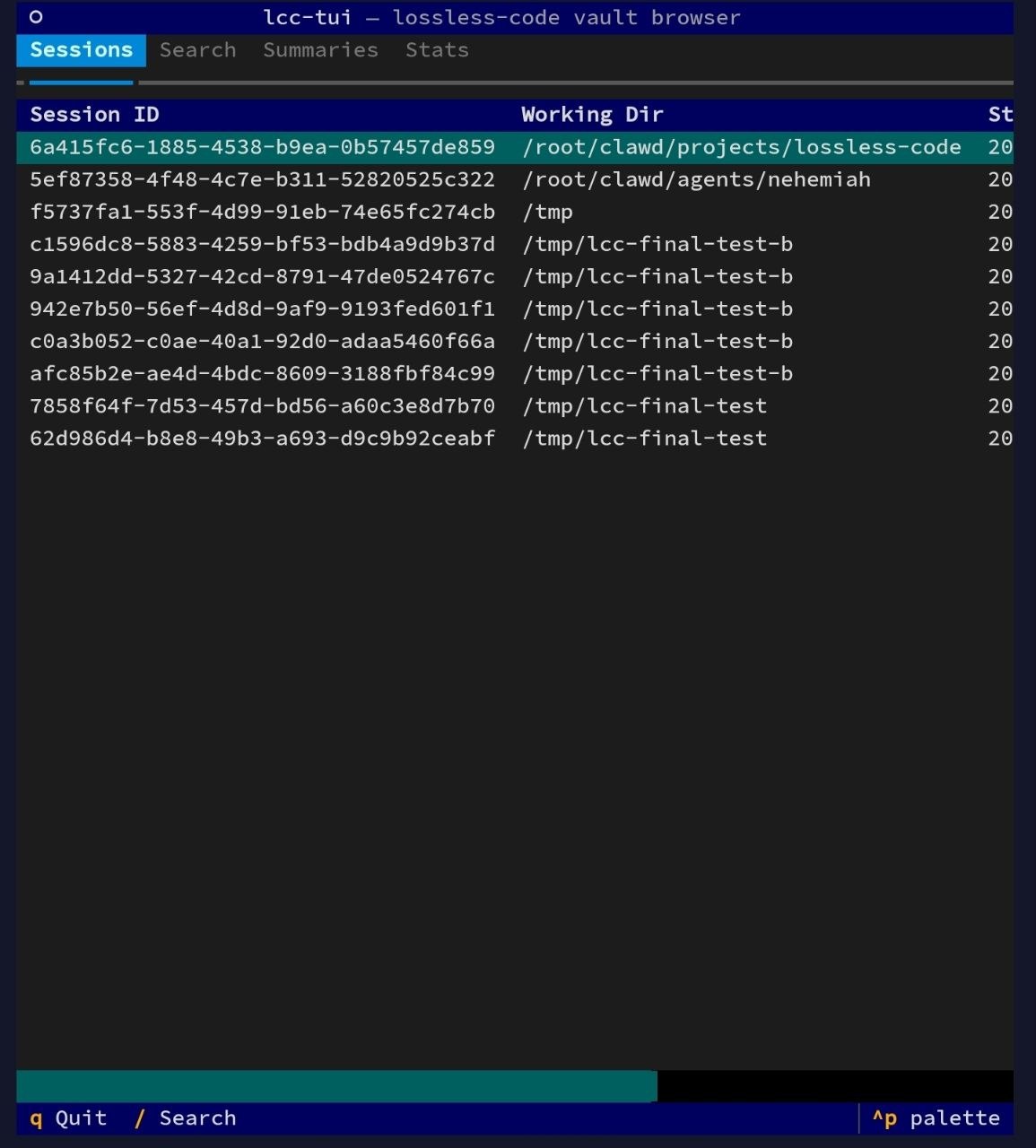
Full reference: docs/tui.md
summaries table (depth=0)summary_sourcesDream is the intelligence layer on top of the DAG. It analyzes vault history to extract recurring patterns and consolidate redundant summaries — all without deleting anything.
Three-phase cycle:
consolidated=1. Nothing is deleted.Auto-trigger: Dream runs automatically from the stop.sh hook when configurable conditions are met (default: 5+ sessions or 24+ hours since last dream). Runs as a background process with file-based locking to prevent concurrent races.
Context injection: On SessionStart, per-project and global dream patterns are injected alongside existing handoff and summaries, within a configurable token budget (default 2000 tokens).
When context injection exceeds contextTokenBudget, lossless-code uses budget-aware per-item packing instead of hard truncation:
This ensures the most relevant summaries survive budget pressure, rather than being silently dropped by position.
Lineage: Every pattern in patterns.md includes source reference IDs. Use lcc_expand to trace any pattern back to the original conversation.
# Run dream manually
lcc dream --run

# Dream for a specific project
lcc dream --run --project /path/to/project

# Cross-project dream
lcc dream --run --global
Hybrid FTS5 + vector search, activated optionally. Default is FTS5-only — install nothing and the plugin behaves exactly as before.
Enable semantic search:
# Install the optional embedding dependency
pip install fastembed

# Turn it on in ~/.lossless-code/config.json
{"embeddingEnabled": true}

# Index your existing vault (one-time backfill)
lcc reindex --embeddings
How it works: New messages are embedded in the background after each session (same non-blocking pattern as dream auto-trigger). Queries combine FTS5 keyword results with vector cosine similarity using Reciprocal Rank Fusion (k=60). When hybrid search is active, lcc grep shows a [hybrid] tag on results.
Provider tiers:
fastembed (default local): ONNX-based, no PyTorch, ~200 MB install. Default model: BAAI/bge-small-en-v1.5openai / anthropic: API-based, higher quality. Set embeddingProvider in config and export the API keyConfig keys (all optional, flat in ~/.lossless-code/config.json):
Switching models: Change embeddingModel and run lcc reindex --embeddings --force to re-embed with the new model.
Check status:
lcc status   # shows "Vector search: active (fastembed, BAAI/bge-small-en-v1.5)"
             #       "Embeddings: 4,231 / 4,400 messages indexed (169 pending)"
When an agent is about to read or edit a file, lossless-code can surface a compact fingerprint of what the vault already knows about that path — prior summaries, last touched date, polarity (created/edited/discussed/mixed), and topic snippets — injected as additionalContext via the PreToolUse hook. An agent that already has recall is less likely to repeat past mistakes on the same file.
Default off. Flip the flag in ~/.lossless-code/config.json:
{"fileContextEnabled": true}
While off, the PreToolUse and PostToolUse hooks return immediately and the feature adds zero latency.
How it works:
Read | Edit | Write | MultiEdit | NotebookEdit call touched (stored on messages.file_path)kind — created | edited | discussed | mixed — based on the tool calls in the chunksummary_sources upward from the target file to ancestor summaries via a recursive CTE, renders a ~200-token fingerprint line, and caches it under ~/.lossless-code/cache/file_fingerprints.json (60s TTL, file-locked reads/writes, single-flight guard)vault.db read-only so the hook never blocks the writerlcc_expand --file <path> (CLI) and {"file": "..."} (MCP) drill from a file path to the full recent summariesCheck status:
lcc status   # shows "Fingerprint: 342 tagged messages across 57 files (12 cached)"
             # (only displayed when fileContextEnabled is on)
~/.lossless-code/
  vault.db       # SQLite: all messages, summaries, DAG, sessions, dream_log
  config.json    # Settings (summary model, thresholds, dream config)
  scripts/       # Python modules and CLI tools
  hooks/         # Shell scripts called by Claude Code hooks
  cache/         # JSON cache for file-context fingerprints (when enabled)
  dream/         # Dream output
    reports/     # Timestamped dream reports
    projects/    # Per-project pattern files (keyed by working dir hash)
    global/      # Cross-project pattern files
    dream.log    # Dream cycle log (for debugging background execution)
~/.lossless-code/config.json:
{
  "summaryModel": "claude-haiku-4-5-20251001",
  "summaryProvider": null,
  "anthropicBaseUrl": null,
  "openaiBaseUrl": null,
  "chunkSize": 20,
  "depthThreshold": 10,
  "incrementalMaxDepth": 5,
  "leafTargetTokens": 2400,
  "condensedTargetTokens": 2000,
  "summaryMaxOverageFactor": 3,
  "workingDirFilter": null,
  "autoDream": true,
  "dreamAfterSessions": 5,
  "dreamAfterHours": 24,
  "dreamModel": "claude-haiku-4-5-20251001",
  "handoffModel": null,
  "dreamTokenBudget": 2000,
  "dreamBatchSize": 100,
  "contextTokenBudget": 8000,
  "ignoreSessionPatterns": [],
  "statelessSessionPatterns": [],
  "circuitBreakerEnabled": true,
  "circuitBreakerThreshold": 5,
  "circuitBreakerCooldownMs": 1800000,
  "dynamicChunkSize": { "enabled": true, "max": 50 },
  "bundleEnabled": true,
  "bundleTokenBudget": 1000,
  "taskStateEnabled": true,
  "taskStateTokenBudget": 200,
  "codexTailImportProjectRoots": [],
  "codexTailImportMaxFiles": 200,
  "codexTailImportMaxTailLines": 120,
  "codexTailImportMaxTailBytes": 120000,
  "codexTailImportTimeoutMs": 1500,
  "codexTailImportCodexHome": null,
  "contractsModel": null,
  "contractsPerCycleLimit": 5,
  "decisionsPerCycleLimit": 10
}
v1.2 reference bundle and behavior contracts:
Session filtering:
Summarization reliability (circuit breaker):
State is persisted in ~/.lossless-code/circuit_breaker.json so the breaker survives across hook invocations.
Dynamic chunk sizing:
In sessions with many unsummarized messages, the chunk size grows up to max, producing fewer but larger summarization passes. Hard-capped at 500 regardless of config.
Environment variable overrides: Set LOSSLESS_SUMMARY_PROVIDER, LOSSLESS_SUMMARY_MODEL, or LOSSLESS_DREAM_MODEL to override config.json values. Useful for hooks and CI environments.
lossless-code auto-detects your LLM provider from environment. No configuration needed for most setups — if you have Claude Code installed, it just works.
When summaryProvider is null (the default), lossless-code checks in priority order:
claude CLI on PATH -> uses Claude CLI (works with Max/Pro subscriptions, $0)ANTHROPIC_API_KEY -> uses Anthropic API directlyOPENAI_API_KEY -> uses OpenAIopenaiBaseUrl set -> uses OpenAI-compatible endpoint (Ollama, etc.)Claude CLI (Claude Max/Pro subscription — $0)
If you have Claude Code installed and authenticated, lossless-code uses it automatically. No API key needed — your existing subscription covers all LLM calls.
This is the highest-priority auto-detection option. If claude is on your PATH, it will be used unless you explicitly set summaryProvider to something else.
{ "summaryProvider": "claude-cli", "summaryModel": "claude-haiku-4-5-20251001" }
Model examples: any model your subscription supports (claude-haiku-4-5-20251001, claude-sonnet-4-20250514)
Note: Each LLM call spawns a
claude --printsubprocess, which adds ~2-5s overhead per call compared to direct API access. For most users this is invisible (summarisation runs in hooks), but heavy users may prefer a direct API key for faster throughput.Subprocesses run with
cwd=~/.lossless-code/.cli-cwdso their per-CWD session files land in their own project bucket and don't pollute your interactiveclaude --resumelist. To verify:python3 scripts/check_summariser_pollution.py(exit 0 = clean, 1 = polluting files listed).
Anthropic
Set ANTHROPIC_API_KEY in your environment. Get a key from console.anthropic.com.
Tip: If you have a Claude Max/Pro subscription and don't want to manage a separate API key, use the Claude CLI provider above instead.
{ "summaryProvider": "anthropic", "summaryModel": "claude-haiku-4-5-20251001" }
Model examples: claude-haiku-4-5-20251001, claude-sonnet-4-20250514
OpenAI
Set OPENAI_API_KEY in your environment.
{ "summaryProvider": "openai", "summaryModel": "gpt-4.1-mini" }
Model examples: gpt-4.1-mini, gpt-4.1-nano, gpt-4o-mini
Ollama (local, free)
Run models locally with Ollama. No API key needed.
{
  "summaryProvider": "openai",
  "openaiBaseUrl": "http://localhost:11434/v1",
  "summaryModel": "llama3"
}
Model examples: llama3, mistral, phi3, gemma2
Groq / Together AI / Fireworks
Any OpenAI-compatible provider works via openaiBaseUrl:
{
  "summaryProvider": "openai",
  "openaiBaseUrl": "https://api.groq.com/openai/v1",
  "summaryModel": "llama-3.1-8b-instant"
}
export OPENAI_API_KEY="your-groq-api-key"
LM Studio
{
  "summaryProvider": "openai",
  "openaiBaseUrl": "http://localhost:1234/v1",
  "summaryModel": "local-model"
}
Custom Anthropic-compatible endpoints
Any provider that exposes an Anthropic Messages API endpoint works (e.g. MiniMax, Cloudflare AI Gateway, custom proxies). Set anthropicBaseUrl in config (or ANTHROPIC_BASE_URL env var) and provide the provider's API key via ANTHROPIC_API_KEY.
{
  "summaryProvider": "anthropic",
  "summaryModel": "MiniMax-M2.7",
  "anthropicBaseUrl": "https://api.minimax.io/anthropic"
}
export ANTHROPIC_API_KEY="your-minimax-api-key"
Reasoning models that return ThinkingBlock responses are handled automatically.
Model examples: MiniMax-M2.7, MiniMax-M2.7-highspeed
Local (extractive fallback)
When no LLM provider is available, lossless-code uses TF-IDF sentence scoring to produce extractive summaries from your conversation history. No API keys, no cost, works everywhere. Quality is lower than LLM summaries but the vault stays fully functional.
{ "summaryProvider": "local" }
Compactions are triggered automatically before context compaction (PreCompact hook) and at session end (Stop hook). The extractive fallback runs automatically when no API key is configured: no hard dependency on any LLM provider.
The lcc CLI provides direct access to vault operations.
# Run compaction manually
lcc summarise --run

# Run compaction for a specific session
lcc summarise --run --session <session-id>

# Check vault status
lcc status

# Search all messages and summaries
lcc grep "auth refactor"

# Show handoff from last session
lcc handoff

# Generate and save a handoff for current session
lcc handoff --generate --session "$CLAUDE_SESSION_ID"

# List recent sessions
lcc sessions

# Expand a summary node
lcc expand sum_abc123def456

# Run dream cycle
lcc dream --run

# Dream for a specific project directory
lcc dream --run --project /path/to/project
sessions        -- session_id, working_dir, started_at, last_active, handoff_text
messages        -- id, session_id, turn_id, role, content, tool_name, working_dir, timestamp, summarised
summaries       -- id, session_id, content, depth, token_count, created_at, consolidated
summary_sources -- summary_id, source_type, source_id
dream_log       -- id, project_hash, scope, dreamed_at, patterns_found, consolidations, sessions_analyzed, report_path
messages_fts    -- FTS5 index on messages.content
summaries_fts   -- FTS5 index on summaries.content
rm -rf ~/.lossless-code
# Remove hooks from ~/.claude/settings.json manually
# Remove skill: rm -rf ~/.claude/skills/lossless-code
lossless-code is a Claude Code adaptation of the Lossless Context Management (LCM) architecture created by Jeff Lehman and the Martian Engineering team. Their lossless-claw plugin for OpenClaw proved that DAG-based context preservation eliminates the information loss problem in long-running AI sessions. lossless-code brings that same architecture to Claude Code.
Additional references:
Contributions are welcome! Please:
git checkout -b feat/your-feature)lossless-code currently supports Claude Code natively. The hook and plugin ecosystem across coding agents is converging fast, and we're tracking compatibility:
Current Codex support focuses on safe start-of-thread continuity: MCP pull-on-demand recall, a bounded SessionStart bundle, readiness checks, launcher fallback, and opt-in latest-tail task state. Roadmap items from the compatibility planning remain prompt capture, stop/transcript import, richer project review tools, and adapter work for other hook-capable CLIs.
MCP works everywhere today. Any agent that supports MCP servers can already use
lcc_grep,lcc_expand,lcc_context,lcc_sessions,lcc_handoff, andlcc_statusfor manual recall. The roadmap above tracks automatic capture via hooks.
Contributions welcome for any of the planned integrations.

MIT
If lossless-code helps your workflow, consider giving it a ⭐
DAG-based Lossless Context Management for Claude Code. Every message preserved, summaries cascade as a DAG, patterns extracted via Lossless Dream — full recall and reflection across sessions.
工具
尚無工具清單。遠端伺服器會在首次健康檢查後取得工具清單。
常見問題
在本頁複製適用於 Cursor、Claude Desktop、Claude Code 或 VS Code 的 stdio 設定。它使用發布者的安裝方式,而不是 PlugMCP 代理伺服器。
這筆記錄未列出必要的環境變數。
Lossless Code 透過 stdio 在本機執行。
上次檢查時間:2026-10-28。 DAG-based Lossless Context Management for Claude Code. Every message preserved, summaries cascade as a DAG, patterns extracted via Lossless Dream — full recall and reflection across sessions.
