Grain
A fast SQL workspace for VS Code, and for the AI agents you work with.
接入你的智能体
發布者自己的指令。不是 PlugMCP 端點。
用我們的金鑰與日誌託管一份副本。
npx -y [email protected]Claude Code 沒有本機指令的安裝連結。複製下方指令並在終端機中執行。
claude mcp add grain-tools -- npx -y grain-tools@0.10.49在終端機中執行。
{ "mcpServers": { "grain-tools": { "command": "npx", "args": [ "-y", "[email protected]" ] } }}claude_desktop_config.json
遠端 URL 還是本機指令? 兩種安裝方式的差異
來自發布者
A fast SQL workspace for VS Code, and for the AI agents you work with.
Standalone Grain MCP database server for VS Code, Claude Desktop, Cursor, and other MCP clients.
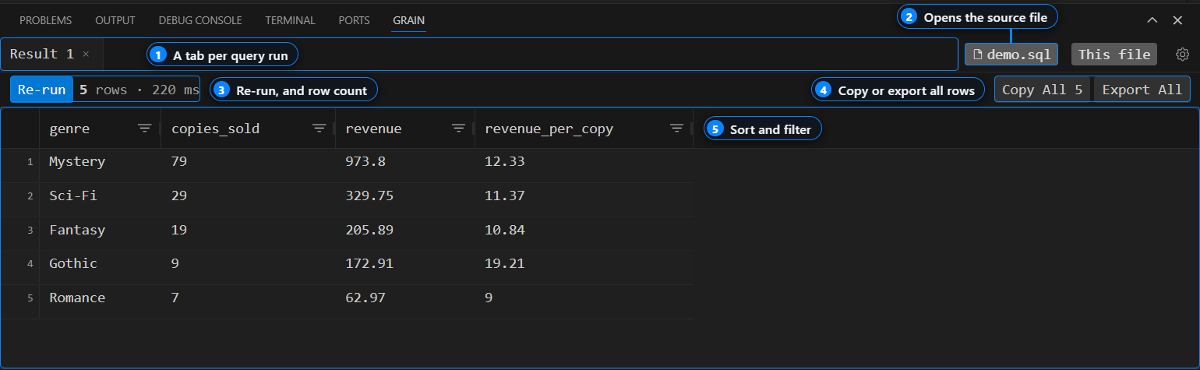
Run SQL from any .sql file with Ctrl+Enter and get the results in a
sortable grid inside VS Code. Passwords stay in your OS keychain, and Grain
has no hosted service.
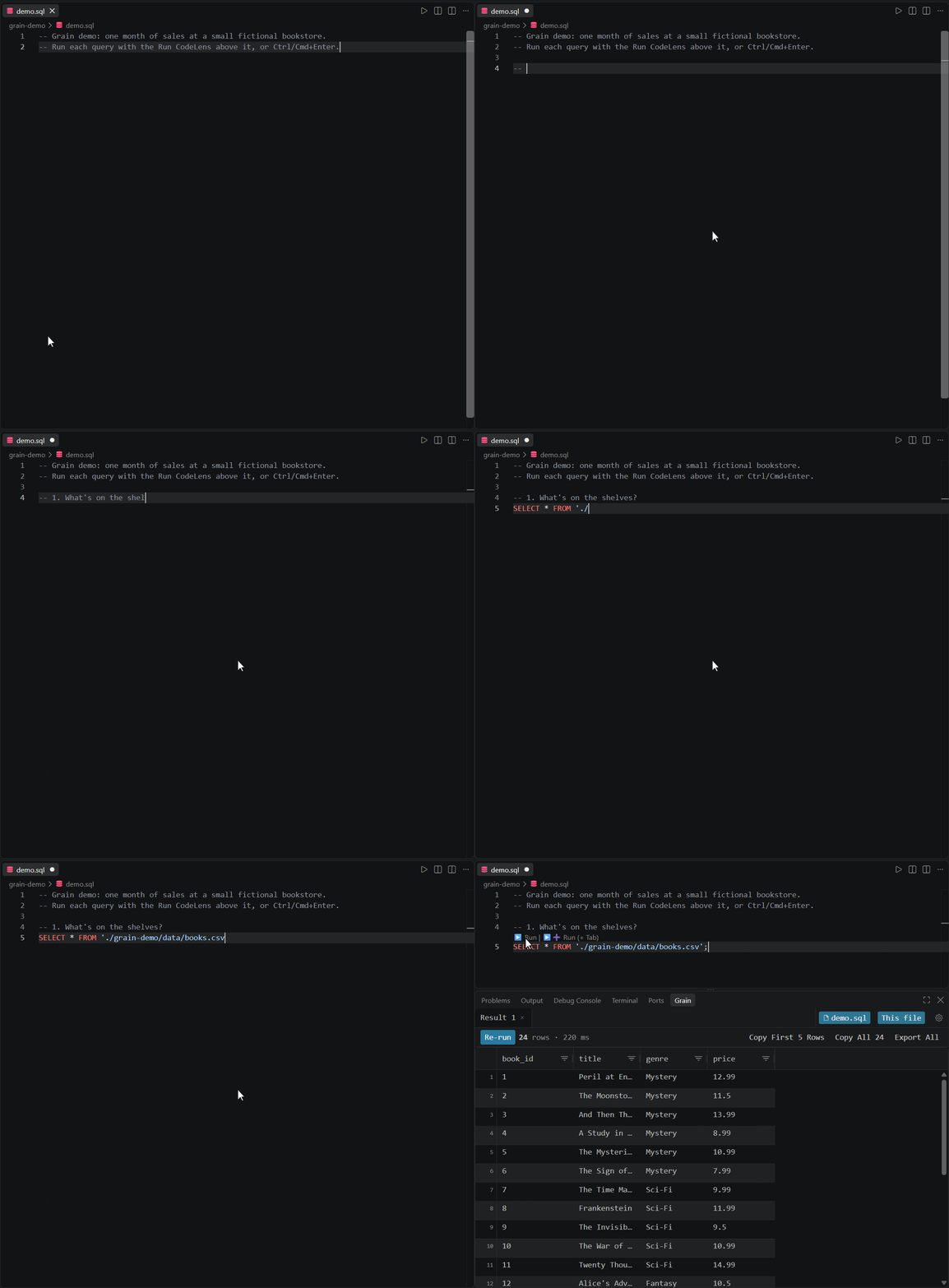
Ctrl+Enter
(Cmd+Enter on macOS).The demo reads two CSV files through Grain's built-in DuckDB connection, so there's nothing to set up. To query your own database, run Grain: Manage Connections, add a profile, and test it before you save.
If Grain is useful to you, a star on this repo helps other developers find it.
Grain can serve your database connections to Claude Code, Cursor, and GitHub Copilot over MCP. Agents get read-only access by default, and every query an agent runs shows up in your Grain results panel, so you can see exactly what it did.
MCP is off until you turn on grain.mcpEnabled in settings. Setup steps for
each client are in the MCP docs, and example
prompts are in examples/agents/.
Through Trino or Presto you can query your cluster's Iceberg, Delta Lake, and Hive tables. DuckDB queries local CSV and Parquet files directly.
PostgreSQL and Trino / Presto are bundled with the extension. The others load their driver on first use, and if a driver is missing, Grain tells you what to install.
Need another database? Request a connector. Requests with the most 👍 get built first.
Runnable queries for Postgres, MySQL,
Elasticsearch, and DuckDB, plus
agent prompts. Open any .sql file with Grain installed
and press Ctrl+Enter.
grain.mcpSafeMode on (the
default), agents can only run SELECT, SHOW, DESCRIBE, EXPLAIN, WITH,
and metadata queries. Agents can't read stored passwords or change saved
connections.grain.telemetry.enabled.Is Grain open source?
No. Grain is closed-source. This repo holds the issue tracker, docs, and
examples.
Which databases does it support?
The nine listed above. To ask for another one,
request a connector.
Do my queries or passwords leave my machine?
No. There's no Grain server. Queries go straight from VS Code to your database,
and passwords stay in your OS keychain. See Privacy for what the
anonymous telemetry does and doesn't include.
How do I connect Claude Code or Cursor?
Turn on grain.mcpEnabled, then follow the steps for your client in the
MCP docs.
Why does my database show a driver error?
Some connectors load their driver on first use. The error message names what
to install. If it's still failing after that,
file a bug report
with the Output panel logs (View → Output → Grain).
We don't have a fixed roadmap yet. What we build next depends a lot on what people ask for here, especially connector requests. See CONTRIBUTING.md for how to file a good issue.
Grain is closed-source. See LICENSE.
Standalone Grain MCP database server for VS Code, Claude Desktop, Cursor, and other MCP clients.
{ "mcpServers": { "grain-tools": { "command": "npx", "args": [ "-y", "[email protected]" ] } }}工具
尚無工具清單。遠端伺服器會在首次健康檢查後取得工具清單。
常見問題
在本頁複製適用於 Cursor、Claude Desktop、Claude Code 或 VS Code 的 stdio 設定。它使用發布者的安裝方式,而不是 PlugMCP 代理伺服器。
這筆記錄未列出必要的環境變數。
Grain Tools 透過 stdio 在本機執行。
上次檢查時間:2026-11-16。 Standalone Grain MCP database server for VS Code, Claude Desktop, Cursor, and other MCP clients.